

This article shows how to use the Visual Studio Toolbox to make reusable code available to any project.
Introduction
What do we do when we want to use a common set of logic code snippets in every page of a project?
Usually we create a class library, create a .dll file or add a class file, create it and reference it from there.
Another important and cool way which can be used in Visual Studio is to add or use code snippets
into Toolbox tabs. Then later just drag and drop the item into your project page.
Lets' Start
In my project, I wanted to use code snippets shown below in multiple pages. This a simple method which returns a string type.
I don't want to copy and paste or create a separate class file or a .dll file etc..
So, how will I use this code snippet on other pages?
public string hello() { return "www.c-sharpcorner.com"; }It's simple; just select the method then drag and drop into the Toolbox tabs and a new item gets created.
This item can be renamed, deleted or added with others like it.
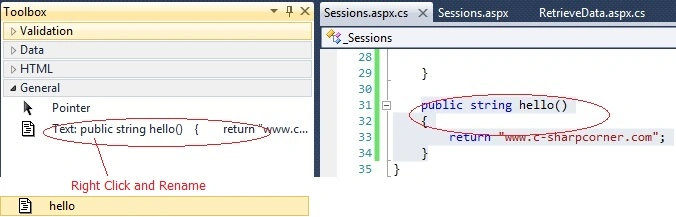
This is another cool feature provided in Visual Studio, great!
Note: For every Visual Studio version you need to add this functionality everytime.
Conclusion
Hope this feature helps you in your daily coding ways. Post your comments.
Manav PandyaPosted Jan 2, 2017, 2:29 PM
Yes thanks sir , i am looking for that sir
Sr KarthigaPosted Jul 7, 2016, 6:58 AM
Nice share
Sr KarthigaPosted Jul 7, 2016, 6:57 AM
Good one
Eric LekwaPosted May 23, 2013, 6:05 AM
Nice one
BalaeditedPosted Jan 22, 2013, 11:25 PMEdited Jan 22, 2013, 11:27 PM
Good to know suthish:)
AmolPosted Apr 16, 2012, 12:24 AM
Great one!!!
Vijai Anand RamalingamPosted Feb 27, 2011, 5:26 AM
Nice Article:-)