

Introduction
After opening Visual Studio, the left hand side (of the Start Page) will have the projects listed that you have worked on recently as shortcut links.
Also, from the menu "File" \ "Recent Files" or "Recent Projects and Solutions" will have your recent web pages and solutions listed.
If you do "Crtl + F" or "Crtl + H" then that shows the recent searches and replaced entries. So, how can we remove these entries?

There are a couple of ways to do the clean up from Visual Studio.
#. From VS 2010 and VS 2012, now it's easy to remove the unwanted referenced project files.
You just need to right-click on any of the list and click on "Remove From List". That's it, the project is removed from the list.
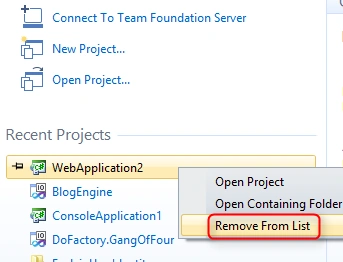
For other versions, refer to the following:
1. By changing the values of the "Environment" \ "General" \ "Recent Files" settings from the "Tools" \ "Options" menu .
The default value is "one" for both options. But this will not actually remove the recent files from Visual Studio.
These settings will just hide the other entries and show only the latest one.

2. The other way is by editing the registry entries to clear the values; this will permanently delete the selected entries.
Open the registry from the Run window by typing "regedit". Or, "Start" \ "All Programs" \ "Microsoft Visual Studio 2010" \ "Remote Registry Editor".
Navigate to "HKEY_CURRENT_USER\Software\Microsoft\VisualStudio\".
This will list various Visual Studio versions available on your system. Select the version you are using from the followiong list:
10.0 For Visual Studio 2010.
9.0 For Visual Studio 2008.
8.0 For Visual Studio 2005. Etc.
i. Remove Recent Projects.

ii. Remove Recent Files.

iii. Remove Find and Replace texts.
Here, select entries from Find to Find9 and Replace to Replace0 only and delete.
Other entries are settings, so be careful while deleting.

Conclusion
Hope this article helps you. Post your comments.
Sr KarthigaPosted Jul 7, 2016, 6:56 AM
Good explanation
Sr KarthigaPosted Jul 7, 2016, 6:56 AM
Nice one
Suthish NaireditedPosted Feb 28, 2013, 8:29 AMEdited Feb 28, 2013, 8:29 AM
It was not showing me also, but available under Microsoft Visual Studio 2008. Start" \ "All Programs" \ "Microsoft Visual Studio 2008" \ "Visual Studio Remote Tools" \ "Remote Registry Editor"
Sam HobbsPosted Feb 23, 2013, 2:56 PM
I find "ProjectMRUList" right where it is said to be. What I cannot find is "Remote Registry Editor" in the Microsoft Visual Studio 2010 node.
Hassan HumayunPosted Feb 25, 2011, 2:34 AM
there isnt any directory named ProjectMRU list , i m using windows 7.