

Creating a ComboBox Control in .xml:
<Window x:Class="WpfComboBox.MainWindow"
xmlns="http://schemas.microsoft.com/winfx/2006/xaml/presentation"
xmlns:x="http://schemas.microsoft.com/winfx/2006/xaml"
Title="MainWindow" Height="350" Width="525">
<Grid Background="OldLace">
<StackPanel Orientation="Horizontal" Width="390" Height="24" Background="Beige" >
<Label Content="Select Zone:" Height=" 22" HorizontalAlignment="Right"/>
<ComboBox Name="ComboBoxZone" Width="120" Height="22" ItemsSource="{Binding}"/>
<StackPanel>
<Button Margin=" 26,0" Name="btnZone" Content="Show" Width="70" Height="20" Click="btnZone_Click" />
</StackPanel>
</StackPanel>
</Grid>
</Window>
In ComboBox Element set the attribute ItemSource="{Binding}".
Get Data from a DataBase table and Binding to ComboBox as follows:
using System.Data;
using System.Data.SqlClient;
namespace WpfComboBox
{
public partial class MainWindow : Window
{
public MainWindow()
{
InitializeComponent();
BindComboBox(ComboBoxZone);
}
public void BindComboBox(ComboBox comboBoxName)
{
SqlConnection conn = new SqlConnection("your connection string");
SqlDataAdapter da = new SqlDataAdapter("Select ZoneId,ZoneName FROM tblZones", conn);
DataSet ds = new DataSet();
da.Fill(ds, "tblZones");
comboBoxName.ItemsSource = ds.Tables[0].DefaultView;
comboBoxName.DisplayMemberPath = ds.Tables[0].Columns["ZoneName"].ToString();
comboBoxName.SelectedValuePath = ds.Tables[0].Columns["ZoneId"].ToString();
}
}
Here DisplayMemberPath helps to display Text in the ComboBox.
SelectedValuePath helps to store values like a hidden field.
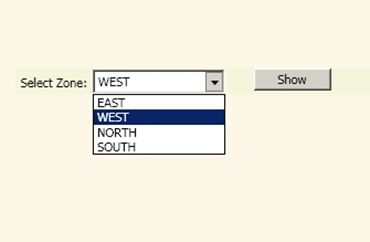
When you Run the Program the Output with ComboBox Items is as follows:
Get the Text and Value of Selected ComboBox Item:
private void btnZone_Click(object sender, RoutedEventArgs e)
{
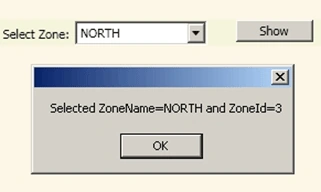
MessageBox.Show("Selected ZoneName="+ComboBoxZone.Text+" and ZoneId="+ ComboBoxZone.SelectedValue.ToString());
}
The Text Property helps get the selected Item.
SelectedValue Property helps you to get the hidden value of Combobox selected Item.
Thanks for Reading my article!
Shakeer
ca ThichPosted Jul 3, 2022, 10:58 PM
How do I set this in the xaml instead of code behind? comboBoxName.ItemsSource = ds.Tables[0].DefaultView; Thanks
Ammar ShaukatPosted Oct 17, 2017, 3:34 AM
A piece of code and some User Interface are not enough. Provide some explanation how it works. between ADO.NET is very old now. Try to make binding with some C# Collection.
Bikramjeet SinghPosted Mar 4, 2013, 5:26 AM
Grate article dude. Im learning WPF now days i have a question now if an one want to also add a "--Select--" IsSelected="True" along whit this binding how can i can do that.
SapnaPosted Feb 17, 2011, 11:06 PM
Good tutorial. Keep up the nice work!
Dennis TriplettPosted Feb 17, 2011, 4:36 PM
Thanks for Sharing... Dennis
knightsPosted Feb 17, 2011, 3:18 PM
Shakeer good example.In my opinion you can submit this write up in blogs or how do i section for better classification.Thanks