

In this article you will know how to use the CheckBox inside Gridivew control and how to select the multiple checkboxes to get the selected CheckBoxes value will be displayed.
First Drag and Drop one Gridview Control and Button on asp Page. Later retrieve the data from a table on Gridview using bound field and add on CheckBox field in .aspx source code page as shown below
<asp:GridView id="Gridview1" runat ="server" AutoGenerateColumns ="False" ShowFooter ="True"
DataSourceID ="SqlDataSource1" OnSelectedIndexChanged="Gridview1_SelectedIndexChanged" style="z-index: 101; left: 19px; position:
absolute; top: 142px" BackColor="LightGoldenrodYellow" BorderColor="Tan" BorderWidth="1px" CellPadding="2" ForeColor="Black" GridLines="None" Width="240px" >
<Columns >
<asp:TemplateField >
<ItemTemplate >
<asp:CheckBox ID="chk" runat ="server" />
</ItemTemplate>
</asp:TemplateField>
<asp:BoundField DataField ="ID" HeaderText ="ID" />
<asp:BoundField DataField="empname" HeaderText ="Name" />
<asp:BoundField DataField ="salary" HeaderText ="Salary" />
</Columns>
<FooterStyle BackColor="Tan" />
<SelectedRowStyle BackColor="DarkSlateBlue" ForeColor="GhostWhite" />
<PagerStyle BackColor="PaleGoldenrod" ForeColor="DarkSlateBlue" HorizontalAlign="Center" />
<HeaderStyle BackColor="Tan" BorderColor="Fuchsia" BorderStyle="Solid" Font-Bold="True" />
<AlternatingRowStyle BackColor="PaleGoldenrod" />
</asp:GridView>
<asp:SqlDataSource ID="SqlDataSource1" runat="server" ConnectionString="<%$
ConnectionStrings:ConnectionString %>"
ProviderName="<%$
ConnectionStrings:ConnectionString.ProviderName %>" SelectCommand="SELECT
[ID], [empname], [salary] FROM [emp]">
</asp:SqlDataSource>
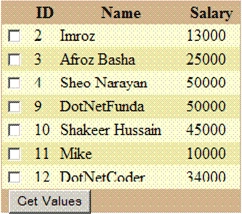
The output of above code is below:
Now I am writing code in GetValues Button to retrive values when the user selects one or more CheckBoxes.
protected void GetValues_Click(object sender, EventArgs e)
{
for (int i = 0; i < Gridview1.Rows.Count; i++)
{
CheckBox chkb = (CheckBox)Gridview1.Rows[i].Cells[0].FindControl("chk");
if (chkb.Checked)
{
string name = Gridview1.Rows[i].Cells[2].Text;
Response.Write("<br>" + name);
}
}
}
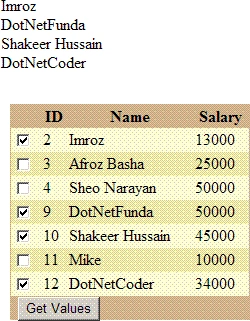
Click on GetValues Button after selecting one or more CheckBoxes, then you will get values that you had checked in gridview.
The output is show below:
Bhabani prasad DashPosted Jun 22, 2013, 7:29 AM
my problem in chk box is i have four column like mornig shoe,even show,night show,if i chk mornig show then only morning show is save in database like night,noon plz help me
sara yeditedPosted Apr 27, 2013, 11:14 AMEdited Apr 27, 2013, 11:59 AM
hi again Syed Shakeer, I just wanted to add this here cause it solved my problem and it may help someone else too in page load: if(!Page.IsPostBack) { //gridview bind information }
sara yPosted Apr 27, 2013, 11:14 AM
hi Syed Shakeer, could you advice me with the problem I face with my code?... I tried the same method to have the same checkbox in my gridview but I can't get where I go wrong cause it seems my checkbox.checked is always false! I change my own code to this code you suggested but still I get the same result
Channa EdirisinghePosted Aug 23, 2010, 6:25 AM
Dear Hussain, Can you advise me how to add check box column using Code. I have existing code as per below which I create temparary table and then add to grid each item by codeing. Can you give any help? private void CreateGrid(){ GridHandle objTmpTab = new GridHandle(); grvItem.Columns.Clear(); grvItem.Columns.Add(objTmpTab.GridViewBoundField("SEQNO", DbType.String, "SeqNo", "Tahoma", FontSize.Small, HorizontalAlign.Left, 45));......} Relvent settings Code to add: public BoundField GridViewBoundField(string pFieldName, DbType pFieldType,string pHeaderText,string pFontName, FontSize pFontSize,HorizontalAlign pAllingment,int pWidth) {BoundField objBondField = new BoundField(); objBondField.DataField = pFieldName; //"DATAFIELDNAME" objBondField.HeaderText = pHeaderText;//HEADER NAME .....}
Syed ShakeerPosted Jul 3, 2010, 7:11 AM
Hi Chuck.snder, First Thank you. for your problem check the following link. http://forums.asp.net/p/1133301/1802924.aspx you will get your soluiton.. Thank you
chuck.snyderPosted Jul 2, 2010, 12:28 PM
Great example, now could you extend the example a little. There are many cases where the check box needs to be edited, and the data is taken from sql which only has a "Bit" value which is 0/1 for true and false. For the data to be Read/Write "Bind" must be used instead of Eval. do you have an example of using the Bind with the checkbox???