This Article explains how to create a CheckBoxList and how to get the Text and Value of a checked CheckBoxListItem in WPF.
First create a CheckBoxList using ListBox with DataTemplate as follows in XAML.
<Window x:Class="WpfApplication1.MainWindow"
xmlns="http://schemas.microsoft.com/winfx/2006/xaml/presentation"
xmlns:x="http://schemas.microsoft.com/winfx/2006/xaml"
Title="CheckBoxLsit" Height="350" Width="525">
<Grid>
<StackPanel Width="250" Height="80">
<ListBox Name="listBoxZone" ItemsSource="{Binding TheList}"
Height="115" Background="Azure">
<ListBox.ItemTemplate>
<DataTemplate>
<CheckBox Name="CheckBoxZone" Content="{Binding TheText}
Tag="{Binding TheValue}" Checked="CheckBoxZone_Checked"
Margin="0,5,0,0"/>
</DataTemplate>
</ListBox.ItemTemplate>
</ListBox>
</StackPanel>
<TextBox Name="ZoneText" Width="160" Height="20" Margin="-80,140,0,0" Background="Bisque" />
<TextBox Name="ZoneValue" Width="160" Height="20" Margin="-80,190,0,0" Background="Bisque" />
</Grid>
</Window>
Binding data to CheckBoxList in .XAML.Cs
Using System.Collections.ObjectModel;
namespace WpfApplication1
{
/// <summary>
/// Interaction logic for MainWindow.xaml
/// </summary>
public partial class MainWindow : Window
{
public ObservableCollection<BoolStringClass> TheList {get; set ;}
public MainWindow()
{
InitializeComponent();
CreateCheckBoxList();
}
public class BoolStringClass
{
public string TheText { get; set; }
public int TheValue { get; set; }
}
public void CreateCheckBoxList()
{
TheList = new ObservableCollection<BoolStringClass>();
TheList.Add(new BoolStringClass { TheText = "EAST" ,TheValue =1});
TheList.Add(new BoolStringClass { TheText ="WEST",TheValue =2});
TheList.Add(new BoolStringClass { TheText ="NORTH", TheValue=3});
TheList.Add(new BoolStringClass {TheText ="SOUTH", TheValue =4});
this.DataContext =this;
}
Get the Text and value of Checked CheckBoxList
Write the code below in the checkBox Checked Event.
private void CheckBoxZone_Checked(object sender, RoutedEventArgs e)
{
CheckBox chkZone = (CheckBox)sender;
ZoneText.Text ="Selected Zone Name= "+ chkZone.Content.ToString();
ZoneValue.Text = "Selected Zone Value= " + chkZone.Tag.ToString();
}
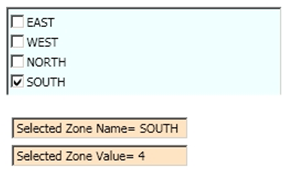
Thanks for Reading my article!