

In this article you will learn how to get the values or text of textbox, CheckBoxlist, RadioButtonList, ListBox and dropdownlist in JavaScript.
Introduction
This article explains you how to Raise Client Click Events for Server Controls
usage:
- Attribute 'OnClientClick':-The OnClientClick property is used to sets a client side script or Method to be run when the Button control is clicked.
Eg:OnClientClick ="return javascriptMethod()" - getElementById ():-It is used to get the Elements in a from. This method takes an argument to access elements with a unique id attribute.
Eg:document.getElementById ("textbox1"); - GetElementsByTagName():-This method takes in as argument the name of a tag element and returns an array of all matching tags elements found in the document.
eg:document.getElementById ("Label");
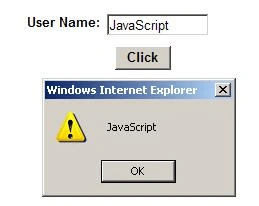
How to get the value of textbox in javascript?
<head runat="server">
<title>Untitled
Page</title>
<script type ="text/javascript">
function
getTxt() {
var
txt = document.getElementById("TextBox1");
alert(txt.value);
}
</script>
</head>
<body>
<form id="form1" runat="server">
<div>
<asp:TextBox ID="TextBox1" runat="server" Height="16px" Style="z-index: 100; left: 176px;position: absolute; top: 32px" Width="96px"></asp:TextBox>
<asp:Button ID="Button1" runat="server" Font-Bold="True" Style="z-index:101;left:184px;position:absolute; top:64px" Text="Click" Width="56px"
OnClientClick ="return
getTxt()"/>
<asp:Label ID="Label1" runat="server" Font-Bold="True" Font-Size="0.8em" Style="z-index: 103;left: 96px; position: absolute; top: 32px"
Text="User
Name:"></asp:Label>
</div>
</form>
</body>
</html>
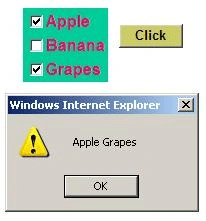
How to get the text of CheckBoxList in JavaScript?
<head id="Head1" runat="server">
<title>Untitled
Page</title>
<script type="text/javascript">
function
chkboxMeth() {
var
chkbox = document.getElementById("CheckBoxList1");
var
inputArr = chkbox.getElementsByTagName('input');
var
labelArr = chkbox.getElementsByTagName('label');
var
sum = "";
for
(var i = 0; i < labelArr.length; i++) {
if
(inputArr[i].checked == true) {
sum = sum +
labelArr[i].innerText;
}
}
alert(sum);
return
false;
}
</script>
</head>
<body>
<form id="form1" runat="server">
<div>
<asp:CheckBoxList ID="CheckBoxList1" runat="server" AutoPostBack="True" BackColor="#00CC99" Font-Bold="True" ForeColor="#FF0066">
<asp:ListItem Value="1">Apple</asp:ListItem>
<asp:ListItem Value="2">Banana</asp:ListItem>
<asp:ListItem Value="3">Grapes</asp:ListItem>
</asp:CheckBoxList>
<asp:Button ID="Button1" runat="server" Style="position: absolute; z-index: 102; left: 400px; top: 48px;" Text="Click" OnClientClick
=" return chkboxMeth()" BackColor="#CCCC66"
Font-Bold="True"
Width="64px"/>
</div>
</form>
</body>
</html>
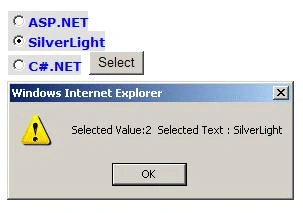
How to get the value or text of radioButtonList in javascript?
<head id="Head1" runat="server">
<title>Untitled
Page</title>
<script type ="text/javascript">
function
GetRadioButtonSelectedValue()
{
var radio
= document.getElementById('radiobuttonlist1');
var
inputArr = radio.getElementsByTagName('input');
var
labelArr = radio.getElementsByTagName('label');
for (var i=0; i<inputArr.length; i++)
{
if
(inputArr[i].checked)
{
alert("Selected
Value:"+inputArr[i].value+"
Selected Text:"+labelArr[i].innerText);
inputArr[i].checked =false
}
}
}
</script>
</head>
<body>
<form id="form1" runat="server">
<div>
<asp:RadioButtonList ID="radiobuttonlist1" runat="Server" RepeatLayout="flow"
ForeColor="Blue"
BackColor="#E0E0E0"
Font-Bold="True"
Font-Names="Verdana"
Font-Size="Small">
<asp:ListItem Text="ASP.NET" Value="1" ></asp:ListItem>
<asp:ListItem Text="SilverLight" Value="2"></asp:ListItem>
<asp:ListItem Text="C#.NET" Value="3"></asp:ListItem>
</asp:RadioButtonList>
<asp:Button ID="Button1" runat="server" Style="position: static;" Text="Select"
OnClientClick
=" return GetRadioButtonSelectedValue(); "
/>
</div>
</form>
</body>
</html>
How to get the selected value or text of dropdown in javascript?
<head id="Head1" runat="server">
<title>Untitled
Page</title>
<script type ="text/javascript">
function
ddlmeth()
{
var
ddl=document.getElementById("DropDownList1");
alert("Selected
Value: "+ddl.value +" "+"
Selected Text: "+ddl[ddl.selectedIndex].innerText);
}
</script>
</head>
<body>
<form id="form1" runat="server">
<div>
<asp:Button ID="Button1"
runat="server"
Style="position: absolute; z-index: 103; left: 200px; top: 120px;" Text="click"
OnClientClick ="return
ddlmeth()" ForeColor="#FF0066" Width="72px"/>
<asp:DropDownList ID="DropDownList1" runat="server" AutoPostBack="True" Style="z-index: 102;left: 208px; position: absolute; top: 8px">
<asp:ListItem Value="1">ASP.NET</asp:ListItem>
<asp:ListItem Value="2">VB.NET</asp:ListItem>
<asp:ListItem Value="3">C#.NET</asp:ListItem>
</asp:DropDownList>
</div>
</form>
</body>
</html>
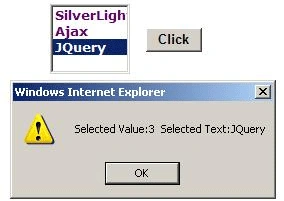
How to get the text or value of ListBox in JavaScript?
<head id="Head1" runat="server">
<title>Untitled
Page</title>
<script type ="text/javascript">
function
getListBox()
{
var
listbox=document.getElementById("ListBox1");
alert("Selected
Value:"+listbox.value+"
Selected Text:"+listbox[listbox.selectedIndex].innerText);
}
</script>
</head>
<body>
<form id="form1" runat="server">
<div>
<asp:ListBox ID="ListBox1" runat="server" BackColor="#FFFFFF" Font-Bold="True" Font-Names="Verdana"ForeColor="#660066" Height="80px" Style="z-index: 100; left: 240px; position: absolute; top: 48px" Width="80px">
<asp:ListItem Value="1">SilverLight</asp:ListItem>
<asp:ListItem Value="2">Ajax</asp:ListItem>
<asp:ListItem Value="3">JQuery</asp:ListItem>
</asp:ListBox>
<asp:Button ID="Button1" runat="server" Font-Bold="True" Style="z-index: 102; left: 336px; position: absolute; top: 72px" Text="Click" Width="56px"
OnClientClick
="return getListBox();"/>
</div>
</form>
</body>
</html>
Thanks for reading my article.
Gowtham RajamanickamPosted May 2, 2015, 4:51 AM
good
hothorasman panjaitanPosted Feb 21, 2015, 11:54 AM
how to merge two the checkbox value to textbox asp.net
AshuPosted Apr 9, 2012, 12:39 PM
This topic is very use full for fresher. Good One!!!!!!!!!!!!!!!1 Syed : Please send me the WPF notes on my mail is [email protected] . Thank you. :)
Michael HoeditedPosted Jan 31, 2012, 9:05 PMEdited Jan 31, 2012, 10:26 PM
Thanks Shakeer, looks really useful. I can't quite figure out the Radio button example. Could you show the code where the 'input' and 'label' elements are defined? Thanks again. Don't worry - I see that they are standard parts of the radio button list. Cheers.
Vineet Kumar SainiPosted Dec 20, 2011, 12:46 PM
Very nice....
NILADRI ROUTPosted Apr 27, 2011, 8:47 AM
this ansa are realy usefull
Felipe RamosPosted Feb 23, 2011, 8:13 AM
Syed this is a great reference, I know it is not something developers use everyday so sometimes at least in my case I forget. Thanks.