

Introduction
This article shall address the use of the error provider control in Win Forms application development. The error provider control is most useful in displaying errors associated with data entry tasks on a Windows form. The error provider control is typically used to show errors related to data entry, however, the developer may also use it to display any desired icon and accompanying tool tip in response to any monitored event. For example, successful entries could be shown with a green checkmark as easily as failed entries could be shown with the standard red ball exclamation mark. (See figures 1 and 2 where both good and bad entries are marked using the error provider control).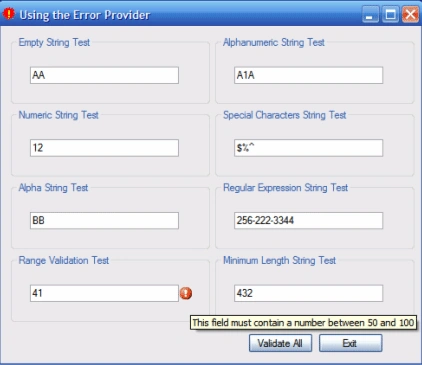
Figure 1: Error Provider Control in Use Marking Bad Input
Figure 3 (below) shows the solution explorer for the project. The project is entitled UseErrorProvider; as can be seen in the figure, no additional references beyond the defaults were added to the project. The single form included is entitled "Form1". 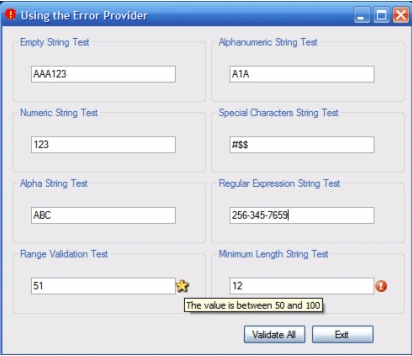
Figure 2: Using the Error Provider to Show Non-Failure Related Information
To use an error provider control, merely drop one from the toolbox onto the form; you may use a single error provider control to mark any and all of the fields on a form, in this respect, using the error provider is similar to using the tool tip control. Once the control has been placed on the form, it may be controlled programmatically.
Normally one would write a custom validation method for each of the controls and test the control's content against that validation method whenever that specific control is validated. It is also possible to write a simple method to validate each of the fields in response to something like button click event. In the example provided, there is "Validate All" button that does test each of the controls on the form and mark any which contain invalid data.
The example is used to validate the contents of some text box controls. Naturally it is just as easy to validate other controls such as a combo box control although it most likely going to be used with text box controls.
Getting Started
There is a single solution contained in the demo project included with this download. This solution is a C# Windows Forms application that contains a single form. On the form are eight different text boxes and each these text boxes are validated against a different set of criteria:
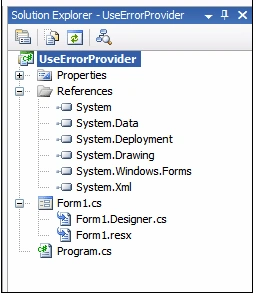
Figure 3: Solution Explorer with Both Projects Visible
The Project using System; using System.Collections.Generic; using System.ComponentModel; using System.Data; using System.Drawing; using System.Text; using System.Windows.Forms; using System.Text.RegularExpressions; namespace UseErrorProvider { /// <summary> /// Using the error provider control - several examples /// </summary> public partial class Form1 : Form { public Form1() { InitializeComponent(); } private void Form1_Load(object sender, EventArgs e) { // do nothing
Code: UseErrorProvider
The application is very simple; in execution, when the application is started, the form will display eight text box controls. Each of the controls has an event handler defined for the "Validated" event. Each control is validated against a different validation method so along with the "Validated" event handler; a custom validation function has also been supplied. Each of these custom validation functions is used to evaluate the content of the associated text box and to display an indication adjacent to the control if that control fails the validation test.
The code starts off with the default imports; in addition to the defaults, the Regular Expression library has also been added to the code in order to support the evaluation of one of the text boxes against a regular expression.
}
The constructor and form load event handler are both in their default conditions. Following this section of code, the next thing up to look at is the validation handler for the non-empty string text box control:
/// <summary> /// Validate to make sure that the textbox contains /// a string with at least one character /// </summary> /// <param name="sender"></param> /// <param name="e"></param> private void txtEmptyString_Validated(object sender, EventArgs e) { bool bTest = txtEmptyStringIsValid(); if (bTest == true) { } else { this.errorProvider1.SetError(txtEmptyString, ""); } /// <summary> /// Test for empty string in the text box and /// return the results /// </summary> /// <returns>boolean</returns> private bool txtEmptyStringIsValid() { if (txtEmptyString.Text == string.Empty) { return true; } else { return false; } /// <summary> /// Test the contents of this text box against a regular expression /// </summary> /// <param name="sender"></param> /// <param name="e"></param> private void txtRegExString_Validated(object sender, EventArgs e) { bool bTest = txtRegExStringIsValid(txtRegExString.Text.ToString()); if (bTest == false) { this.errorProvider1.SetError(txtRegExString, "This field must contain a phone number (222-333-4444)"); } else { this.errorProvider1.SetError(txtRegExString, ""); } }
this.errorProvider1.SetError(txtEmptyString, "This field must contain text");
}
There are couple of interesting things to note in this handler; first off note that a boolean is set to capture the results of a method called "txtEmptyStringIsValid"; this is the method that actually tests the contents of the text box to make sure that it is not empty. As a result of the test, the error provider control is configured; if the string is empty, the error provider is associated with the text box control and the error provider's control is set to display "This field must contain text". If the string is not empty, the error provider is set to display nothing; this disables the error provider as applied to that control. The result is that, whenever the text box control is validated, the test will execute and, if failed, the error provider icon will be displayed. If the user hovers the cursor over the error provider's icon, the tool tip text will be displayed. If the string is not empty, the error provider icon will not appear and there will be no tooltip.
The method used to validate the control is as follows:
}
This simple method is configured to return a boolean value; if the text box control contains text, the function will return false and no error provider indication will be shown on the form. If the string is empty, the method will return true and the error provider will be used to mark the empty string text box. This is essentially how all of the validation event handlers perform in this demo application; that is, the validation event handler calls the method used to test the associated control and then, as a result of that test, either the error indication is shown or not shown.
The next item up is the validation event handler for the regular expression test text box:
As before, the validation method is contained in separate method; that method evaluates the contents of the text box against a regular expression and marks or clears the error provider indication as a result of the outcome of that test. The regular expression validation methods is as follows:
/// <summary> /// Test for a regex expression match in the text box and /// return the results - the example uses a regular /// expression used to validate a phone number /// </summary> /// <returns>boolean</returns> private bool txtRegExStringIsValid(string textToValidate) { Regex TheRegExpression; string TheTextToValidate; string TheRegExTest = @"[2-9]\d{2}-\d{3}-\d{4}"; TheTextToValidate = textToValidate; TheRegExpression = new Regex(TheRegExTest); // test text with expression if (TheRegExpression.IsMatch(TheTextToValidate)) { return true; } else { return false; }
}
This method creates an instance of and populates a regular expression object. The regular expression shown is used to validate a US telephone number. The text to validate property is the contents of the associated text box control. The regular expression object's "IsMatch" method is used to validate the text and, as a result of the test, the method returns a boolean value set to either true or false. /// <summary> /// Validate that the textbox contains only numbers /// </summary> /// <param name="sender"></param> /// <param name="e"></param> private void txtNumericString_Validated(object sender, EventArgs e) { bool bTest = txtNumericStringIsValid(); if (bTest == true) { this.errorProvider1.SetError(txtNumericString, "This field must contain only numbers"); } else { this.errorProvider1.SetError(txtNumericString, ""); } } /// <summary> /// Test for non-numeric values in the text box and /// also make sure the textbox is not empty /// </summary> /// <returns>boolean</returns> private bool txtNumericStringIsValid() { if (txtNumericString.Text == string.Empty) { return true; } char[] testArr = txtNumericString.Text.ToCharArray(); bool testBool = false; for (int i = 0; i < testArr.Length; i++) { if (!char.IsNumber(testArr[i])) { testBool = true; } } return testBool; /// <summary> /// Test to validate that this textbox only contains /// alphas /// </summary> /// <param name="sender"></param> /// <param name="e"></param> private void txtAlphaString_Validated(object sender, EventArgs e) { bool bTest = txtAlphaStringIsValid(); if (bTest == true) { this.errorProvider1.SetError(txtAlphaString, "This field must contain only alphas"); } else { this.errorProvider1.SetError(txtAlphaString, ""); } } /// <summary> /// Test for non-alpha values in the text box and /// also make sure that the textbox is not empty /// </summary> /// <returns>boolean</returns> private bool txtAlphaStringIsValid() { // first make sure the textbox contains something if (txtAlphaString.Text == string.Empty) { return true; } // test each character in the textbox char[] testArr = txtAlphaString.Text.ToCharArray(); bool testBool = false; for (int i = 0; i < testArr.Length; i++) { if (!char.IsLetter(testArr[i])) { testBool = true; } } return testBool; /// Validate that the textbox contains a value /// that is between 50 and 100 /// </summary> /// <param name="sender"></param> /// <param name="e"></param> private void txtRangeValidation_Validated(object sender, EventArgs e) { bool bTest = txtRangeValidationIsValid(); if (bTest == false) { this.errorProvider1.SetError(txtRangeValidation, "This field must contain a number between 50 and 100"); this.errorProvider2.SetError(txtRangeValidation, ""); } else { this.errorProvider1.SetError(txtRangeValidation, ""); this.errorProvider2.SetError(txtRangeValidation, "The value is between 50 and 100"); } } /// <summary> /// Test for numeric values between 50 and 100 in the text box and /// return the results /// </summary> /// <returns>boolean</returns> private bool txtRangeValidationIsValid() { int tmpVal = 0; try { tmpVal = Convert.ToInt32(txtRangeValidation.Text); } catch { } bool testBool = false; if (tmpVal < 100 && tmpVal > 50) { testBool = true; } return testBool; /// Validate that the text box contains only numbers /// or letters /// </summary> /// <param name="sender"></param> /// <param name="e"></param> private void txtAlphaNumericString_Validated(object sender, EventArgs e) { bool bTest = txtAlphaNumericStringIsValid(); if (bTest == true) { this.errorProvider1.SetError(txtAlphaNumericString, "This field must contain only alphanumerics"); } else { this.errorProvider1.SetError(txtAlphaNumericString, ""); } } /// <summary> /// Test for non-alpha values in the text box and /// return the results /// </summary> /// <returns>boolean</returns> private bool txtAlphaNumericStringIsValid() { // Make sure the string is not empty first if (txtAlphaNumericString.Text == string.Empty) { return true; } // check for alphanumeric values char[] testArr = txtAlphaNumericString.Text.ToCharArray(); bool testBool = false; for (int i = 0; i < testArr.Length; i++) { if (!char.IsLetter(testArr[i]) && !char.IsNumber(testArr[i])) { testBool = true; } } return testBool; } /// <summary> /// Validate that this text box contains only special characters /// (non-alphanumerics) /// </summary> /// <param name="sender"></param> /// <param name="e"></param> private void txtSpecialChars_Validated(object sender, EventArgs e) { bool bTest = txtSpecialCharsIsValid(); if (bTest == false) { this.errorProvider1.SetError(txtSpecialChars, "This field must contain only special characters"); } else { this.errorProvider1.SetError(txtSpecialChars, ""); } }
/// <summary> /// Test for special character values in the textbox /// </summary> /// <returns>boolean</returns> private bool txtSpecialCharsIsValid() { // Make sure the string is not empty first if (txtSpecialChars.Text == string.Empty) { return false; } char[] testArr = txtSpecialChars.Text.ToCharArray(); bool testBool = false; for (int i = 0; i < testArr.Length; i++) { if (!char.IsSymbol(testArr[i])) { testBool = true; } if(char.IsLetterOrDigit(testArr[i])) { testBool = false; } } return testBool; /// <summary> /// Validate that the text box contains a minimum /// number of characters /// </summary> /// <param name="sender"></param> /// <param name="e"></param> private void txtMinLengthTest_Validated(object sender, EventArgs e) { bool bTest = txtMinLengthTestIsValid(); if (bTest == true) { this.errorProvider1.SetError(txtMinLengthTest, "This field must contain at least 3 characters"); } else { this.errorProvider1.SetError(txtMinLengthTest, ""); } } /// <summary> /// Test to see that the textbox contains a minimum number /// of characters /// </summary> /// <returns>boolean</returns> private bool txtMinLengthTestIsValid() { char[] testArr = txtMinLengthTest.Text.ToCharArray(); bool testBool = false; if (testArr.Length < 3) { testBool = true; } return testBool; /// <summary> /// Validate all of the controls at the same time from /// a button click event handler /// </summary> /// <param name="sender"></param> /// <param name="e"></param> private void btnValidateAll_Click(object sender, EventArgs e) { txtEmptyString_Validated(this, e); txtAlphaNumericString_Validated(this, e); txtAlphaString_Validated(this, e); txtMinLengthTest_Validated(this, e); txtNumericString_Validated(this, e); txtRangeValidation_Validated(this, e); txtRegExString_Validated(this, e); txtSpecialChars_Validated(this, e);
The next validation event handler and custom validation method are used to validate that the text box control contains only numeric values. The custom validation method also makes sure that the text box control is not empty. To test the text box, the contents of the text box are dumped into a character array and each character in that array is evaluated to make sure that is does not contain non-numeric values.
}
The next pair is used to validate on alphas only, it works essentially the same way as the previous example:
}
Next up is the range validation example; this example is used to test to see if the value entered is a numeric value between 50 and 100. One thing interesting to note in this example is that two error providers are used; one shows up on valid entries and one shows up on invalid entries. This was done to demonstrate using the control to show status other than failure (in the form of a confirmation of a good entry).
///
}
/// <summary>
}
The next example is used to validate that a text box contains a minimum number of characters (3):
}
}
Summary.
This article was intended to demonstrate a few different ways in which one might implement the error provider in a Win Forms application. As was mentioned, the error provider be displayed in response to any custom validation methods and, subsequently it may be used to show either good or bad status information to the user.
It should be noted also that you can prevent the entry of bad data into a control by writing handlers for the key press event. For example, the following code will prevent the user from entering anything but numbers into a text box; it also allows the user to enter control keys so that things such as the backspace key will also work when the user enters text into the text box control.
private void txtDollarValue_KeyPress(object sender, KeyPressEventArgs e)
{
// allows only numbers
if (!Char.IsDigit(e.KeyChar) && !Char.IsControl(e.KeyChar))
{
e.Handled = true;
}
}
Join the conversation! Your thoughts help the community grow.