SIGN UP MEMBER LOGIN:    
ARTICLE

Project web access integration with outlook

Posted by Tariq Younas Articles | SharePoint March 03, 2008
This article tells you about the project web access integration with microsoft outlook.
Reader Level:

Introduction

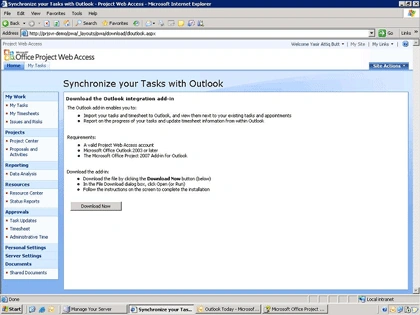
  • Click Personal Settings --> Out Look Sync
  • Click Download Now

  • Start Outlook 2003 or 2007.
  • A toolbar will be added to the Outlook interface
  • Click Tools --> Options
  • Click Project Web Access Tab

There are two options for importing Tasks

  • Outlook Tasks
  • Outlook Calendar

You can also set your Project web access user id and password for automatic login and status update.

  • From PWA Toolbar Click Import New Assignments
  • Click OK to import the tasks
  • Tasks will be displayed on Outlook Welcome Screen as well as tasks page
  • Click ON Tasks button on the left menu to go inside the tasks page
  • Click on any task to see its details
  • Now Double Click on any task to see its details
  • Click next or Previous to move into different time spans.
  • Enter the appropriate time in the task progress or timesheet information
  • To save click Save to Project Web Access
  • To Sent Timesheet to Project Manager Check the "And submit to project manager".
  • You can also visit the PWA from the buttons given on this page.
  • Using Outlook Calendar

    a. Change the settings in PWA Options

    b. Click Import Assignments fro m Toolbar

    c. Click OK

    d. You will automatically see the notification if the tasks are late otherwise you can see the task from calendar page.

    e. Click On Calender

    f. Navigate to the dates of the tasks

    g.You can also choose categories to identify various tasks.

Login to add your contents and source code to this article
share this article :
post comment
 

Hi. Is there a way to download the installer from antoher place that's not Project web access directly? I use a Sharepoint client for the Project access, and I can't find the option to download it, Thanks. Hugo

Posted by Hugo Aristizabal Feb 10, 2010
6 Months Free & No Setup Fees ASP.NET Hosting!
Become a Sponsor
PREMIUM SPONSORS
  • Finally – a virtual platform that delivers next-generation Windows Server 2008 Hyper-V virtualization technology from a managed hosting partner you can truly depend on. Visit www.maximumasp.com/max for a FREE 30 day trial. Hurry offer ends soon. Climb aboard the MaxV platform and take advantage of High Availability, Intelligent Monitoring, Recurrent Backups, and Scalability – with no hassle or hidden fees. As a managed hosting partner focused solely on Microsoft technologies since 2000, MaximumASP is uniquely qualified to provide the superior support that our business is built on. Unparalleled expertise with Microsoft technologies lead to working directly with Microsoft as first to offer IIS 7 and SQL 2008 betas in a hosted environment; partnering in the Go Live Program for Hyper-V; and product co-launches built on WS 2008 with Hyper-V technology.
    ceTE software specializes in components for dynamic PDF generation and manipulation. The DynamicPDF™ product line allows you to dynamically generate PDF documents, merge PDF documents and new content to existing PDF documents from within your applications. Visit DynamicPDF here
Nevron Gauge for SharePoint
Become a Sponsor