

Overview:
Remote Desktop Services is one of Microsoft Windows components to access a remote computer through network. Only the user interface of the application is presented at the client. Any input is redirected over to the remote computer over the network.
At work we use Remote Desktop a great deal. It allows us to login to a remote server to perform health checks, deploy applications, troubleshoot problems, etc. We also use remote desktop often when we do WFH (work from homeJ). 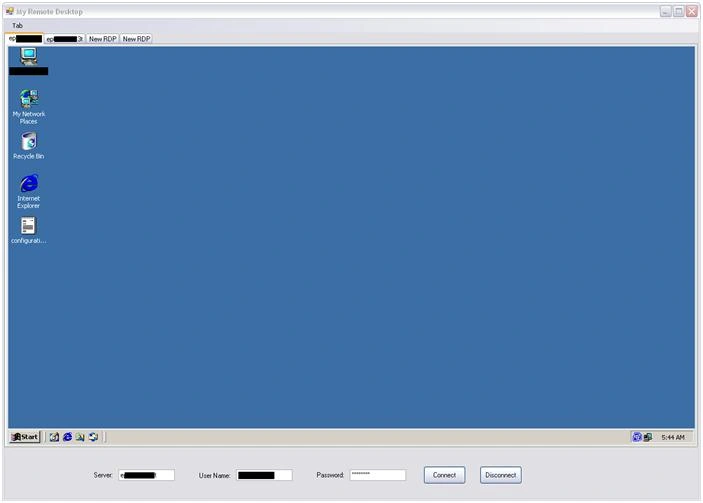
Why do we want to write a .Net application to do this when you have the MS Terminal Services client available from OS? Well, consider if you want to work on 3 different application servers at the same time and want to toggle between these 3 servers quite often. With the MSTSC, we will be running 3 different clients for the 3 servers and it is difficult to manage the working environment. In .Net you can develop an application with tab control to load remote desktop sessions in different tabs in one window.
However, tab control is not in scope of this article. That gives me an idea for my next article :)
Microsoft Terminal Services Control
We will be using AxMSTSCLib an ActiveX component in our program to connect to the remote computer. It's not that hard to build a remote desktop application in .Net.
Microsoft has a "Microsoft RDP client control" ActiveX control that we will be using in our application.
This is how we do it
We will start by creating a windows application in the Visual Studio IDE.
Add reference to "Microsoft Terminal Services Control Type Library" from the COM tab. This will add MSTSCLib.dll to the project. 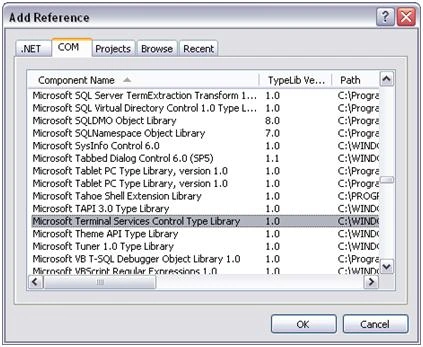
To add MSTSC to the toolbox, right click the toolbox and select "Choose Items…". Now add "Microsoft Terminal Services control from the COM tab.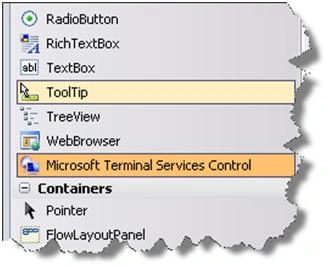
Drag the newly added control from toolbox to the form.
Add 3 textbox and 2 button controls to the form. 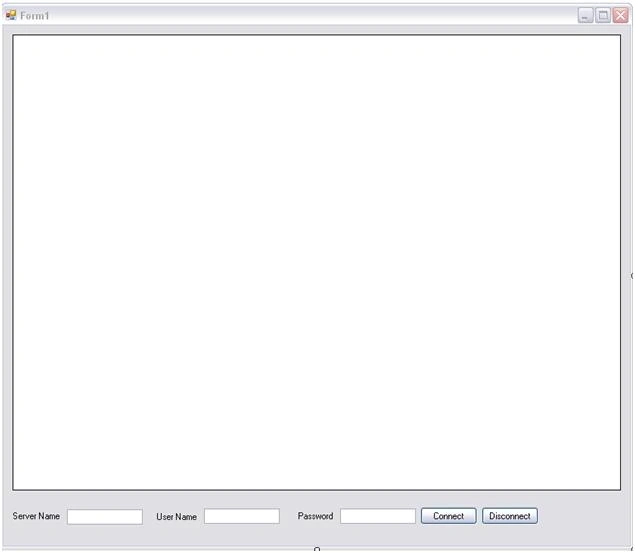
Connect Button - Click Event:
Here is how we write the Connect button click event.
|
rdp.Server = txtServer.Text; rdp.UserName = txtUserName.Text;
IMsTscNonScriptable secured = (IMsTscNonScriptable)rdp.GetOcx(); secured.ClearTextPassword = txtPassword.Text; rdp.Connect(); |
Now assign the properties (Server, UserName) of RDP control with the textbox values.
Here's how easy to login to remote machine. However there is one catch, there is no direct method in RDP control through which you can pass the username and password to login to the remote desktop.
Due to security reasons you have to implement an interface (IMsTscNonScriptable) to cast it separately.
|
|
Disconnect Button - Click Event:
To disconnect from the remote desktop session, we just need to call the Disconnect() method.
Before disconnecting, we want to ensure that the connection is still available. We don't want to disconnect if it is already disconnected (very clever huhJ)
|
if (rdp.Connected.ToString() == "1") rdp.Disconnect(); |
Check the full source code in the attachment. Please leave your valuable comments and questions.
That's all folks! Happy Coding!
raj rajPosted May 11, 2023, 7:15 AM
How can we do it in MVC
Adam SafiullahPosted Jul 7, 2022, 12:14 PM
Is this working for windows10 pro
Space SystemPosted Jul 1, 2022, 8:51 AM
THIS CODE NOT WORKING ON MY SERVER
pradeep kumarPosted Feb 26, 2016, 6:48 AM
Dear Thiagarajan Alagarsamy, I need to set default printer in remote box from my local . Could you pls me?
satish DokePosted May 24, 2015, 3:44 AM
@Thiagarajan Alagarsamy thanks nice work it
Arup DoluiPosted Sep 13, 2012, 6:53 AM
This code is not working on VB.Net 2010 version and windows 7...Please help me to do the same on VB.NET 2010 or mail me the code for VB.NET 2010 in the id: [email protected]. Thanx in advance.
Kathy SPosted Apr 13, 2012, 9:29 AM
Is there a way to write something in c# that redirects the Windows command line? I don't need the gui, sometimes I need to just log in to a Windows box, do one thing, and get out. Client doesn't want ssh server, so I'm looking to write something quick (client/server). In Linux we redirect the tty - how do I do this on Windows?
darvi sunnyPosted Apr 10, 2012, 5:36 AM
Dear Thiagarajan Alagarsamy, When we run this application remote computer is logging off.Do you have any solution for this.
aamir akhterPosted Mar 27, 2012, 10:29 AM
anybody help me to create interface for above project
James WijayaPosted Feb 2, 2012, 5:05 AM
Thanks for this tutorial This is something I was looking for a long time
jeet nimPosted Dec 17, 2011, 6:25 AM
I didn't find the above reference in my COM component. Please tell me where i can get it
Nagendra KumarPosted Sep 8, 2011, 3:53 AM
we success to connect remote computer but remote computer locked. how can i unlock remote computer. Reply me very soon it is urgent
David HPosted Aug 9, 2011, 9:47 AM
Very cool short and simple program. Do you know of a way to implement file transfer into this program? Thanks, David
ravi rajputPosted Mar 16, 2011, 5:55 AM
i want that kind of fiture in coding complite my all expectations
QING CHENPosted Feb 19, 2011, 8:34 AM
thank you! could this program support win 7?
Jaiprakash SuryanathanPosted Feb 12, 2011, 7:35 AM
Hi, how do i connect using different port, my server's default terminal port is changed to 1978 i tried using server1:1978 but getting error Please advice on the same Thanks
smileoftusharPosted Feb 11, 2011, 11:48 AM
I tried to add the MSTSC confrol into the toolbox but nothing happens. Does this code work only in Windows app?
Anandhi PremPosted Feb 10, 2011, 6:42 AM
On connecting to the remote system, while connection is established automatically the remote system is getting log off. Can we recover this problem? that is while connecting to the remote system that system should not log off. Is there any idea to do this.. Thanks in advance.
Siva PrasadPosted May 27, 2010, 1:41 AM
I want to capture the RDP data and sent it to server using sockets (instead of showing it in FORM),where server can show that in a Java Applet. Is there any way to do like this? Thanks, Siva.
balu guptaPosted May 13, 2010, 2:51 AM
hi the given sample is very nice. first time when i run the application i am unable to get the remote desktop in the application after i given the permission in the server "Allow remote desktop" in the remote tab of my computer properties, then i am able to view the remote desktop. thank you its really good.
Tejaswini Prashant JPosted May 12, 2010, 5:19 AM
Hi, can u tell me how I can find from an application whether user is using RDP?
Muhammad ShakirPosted Apr 23, 2010, 5:16 AM
I am writing an application that handle mobile desktops PDAs from desktop pc via remote desktop.my application is working well from desktop to desktop but i want to connect from desktop to handle mobile desktop [PDA]. Can you please help me.
admaPosted Apr 17, 2010, 9:01 AM
This project references to AxMSTSCLib.dll (which one of his memebres is AXHost) I have used the command axImp.exe to create a AxMSTSCLib.dll: %<SDK bin directory>%\aximp.exe %windir%\system32\mstscax.dll But there is no Axhost (checked the object browser through visual studio). so I guess I'm creating this dll the wrong way, but I could find any other way. here is my dll compared with the one which was donloaded from code-porject http://drop.io/hidden/eopb4tphk8qekl/asset/Z2V0b2N4LTItanBn http://drop.io/hidden/eopb4tphk8qekl/asset/bm8tZ2V0LW9jeDItanBn Anyone knows why? and how can I fix that? or where should i ask this ver specific question? Regards, Elad
deepPosted Mar 5, 2010, 7:19 PM
Hi there I have tried to run your application but it does not work..I couldn't see any bug on this project but couldn't connect to remote computer as well...when i press connect..it doesn't show any reaction nor it display any error..so can u plz help me running this application... Thank X
Muhammad YasirPosted Dec 3, 2009, 1:47 AM
This is something I was looking for a long time. As I need to work on multiple servers in my office through RDP. I will share this with my colleages too. Thanks for sharing this. I am love'in it.
BenjaminPosted Nov 13, 2009, 6:22 AM
Thank you very much for this tutorial! I'd just like to add, what if you want to login using a domain-login, you have to specify the username as DOMAINNAME\USERNAME. On top of that, this method will even login if the PC is "secured" by you having to press CTRL-ALT-DEL in order to login.
lahiru premasinghePosted Nov 1, 2009, 1:18 AM
dgggggggggggggggggggg