

Introduction:
This articles explain about how to add label control in the datagrid.
Implemention:
Just add one datagrid in our window application using c# and add below coding and implement the process.
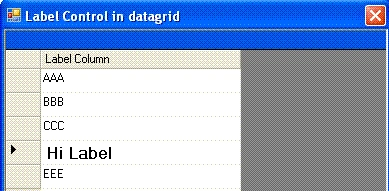
Declare the variable and objects ,
private DataTable dtTemp = new
DataTable();
private Label lbl = new Label();
DataGridTableStyle dgStyle = new
DataGridTableStyle();
DataGridTextBoxColumn
dgLabel = new DataGridTextBoxColumn();
Add the code in form load and bind the data.
private void Form1_Load(object sender, System.EventArgs
e)
{
//label property
lbl.ForeColor =
Color.Black;
lbl.Font = new Font("TimesRoman",
12, FontStyle.Bold);
dgStyle.GridColumnStyles.Add(dgLabel);
dgLabel.HeaderText
= "Label Column";
dgLabel.MappingName
= "Name";
dgLabel.Width =
200;
dgStyle.PreferredRowHeight
= 24;
dg
.TableStyles.Add(dgStyle);
//Create temp datatable for bind values
DataTable dtTemp = new DataTable(); DataRow dr;
//create schema
dtTemp.Columns.Add("Name"); dtTemp.Columns.Add("City");
dtTemp.Columns.Add("State");
//Add temp datas
dr =
dtTemp.NewRow(); dr["Name"] = "AAA"; dr["City"]
= "CAAA"; dr["State"] = "SAAA";
dtTemp.Rows.Add(dr);
dr =
dtTemp.NewRow(); dr["Name"] = "BBB"; dr["City"]
= "CBBB"; dr["State"] = "SBBB";
dtTemp.Rows.Add(dr);
dr =
dtTemp.NewRow(); dr["Name"] = "CCC"; dr["City"]
= "CCCC"; dr["State"] = "SCCC";
dtTemp.Rows.Add(dr);
dr =
dtTemp.NewRow(); dr["Name"] = "DDD"; dr["City"]
= "CDDD"; dr["State"] = "SDDD";
dtTemp.Rows.Add(dr);
dr =
dtTemp.NewRow(); dr["Name"] = "EEE"; dr["City"]
= "CEEE"; dr["State"] = "SEEE";
dtTemp.Rows.Add(dr);
//Bind the datasourse
dg .DataSource =
dtTemp;
}
When datagrid mouse up event will occurs, we will bind the label.
private void dg_MouseUp(object sender, System.Windows.Forms.MouseEventArgs e)
{
if(dg.HitTest(e.X, e.Y) != null)
{
if(dg.HitTest(e.X, e.Y).Column == 0)
{
dgLabel.TextBox.Controls.Add(lbl);
lbl.Text
= "Hi Label " +
dg[dg.CurrentRowIndex, 0].ToString();
}
}
}
Conclusion:
Through the help of this articles you can add any controls like TextBox, ComboBox, RadioButton, button etc. in a DataGrid cell.
Join the conversation! Your thoughts help the community grow.