
SIGN UP MEMBER LOGIN:    
ARTICLE

Quick Steps to URL Rewriting in Asp.net 4.0

Posted by Amit Choudhary Articles | ASP.NET Controls in C# August 26, 2011
In this article you will learn URL Rewriting in Asp.net 4.0.
Reader Level:
Download Files:
 

Since SEO comes into consideration it becomes the part of web development. These days every website being developed should be optimized to some extent so it could get crawled by Search Engines.Its advisable that you should take care of your URL's rather than showing them in a raw format make them readable by user as well SEO friendly.

URL is the important part that search engines want to take a look before they crawl the pages of your website. There are enormous open source libraries and ISAPI filter available that provides support to help you rewriting your URLs. The SEO and url rewriting is now taken into account and is introduced a supported extension for IIS 7.0/7.5 by providing URLRewriterExtension. But here we're going to discuss how you can rewrite you URL in your Asp.net website with just 3 steps.

  1. Create a Route path entry in RouteCollection First of all add below code your to you Global.asax file. you can add as many route as you want to the RouteCollection object. 
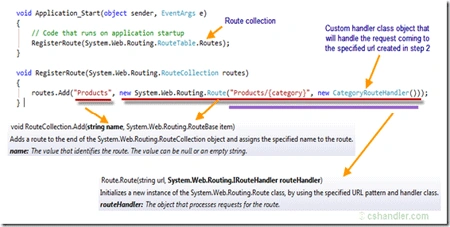
RouteCollection in ASP.NET
  1. Create a class specific to the particular section that implements the IRouteHandler interface to handle the incoming Route and receiving the data from the URL
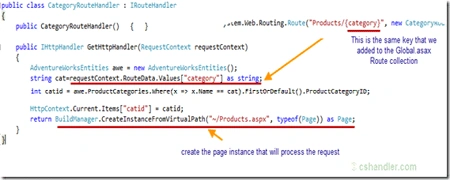
IRouteHandler in ASP.NET
  1. Finally get into the Asp.net web form and process the request

span style="font-family: 'Courier New';">protected void Page_Load(object sender, EventArgs e) { int catid = Convert.ToInt32(HttpContext.Current.Items["catid"]); var product = awe.Products.Where(item => item.ProductSubcategoryID == catid); GridView1.DataSource = product; GridView1.DataBind(); }

You can download the complete source code of this post from here Article Source Code

Thank for giving your time reading this post. Please leave a comment for any questions/suggestions.
 

Login to add your contents and source code to this article
share this article :
post comment
 
Become a Sponsor
PREMIUM SPONSORS
  • Finally – a virtual platform that delivers next-generation Windows Server 2008 Hyper-V virtualization technology from a managed hosting partner you can truly depend on. Visit www.maximumasp.com/max for a FREE 30 day trial. Hurry offer ends soon. Climb aboard the MaxV platform and take advantage of High Availability, Intelligent Monitoring, Recurrent Backups, and Scalability – with no hassle or hidden fees. As a managed hosting partner focused solely on Microsoft technologies since 2000, MaximumASP is uniquely qualified to provide the superior support that our business is built on. Unparalleled expertise with Microsoft technologies lead to working directly with Microsoft as first to offer IIS 7 and SQL 2008 betas in a hosted environment; partnering in the Go Live Program for Hyper-V; and product co-launches built on WS 2008 with Hyper-V technology.
    Finally – a virtual platform that delivers next-generation Windows Server 2008 Hyper-V virtualization technology from a managed hosting partner you can truly depend on. Visit www.maximumasp.com/max for a FREE 30 day trial. Hurry offer ends soon. Climb aboard the MaxV platform and take advantage of High Availability, Intelligent Monitoring, Recurrent Backups, and Scalability – with no hassle or hidden fees. As a managed hosting partner focused solely on Microsoft technologies since 2000, MaximumASP is uniquely qualified to provide the superior support that our business is built on. Unparalleled expertise with Microsoft technologies lead to working directly with Microsoft as first to offer IIS 7 and SQL 2008 betas in a hosted environment; partnering in the Go Live Program for Hyper-V; and product co-launches built on WS 2008 with Hyper-V technology.
Team Foundation Server Hosting
Become a Sponsor