

In a previous article how does C# code behind interact with an XAML interface within a Silverlight 2 context? - Data conversion: Part VII, we demonstrate how to implement conversion logic between two types within a Silverlight 2 application context and how the binding engine does behave in this situation of interaction between the two sides. In this article, we will dig a little bit into details and parse the different binding modes. In fact, there are five types of Binding mode at the contrast of what is supposed to be, I mean four modes. I explain: there are the four well known namely the TwoWay, the OneWay, the OneTime, and the OneWayToSource in addition to the Default mode which is supposed to be the fifth.
The TwoWay mode:
As it name says, it provides a way to cause updates in to the both senses, namely from the source object to the XAML side and from the XAML side to the source object side, it is very useful for example when binding a data consumer object to a source of data such as the DataGrid case because this type of binding is appropriate for editable controls
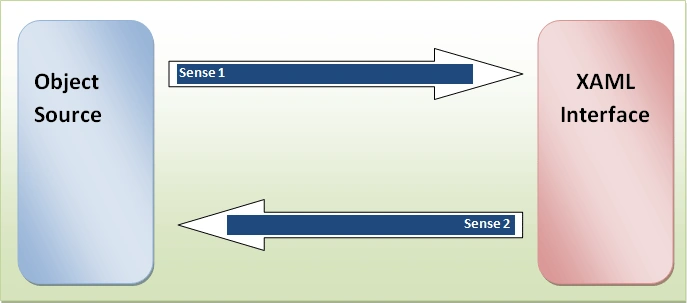
Figure 1
Let's consider this example, this is an XAML interface designed to be bound to an object type of Person and this is the Person class:
public class Person : INotifyPropertyChanged
{
public Person() { }
private string _FirstName;
public string FirstName
{
get { return _FirstName; }
set
{
_FirstName = value;
if (PropertyChanged != null)
{
PropertyChanged(this, new PropertyChangedEventArgs("FirstName"));
}
}
}
private string _LastName;
public string LastName
{
get { return _LastName; }
set
{
_LastName = value;
if (PropertyChanged != null)
{
PropertyChanged(this, new PropertyChangedEventArgs("LastName"));
}
}
}
private string _Gender;
public string Gender
{
get { return _Gender; }
set
{
_Gender = value;
if (PropertyChanged != null)
{
PropertyChanged(this, new PropertyChangedEventArgs("Gender"));
}
}
}
public override string ToString()
{
return string.Format("First name: {0},last name: {1},age: {2},gender: {3}", FirstName, LastName, Gender);
}
#region INotifyPropertyChanged Members
public event PropertyChangedEventHandler PropertyChanged;
#endregion
}
And then, this is the corresponding XAML implementation:
<UserControl xmlns:data="clr-namespace:System.Windows.Controls;assembly=System.Windows.Controls.Data" xmlns:basics="clr-namespace:System.Windows.Controls;assembly=System.Windows.Controls" x:Class="Silverlight.Page"
xmlns="http://schemas.microsoft.com/winfx/2006/xaml/presentation"
xmlns:x="http://schemas.microsoft.com/winfx/2006/xaml"
xmlns:code="clr-namespace:Silverlight"
Width="200" Height="400">
<StackPanel x:Name="LayoutRoot"
Margin="10"
Orientation="Vertical">
<StackPanel.Resources>
<code:Person x:Name="myPerson"
FirstName="Bill"
LastName="Gates"
Gender="Male"
/>
</StackPanel.Resources>
<TextBlock Text="First name"
FontSize="14"
/>
<TextBox x:Name="txtFirstName"
Background="Blue"
Foreground="White"
FontWeight="Bold"
FontSize="12"
Text="{Binding Source={StaticResource myPerson}, Mode=TwoWay,Path=FirstName}"
/>
<TextBlock Text="Last name"
FontSize="14"
/>
<TextBox x:Name="txtLastName"
Background="Blue"
Foreground="White"
FontWeight="Bold"
FontSize="12"
Text="{Binding Source={StaticResource myPerson},Mode=TwoWay,Path=LastName}"
/>
<TextBlock Text="Gender"
FontSize="14"
/>
<TextBox x:Name="txtGender"
Background="Blue"
Foreground="White"
FontWeight="Bold"
FontSize="12"
Text="{Binding Source={StaticResource myPerson}, Mode=TwoWay,Path=Gender}"
/>
<Button Margin="0,20"
Content="Display data"
Click="Button_Click"
></Button>
</StackPanel>
</UserControl>
This is how looks like the resulting interface:
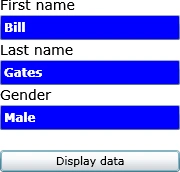
Figure 2
Now, suppose that we want to rectify the “myPerson” data through code then we implement the button click event handler as bellow:
private void Button_Click(object sender, RoutedEventArgs e)
{
Person person = LayoutRoot.Resources["myPerson"] as Person;
person.FirstName = "Bejaoui";
person.LastName = "Bechir";
person.Gender = "Male";
}
Once the button is clicked, the data will change:
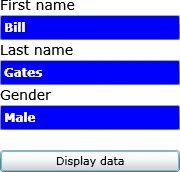 Before click |
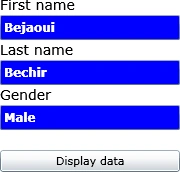 After click |
Figure 3
As a resume, the TwoWay mode is used in case where there is an interaction between the interface and the user, I mean the user enters or rectifies data and the interface displays updated data to the user and so forth, but what if we want only display data or set some properties those couldn't be rectified by the final user then we use the OneWay mode, if you try to change the TwoWay mode in the previous example by the OneWay one you risk to do not change or update data since it will be transformed to a read only data. But what is the advantage of using the OneWay?
The OneWay mode:
The OneWay is used as it is said when we target a property hasn't control interface for making changes directly by the user, the main purpose of using this mode is in fact that using the OneWay binding mode avoids the overhead of the TwoWay binding mode.
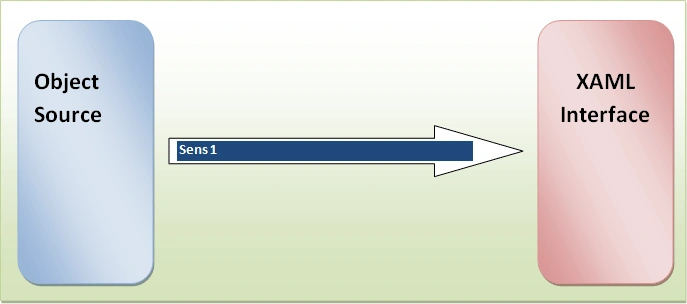
Figure 4
Let's give an example about the one way mode, always with the same interface of the previous example. We try to parameter the text boxes background colors as follow:
This is the rectified XAML UI. We target the Foreground dependency property this once
<UserControl x:Class="Silverlight2.Page"
xmlns="http://schemas.microsoft.com/winfx/2006/xaml/presentation"
xmlns:x="http://schemas.microsoft.com/winfx/2006/xaml"
xmlns:code="clr-namespace:Silverlight2"
Width="300" Height="350">
<StackPanel x:Name="LayoutRoot">
<StackPanel.Resources>
<code:TextBlockColor x:Name="myColorClass"/>
</StackPanel.Resources>
<TextBlock Width="300"
Height="50"
FontSize="14"
Margin="0,20"
Foreground="{Binding Source={StaticResource myColorClass},Path=ForeColor,Mode=OneWay}"
Text="OneWay binding mode">
</TextBlock>
<Button Content="Change the color"
Click="Button_Click"
Width="150">
</Button>
</StackPanel>
</UserControl>
In the other hand, we develop a class that wraps a property. This last one has a Solid color brush property that plays the role of a source for our TextBlock foreground dependency property.
namespace Silverlight2
{
public class TextBlockColor:INotifyPropertyChanged
{
private SolidColorBrush _ForeColor;
public SolidColorBrush ForeColor
{
get { return _ForeColor; }
set
{
_ForeColor = value;
if (PropertyChanged != null)
PropertyChanged(this, new PropertyChangedEventArgs("ForeColor"));
}
}
#region INotifyPropertyChanged Members
public event PropertyChangedEventHandler PropertyChanged;
#endregion
}
}
Let's try this code
namespace Silverlight2
{
public partial class Page : UserControl
{
TextBlockColor brush;
Color color;
public Page()
{
InitializeComponent();
brush = LayoutRoot.Resources["myColorClass"] as TextBlockColor;
color = Colors.Orange;
brush.ForeColor = new SolidColorBrush(color);
}
private void Button_Click(object sender, RoutedEventArgs e)
{
if (color == Colors.Orange)
{
color = Colors.Green;
brush.ForeColor = new SolidColorBrush(color);
}
else
{
color = Colors.Orange;
brush.ForeColor = new SolidColorBrush(color);
}
}
}
}
If we run the application and we click the button, the TextBlock foreground will changes as long as we click the button.
 One click |
 Another click |
Figure 5
The OneTime mode:
Now, what if we change the binding mode from OneWay to OneTime and we try to execute the code. Nothing will happen, this is the big difference between OneWay and OneTime, in fact , updates are happened each time the source property is modified within a OneWay binding mode context, meanwhile, updates are happened only when the application starts or the data context changes. This binding mode is more performant if we need to initialize some properties at the starting of the application or when we don't need to set the dependency property once it is set.
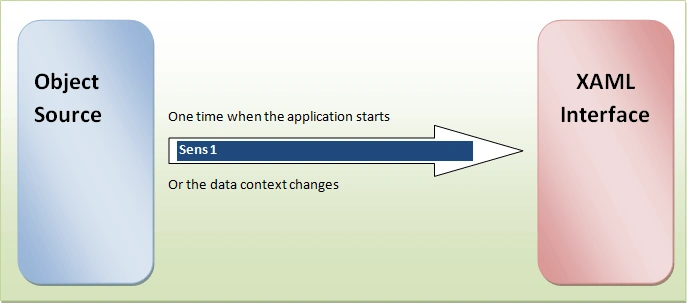
Figure 5
Nothing will change with this code, even if we click the button to change the color
<UserControl x:Class="Silverlight2.Page"
xmlns="http://schemas.microsoft.com/winfx/2006/xaml/presentation"
xmlns:x="http://schemas.microsoft.com/winfx/2006/xaml"
xmlns:code="clr-namespace:Silverlight2"
Width="300" Height="350">
<StackPanel x:Name="LayoutRoot">
<StackPanel.Resources>
<code:TextBlockColor x:Name="myColorClass"
ForeColor="Orange"
/>
</StackPanel.Resources>
<TextBlock Width="300"
Height="50"
FontSize="14"
Margin="0,20"
Foreground="{Binding Source={StaticResource myColorClass},Path=ForeColor,Mode=OneTime}"
Text="OneWay binding mode">
</TextBlock>
<Button Content="Change the color"
Click="Button_Click"
Width="150">
</Button>
</StackPanel>
</UserControl>
The OneWayToSource:
The OneWayToSource is exactly like the previous OneWay binding mode except that the sense will be changed from the Source to the XAML side to the inverse and that means from the XAML UI to the source object. It is very useful in case of making updates operations on data bases or files from users, so the data flux will be on the direction from the user interface to the storage location.
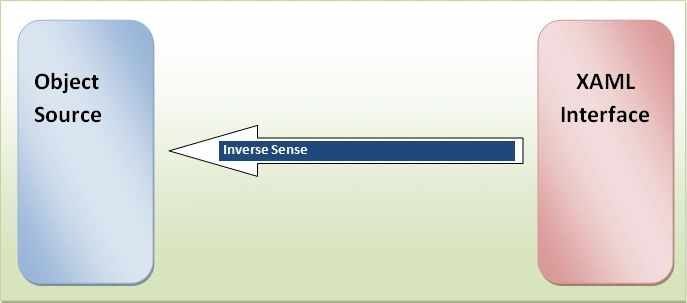
Figure 6
The Default mode:
Imagine a situation where there are properties those are read-only. I mean they implement the get and not the set assessors and at the same time the Binding mode is set to TwoWay. The problem is that no updates will happen because some of the properties are read only they couldn't be modified any way. Therefore the Default keyword is used in this particular case to avoid such troubles, that's it.
Good Dotneting!!!
Gowtham RajamanickamPosted May 20, 2015, 12:56 AM
helpful...