

One of the useful cases when COM is employed is when one profits of the already existed API, those developed within an environment other than .Net in order to leverage some operations that aren't possible via the managed code. A good example is the WIA API "wiaaut.dll". It represents a set of services that enable profiting of the devices services such as webcams, cameras and scanners.
Walkthrough :
You have to know that this kind of operation is only leveraged within windows XP environment, moreover, the WIA API is not automatically delivered with Windows; therefore, it must be downloaded from this link.
http://www.microsoft.com/downloads/details.aspx?FamilyID=a332a77a-01b8-4de6-91c2-b7ea32537e29&displaylang=en
First, install the WIA API by extracting the content of the zipped file then by copying and pasting the wiaaut.dll assembly to C:\Windows\System32 and finally by registering the assembly using the regsvc32.exe
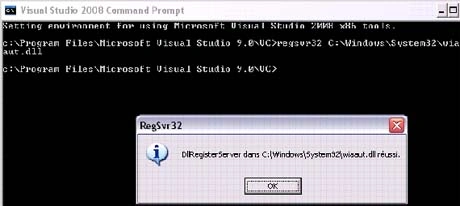
Figure 1.
It is necessary to choose a peripheral therefore the library provides us the dialog box that enables the selection of peripherals through a list view. To use this dialog box you have to implement the following code :
Device oDevice = null;
CommonDialogClass oDialog = new CommonDialogClass();
try
{
//This dispalys the dialog box that enables the user to choose the right device
oDevice = oDialog.ShowSelectDevice(WiaDeviceType.UnspecifiedDeviceType, true, false);
}
catch (Exception caught) { }
Well, as I have only a webcam device the dialog box will look like the image shown in the figure2
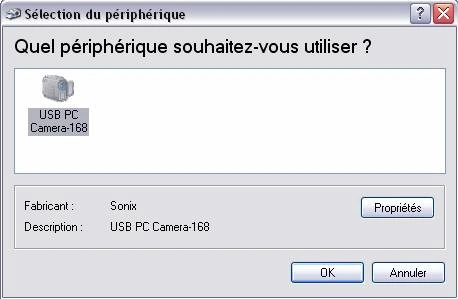
Figure 2.
But you may say I can use this line
oDevice = new CommonDialogClass().ShowSelectDevice(WiaDeviceType.CameraDeviceType, true, false);
Instead of this one
oDevice = oDialog.ShowSelectDevice(WiaDeviceType.UnspecifiedDeviceType, true, false);
But I tell you that you will receive a runtime error in the first case.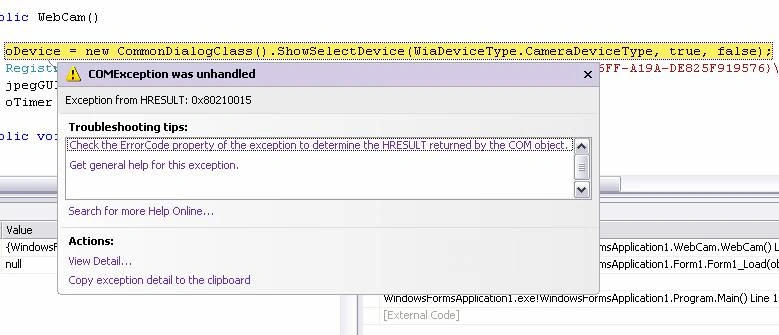
Figure3
That means that the error occurs when the device you are trying to connect to is not WIA compatible. So it is worth to let the user select his/her device by him/her self.
To get the snapshot you may use this code :
Device oDevice;
string jpegGUID;
Item oItem;
string path;
//This lets the user select the correspondent device
oDevice = new CommonDialogClass().ShowSelectDevice(WiaDeviceType.CameraDeviceType, true, false);
/* As the image is of jpg format then you try to get the value of the representative GUID */
RegistryKey key = Registry.ClassesRoot.OpenSubKey(@"CLSID\{D2923B86-15F1-46FF-A19A-DE825F919576}\SupportedExtension\.jpg");
jpegGUID = key.GetValue("FormatGUID").ToString();
The above is a kind of preparation because it allows selecting the correspondent device in first phase, then in a second phase; it retrieves the jpg registry reference in order to be used later.
In order to make a command and pass it to the device you may use this code :
try
{
oItem = oDevice.ExecuteCommand(CommandID.wiaCommandTakePicture);
// As you may remarque, the jpg registry reference is passed as an
// argument at the transfer method level
ImageFile imgFile = oItem.Transfer(jpegGUID) as WIA.ImageFile;
/* This method render the user more familiar when precising the path
As the save dialog box is used in this case */
SaveImageAs();
imgFile.SaveFile(path);
oItem = null;
}
catch (Exception caught)
{
MessageBox.Show("Put another image");
}
void SaveImageAs()
{
SaveFileDialog dlg = new SaveFileDialog();
dlg.Filter = "(*.jpg)|*.jpg";
if (dlg.ShowDialog() == DialogResult.OK)
{
path = dlg.FileName;
}
}
What if you want the represent those couples of codes in more representative and methodic way, you may create a class for this purpose and encapsulate the code within it as follow :
public class WebCam
{
Device oDevice;
string jpegGUID;
Item oItem;
string path { get; set; }
public string GetSnapShotPath()
{
return path;
}
public WebCam()
{
try
{
//This lets the user select the correspondant device
oDevice = new CommonDialogClass().ShowSelectDevice(WiaDeviceType.UnspecifiedDeviceType, true, false);
//As the image is of jpg format then you try to get the value of the representative GUID
RegistryKey key = Registry.ClassesRoot.OpenSubKey(@"CLSID\{D2923B86-15F1-46FF-A19A-DE825F919576}\SupportedExtension\.jpg");
jpegGUID = key.GetValue("FormatGUID").ToString();
}
catch (Exception caught)
{
MessageBox.Show("SnapShot canceled or something wrong!!!");
}
}
//Via this method the snapshot method will be executed
public void SnapShot()
{
try
{
oItem = oDevice.ExecuteCommand(CommandID.wiaCommandTakePicture);
ImageFile imgFile = oItem.Transfer(jpegGUID) as WIA.ImageFile;
SaveImageAs();
imgFile.SaveFile(path);
oItem = null;
}
catch (Exception caught)
{
MessageBox.Show("Put another image");
}
}
//This methos lets the user set image path with a more familiar way
void SaveImageAs()
{
SaveFileDialog dlg = new SaveFileDialog();
dlg.Filter = "(*.jpg)|*.jpg";
if (dlg.ShowDialog() == DialogResult.OK)
{
path = dlg.FileName;
}
}
}
Now, to consume this above class services, create a new windows application project then add a picture box, a button and a status strip then copy and paste the above class within the scope of the form code. The form should looks like in the figure 4
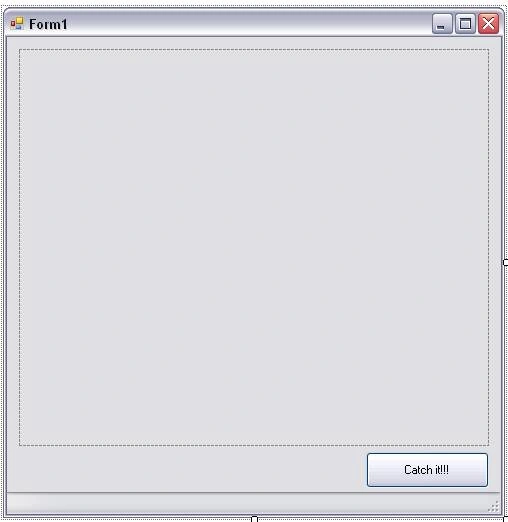
Figure 4.
Then, add a tool strip label as shown in the figure 5
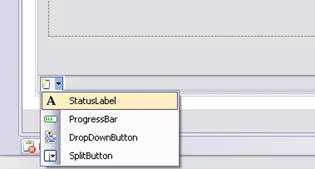
Figure 5.
Afterward, implement the button stab with this below code :
private void button1_Click(object sender, EventArgs e)
{
WebCam oCam = new WebCam();
oCam.SnapShot();
pictureBox1.Image = Image.FromFile(oCam.GetSnapShotPath());
toolStripStatusLabel1.Text = oCam.GetSnapShotPath();
}
Try to run the application
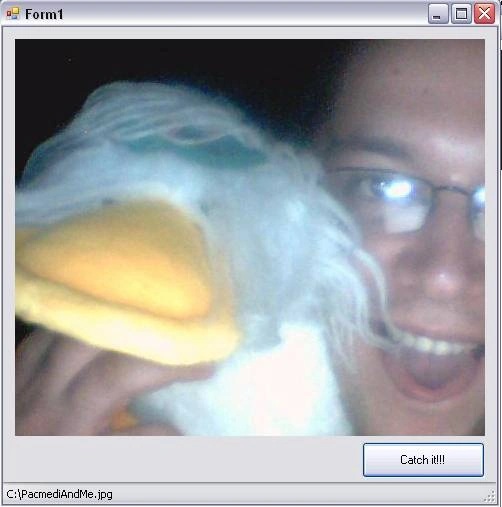
Figure 6.
If you browse to the emplacement where the image was saved you will remark that a jpg file is newly added. In my case, it is, Of Corse, the great Pacmedi and I.

Figure 7.
And if I try to open the image, I will have as a result .

Figure 8.
Good Dotneting !!!
anilPosted Aug 17, 2011, 12:31 AM
how to rectify the HRESULT error
Jasper MauricePosted Mar 28, 2011, 7:51 PM
Hi, i can't create the DialogBox to select the device. Someone could tell me where i can find the device toolsbox... that will help me. Like Cell, I've got the problem with Device oDevice and Item oItem, i think because i haven't the device toolbox. Thx
Vandana PandeyPosted Feb 16, 2011, 6:55 AM
Thankx for ur code. i got solution
Vandana PandeyPosted Feb 16, 2011, 6:42 AM
string path { get;set;} i got error on above line. i working on .net 2.0 plz help me out sir
Mukesh SharmaPosted Nov 11, 2010, 5:55 AM
thanks for all above code and information It works for me just require to add few namespace.But it really works. Thanks once again
prakash guptaPosted Oct 23, 2010, 3:01 PM
sir,,,but this coding is not working in window 7...or i'm implementing the code wrong....can u pls send me some snaps and the correct way of implementing the code..sir i want this pls as quick as possible- [email protected](email-id)
Kareem AmerPosted Aug 25, 2010, 5:14 AM
iam using Canon camera & i have an error in this line "oItem = oDevice.ExecuteCommand(CommandID.wiaCommandTakePicture); " the error is : the method or operation is not implemented please any help about this ... thanks ...
Wessel OosthuizenPosted Jul 9, 2010, 9:58 AM
Thank you for this code. Is there any help you can provide to make capturing a picture from a camera device on windows 7 possible? I have searched the web high and low and found only dead ends. Thanks you
CellPosted Jun 21, 2010, 9:57 AM
Any directive to make this work ? It doesn't seem to know what Device and Item is.
techmaniac jainPosted Jun 10, 2010, 8:53 AM
i got "Exception from HRESULT: 0x80210083" this error i have already used unspecifieddevice instead of cameradevice but it look same so help ASAP fast fast can it happen due to fact that i have no such devices connect to my pc
saurabhPosted May 25, 2010, 5:58 AM
Exception from HRESULT: 0x80210083 followed the way u said ..i m able to acess classes in wia namespace but this is the eroor when capture image method is called
bhrugesh mehtaPosted Apr 22, 2010, 5:02 AM
project works fine but i need to do somthing more with this project i need to add "save as" button n also saved it on perfect dir with time n date stamp what would i doo for further bec i m new in video streaming line i m tottaly confused maile me on [email protected] at the end perfect project n also give me perfect description of it
erubey floresPosted Apr 8, 2010, 6:21 PM
The registrykey type send me a mistake, and I can't find a librery or something to make it works. I'd be wonderfull if someone could help me.
Paul WainwrightPosted Jan 6, 2010, 6:53 AM
Hi, Is the project code available for download? I have tried cut/paste into a new project but can't seem to build the project successfully. Thanks Paul.
sherif attiaPosted Dec 5, 2009, 7:06 PM
this is amazing man!!!
Mohammed SaudiPosted Nov 20, 2009, 12:15 PM
Really useful. Thanks so much
shiv kumarPosted Oct 24, 2009, 1:24 AM
it's excellent code
HelioPosted Mar 4, 2009, 10:47 AM
Tks a million, but not works here :( There are a problem with the object Device. Device oDevice; Help-me please!!! I'm so sad :(
HelioeditedPosted Feb 18, 2009, 11:23 PMEdited Feb 18, 2009, 11:24 PM
Hi guys, i´m really need study this code, but the link is down. :( Someone can fix this ? Thanks a lot, cheers!!! WebCam.zip
low keithPosted Jan 23, 2009, 3:15 AM
hi, i am working on a c sharp project. MY project need to regonize the user faces in working hours period. Capture the user image. Must be able to detect and record down the user absence or presence period. Can some one help me ???