

In this two parts article, I will give techniques of how to deal with stored procedures and user defined functions UDF from within a LINQ context rather than ADO.Net. The advantage of calling the stored procedures and UDF via LINQ is, in fact, that LINQ is not concerned whether they are written using Transact SQL or SQL Common language Runtime that allows users to create objects such as stored procedures or user defined functions using C# or VB.Net. In the other hand, LINQ enables to write strongly typed queries. To know how to execute a stored procedure or a given UDF using LINQ and have an overview concerning this issue; I invite you to follow those scenarios.
During this tutorial the NorthWind SQL Server data base is used as a data source. In order to download it you can reach it via this link
http://www.microsoft.com/downloads/details.aspx?FamilyID=06616212-0356-46A0-8DA2-EEBC53A68034&displaylang=en
The NORTHWIND.MDF could be reached in your hard drive C:\SQL Server 2000 Sample Databases\NORTHWND.MDF
Before starting let's make a rapid comparison between the stored procedures and the UDF or user defined functions through this schedule:
|
Stored procedures |
User defined functions |
| A Stored procedure can't return a table variable in spite of the ability to create one | A Function can return table variables |
| A Stored procedure can change the server environment | A Function can't change the server environment |
| A Stored procedure can be used in an XML FOR clause | A Function can't be used in an XML FOR clause |
| Stored procedures are called independently using EXEC | Functions are called from within SQL statement |
| Stored procedures may return an integer or nothing | Functions must always return an object |
| A stored procedure continues to the next instruction when an error occurs except that an error handling code is set | Functions stops execution when an error occurs |
In addition to the above schedule, I can say that based on my experience, the stored procedure are more rapidly executed than the user defined functions.
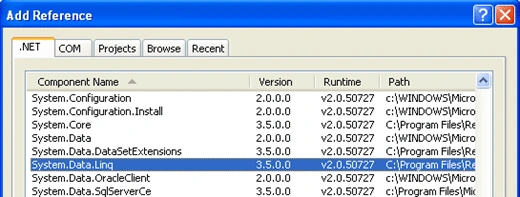
First, create a new windows Console application then add those namespaces into your project System.Data.Linq; and System.Data.Linq.Mapping. If a reference isn't already added to System.Data.Linq then right click on the project icon in the solution explorer and add a reference to it.
Stored procedures and LINQ
Senario1:
Say that you want to update the NorthWind Products table by enabling final users to modify the price related to a given product according to its identifier. In this case, the user has to enter both the product identifier and the price value via an interface dedicated to that.
This is the stored procedure core:
CREATE PROCEDURE dbo.ModifiyPrice
(
@NewPrice MONEY,
@ProdID INT
)
AS
/* SET NOCOUNT ON */
UPDATE Products
SET UnitPrice = @NewPrice
WHERE ProductID = @ProdID;
RETURN
Let's switch to Visual Studio and perform the code that calls the above procedure. First, you derive a class from the DataContext in order to create some customized behaviors those fit our need.
class NorthWind : DataContext
{
public NorthWind()
: base(@"Data Source=.\SQLEXPRESS;AttachDbFilename=" +
@"C:\SQL Server 2000 Sample Databases\NORTHWND.MDF';" +
@"Integrated Security=True;Connect Timeout=30;User Instance=True") { }
.........
.........
}
Then you add a method responsible of mapping the stored procedure into the above class, it is public int SetNewPrice in this case.
class NorthWind : DataContext
{
//The constuctor
public NorthWind()
: base(@"Data Source=.\SQLEXPRESS;AttachDbFilename=" +
@"C:\SQL Server 2000 Sample Databases\NORTHWND.MDF';" +
@"Integrated Security=True;Connect Timeout=30;User Instance=True") { }
//This attribute provides data about the stored procedure that will be used
//through reflection mechnism within the SetNewPrice method
[Function(Name = "ModifiyPrice")]
//The method that maps the stored procedure must return an object
//We use an int as a returned type because this is only an update action
public int SetNewPrice([Parameter(Name="@NewPrice",DbType="int")]int Price,[Parameter(Name="@ProdID",DbType="int")]int identifier)
{
/*The ExecuteMethodCall recieves as parameters, a datacontext, a MethodInfo
therefore System.Reflection namespace has to be included and finally an object
table that contained the input parapeters entred by the user
and it returns an IExecuteResult object*/
IExecuteResult oResult = this.ExecuteMethodCall(this, MethodInfo.GetCurrentMethod() as MethodInfo,new object[2]{Price,identifier});
//The IExecuteResult.ReturnValue is a type of object
//therefore it must be transtyped to integer type
return (int)oResult.ReturnValue;
}
}
DataContext.ExecuteMethodCall() is used in this case and it returns an IExecuteResult object that returns the executed query result by itself through the oResult.ReturnValue object. It is only a unique update operation to perform in this case, thus, the returned value is not so important in this context rather than the update operation itself. Another important think that has to be said before you begin write the code. In fact, the System.Reflection namespace has to be included as we use MethodInfo in this context. The MethodInfo invokes the method that maps the stored procedure through reflection.
Now, let's write a code that consumes the services of this above class
static void
{
//Initilise a NorthWind object
NorthWind oNorthWind = new NorthWind();
//The product identifier
Console.WriteLine("Enter the product identifier");
string id = Console.ReadLine();
//The new price
Console.WriteLine("Enter the product new price");
string np = Console.ReadLine();
//Execute the product update operation through the bellow method
int oResult = oNorthWind.SetNewPrice(Convert.ToInt32(id), Convert.ToInt32(np));
Console.WriteLine(string.Format("The product {0} price is updated to {1}",id,np));
Console.ReadLine();
}
Let's run the application and observe,

Figure 2
Open the products table and the result will be

Figure 3
Senario2:
Always with the same table, I mean Products one. Imagine that the price follow this mechanism
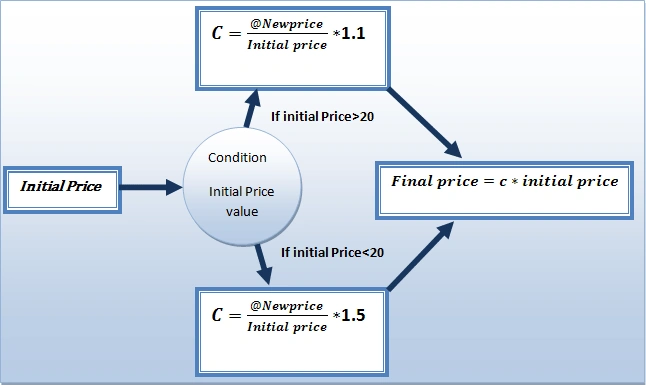
Figure 4
Where C is the periodic growth price ratio multiplied by a constant that depends on whether the price is greater or less than 20, the final price will be the initial one multiplied by the C coefficient.
And this is the new stored procedure core:
ALTER PROCEDURE dbo.ModifiyPrice
(
@NewPrice MONEY,
@ProdID INT
)
AS
/* SET NOCOUNT ON */
IF @NewPrice> 20
BEGIN
UPDATE Products
SET UnitPrice = UnitPrice*(@NewPrice/UnitPrice)*1.1
WHERE ProductID =@ProdID
END
ELSE IF @NewPrice < 20
BEGIN
UPDATE Products
SET UnitPrice = UnitPrice*(@NewPrice/UnitPrice)*1.5
WHERE ProductID =@ProdID
END
In this case, the stored procedure will be mapped according to its multiple results shape. And the code will be changed to fit the new circumstances:
class NorthWind : DataContext
{
//The constuctor
public NorthWind()
: base(@"Data Source=.\SQLEXPRESS;AttachDbFilename=" +
@"C:\SQL Server 2000 Sample Databases\NORTHWND.MDF';" +
@"Integrated Security=True;Connect Timeout=30;User Instance=True") { }
//This attribute provides data about the stored procedure that will be used
//through reflection mechnism within the SetNewPrice method
[Function(Name = "dbo.ModifiyPrice")]
//If There is nothing to return set the generic type to int
//As the stored procedure returns and integer 0 after execution
[ResultType(typeof(int))]
[ResultType(typeof(int))]
//The method that maps the stored procedure must return an object
//We use an int as a returned type because this is only an update action
public IMultipleResults SetNewPrice([Parameter(Name="@ProdID",DbType="int")]int identifier,
[Parameter(Name = "@NewPrice", DbType = "int")]int newprice)
{
/*The ExecuteMethodCall recieves as parameters, a datacontext, a MethodInfo
therefore System.Reflection namespace has to be included and finally an object
table that contained the input parapeters entred by the user
and it returns an IExecuteResult object*/
IExecuteResult oResult = this.ExecuteMethodCall(this, MethodInfo.GetCurrentMethod() as MethodInfo,new object[2]{identifier,newprice});
//The IExecuteResult.ReturnValue is a type of object
//therefore it must be transtyped to integer type
return (IMultipleResults)oResult.ReturnValue;
}
}
As you remark, the returned type is changed from int in the first scenario to IMultipleResults in the current one because each block of the stored procedure returns a different result. Hence, you will deal with a multiple queries context. The IMultipleResults interface is leveraged for such case.
In order to make use of the above code, let's implement the main method as follow:
static void
{
//Instanciate the NorthWind data context
NorthWind oNorthWind = new NorthWind();
//Enter the product identifier
Console.WriteLine("Enter the product identifier number");
string id = Console.ReadLine();
//Enter the price of the accoring product
Console.WriteLine("Enter the new price");
string price = Console.ReadLine();
try
{
//The first block is executed
if (Convert.ToInt32(price) > 20)
{
/* The IMultipleResults represents the queries result, the returned object is not our primary concern, the principal think is to execute the update*/
IMultipleResults result1 = oNorthWind.SetNewPrice(Convert.ToInt32(id), Convert.ToInt32(price));
Console.WriteLine("The first block of the stored procedure is used");
Console.WriteLine("Update operation is complete");
Console.Read();
}
//The second bolck is executed
else
{
IMultipleResults result2 = oNorthWind.SetNewPrice(Convert.ToInt32(id), Convert.ToInt32(price));
Console.WriteLine("The second block of the stored procedure is used");
Console.WriteLine("Update operation is complete");
Console.Read();
}
}
catch (Exception caught)
{
Console.WriteLine(caught.Message);
Console.Read();
}
}
As you remark, the code is cracked into two main blocks, the first one deals with the situation where the entered price is more than 20 and the second block deals with the situation where the price is less than or equal to 20. For each situation, an IMultipleResults object is returned. Normally, you make use of the result1.GetResult<typeof(returned object)>() and result2.GetResult<typeof(returned object)>() that returns a generic IEnumerable object that enables us to enumerate table objects through a foreach loop, but in this situation there is not important returned objects, I mean the main task is to update the data base through the employed stored procedure and no more. In this case, a simple integer is returned after executing the update operation. Thus, you have to precise that the type of the result is integer through adorning the IMultipleResults SetNewPrice() method that returns results by the both attributes [ResultType(typeof(int))] and [ResultType(typeof(int))], those last ones are very necessary even there are not returned objects; if you ignore them you'll receive an Invalid operation exception at the run time.
Finally, try to run the application and observe:
Open the products table
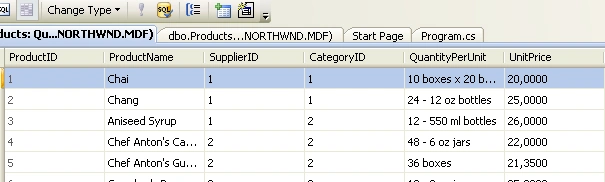
Figure 5
As you remark, the initial price is 20. Try to modify the price as follow:
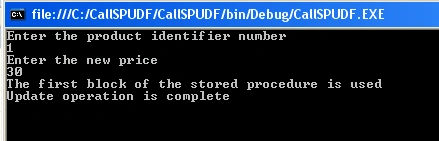
Figure 6
The new price will be leveraged according to the first alternative as the price is more than 20 and the result will be as below after reopening the Products table.

Figure 7
Now, set back the unit price to its initial value, I mean, the unit price of the product 1 to 20. Then run the application and try to update the same product using a price value less than or equal to 20.
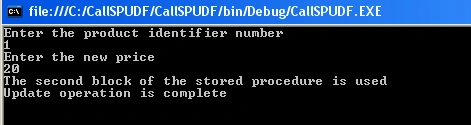
Figure 8
The result will be leveraged according to the second alternative
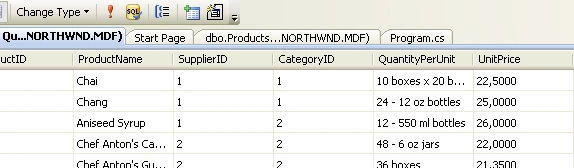
Figure 9
Finally, recall that LINQ provides more than one mechanism to call a stored procedure. In part II of this article you'll discover how to call an UDF and obtain its result(s) using LINQ.
Good Dotneting!!!
Join the conversation! Your thoughts help the community grow.