

In this article, I will demonstrate a second way other than used in the "Building parameterized queries from ADO.Net to DLINQ" article, in this once, I will make use of the CompiledQuery.Compile generated method which receives a Lambda expression as parameter, and then it generates a delegate that returns a generic IQueryable object that one can enumerate it through a foreach loop.
The CompiledQuery class:
The main and the only mission of this class is to compile and recompile queries for reutilization purposes. I mean, there are situations when one needs to use the same query structure for several times by changing only parameters or criteria for example:
- from cust in Customers where cust.Country =="Tunisia" select cust.Address
- from cust in Customers where cust.Country =="Algeria" select cust.Address
- from cust in Customers where cust.Country =="Morroco" select cust.Address
In this case, only the Country field is changed at the where clause level but the rest of the query structure remains unmodified. For instance, SQL Server as a data base manager doesn't waste time through parsing similar queries as a part of the optimization process. Thus, the CompiledQuery class is coming into the world and has as principal mission for each time a similar query is needed; the LINQ parses the given query as a parameter within a Lambda expression. The generated delegate receives the followed arguments.
DataContext,Parameter1,...,ParameterN, and returns an IQueryable<Entityclass>.
The last argument is the type of the returned object. The DataContext is compulsory but the other arguments are optional, nevertheless, they are important as queries parameters are passed through them Now, to know how to make use of this class to build parameterized queries, I invite you to follow this walkthrough.
Walkthrough
During this tutorial the NorthWind SQL Server data base is used as a data source. In order to download it you can reach it via this link:
After downloading and deploying the msi file, the NORTHWIND data base is reached in C:\SQL Server 2000 Sample Databases\NORTHWND.MDF
- Create a new Windows application
- Add a Combo box and la list box into the Form1
- Add a reference to the System.Data.Linq and System.Data.Linq.Mappinq. This last namespace enables us to define Entity classes witches are a sort of proxies' objects that represent the effective tables located in relational data base
-
Create the Entity class that corresponds to the Customers NORTHWIND.MDF table as follow:
//The entity class that plays the role of Customers table proxy[Table(Name = "Customers")]
class Customer
{
[Column(Name = "CustomerID", IsPrimaryKey = true)]
public string Identifier;
[Column(Name = "CompanyName")]
public string CompanyName;
[Column(Name = "ContactName")]
public string ContactName;
[Column(Name = "Address")]
public string Address;
[Column(Name = "City")]
public string City;
[Column(Name = "Region")]
public string Region;
[Column(Name = "Country")]
public string Country;
}
-
Implement the Form1 load even handler as under
/*The data context witch is responsible for connecting to thethe NorthWind data base*/
DataContext oNorthWind;
private void Form1_Load(object sender, EventArgs e)
{
//Instanciate the oNorthWind data context
oNorthWind = new DataContext(@"Data Source=.\SQLEXPRESS;AttachDbFilename=" +
@"C:\SQL Server 2000 Sample Databases\NORTHWND.MDF";Integrated Security=True;Connect" +
" Timeout=30;User Instance=True");
//This query serves as data source to the combox box
var Query = (from cust in oNorthWind.GetTable<Customer>()
select cust.Country).Distinct();
comboBox1.DataSource = Query;
}
-
The method responsible for generating the parameterized query and populating the listbox1 control is designed as bellow:
private void ParametrizedQuery(DataContext datacontext, string CountryParameter)
{Table<Customer> Customers = oNorthWind.GetTable<Customer>();
var Query = CompiledQuery.Compile((DataContext dc, string Country) =>
from cust in Customers
where cust.Country == Country
select cust);
foreach (var c in Query(datacontext, CountryParameter))
{
listBox1.Items.Add("Address: " + c.Address + ", " + c.City );
}
}
Once the method is called, the CountryParameter will be checked and the query will be recompiled according to its value. As you can observe, the Compile method receives a bi-parameters Lambda expression, the first parameter is the DataContext and the second parameter is the given query. The method also populates the listbox1 by the given address and the city of each customer according to the input parameter, the country in this case.
-
Populate the comboBox1 selected index changed event handler by the under code so that when the user changes the country through the comboBox1, the current addresses list will be cleared out and listbox1 will be again populated by a new addresses list according to the new selected value.
private void comboBox1_SelectedIndexChanged(object sender, EventArgs e)
{listBox1.Items.Clear();
ParametrizedQuery(oNorthWind,comboBox1.Text);
}
-
Run the application and observe:
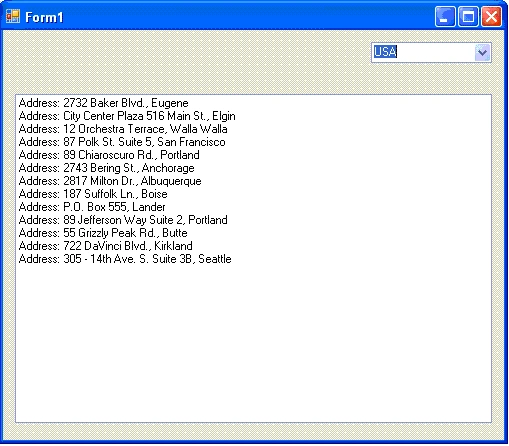
Figure 1
That's it
Good Dotneting!!!
Note: The entities classes are out of the scope of this tutorial but I promise to write an article about them as soon as possible. Nevertheless, I will give the necessary instructions to use them in this tutorial.
James SneeringerPosted Sep 11, 2008, 3:17 PM
Does this mean that the SQL Server execution plan is only created once, as is true for a stored procedure? Will the execution plan be recreated each time CompiledQuery.Compile() is called?
James SneeringerPosted Sep 11, 2008, 3:15 PM
Does this mean that the SQL Server execution plan is only created once, as is true for a stored procedure? Will the execution plan be recreated each time CompiledQuery.Compile() is called?