
Blue Theme Orange Theme Green Theme Red Theme
 
Home | Forums | Videos | Advertise | Certifications | Downloads | Blogs | Interviews | Jobs | Beginners | Training
 | Consulting  
Submit an Article Submit a Blog 
 Jump to
Skip Navigation Links
TechnologyExpand Technology
WebsiteExpand Website
DevExpress UI Controls
Search :       Advanced Search »
Home » XAML » Your first Animation using XAML and Silverlight - Point Animation class: Part III

Your first Animation using XAML and Silverlight - Point Animation class: Part III

This article is third part of the series of articles about animation using XAML and Silverlight.

Author Rank :
Page Views : 9131
Downloads : 0
Rating :
 Rate it
Level : Intermediate
   Print Read/Post comments Post a comment  Similar Articles  
   Email to a friend  Bookmark  Author's other articles  
 
Nevron Chart
Become a Sponsor
 Tag Cloud
 Latest Jobs
More ... 
 Latest Interview Questions
More ... 


I the previous articles Your first animations using XAML and Silverlight - Color animation: Part I and Your first animations using XAML and Silverlight- Double animation: Part II, we discovered how to deal with ColorAnimation and DoubleAnimation classes. In this one we will show how to deal with PointAnimation class to perform a linear interpolation movement between two points of a given object. As a first step, we will perform this with xaml then we will do the same animation using the C# code.

If you have already developed Adobe Flash projects like me, you will observe that this kind of animation class helps to perform the same task as a given linear interpolation movement done with flash. 

Ok, let's consider an ellipse that moves from a point to another as mentioned within this bellow presentation:
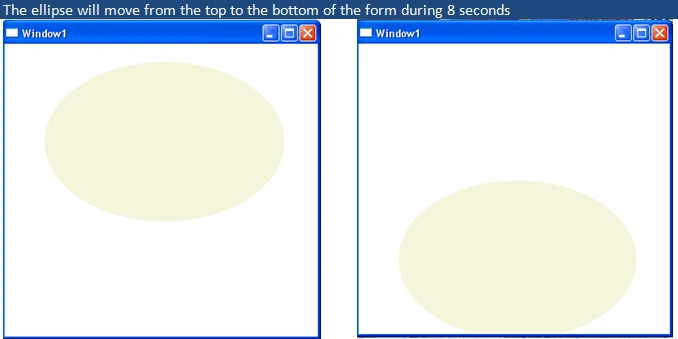
Figure 1

To perform this, I propose this xaml and C# code:

XAML Code:

<Window x:Class="myWpfApplication.Window1"

    xmlns="http://schemas.microsoft.com/winfx/2006/xaml/presentation"

    xmlns:x="http://schemas.microsoft.com/winfx/2006/xaml"

    Title="Window1" Height="400" Width="400" Loaded="Window_Loaded">

    <!--I used canvas this once as container to host child element -->

        <Canvas>

            <!--Don't confuse with System.IO.Path class

            this one is System.Windows.Shapes.Path witch

            is responsible to draw curves-->

            <Path Fill="Beige" Margin="0,0,200,200">

                <Path.Data>


                    <!-- Describes an ellipse. -->

                    <EllipseGeometry x:Name="MyAnimatedEllipseGeometry"

            Center="200,110" RadiusX="150" RadiusY="100" />

                </Path.Data>

                <Path.Triggers>

                    <!--The Loaded event of the path class will

                    trigger the point aniamtion-->

                    <EventTrigger RoutedEvent="Path.Loaded">

                        <BeginStoryboard Name="MyBeginStoryboard">

                            <Storyboard>


                <!-- Animate the Center property so that the ellipse animates from

                one point on the screen to another. -->

                                <PointAnimation

                Storyboard.TargetProperty="Center"

                Storyboard.TargetName="MyAnimatedEllipseGeometry"

                Duration="0:0:8" From="200,110" To="200,290" RepeatBehavior="Forever" />

                            </Storyboard>

                        </BeginStoryboard>

                    </EventTrigger>

                </Path.Triggers>

            </Path>

        </Canvas>  

</Window>

In the xaml code editor copy and paste the above code instead of the existing code, then run the project and observe.

C# code:

To perform this task using C#, open a new WPF application and then add this code to the C# code editor, for instance, don't forget to include the both namespaces System.Windows.Media.Animation and System.Windows.Shapes if they aren't included yet.

//The shape container

        Canvas myCanvas;

        //The curve

        Path myPath;

        //The shape form

        EllipseGeometry myEllipseGeometry;

        //The PointAnimation instance

        PointAnimation oPointAnimation;

        private void Window_Loaded(object sender, RoutedEventArgs e)

        {

            //Instantiate the canvas container

            myCanvas = new Canvas();

            //Instantiate the curve

            myPath = new Path();

            //The the fill color as beige

            myPath.Fill = Brushes.Beige;

            //Set the shape volume

            myPath.Margin = new Thickness(0, 0, 200, 200);

            /* instantiate the ellipse shape, you can make use of the ellipse

             * class directly instead of using ellipse geometry and path classes

             to draw an ellipse*/

            myEllipseGeometry = new EllipseGeometry(new Point(200, 110), 150, 100);

            //Set the path data to the given ellipse geometry

            myPath.Data = myEllipseGeometry;

            //Add the path to the canvas container

            myCanvas.Children.Add(myPath);

            //Finally, add the container to the form

            this.AddChild(myCanvas);

            myPath.Loaded+=new RoutedEventHandler(myPath_Loaded);

        }

        private void myPath_Loaded(object sender, RoutedEventArgs e)

        {

            oPointAnimation = new PointAnimation();

            oPointAnimation.From = new Point(200, 110);

            oPointAnimation.To = new Point(200, 290);

            oPointAnimation.RepeatBehavior = RepeatBehavior.Forever;

            oPointAnimation.Duration = TimeSpan.FromSeconds(8);

            myEllipseGeometry.BeginAnimation(EllipseGeometry.CenterProperty,oPointAnimation);

        }

Now run the project and you will remark the same behaviour as the first. You can combine animations, I mean double animation, color animation and point animation to build a complex one. 

Good Dotneting!!!

Comment Request!
Thank you for reading this post. Please post your feedback, question, or comments about this post Here.
Login to add your contents and source code to this article
 [Top] Rate this article
 
 About the author
 
Bechir Bejaoui

The author holds a master degree in NTIC specialized  in software developement delivered by the high school of communication SUPCOM, he also holds a bachelor degree in finance delivered by  the  economic sciences and  management  university of Tunis "FSEGT".

He also holds:

MCPD enteprise solutions developement 3.5 certification and MCTS distibuted application developement 2.0

 He's a freelance developer since 2006. Actually woking on the WPF, .Net framewok 3.5, silverlight and the other .Net new features, in addition, he is painter and sculptor.

Looking for C# Consulting?
C# Consulting is founded in 2002 by the founders of C# Corner. Unlike a traditional consulting company, our consultants are well-known experts in .NET and many of them are MVPs, authors, and trainers. We specialize in Microsoft .NET development and utilize Agile Development and Extreme Programming practices to provide fast pace quick turnaround results. Our software development model is a mix of Agile Development, traditional SDLC, and Waterfall models.
Click here to learn more about C# Consulting.
 
Introducing MaxV - one click. infinite control. Hyper-V Hosting from MaximumASP.
Finally – a virtual platform that delivers next-generation Windows Server 2008 Hyper-V virtualization technology from a managed hosting partner you can truly depend on. Visit www.maximumasp.com/max for a FREE 30 day trial. Hurry offer ends soon. Climb aboard the MaxV platform and take advantage of High Availability, Intelligent Monitoring, Recurrent Backups, and Scalability – with no hassle or hidden fees. As a managed hosting partner focused solely on Microsoft technologies since 2000, MaximumASP is uniquely qualified to provide the superior support that our business is built on. Unparalleled expertise with Microsoft technologies lead to working directly with Microsoft as first to offer IIS 7 and SQL 2008 betas in a hosted environment; partnering in the Go Live Program for Hyper-V; and product co-launches built on WS 2008 with Hyper-V technology.
Dynamic PDF
ceTE software specializes in components for dynamic PDF generation and manipulation. The DynamicPDF™ product line allows you to dynamically generate PDF documents, merge PDF documents and new content to existing PDF documents from within your applications.
Discover the Top 5 .NET Memory Management Fundamentals
To write the best .NET code, you need to know exactly how the .NET framework really manages memory. Ricky Leeks presents the Top 5 fundamental facts of .NET memory management. Learn more.
Nevron Chart for .NET 2010.1 Now Available
The leading .NET charting control now features PDF, Flash and Silverlight export, visualization of large datasets and more. Deliver true charting functionality to your BI, Scorecard, Presentation or Scientific apps. Download evaluation now.
ASP.NET 4 Hosting
Get 2 Months Free of ASP.NET Hosting for Only $4.95/month! Receive FREE MS SQL and MySQL Databases Including ASP.NET 4/3.5, MVC 3.0, Silverlight 4, Windows 2008/IIS 7.0 Plus FREE IIS 7 Modules. Host UNLIMITED ASP.NET Web Sites – Click Here!
 
 Post a Feedback, Comment, or Question about this article
Subject:
Comment:
Discover the top 5 tips for understanding .NET Interop
Become a Sponsor
 Comments

 © 2012  contents copyright of their authors. Rest everything copyright Mindcracker. All rights reserved.