

Background
Before AJAX Control Toolkit 4.0 or any other calendar such as the ASP.Net Calender Control, it is a very tedious process to disable the past or future dates from a calendar. Because to do that we need to write more than a hundred lines of code in JavaScript or any other scripting language but we can do this by using an AJAX calendar extender with two lines of code. So by considering the above requirement I have decided to write this article.
So let us start with the basics.
Requirement
- You need an "AJAX Control Toolkit 4.0" and above, it only works in this version
- Don't forget to add the "AJAX control toolkit assembly reference" at the top of the .aspx page source code
- Don't forget to use either "Script Manager" or "ToolScript Manager" in a .aspx page because whenever you use any AJAX control you need to use one of them to handle scripts.
Now let us create one sample application to do our task as
- "Start" - "All Programs" - "Microsoft Visual Studio 2010".
- "File" - "New Web Site" - "C#" - "Empty WebSite" (to avoid adding a master page).
- Provide the website a name such as AjaxCalender or another as you wish and specify the location.
- Then right-click on Solution Explorer - "Add New Item" - "Default.aspx" page.
- Drag and drop one textbox and one ScriptManager from the Ajax Extension section on the <form> section of the Default aspx page.
Now the source code of the Default.aspx should look as in the following.
<form id="form1" runat="server">
    <asp:ScriptManager ID="ScriptManager1" runat="server"></asp:ScriptManager>
    <div align="center">
        <asp:TextBox ID="TextBox1" runat="server"></asp:TextBox>
        <asp:CalendarExtender ID="Calendar1" runat="server"
            Enabled="True" TargetControlID="TextBox1" Format="dd/MM/yyyy"></asp:CalendarExtender>
    </div>
</form>
Now use the following code in the .cs file.
To disable a past date use the following code in the "Page load".
protected void Page_Load(object sender, EventArgs e)
{
    Calendar1.StartDate = DateTime.Now; // to disable past Date
}
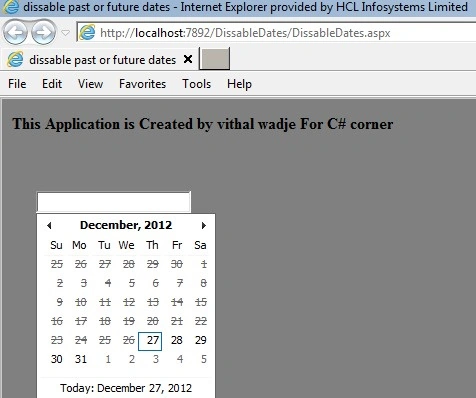
In the above code, I have set the Calendar Extender start date to the current date so I will disable all past dates.
Now run the application; the output will look as in the following.
To disable a future date use the following code in the "Page load.
protected void Page_Load(object sender, EventArgs e)
{
    Calendar1.EndDate = DateTime.Now;   //to disable future Date
}
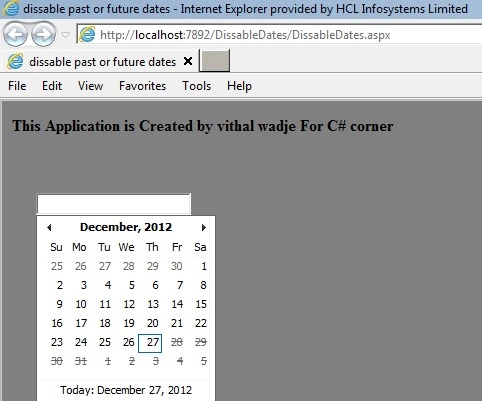
In the above code, I have set the Calendar Extender End date to the current date so I will disable all future dates.
Now run the application; the output will look as in the following.
Start the Calendar after one month from the Present Date.
protected void Page_Load(object sender, EventArgs e)
{
    Calendar1.EndDate = DateTime.Now.AddMonths(1); // Start Calendar after one month from Present Date
}
Note. For detailed code please download the Zip file.
Summary
I hope this article is useful for all readers and I also hope developers will follow this technique to avoid a hundred lines of code to do this, if you have any suggestions then please contact me.
Akash DhondePosted Apr 16, 2017, 7:15 AM
I have two Calendar extender i have done as you done in first calendar but in calendar extender 2 i want to select further date of calendar extender 1 which is selected
Vithal WadjePosted Jul 13, 2016, 11:16 PM
Check your integration
Ashish TriPosted Jul 13, 2016, 8:45 AM
Hello Sir, But if u double click on date it is showing in textbox. pls help!!
Vithal WadjePosted Apr 14, 2016, 12:48 PM
Subtract 18 years from current date
Pankaj GuptaPosted Apr 14, 2016, 6:31 AM
Hello sir, i want to disable date from current date to 18 years before date, please help. Thank You.
Vithal WadjePosted Dec 16, 2015, 9:45 AM
Thanks sir
vilas sagarPosted Dec 16, 2015, 2:20 AM
Nice Articel
Vithal WadjePosted Oct 9, 2015, 4:23 AM
Thanks
Mohamed Gani MnPosted Oct 9, 2015, 3:15 AM
Nice article and tried this very well.
Vithal WadjePosted Dec 8, 2014, 5:44 AM
thanks sir
Venkat KumarPosted Dec 8, 2014, 5:27 AM
it's good sir... simple code
Vithal WadjePosted Dec 28, 2012, 2:09 AM
thanks a lot shivanand sir,your comments also gives me a great motivation to post more article in future,sir if you have any suggestion regarding my any article then please tell me i will improve it so other people can understand it better
Shivanand ArurPosted Dec 28, 2012, 12:01 AM
Nice article Vithal, Really good for beginners... I like your work, Sirji... All the best!!!