

Introduction
This article is a continuation of my previous article on Storing Sessions in a State Server.
I would request readers to have a quick look at my previous article here: Out-of-Process Session State (In State Server) in ASP.NET
In ASP.Net, by default sessions are stored in-proc (i.e. in memory of the Web Server).
Sessions can be stored out-of-process
- In a local or remote NT Service
- In a local or remote SQL Server.
Let us understand how sessions can be stored in a SQL Server with a sample demo.
To begin with, please download the sample code (OutofProcSessionState.zip) from: Out-of-Process Session State (In State Server) in ASP.NET
Step 1. Open the project.
Step 2. Go to the Web. Config file:
- We need to change the SessionState mode to "SQL Server" and also need to provide the corresponding SQLConnection String as shown below:
<sessionStatemode="SQLServer" sqlConnectionString="server=SAURABHPC;trusted_connection=yes"</sessionState> - Note that the SQL connection string will vary in your case.
Step 3. Now, go to Login.aspx and run the application from Visual Studio.

Step 4. Click "Go to Home Page" (as per the logic mentioned; the user should go to the new page (Home.aspx) and the user name "Gaurav Singh" should be retrieved from the session.
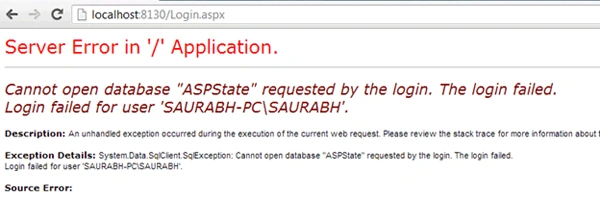
Step 5. Not a good-looking screen for developers!! Right… Let's sort it out!!
Step 6. As the error screen says, it was unable to open a particular database (ASPState) in the SQL Server name "Saurabh-PC" which we specified in the web. config.
Step 7. So, what we need to do is to open a Visual Studio Command Prompt to configure the database, as in:
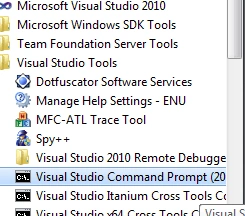
- Here we will be running a utility called aspnet_regsql; it's a generic utility that is used for SQL-related things in ASP. Net,
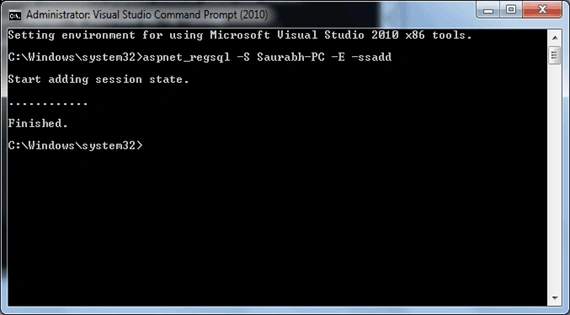
In the above command:
- -S: denotes Server Name
- Saurabh-PC: is the SQL Server name; please provide your corresponding name here.
- -E: for Trusted connections.
- -ssadd: for installing the session state features.
Step 8. So now the session state should have been added to our database.
Step 9. We can verify this by opening our database as:
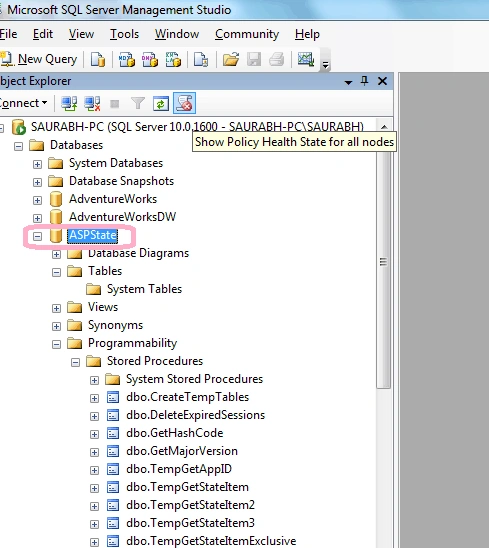
- We will see the new database was added as "ASPState"; remember, it's the same database that was shown in the Yellow Error Screen when we ran the application above in Step 4.
- There will be no tables in this database.
- States will be stored in temp tables.
- We will see that there are a number of default Stored Procedures created, which would create temporary tables to store the state (Session State) for the user/client.
Step 10. Go to Visual Studio and run the application:
- Enter the User Name:
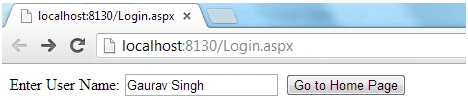
- Click "Go To Home Page":
So the user name is retrieved from the session and is shown on the Home Page.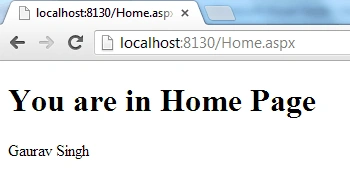
- To verify: go and stop the Web Development Server.
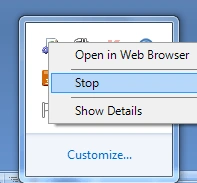
- Go to Visual Studio and launch the application again and go directly to the Home Page via the URL (http://localhost:8130/Home.aspx) (Note: the port # may vary) without closing the browser to keep the client session identifier the same;
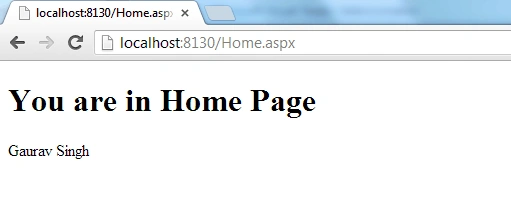
- As evident from the output, we were able to retrieve the User Name from the session, in spite of restarting the Web Server, since in this case our session was stored in SQL Server.
Conclusion
So in this article, we have seen how to store a session Out-of-process in SQL Server. I have attached the above demonstration code.
Happy Learning!!
prakash namPosted Mar 17, 2013, 6:10 AM
is really good.. .