

Introduction
Session in ASP.Net is used to store the state for the individual clients. By default, sessions are stored in-proc (in-process), i.e., the memory of the Web Server.
Why do we need Out-of-Process Session States?
- As mentioned above, by default, sessions are stored in-process, so when the process is recycled or fails (say, the server goes out of order), the session state is lost, even if the browser has the Session Key stored with it.
- Also, an in-proc session doesn't go well with Web Farms.
If the application is deployed to the Web Farms with many machines and each request can be served by different devices, then an in-proc session state could not track the user.
To overcome the above issues, we can store a session Out-of-Process; in a local or remote NT Service.
Step 1. Open Visual Studio - create a new project - Web - ASP.Net Empty Web Application and let's name it "OutofProcSessionState."
Step 2. Add new Web Form Login. aspx as in the following:
-
Add a new textbox to get the username and a button to Login:
Login. aspx
Enter User Name
<asp:TextBox ID="txtUserName" runat="server"></asp:TextBox> <asp:Button ID="btnSubmit" runat="server" Text="Go to Home Page" OnClick="btnSubmit_Click" /> - Login. aspx.cs: Add the handler code for the Submit button in the Code behind:
protected void btnSubmit_Click(object sender, EventArgs e) { Session["UserName"] = txtUserName.Text.ToString(); Response.Redirect("Home.aspx"); }- Store the User Name logged in by the user in the session indexed by User Name.
- Redirect the user to the Home Page with the click of a button.
Step 3. Add new Web Form, Home. aspx:
- Home.aspx: Add a label control in the Home Page to show the logged-in User Name.
<label id="lblUserName" runat ="server"></label> - Home. aspx.cs - In the Page Load event, retrieve the User Name from the Session State.
protected void Page_Load(object sender, EventArgs e) { if (Session["UserName"] != null && Session["UserName"] !="") { lblUserName.InnerText = Session["UserName"].ToString(); } else { lblUserName.InnerText = "Anonymous User"; } }- Retrieve the User Name from the Session and display it.
- If the User Name is absent in the session, show the user name as Anonymous User.
Step 4. Run the application with Login. aspx as the Start Page.
-
Enter a user name.

-
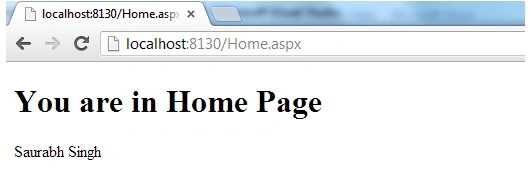
Go to the Home Page.
-
So all is fine until here; the session has been, by default, stored in proc and is working as expected.
-
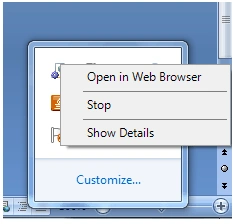
Now let us go and stop the web development server.
-
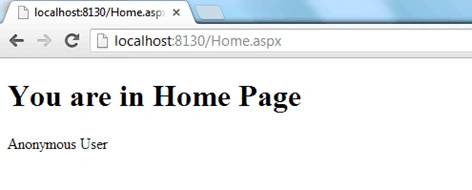
Next, go to Visual Studio and relaunch the application and go directly to the URL:
http://localhost:8130/Home.aspx (Port number may vary).
-
The User Name was stored in the session (in-proc), which was in memory of the web development server, and since then, we have restarted the server. The User Name was lost, so "Anonymous User" is displayed as the User Name based on the alternate logic we mentioned in our Code.
Step 5. Now let me demonstrate to store the Session State (out-of-proc) in the State Server, in the local or remote NT Service.
Step 6. Open the Web. Config file and go to the Session State configuration file element, and specify the mode as:
"State server"
<sessionState mode="StateServer" stateConnectionString="tcpip=127.0.0.1:42424"></sessionState>
- Mode="State Server" indicates that we use an Out-of-Process State Server.
- We have also specified the State Server Connection String; so that the State Server can be found to retrieve the Session data.
- stateConnectionString="tcpip=127.0.0.1:42424" -> We need to provide the IP Address of the State Server along with the Port number; in this case, we are running locally over the default Port #, so we have specified that as: tcpip=127.0.0.1:42424 (42424 is the default port for which the Service will listen).
- Since, in this case, we are running locally, let's start the Service on our machine:
-
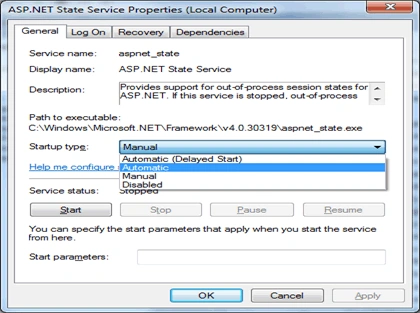
Go to Control Panel - Administrative Tools - Services
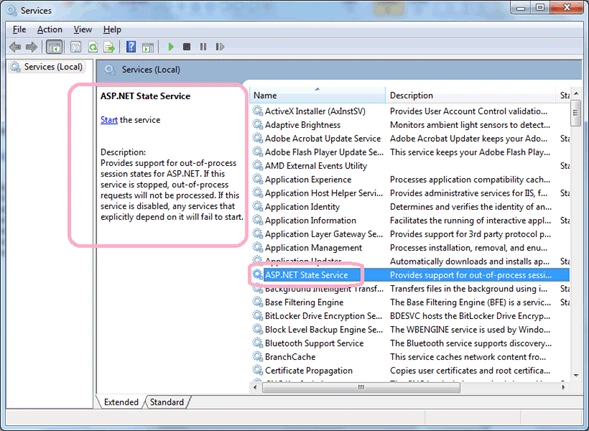
- If ASP.Net is installed on the server, we should see the ASP.NET State Service listed above.
-
Right-click and start the Service.

- Also, in the actual scenarios, we would need to make this process start automatically:
-
- Now run the application. Please enter the User Name in the Login Page, displayed on the Home Page, as we saw before.
- Now let's stop the development server again, as we did in Step 4, and then go to Visual Studio and relaunch the application, and go directly to the Home Page via the URL:
http://localhost:8130/Home.aspx (note that the port # may vary) without closing the browser to keep the client session identifier the same.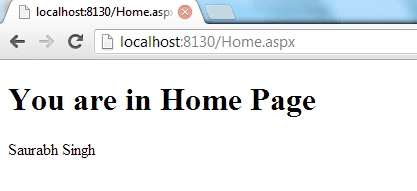
- So here we retrieved the User Name from the session, despite restarting the Web Server since, in this case, our session was stored in a State Server.
Conclusion
So in this article, we have seen how to store a session Out-of-Process in a State Server. I have attached the above demonstration code.
Happy Learning!
Danish KhanPosted Feb 22, 2021, 7:13 AM
Thanks very usefull..
Saineshwar BageriPosted May 23, 2018, 2:42 AM
Article is good ,But always tell advantages and disadvantages of using it
prakash namPosted Mar 17, 2013, 5:54 AM
its state server session management .. where is out of proc..
Kumar SaurabhPosted Nov 13, 2012, 2:53 PM
For storing Session State in SQL Server - Please see @ http://www.c-sharpcorner.com/UploadFile/2124ae/out-of-process-session-state-in-sql-server/
Anil KumarPosted Nov 13, 2012, 2:36 AM
good one :)