
Introduction
Ajax (Asynchronous JavaScript and XML) is a new web development technique for interactive websites. With AJAX help we can develop web applications and retrieve a small amount of data from a web server. AJAX consists of a different type of technology.
- JavaScript
- XML
- Asynchronous Call to the server
ValidatorCallOutExtender Control
ValidatorCallout is an ASP.NET AJAX extender that enhances the functionality of existing ASP.NET validators. When we use this control add an input field and a validator control then add the ValidatorCallout and set its TargetControlID property to reference the validator control for the AJAX application.
Property
- TargetControlID
- ServicePath
- HightLightCssClass
Step 1 : Open Visual Studio 2010.
- Go to File->New->WebSite
- Select ASP.NET Empty WebSite
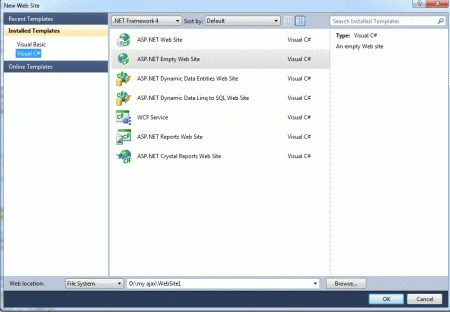
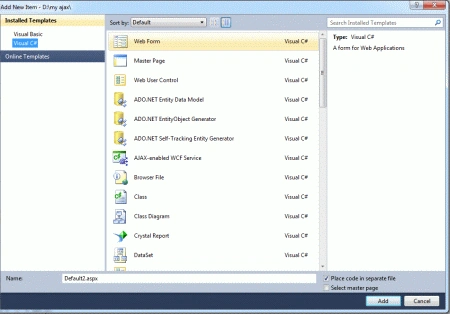
Step 2 : Go to Solution Explorer and right-click.
- Select Add->New Item
- Select WebForm
- Default.aspx page open
Step 3 : Go to Default.aspx page and click on the [Design] option and drag the control from the Toolbox.
- Drag ScriptManager control, Button, RequireField Validator, TextBox
EnableState
Step 4 : Now go to Default.aspx
page[Source] option and define the Scriptmanager property EnableState as "True".
<asp:ScriptManager
ID="ScriptManager1"
runat="server"
EnableViewState ="true">
</asp:ScriptManager>
ContentTemplate
Step 5 : Now drag UpdatePanel control from Toolbox and define a Trigger for the Validator control.
Trigger and ContentTemplate
<asp:UpdatePanel
runat="server"
ID="up1">
<ContentTemplate>
<asp:Label
id="lblMessage"
runat="server"
/>
</ContentTemplate>
<Triggers>
<asp:AsyncPostBackTrigger
ControlID="Button1"
EventName="Click"
/>
</Triggers>
</asp:UpdatePanel>
Regular Expression Validator
Step 6 : Now go to Default.aspx page; define RequireFieldValidator for the missing field.
Code :
<asp:RequiredFieldValidator
runat="server"
ID="Req"
ControlToValidate="NameTextBox"
Display="None"
ErrorMessage="<b>
Missing Field</b><br />A name is required."
/>
Run Time Change Callout Validator :
Step 7 : Go to Defualt.aspx page and define the validator for the run time application.
Code :
<asp:ValidatorCalloutExtender
ID="ValidatorCalloutExtender1"
runat="server"
TargetControlID="Req"
HighlightCssClass="validatorCalloutHighlight"
>
Step 8 : Now click on Default.aspx.cs file and write a code.
Code :
using
System;
using
System.Collections.Generic;
using
System.Linq;
using System.Web;
using
System.Web.UI;
using
System.Web.UI.WebControls;
public
partial class
Default2 : System.Web.UI.Page
{
protected void
Page_Load(object sender,
EventArgs e)
{
}
protected void
Button1_Click(object sender,
EventArgs e)
{
lblMessage.Text = string.Format("Thanks
{0}, we'll give you a call at {1}.", NameTextBox.Text,
PhoneNumberTextBox.Text);
}
}
Step 9 :
Go to Default.aspx page option and write a
code.
Code :
<title></title>
</head>
<body>
<form
id="form1"
runat="server">
<asp:ScriptManager
ID="ScriptManager1"
runat="server"
EnableViewState ="true">
</asp:ScriptManager>
<div>
<b>ValidatorCallout
Demonstration</b><br
/>
<table>
<tr>
<td>Name:</td>
<td><asp:TextBox
runat="server"
ID="NameTextBox"
BorderStyle="solid"
BorderWidth="1px"
BorderColor="#a9a9a9"
/></td>
</tr>
<tr>
<td>Phone
Number:</td>
<td><asp:TextBox
runat="server"
ID="PhoneNumberTextBox"
BorderStyle="solid"
BorderWidth="1px"
BorderColor="#a9a9a9"
/></td>
</tr>
</table>
<br
/>
<asp:RequiredFieldValidator
runat="server"
ID="Req"
ControlToValidate="NameTextBox"
Display="None"
ErrorMessage="<b>
Missing Field</b><br />A name is required." />
<asp:ValidatorCalloutExtender
ID="ValidatorCalloutExtender1"
runat="server"
TargetControlID="Req"
HighlightCssClass="validatorCalloutHighlight"
>
</asp:ValidatorCalloutExtender>
<asp:RequiredFieldValidator
runat="server"
ID="PNReq"
ControlToValidate="PhoneNumberTextBox"
Display="None"
ErrorMessage="<b>Required
Field Missing</b><br />A phone number is required.<div
style='margin-top:5px;padding:5px;border:1px solid
#e9e9e9;background-color:white;'><b>Other Options:</b><br /><a href='javascript:alert("No
phone number available in
profile.");'>Extract from Profile</a></div>"
/>
<asp:ValidatorCalloutExtender
ID="ValidatorCalloutExtender2"
runat="server"
TargetControlID="PNReq"
HighlightCssClass="validatorCalloutHighlight"
Width="350px"
>
</asp:ValidatorCalloutExtender>
<asp:RegularExpressionValidator
runat="server"
ID="PNRegEx"
ControlToValidate="PhoneNumberTextBox"
Display="None"
ValidationExpression="((\(\d{3}\)
?)|(\d{3}-))?\d{3}-\d{4}"
ErrorMessage="<b>Invalid
Field</b><br />Please enter a phone number in the format:<br />(###) ###-####"
/>
<asp:ValidatorCalloutExtender
ID="ValidatorCalloutExtender3"
runat="server"
TargetControlID="PNRegEx"
HighlightCssClass="validatorCalloutHighlight">
</asp:ValidatorCalloutExtender>
<asp:Button
ID="Button1"
runat="server"
Text="Submit"
onclick="Button1_Click"
/><br
/><br
/>
<asp:UpdatePanel
runat="server"
ID="up1">
<ContentTemplate>
<asp:Label
id="lblMessage"
runat="server"
/>
</ContentTemplate>
<Triggers>
<asp:AsyncPostBackTrigger
ControlID="Button1"
EventName="Click"
/>
</Triggers>
</asp:UpdatePanel>
</div>
</form>
</body>
Step 10 :
Now run the application by Pressing F5.
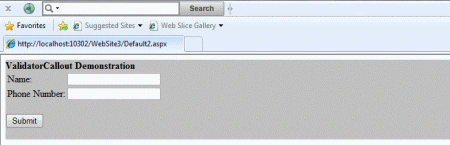
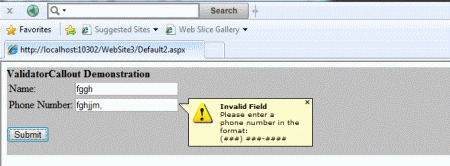
Step 11: When we define the name, Phone number and click on the Submit button then following message shows.
Resource
AJAX Text Box Watermark Extender
Vinay YadavPosted Feb 5, 2019, 1:01 PM
I have to make the Required validator conditional. i.e. if user checks the checkbox then date fields is required, else false. how can I do this.
ghanshyam kumarkhaniyaPosted Mar 29, 2014, 2:56 PM
this is very usefull for new any user in ajax any control in some detail information for example with thanks....
Sonakshi SinghPosted Jan 17, 2012, 4:50 AM
Very well explained... keep it up... and thank u so much for sharing