

ScaffoldColumn(bool value) vs HiddenInput(DisplayValue = bool value) in MVC
In this article, we will see what the use of ScaffoldColumn and HiddenInput. We will also compare what are the key differences between these two attribute and what scenario we should consider these attributes for usage. So, accordingly prior to my articles on MVC we will just add these attributes and we will see the best that we can produce.
Let's
reduce the Confusion held between these using two attributes!!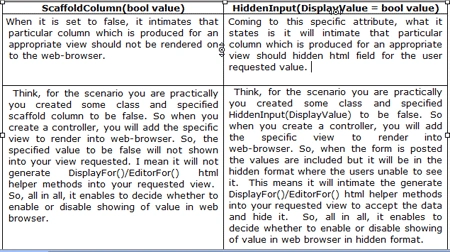
So, now we will elaborate on these two attributes in a practical manner:
So, let's consider Student.cs:
The Location Prop is specified with [HiddenInput(DisplayValue=false)]
Student.cs
using
System;
using
System.Collections.Generic;
using
System.Linq;
using
System.Web;
using
System.ComponentModel.DataAnnotations;
using
System.Web.Mvc;
namespace MVC_Basic_Application.Models
{
public class Student
{
[Key]
public int StudentId { get; set; }
[Required(ErrorMessage = "Please Enter FirstName")]
[StringLength(10, ErrorMessage = "FirstName morethan 10 charcs")]
public string FirstName { get; set; }
[Required(ErrorMessage = "Please Enter LastName")]
[StringLength(10, ErrorMessage = "LastName morethan 10 charcs")]
public string LastName { get; set; }
[Range(5, 50, ErrorMessage = "Age Should Be Between 5 and 50")]
public int Age { get; set; }
[HiddenInput(DisplayValue=false)]
[Required(ErrorMessage = "Please Enter Location")]
[StringLength(10, ErrorMessage = "Location morethan 10 charcs")]
public string Location { get; set; }
[Required(ErrorMessage = "Email is required")]
[RegularExpression(@"^([a-zA-Z0-9_\-\.]+)@((\[[0-9]{1,3}" +
@"\.[0-9]{1,3}\.[0-9]{1,3}\.)|(([a-zA-Z0-9\-]+\" +
@".)+))([a-zA-Z]{2,4}|[0-9]{1,3})(\]?)$",
ErrorMessage = "Email appears to be invalid.")]
[UIHint("_Email")]
public string Email { get; set; }
[Required(ErrorMessage = "Confirm Email is required")]
[RegularExpression(@"^([a-zA-Z0-9_\-\.]+)@((\[[0-9]{1,3}" +
@"\.[0-9]{1,3}\.[0-9]{1,3}\.)|(([a-zA-Z0-9\-]+\" +
@".)+))([a-zA-Z]{2,4}|[0-9]{1,3})(\]?)$",
ErrorMessage = "Email appears to be invalid.")]
[UIHint("_Email")]
[Compare("Email",ErrorMessage="Email Should Match")]
public string ConfirmEmail { get; set; }
[Display(Name="Person Gender")]
[Required(ErrorMessage="Gender is Required")]
[StringLength(8, ErrorMessage="Gender Too Long")]
public string Gender { get; set; }
}
}
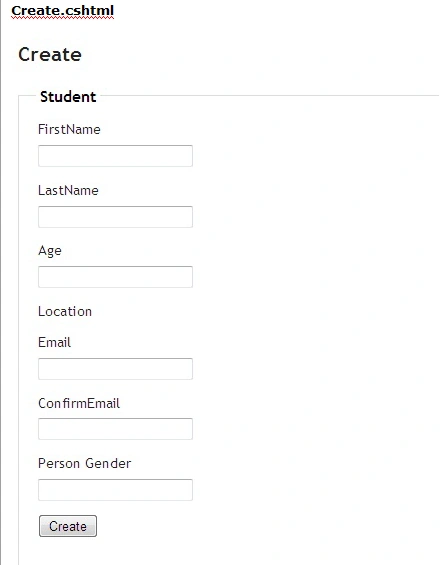
So, the output looks like this where the values are hidden:

Index.cshtml
So, when we want to create new values using Create.cshtml, the screen looks like below:
Now let's try the other attribute which is ScaffoldColumn()
The Location Prop is specified with [ScaffoldColumn(false)]
Student.cs
using
System;
using
System.Collections.Generic;
using
System.Linq;
using
System.Web;
using
System.ComponentModel.DataAnnotations;
using
System.Web.Mvc;
namespace
MVC_Basic_Application.Models
{
public class
Student
{
[Key]
public int
StudentId { get; set;
}
[StringLength(10, ErrorMessage = "FirstName morethan 10 charcs")]
public string FirstName { get; set; }
[Required(ErrorMessage = "Please Enter LastName")]
[StringLength(10, ErrorMessage = "LastName morethan 10 charcs")]
public string LastName { get; set; }
[Range(5,
50, ErrorMessage = "Age Should Be Between 5 and 50")]
public int Age {
get; set; }
[Required(ErrorMessage = "Please Enter Location")]
[StringLength(10, ErrorMessage = "Location morethan 10 charcs")]
public string Location { get; set; }
[Required(ErrorMessage
= "Email is required")]
[RegularExpression(@"^([a-zA-Z0-9_\-\.]+)@((\[[0-9]{1,3}"
+
@"\.[0-9]{1,3}\.[0-9]{1,3}\.)|(([a-zA-Z0-9\-]+\"
+
@".)+))([a-zA-Z]{2,4}|[0-9]{1,3})(\]?)$",
ErrorMessage = "Email appears to be invalid.")]
[UIHint("_Email")]
public string
Email { get; set;
}
[RegularExpression(@"^([a-zA-Z0-9_\-\.]+)@((\[[0-9]{1,3}" +
@"\.[0-9]{1,3}\.[0-9]{1,3}\.)|(([a-zA-Z0-9\-]+\" +
@".)+))([a-zA-Z]{2,4}|[0-9]{1,3})(\]?)$",
ErrorMessage = "Email appears to be invalid.")]
[UIHint("_Email")]
[Compare("Email",ErrorMessage="Email Should Match")]
public string ConfirmEmail { get; set; }
[Display(Name="Person Gender")]
[Required(ErrorMessage="Gender is Required")]
[StringLength(8, ErrorMessage="Gender Too Long")]
public string Gender { get; set; }
}
}
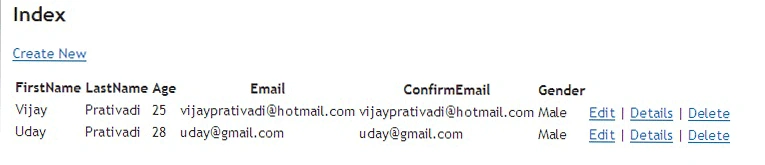
By Looking at the Output of Index.cshtml now :
Index.cshtml
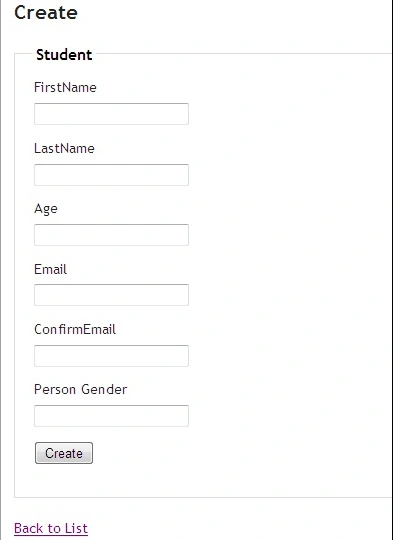
By Looking at the Output of Create.cshtml now:
Create.cshtml
I hope this article is useful to you!!!!!!!!..Thanks for reading this article..I look Forward for Comments and Feedback....Vijay Prativadi.
Join the conversation! Your thoughts help the community grow.