

Introduction
In this tutorial, I am going to explain about altering Table Commands in MySQL with examples.
Modifying
Themodifycommand is used when we have to modify a column in the existing table, like adding a new one, modifying the datatype for a column, and dropping an existing column. By using this command, we have to apply some changes to the result set field. This command allows more or fewer characters than before.
To understand the concept of MySQL ALTER TABLE Commands, let’s take a sample database and a table. So, without wasting time, let’s start.
CREATE DATABASE CsharpCorner;
USE CsharpCorner;
CREATE TABLE CsharpCorner_MVPs (
    MVPID INT AUTO_INCREMENT PRIMARY KEY,
    MVPName VARCHAR(100) NOT NULL,
    MVPForYear INT NOT NULL,
    MVPAddress VARCHAR(100)
);
1) Add a new column to the existing table
ALTER TABLE and ADD COLUMN statement is used to add one or more new columns to an existing table.
a) Add a single column to a table.
Syntax
ALTER TABLE <table_name>
ADD COLUMN <new_column_name> <Datatype> [CONSTRAINTS];
Example.
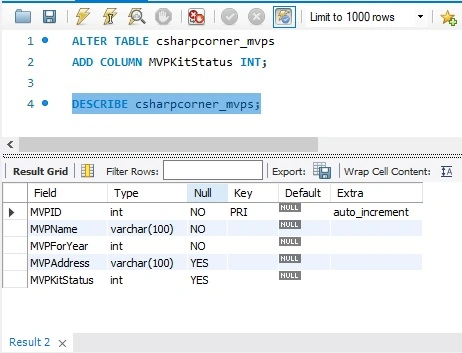
ALTER TABLE csharpcorner_mvps
ADD COLUMN MVPKitStatus INT;
Note. Use the “DESCRIBE” command to check the result from the ALTER TABLE ADD statement.
b) Add multiples column to a table.
Syntax
ALTER TABLE employees
ADD COLUMN date_of_birth DATE NOT NULL,
ADD COLUMN department VARCHAR(50) DEFAULT 'IT',
ADD COLUMN salary DECIMAL(10,2) NOT NULL;
Example.
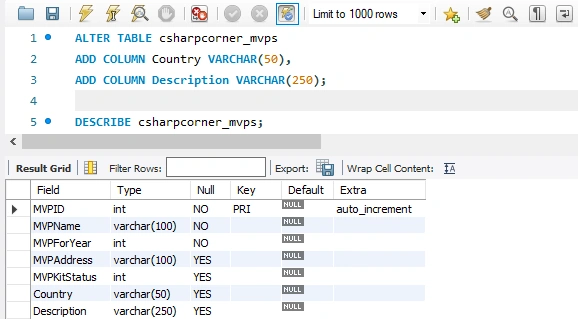
ALTER TABLE csharpcorner_mvps
ADD COLUMN Country VARCHAR(50),
ADD COLUMN Description VARCHAR(250);
Note. Use the “DESCRIBE” command to check the result from the ALTER TABLE ADD statement.
ALTER TABLE MODIFY statement is used to modify one or more columns to an existing table.
a) Modify a single column in a table
Syntax
ALTER TABLE employees
MODIFY employee_name VARCHAR(100);
Example.
ALTER TABLE csharpcorner_mvps
MODIFY MVPKitStatus VARCHAR(100);
Note.
Use the “DESCRIBE” command to check the result from the ALTER TABLE MODIFY statement.

b) Modify multiple columns in a table
Syntax
ALTER TABLE employees
MODIFY employee_name VARCHAR(100),
MODIFY salary DECIMAL(10,2);
Example.
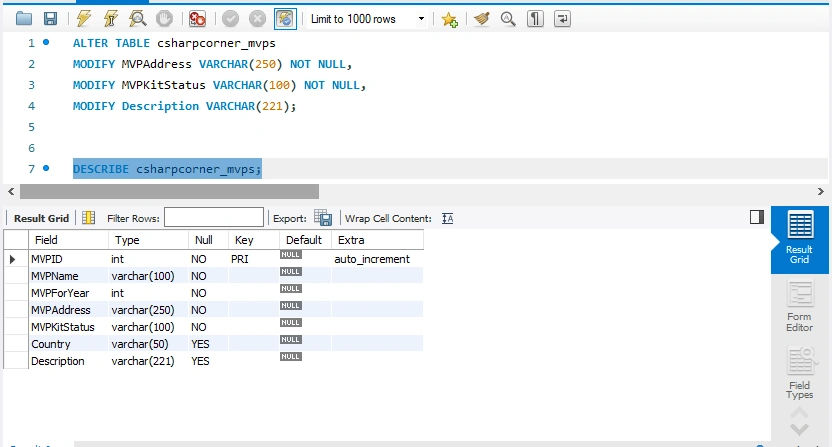
ALTER TABLE csharpcorner_mvps
MODIFY MVPAddress VARCHAR(250) NOT NULL,
MODIFY MVPKitStatus VARCHAR(100) NOT NULL,
MODIFY Description VARCHAR(221);
Note.
Use the “DESCRIBE” command to check the result from the ALTER TABLE MODIFY statement.
3) DROP a Column
ALTER TABLE DROP COLUMN statement is used to drop the column(s) in a table.
Syntax
ALTER TABLE employees
DROP COLUMN date_of_birth;
Example.
ALTER TABLE csharpcorner_mvps
DROP COLUMN Country;
Note. Use the “DESCRIBE” command to check the result from the ALTER TABLE DROP statement.

4) Change Column name
To rename a column in a table, use the following statement.
Syntax
ALTER TABLE employees
CHANGE COLUMN emp_name employee_name VARCHAR(100);
Example.
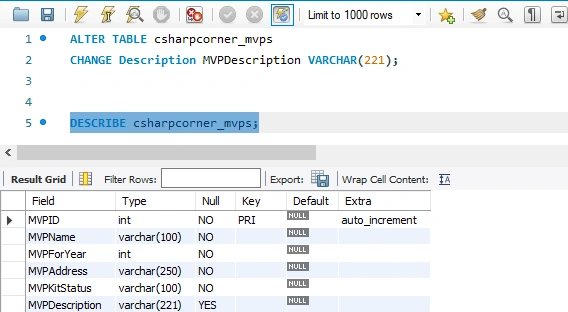
ALTER TABLE csharpcorner_mvps
CHANGE COLUMN Description MVPDescription VARCHAR(221);
Note. Use the “DESCRIBE” command to check the result from the ALTER TABLE CHANGE statement.
UPDATING STATEMENT
A) UPDATE QUERY
It is necessary to change the data in our database, so these commands are helpful for updating a table.
Syntax
UPDATE employees
SET department = 'HR'
WHERE employee_id = 12345;
Example.
UPDATE csharpcorner_mvps
SET MVPAddress = 'sec63, Noida'
WHERE MVPID = 3;
Note. Use the “DESCRIBE” command to check the result from the UPDATE query.

B) DELETE STATEMENT
Syntax
DELETE FROM employees
WHERE department = 'HR';
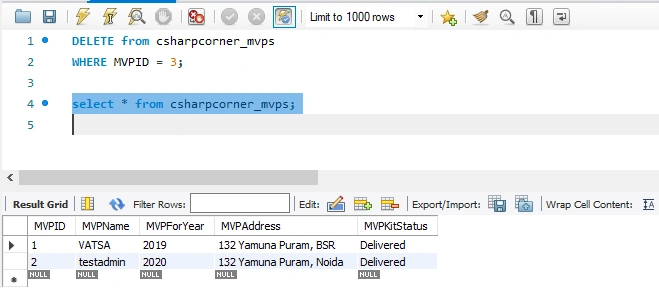
Example.
DELETE FROM csharpcorner_mvps
WHERE MVPID = 3;
C) Update database permissions/privileges
FLUSH PRIVILEGES;
D) Load a CSV file into a table
LOAD DATA INFILE '/tmp/filename.csv' replace
INTO TABLE [table name] FIELDS TERMINATED BY ',' LINES TERMINATED BY '\n' (field1, field2, field3);
Conclusion
In this article, I have discussed the concept of modifying and updating Tables in MySQL with various examples.
I hope you enjoyed this article. Follow C# Corner to learn more new and amazing things about MySQL.
Thanks for reading this article!
Join the conversation! Your thoughts help the community grow.