
Introduction
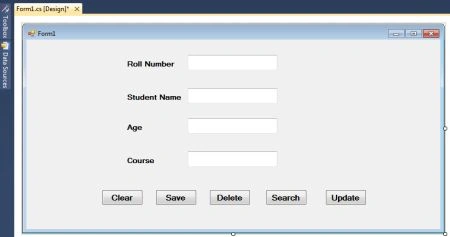
- conn = new SqlConnection(connstring);
- conn.Open();
- comm = new SqlCommand("insert into student_detail values(" + txtrn.Text + ",'" + txtname.Text + "'," + txtage.Text + ",'" + txtcourse.Text + "')", conn);
- try
- {
- comm.ExecuteNonQuery();
- MessageBox.Show("Saved...");
- }
- catch (Exception)
- {
- MessageBox.Show("Not Saved");
- }
- finally
- {
- conn.Close();
- }
- using System;
- using System.Collections.Generic;
- using System.ComponentModel;
- using System.Data;
- using System.Drawing;
- using System.Linq;
- using System.Text;
- using System.Windows.Forms;
- using System.Data.SqlClient;
- namespace savedeleteupdateapp
- {
- public partial class Form1 : Form
- {
- public Form1()
- {
- InitializeComponent();
- }
- SqlConnection conn;
- SqlCommand comm;
- SqlDataReader dreader;
- string connstring = "server=localhost;database=student;user=sa;password=wintellect";
- private void btnsave_Click(object sender, EventArgs e)
- {
- conn = new SqlConnection(connstring);
- conn.Open();
- comm = new SqlCommand("insert into student_detail values(" + txtrn.Text + ",'" + txtname.Text + "'," + txtage.Text + ",'" + txtcourse.Text + "')", conn);
- try
- {
- comm.ExecuteNonQuery();
- MessageBox.Show("Saved...");
- }
- catch (Exception)
- {
- MessageBox.Show("Not Saved");
- }
- finally
- {
- conn.Close();
- }
- }
- private void btnclear_Click(object sender, EventArgs e)
- {
- txtage.Clear();
- txtcourse.Clear();
- txtname.Clear();
- txtrn.Clear();
- txtrn.Focus();
- }
- private void btndelete_Click(object sender, EventArgs e)
- {
- conn = new SqlConnection(connstring);
- conn.Open();
- comm = new SqlCommand("delete from student_detail where roll_no = " + txtrn.Text + " ", conn);
- try
- {
- comm.ExecuteNonQuery();
- MessageBox.Show("Deleted...");
- txtage.Clear();
- txtcourse.Clear();
- txtname.Clear();
- txtrn.Clear();
- txtrn.Focus();
- }
- catch (Exception x)
- {
- MessageBox.Show(" Not Deleted" + x.Message );
- }
- finally
- {
- conn.Close();
- }
- }
- private void btnsearch_Click(object sender, EventArgs e)
- {
- conn = new SqlConnection(connstring);
- conn.Open();
- comm = new SqlCommand("select * from student_detail where roll_no = " + txtrn.Text + " ", conn);
- try
- {
- dreader = comm.ExecuteReader();
- if (dreader.Read())
- {
- txtname.Text = dreader[1].ToString();
- txtage.Text = dreader[2].ToString();
- txtcourse.Text = dreader[3].ToString();
- }
- else
- {
- MessageBox.Show(" No Record");
- }
- dreader.Close();
- }
- catch (Exception)
- {
- MessageBox.Show(" No Record");
- }
- finally
- {
- conn.Close();
- }
- }
- private void btnupdate_Click(object sender, EventArgs e)
- {
- conn = new SqlConnection(connstring);
- conn.Open();
- comm = new SqlCommand("update student_detail set s_name= '"+txtname.Text+"', age= "+txtage.Text+" , course=' "+txtcourse.Text+"' where roll_no =
- "+txtrn.Text+" ", conn);
- try
- {
- comm.ExecuteNonQuery();
- MessageBox.Show("Updated..");
- }
- catch (Exception)
- {
- MessageBox.Show(" Not Updated");
- }
- finally
- {
- conn.Close();
- }
- }
- private void Form1_Load(object sender, EventArgs e)
- {
- txtrn.Focus();
- }
- }
- }
Summary
Here are some related resource
syaf rPosted Mar 5, 2024, 6:42 AM
Thank for give mechance as your follower.
Sharad GaurPosted Jan 30, 2021, 8:54 AM
If you have a weak entity then how will you save data for that weak entity using ado.net? For example, You have one table named User and another table is Role, now I'm adding a new user and assigning 3 roles to that User, I can write code to add a User as you mentioned above, but for this new user, I want to add all 3 roles in another table called UserRoles where I will store UserId and RoleId. How can I save these User Roles. Role table has list of roles already.
Akash choudharyPosted Jan 28, 2021, 3:59 PM
Hlw friends mujhe aap logo ki help chaiye mai questions send kr rha hu in questions ke ans. Ho to send kr dena
shakib patelPosted Nov 8, 2017, 9:55 AM
Thanks you so much this example is very help full for me.
ravi chudasamaPosted Mar 16, 2017, 7:09 AM
Thanks you give very usefull contain
masoome abolfathiPosted Feb 20, 2016, 9:19 AM
thanks.....so helpfull
Sandeep SharmaPosted Mar 27, 2015, 9:37 PM
Nice article and very helpful for beginners .. Keep't up...
Anoop AntonyPosted Jul 28, 2012, 12:05 PM
thanks ............ nice work....very useful.....
RAJESH YADAVPosted Apr 18, 2012, 12:27 PM
AWESOME EXAMPLE AND ITS WORKING 100% I FACED AN ERROR IT WAS NOT SAVING DATA THEN I CHANGED MY CONNECTION STRING (AS EVERYONE WILL HAVE TO CHANGE AS PER THEIR SYSTEM'S CONFIG.) I CHANGED server=localhost; to server=.; AND I RESOLVED MY PROBLEM !!! :) THANKS FOR THIS NICE SHARE !