
This article will explain how to insert, update, delete records in datagridview using Linq.
Introduction:
This is a simple application that shows how to insert, update, and delete the records by using DataGridView.
Please check the link for how to add Linq to Sql classes to the project http://msdn.microsoft.com/en-us/library/bb384470%28v=VS.90%29.aspx
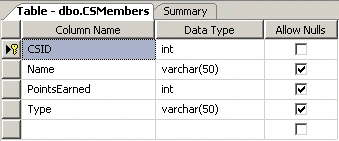
Following is the table with four columns I have used to bind the datagridview.
Code:
Here is the code to bind the gridview.
var getData = (from
cstable in dbCnn.CSMembers
select cstable);
CSGridView1.DataSource = getData;
Once the above code is called the gridview with data looks like
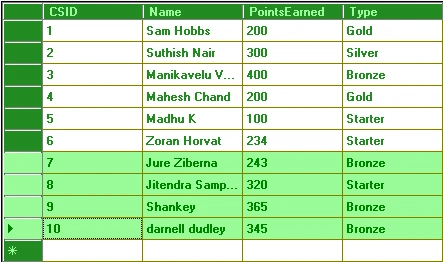
Initially the buttons to insert update and delete are hidden when clicked on any cell the buttons are made visible. The CSID column has set to read only as it is set to identity specification where all the operations are done based on this column.
Here is the code to update the records and is called in btnUpdate click event
var getData = (from
cstable in dbCnn.CSMembers
where
cstable.CSID == CSID
select
cstable).Single();
getData.PointsEarned =
PointsEarned;
getData.Name = Name;
getData.Type = Type;
dbCnn.SubmitChanges();
Cellclick event is used to get the current row and the CSID from the datagridview.
Here is the code to insert the records and is called in btnInsert click event
CSMember csm = new CSMember();
if (csname != null &&
cstype != null && cspointsearned != null)
{
csm.Name
= csname;
csm.PointsEarned
= cspointsearned;
csm.Type
= cstype;
dbCnn.GetTable<CSMember>().InsertOnSubmit(csm);
dbCnn.SubmitChanges();
}
Here is the code to delete the record from database and is called in btnDelete click event.
for (int i = 0; i <
CSGridView1.SelectedRows.Count; i++)
{
using (var
dbCnn = ConnClass.ConDB())
{
if (CSID !=
0)
{
var getData
= (from cstable in
dbCnn.CSMembers
where cstable.CSID == CSID
select cstable).Single();
dbCnn.CSMembers.DeleteOnSubmit(getData);
dbCnn.SubmitChanges();
}
}
}
In the code for loop is used to delete the multiple records from the datagridview.
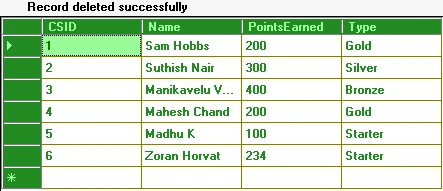
Once the above code is called the output looks as
Check the attachment for complete code along with mdf file.
Ali HamzaPosted Dec 12, 2017, 11:42 PM
Hello!! I'm new in wpf. In wpf datagridview is not supported please tell me about how we will do it in datagrid using linq to sql
rodolfo magsayoeditedPosted Dec 11, 2012, 10:08 AMEdited Dec 11, 2012, 10:09 AM
HELLO!!!I'm newbie and i already download and unzip the files but i don't know how to run the application..,,,i would be very glad if you help me.,,,,,
benni bennetsenPosted Dec 14, 2010, 4:12 AM
Where is the attacted code ?