
Introduction:
The SqlTransaction class is very
important class of .NET Framework. The SqlTransaction class is used for satisfying the ACID
property of DBMS (I am not describing ACID property here.). It ensure that a body
of code will affect a Database or keep the same as previous (Rollback). In this
article, I am giving an example of using the SqlTransaction class in .NET using
C#. At first we should know about it's two most important method which will be
used here. They are given below.
- Commit(): It commits the transaction. It save changes made in Database during transaction. In simple term we can say also that it shows the end of transaction at that time.
- Rollback(): It is used to rollback the transaction. It set the Database in previous stage which was, before the begin of transaction.
Now we write a simple program to understand how
it works. At first we create a Database. We are writing a program for transaction,
so we create two tables. I am creating two tables as userdet and
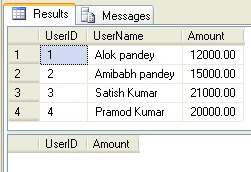
moneytrans insert some records in userdet table. Below, I am giving a
screen shot of the output of a select command for showing the records of the tables.
select
* from userdet
select
* from
moneytrans
Writing Program:
Create a windows application and arrange U.I. controls.( I have arranged it as below) 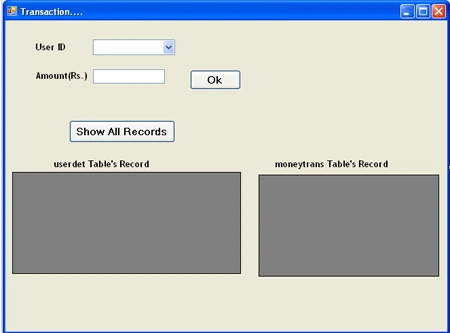
using System;
using
System.Collections.Generic;
using
System.ComponentModel;
using
System.Data;
using
System.Drawing;
using
System.Linq;
using
System.Text;
using
System.Windows.Forms;
using
System.Data.SqlClient;
namespace
SqlTransactionClassinAdodotNet
{
public partial
class Form1 :
Form
{
public Form1()
{
InitializeComponent();
}
SqlConnection conn;
SqlCommand comm1, comm2, comm3;
SqlTransaction trans;
SqlDataAdapter adapter1, adapter2;
DataSet ds1, ds2;
string constring =
@"Data Source=SERVER_NAME;Initial Catalog=EMP;Integrated
Security=True";
private void
Form1_Load(object sender,
EventArgs e)
{
conn = new
SqlConnection(constring);
conn.Open();
comm1 = new
SqlCommand("select
userid from userdet", conn);
SqlDataReader reader =
comm1.ExecuteReader();
while (reader.Read())
{
cmbuserid.Items.Add(reader[0]);
}
reader.Close();
conn.Close();
}
private void
btnshowrecord_Click(object sender,
EventArgs e)
{
adapter1 = new
SqlDataAdapter("select
* from userdet", constring);
adapter2 = new
SqlDataAdapter("select
* from moneytrans", constring);
ds1 = new System.Data.DataSet();
adapter1.Fill(ds1);
ds2 = new System.Data.DataSet();
adapter2.Fill(ds2);
dgvforuserdet.DataSource = ds1.Tables[0];
dgvformoneytrans.DataSource = ds2.Tables[0];
}
private void
btnok_Click(object sender,
EventArgs e)
{
if (txtamount.Text ==
"" || cmbuserid.Text ==
"")
{
MessageBox.Show("Plz,
Write Amout");
}
else
{
conn = new
SqlConnection(constring);
conn.Open();
comm2 = new
SqlCommand("insert
into moneytrans values(" + cmbuserid.SelectedItem.ToString() +
"," + txtamount.Text +
")", conn);
comm3 = new
SqlCommand("update
userdet set amount=amount-'" + txtamount.Text +
"' where userid="+
cmbuserid.SelectedItem.ToString()+"
", conn);
trans = conn.BeginTransaction();
comm2.Transaction = trans;
comm3.Transaction = trans;
try
{
comm2.ExecuteNonQuery();
comm3.ExecuteNonQuery();
trans.Commit();
MessageBox.Show("Transaction
Complted. ");
}
catch (Exception)
{
trans.Rollback();
MessageBox.Show("Transaction
Failed..");
}
}
conn.Close();
}
}
}
Note here (In the try block of
code), I have used commit() method after both
ExecuteNonQuery.
Suppose
first ExecuteNonQuery()
statement has
executed (Means amount has been transferred to
moneytrans table) and any error has
occurred.
Then
inconsistency will be
generated in Database
because error has occurred after execution of first
ExecuteNonQuery statement. So,
although Amount has
transferred from userdet table but Database table will show full amount as previous). So commit() should be used after
execution of all transaction statement. If there will be any error, then control
will jump to catch block where we have used Rollback(), which will
rollback the transaction.
Output:
Click at "Show All Record" button. It will show the all records of both table.
Output: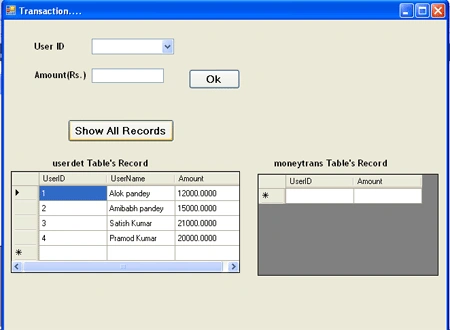
Now, fill the form and
click "ok" button. 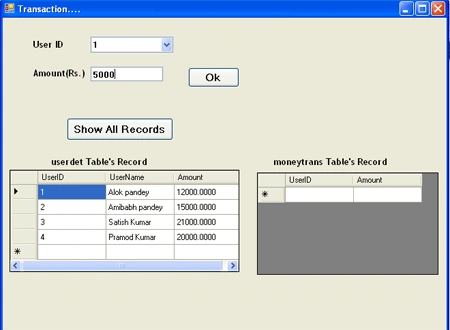
After
clicking ok button, a messagebox will is appeared with confirm message of
transaction. Like as below figure.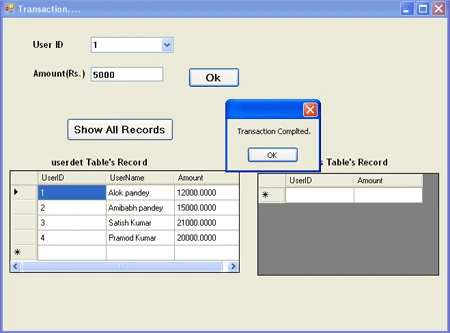
Now see the record of Database table to view all transaction.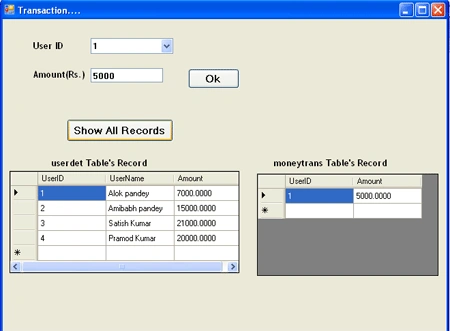
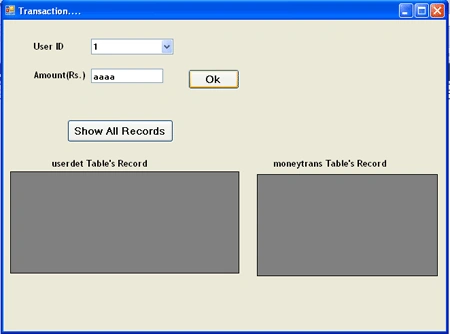
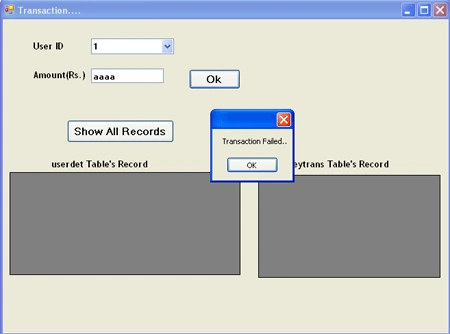
Suppose a user writes the wrong amount( Non numeric value) in the amount field, then the transaction will be rolledback. Like the below figure.
Entering Wrong Input:
Output:
Sudhakar ChaudharyPosted Mar 31, 2012, 2:45 AM
amount=amount-'" + txtamount.Text + this point is very usefull for me thanks.
aleksey erinPosted Dec 13, 2011, 4:29 PM
when i can use client transaction and server transaction? what better?