

Introduction
Before reading further, read the following article.
- Overview of Scalable Vector Graphics (SVG)
- Scalable Vector Graphics - Rectangle
- Scalable Vector Graphics - Circle
- Scalable Vector Graphics - Ellipse
Now let's move to the SVG line.
SVG Line
The tag <line> is used to draw a line with starting and ending points inside the SVG image. The <line> tag just takes the attributes x1, x2, y1, and y2 to draw a line from the starting point (x1, x2) to the ending point (y1, y2).
Syntax
- <svg height="210" width="500">
- <line x1="0" y1="0" x2="200" y2="200" style="stroke:green; stroke-width:2" />
- </svg>
- x1 and y1 attributes define the starting point of the line on x-axis and y-axis respectively.
- x2 and y2 attributes define the ending point of the line on x-axis and y-axis respectively.
Let's see a simple example to understand it properly.
Example 1
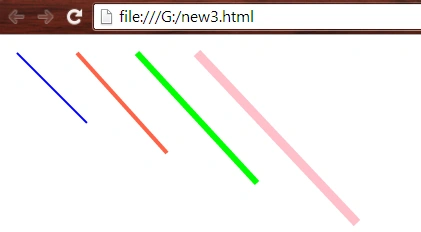
Lines with simple strokes.
- <html>
- <body>
- <svg height="210" width="600">
- <line x1="10" y1="10" x2="80" y2="80" style="stroke:blue ;stroke-width:2" />
- <line x1="70" y1="10" x2="160" y2="110" style="stroke:tomato ;stroke-width:4" />
- <line x1="130" y1="10" x2="250" y2="140" style="stroke:lime ;stroke-width:6" />
- <line x1="190" y1="10" x2="350" y2="180" style="stroke:pink ;stroke-width:9" />
- </svg>
- </body>
- </html>
- <html>
- <body>
- <svg height="250" width="500">
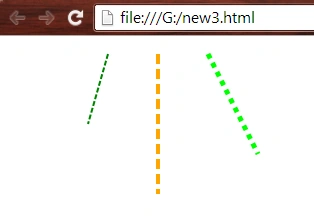
- <line x1="100" y1="10" x2="80" y2="80" style="stroke:green ;stroke-width:2; stroke-dasharray:5 2;" />
- <line x1="150" y1="10" x2="150" y2="150" style="stroke:orange ;stroke-width:4; stroke-dasharray:10 5;" />
- <line x1="200" y1="10" x2="250" y2="110" style="stroke:lime ;stroke-width:5; stroke-dasharray:5 5;" />
- </svg>
- </body>
- </html>
- <html>
- <body>
- <svg height="250" width="500">
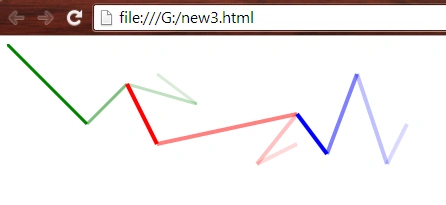
- <line x1="0" y1="0" x2="80" y2="80" style="stroke:green ;stroke-width:3;" />
- <line x1="80" y1="80" x2="120" y2="40" style="stroke:green ;stroke-width:3; opacity:0.5" />
- <line x1="120" y1="40" x2="190" y2="60" style="stroke:green ;stroke-width:3; opacity:0.5; stroke-opacity: 0.5" />
- <line x1="190" y1="60" x2="150" y2="30" style="stroke:green ;stroke-width:3; opacity:0.5; stroke-opacity: 0.3" />
- <line x1="120" y1="40" x2="150" y2="100" style="stroke:red ;stroke-width:4;" />
- <line x1="150" y1="100" x2="290" y2="70" style="stroke:red ;stroke-width:4; opacity:0.5" />
- <line x1="290" y1="70" x2="250" y2="120" style="stroke:red ;stroke-width:4; opacity:0.5; stroke-opacity: 0.5" />
- <line x1="250" y1="120" x2="290" y2="100" style="stroke:red ;stroke-width:4; opacity:0.5; stroke-opacity: 0.3" />
- <line x1="290" y1="70" x2="320" y2="110" style="stroke:blue ;stroke-width:4;" />
- <line x1="320" y1="110" x2="350" y2="30" style="stroke:blue ;stroke-width:4; opacity:0.5" />
- <line x1="350" y1="30" x2="380" y2="120" style="stroke:blue ;stroke-width:4; opacity:0.5; stroke-opacity: 0.5" />
- <line x1="380" y1="120" x2="400" y2="80" style="stroke:blue ;stroke-width:4; opacity:0.5; stroke-opacity: 0.3" />
- </svg>
- </body>
- </html>
- <html>
- <body>
- <svg height="250" width="500">
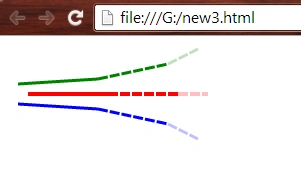
- <line x1="10" y1="40" x2="90" y2="35" style="stroke:green ;stroke-width:3;" />
- <line x1="90" y1="35" x2="160" y2="20" style="stroke:green ;stroke-width:3; stroke-dasharray:10 2" />
- <line x1="160" y1="20" x2="190" y2="5" style="stroke:green ;stroke-width:3; stroke-dasharray:10 2; opacity:0.5; stroke-opacity: 0.5" />
- <line x1="20" y1="50" x2="100" y2="50" style="stroke:red ;stroke-width:4;" />
- <line x1="100" y1="50" x2="170" y2="50" style="stroke:red ;stroke-width:4; stroke-dasharray:10 2" />
- <line x1="170" y1="50" x2="200" y2="50" style="stroke:red ;stroke-width:4; stroke-dasharray:10 2; opacity:0.5; stroke-opacity: 0.5" />
- <line x1="10" y1="60" x2="90" y2="65" style="stroke:blue ;stroke-width:3;" />
- <line x1="90" y1="65" x2="160" y2="80" style="stroke:blue ;stroke-width:3; stroke-dasharray:10 2" />
- <line x1="160" y1="80" x2="190" y2="95" style="stroke:blue ;stroke-width:3; stroke-dasharray:10 2; opacity:0.5; stroke-opacity: 0.5" />
- </svg>
- </body>
- </html>
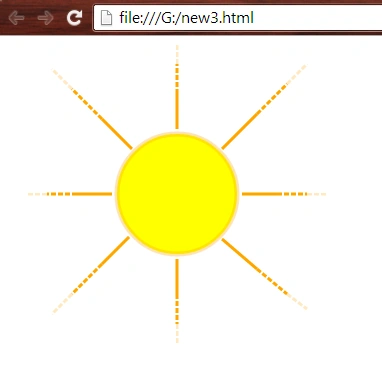
- <html>
- <body>
- <svg height="500" width="500">
- <circle cx="170" cy="150" r="60" style="fill:yellow; stroke:orange ;stroke-width:5; stroke-opacity: 0.3"/>
- <line x1="170" y1="85" x2="170" y2="50" style="stroke:orange ;stroke-width:3;" />
- <line x1="170" y1="50" x2="170" y2="20" style="stroke:orange ;stroke-width:3; stroke-dasharray:5 2" />
- <line x1="170" y1="20" x2="170" y2="0" style="stroke:orange ;stroke-width:3; stroke-dasharray:5 2; opacity:0.5; stroke-opacity: 0.5" />
- <line x1="215" y1="105" x2="250" y2="70" style="stroke:orange ;stroke-width:3;" />
- <line x1="250" y1="70" x2="280" y2="40" style="stroke:orange ;stroke-width:3; stroke-dasharray:5 2" />
- <line x1="280" y1="40" x2="300" y2="20" style="stroke:orange ;stroke-width:3; stroke-dasharray:5 2; opacity:0.5; stroke-opacity: 0.5" />
- <line x1="235" y1="150" x2="270" y2="150" style="stroke:orange ;stroke-width:3;" />
- <line x1="270" y1="150" x2="300" y2="150" style="stroke:orange ;stroke-width:3; stroke-dasharray:5 2" />
- <line x1="300" y1="150" x2="320" y2="150" style="stroke:orange ;stroke-width:3; stroke-dasharray:5 2; opacity:0.5; stroke-opacity: 0.5" />
- <line x1="215" y1="195" x2="250" y2="225" style="stroke:orange ;stroke-width:3;" />
- <line x1="250" y1="225" x2="280" y2="250" style="stroke:orange ;stroke-width:3; stroke-dasharray:5 2" />
- <line x1="280" y1="250" x2="300" y2="265" style="stroke:orange ;stroke-width:3; stroke-dasharray:5 2; opacity:0.5; stroke-opacity: 0.5" />
- <line x1="170" y1="215" x2="170" y2="250" style="stroke:orange ;stroke-width:3;" />
- <line x1="170" y1="250" x2="170" y2="280" style="stroke:orange ;stroke-width:3; stroke-dasharray:5 2" />
- <line x1="170" y1="280" x2="170" y2="300" style="stroke:orange ;stroke-width:3; stroke-dasharray:5 2; opacity:0.5; stroke-opacity: 0.5" />
- <line x1="122" y1="193" x2="95" y2="220" style="stroke:orange ;stroke-width:3;" />
- <line x1="95" y1="220" x2="65" y2="250" style="stroke:orange ;stroke-width:3; stroke-dasharray:5 2" />
- <line x1="65" y1="250" x2="45" y2="270" style="stroke:orange ;stroke-width:3; stroke-dasharray:5 2; opacity:0.5; stroke-opacity: 0.5" />
- <line x1="105" y1="150" x2="70" y2="150" style="stroke:orange ;stroke-width:3;" />
- <line x1="70" y1="150" x2="40" y2="150" style="stroke:orange ;stroke-width:3; stroke-dasharray:5 2" />
- <line x1="40" y1="150" x2="20" y2="150" style="stroke:orange ;stroke-width:3; stroke-dasharray:5 2; opacity:0.5; stroke-opacity: 0.5" />
- <line x1="125" y1="105" x2="95" y2="75" style="stroke:orange ;stroke-width:3;" />
- <line x1="95" y1="75" x2="65" y2="45" style="stroke:orange ;stroke-width:3; stroke-dasharray:5 2" />
- <line x1="65" y1="45" x2="45" y2="25" style="stroke:orange ;stroke-width:3; stroke-dasharray:5 2; opacity:0.5; stroke-opacity: 0.5" />
- </svg>
- </body>
- </html>
Want to read more...
Thank you, keep learning and sharing.
Gopi ChandPosted Aug 19, 2015, 6:50 AM
Thanks Rajeesh
Rajeesh MenothPosted Jul 25, 2015, 1:55 PM
Good Article
Sibeesh VenuPosted Jul 24, 2015, 4:13 AM
Nice Share. Thank you
SharadPosted Jul 24, 2015, 3:16 AM
great...
Shridhar SharmaPosted Jul 23, 2015, 6:51 PM
good one :)