

In this article I used three fields in a database.
The database definition is as in the image shown below:

Depending on the fields we use three textboxes to perform operations on the data of the database 7 also we take one DataGridVeiw to show all data of table.
When you run this project for the first time it will looks like the image shown below:
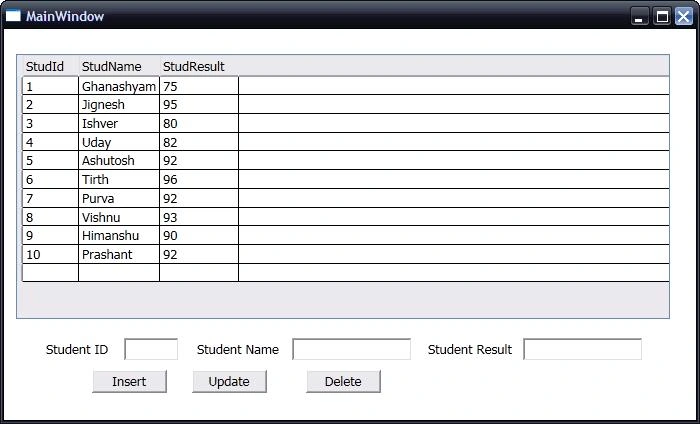
Here in the "Window_Loaded" event I call the function "BindMyData".
Using this function will load all data from the table into the DataGridView when the form loads.
public void BindMyData()
{
try
{
conn.Open();
SqlCommand comm = new SqlCommand("SELECT * FROM Student", conn);
DataSet ds = new DataSet();
SqlDataAdapter da = new SqlDataAdapter(comm);
da.Fill(ds);
myDataGrid.ItemsSource = ds.Tables[0].DefaultView;
}
catch (Exception ex)
{
MessageBox.Show(ex.Message.ToString());
}
finally
{
conn.Close();
}
}
Insert New Data:
try
{
//Open Connection...
conn.Open();
//Write Query For Insert Data Into Table using Creating Object Of SqlCommand...
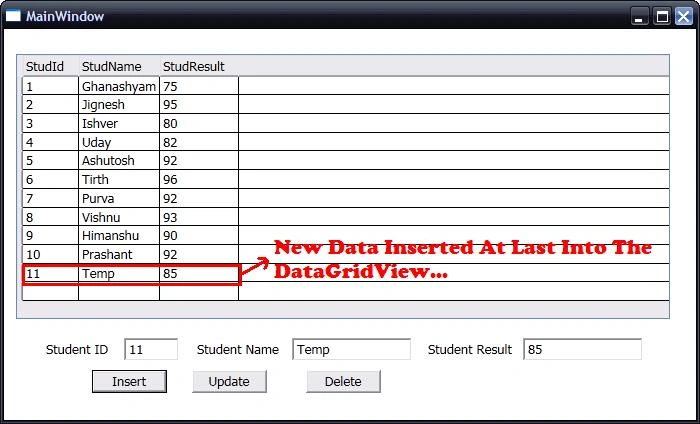
SqlCommand comm = new SqlCommand("INSERT INTO Student VALUES(" +
txtStudId.Text + ",'" + txtStudName.Text + "'," + txtStudResult.Text + ")", conn);
comm.ExecuteNonQuery();
}
catch (Exception ex)
{
//If Any Exception Will Occur then It Will Display That Message...
MessageBox.Show(ex.Message.ToString());
}
finally
{
//Finally Close the Connection...
conn.Close();
//Display Effect of New Added Row Into DataGridView...
BindMyData();
}
See below Image :
Update Data:
try
{
//Open Connection...
conn.Open();
//Write Query For Update Data Into Table using Creating Object Of SqlCommand...
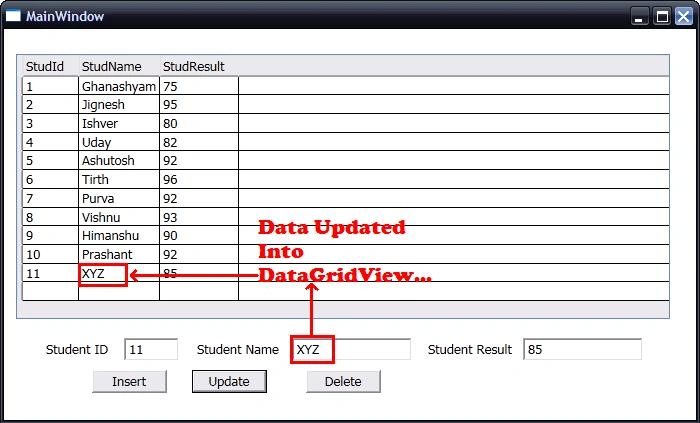
SqlCommand comm = new SqlCommand("UPDATE Student SET StudName='" +
txtStudName.Text + "',StudResult=" + txtStudResult.Text + "WHERE StudId=" + txtStudId.Text + "", conn);
comm.ExecuteNonQuery();
}
catch (Exception ex)
{
//If Any Exception Will Occur then It Will Display That Message...
MessageBox.Show(ex.Message.ToString());
}
finally
{
//Finally Close the Connection...
conn.Close();
//Display Effect of New Added Row Into DataGridView...
BindMyData();
}
See below Image :
Delete Data :
try
{
//Open Connection...
conn.Open();
//Write Query For Delete Data From the Table using Creating Object Of SqlCommand...
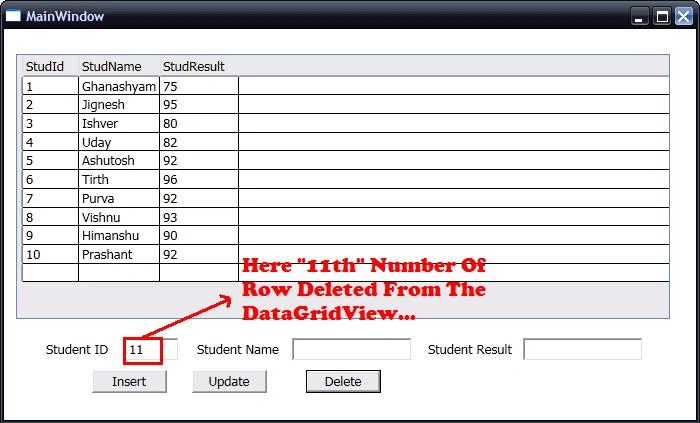
SqlCommand comm = new SqlCommand("DELETE FROM Student WHERE StudId=" +
txtStudId.Text + "", conn);
comm.ExecuteNonQuery();
}
catch (Exception ex)
{
//If Any Exception Will Occur then It Will Display That Message...
MessageBox.Show(ex.Message.ToString());
}
finally
{
//Finally Close the Connection...
conn.Close();
//Display Effect of New Added Row Into DataGridView...
BindMyData();
}
See below Image :
Main Code :
using System;
using System.Collections.Generic;
using System.Linq;
using System.Text;
using System.Windows;
using System.Windows.Controls;
using System.Windows.Data;
using System.Data;
using System.Windows.Documents;
using System.Windows.Input;
using System.Windows.Media;
using System.Windows.Media.Imaging;
using System.Windows.Navigation;
using System.Windows.Shapes;
using System.Data.SqlClient;
namespace WPFAllDatabaseOperationApplication
{
/// <summary>
/// Interaction logic for MainWindow.xaml
/// </summary>
public partial class MainWindow : Window
{
SqlConnection conn = new SqlConnection(@"Data Source=.\SQLEXPRESS;AttachDbFilename=|DataDirectory|\MyDatabase.mdf;Integrated Security=True;User Instance=True");
public MainWindow()
{
InitializeComponent();
}
public void BindMyData()
{
try
{
conn.Open();
SqlCommand comm = new SqlCommand("SELECT * FROM Student", conn);
DataSet ds = new DataSet();
SqlDataAdapter da = new SqlDataAdapter(comm);
da.Fill(ds);
myDataGrid.ItemsSource = ds.Tables[0].DefaultView;
}
catch (Exception ex)
{
MessageBox.Show(ex.Message.ToString());
}
finally
{
conn.Close();
}
}
private void Window_Loaded(object sender, RoutedEventArgs e)
{
BindMyData();
}
private void btnInsert_Click(object sender, RoutedEventArgs e)
{
try
{
conn.Open();
SqlCommand comm = new SqlCommand("INSERT INTO Student VALUES(" + txtStudId.Text + ",'" + txtStudName.Text + "'," + txtStudResult.Text + ")", conn);
comm.ExecuteNonQuery();
}
catch (Exception ex)
{
MessageBox.Show(ex.Message.ToString());
}
finally
{
conn.Close();
BindMyData();
}
}
private void btnUpdate_Click(object sender, RoutedEventArgs e)
{
try
{
conn.Open();
SqlCommand comm = new SqlCommand("UPDATE Student SET StudName='" + txtStudName.Text + "',StudResult=" + txtStudResult.Text + "WHERE StudId=" + txtStudId.Text + "", conn);
comm.ExecuteNonQuery();
}
catch (Exception ex)
{
MessageBox.Show(ex.Message.ToString());
}
finally
{
conn.Close();
BindMyData();
}
}
private void btnDelete_Click(object sender, RoutedEventArgs e)
{
try
{
conn.Open();
SqlCommand comm = new SqlCommand("DELETE FROM Student WHERE StudId=" + txtStudId.Text + "", conn);
comm.ExecuteNonQuery();
}
catch (Exception ex)
{
MessageBox.Show(ex.Message.ToString());
}
finally
{
conn.Close();
BindMyData();
}
}
}
}
aram halabjaPosted Aug 17, 2014, 8:38 PM
thanks good job
mayuriPosted Apr 24, 2013, 7:49 AM
thanks...