The lack of XOR Drawing feature in GDI+ was not certainly welcome in the programmer's community. I guess it will be hard to survive with this handicap.
In spite of this, I would like to show how we can draw rubber-band lines and shapes in GDI+ with just a few lines of code.
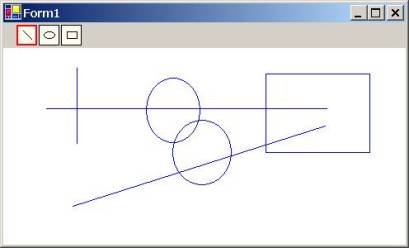
private
void Form1_Load(object sender, System.EventArgs e)
{
//Size size = this.Size;
Size size = SystemInformation.PrimaryMonitorMaximizedWindowSize;
bitmap = new Bitmap(size.Width, size.Height);
gB = Graphics.FromImage(bitmap);
Color bckColor = this.BackColor;
gB.Clear(bckColor);
}
private void Form1_MouseDown(object sender, System.Windows.Forms.MouseEventArgs e)
{
Point p = new Point(e.X, e.Y);
x0 = p.X;
y0 = p.Y;
drag = true;
}
private void Form1_MouseMove(object sender, System.Windows.Forms.MouseEventArgs e)
{
Point p = new Point(e.X, e.Y);
x= p.X;
y = p.Y;
int cx = x - x0;
int cy = y - y0;
if (drag)
{
Graphics gx = CreateGraphics();
gx.DrawImage(bitmap, 0, 0);
gx.Dispose();
Graphics g = CreateGraphics();
Pen pen = new Pen(Color.Blue);
switch (DrawMode)
{
case 1:
{
g.DrawLine(pen, x0, y0, x, y);
break;
}
case 2:
{
g.DrawEllipse(pen, x0, y0, cx, cy);
break;
}
case 3:
{
g.DrawRectangle(pen, x0, y0, cx, cy);
break;
}
}
g.Dispose();
pen.Dispose();
}
}
private void Form1_MouseUp(object sender, System.Windows.Forms.MouseEventArgs e)
{
int cx = x - x0;
int cy = y - y0;
Pen pen = new Pen(Color.Blue);
switch (DrawMode)
{
case 1:
{
gB.DrawLine(pen, x0, y0, x, y);
break;
}
case 2:
{
gB.DrawEllipse(pen, x0, y0, cx, cy);
break;
}
case 3:
{
gB.DrawRectangle(pen, x0, y0, cx, cy);
break;
}
}
drag = false;
pen.Dispose();
}
private void Form1_Paint(object sender, System.Windows.Forms.PaintEventArgs e)
{
Graphics gx = CreateGraphics();
gx.DrawImage(bitmap, 0, 0);
gx.Dispose();
}
private void button1_Click(object sender, System.EventArgs e)
{
button1.ForeColor = Color.Red;
button2.ForeColor = Color.Black;
button3.ForeColor = Color.Black;
DrawMode = 1;
}
private void button2_Click(object sender, System.EventArgs e)
{
button2.ForeColor = Color.Red;
button1.ForeColor = Color.Black;
button3.ForeColor = Color.Black;
DrawMode = 2;
}
private void button3_Click(object sender, System.EventArgs e)
{
button3.ForeColor = Color.Red;
button1.ForeColor = Color.Black;
button2.ForeColor = Color.Black;
DrawMode = 3;
}
private void panel1_Paint(object sender, System.Windows.Forms.PaintEventArgs e)
{
button1.ForeColor = Color.Red;
button1.Focus();
}
}