

In this article you will learn how to create data binding in Universal Windows Platform.
Data binding is a technique used to make an item dependent to another item. Eitherthe source (User) is dependent on the target (Server) or the target is dependent onthe source or both are dependent on each other.
The change in one item will also change the second item.
Data Binding Types
- One way binding: Only one item is dependent on the other item.
- Two way binding: Both first and the second items are dependent on each other.
In logical words, in one-way binding, the server can change the user form or whatever the user is accessing, while in two-way binding both can access each other, whatever they are accessing.
Here in this example we are going to implement just one-way binding, we will also talk about two-way binding in the next tutorial.
Example
In this example we will make a slider in our "MainPage.xaml" and one image. We will bind image height with the slider. As we will increase slider volume the height of picture will be increased accordingly. So, let's start with the new project.
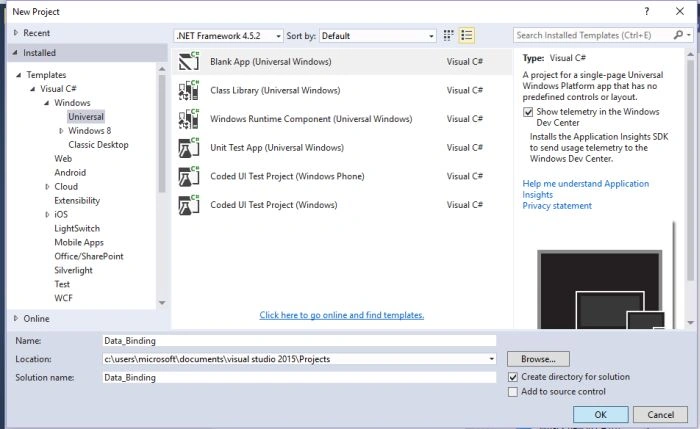
- Click on the "New Project" in the start screen.

- Under "Visual C#" click on Windows, Universal, then click on "Blank App" and name your blank app.
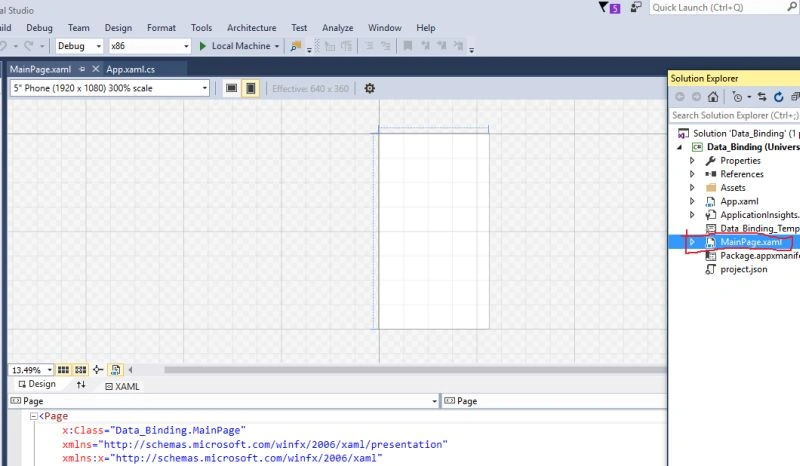
- After creating blank app double click on "MainPage.xaml" in the solution explorer. This will open Designer and Xaml. In the Design you can simply drag and drop items from toolbox in the menu and in the Xaml you simply write the code on your own.
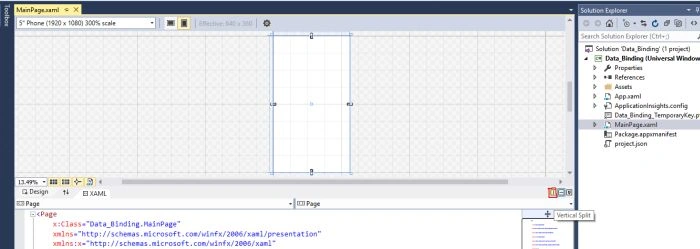
- You can split your window as you want by just clicking at bottom window split icon as you can see in the picture.
- Now drag the image from your computer and drop it on the "Assets" in the solution explorer window.
- Now in the "MainPage.xaml", open xaml and here we create slider and one image tag.

- Here we put image and slider in "Stack Panel." The reason is that stack panel organizes the sequence of your controls in the center and also align them horizontally and vertically.
- In the image tag we bind the height of image with the slider where "saqib" is the name of the slider. Also we provide the source of the image that is in our "Assets" folder and the name of the image is "Superior_University.jpg".
- "ElementName" in the image tag is the control name with which you want to bind the current control or image.
- Slider has a minimum and maximum value. By default maximum value equals to 100.
Output
On increasing the Slider value.

On decreasing the value of slider.

So, as we increase the slider value the greater will be the image height. We bind the image height with the slider value.
Asfend YarPosted Mar 2, 2016, 3:58 AM
nice
Shubham KumarPosted Feb 12, 2016, 12:24 AM
nice
Kuppurasu NagarajPosted Feb 11, 2016, 12:30 PM
nice one
Kumaresh RajalingamPosted Feb 11, 2016, 10:38 AM
Nice
Debasis SahaPosted Feb 11, 2016, 8:29 AM
Nice one..
Shubham KumarPosted Feb 11, 2016, 2:20 AM
nice
Sibeesh VenuPosted Feb 11, 2016, 1:51 AM
Nice Share
Mohammed IbrahimPosted Feb 10, 2016, 7:51 PM
nice
Vignesh ManiPosted Feb 10, 2016, 4:34 PM
Nice one
Santhakumar MunuswamyPosted Feb 10, 2016, 2:06 PM
Thanks for nice work
Ankur MistryPosted Feb 10, 2016, 2:05 PM
Good one