

Introduction
This is a simple application for beginners that shows how to create a rotation of a title on a web page using HTML 5 and CSS tools. We know that HTML 5 is the advanced version of HTML. Basically HTML 5 can be used to develop 3D applications. This article is intended to help with the use of HTML5 tools to develop a rotation of a title on a web page application. We know that HTML is HyperText Markup Language and is used to display data on a browser. CSS is the acronym for Cascading Style Sheet that is used for design. CSS defines how HTML elements are to be displayed.
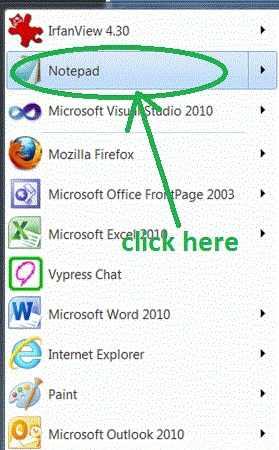
Step 1: First Open an HTML editor such as Notepad.
- Open start->Notepad.
- The name of the editor is "Rotation."
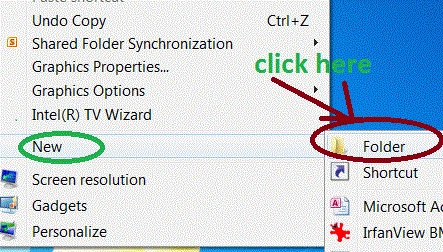
Step 2: Create a Folder on a desktop.
- Right-click on desktop->new->Folder.
- The name of the folder is "Tom".
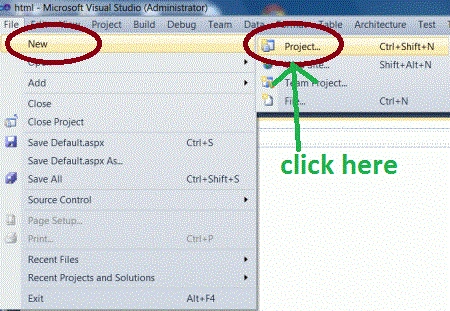
Step 3: Open Visual Studio.
- Go to file -> New->Projects.
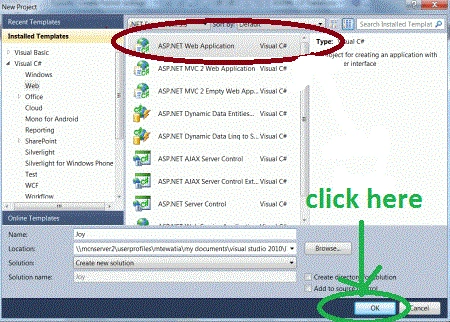
- Create an ASP. NET Web Application.
- Name of "India.aspx".
Step 4: Add an HTML file to your web application.
- Right-click on Solution Explorer.
- Add->add new item->HTML form.
- The Name of the HTML form is "Rotation.html".
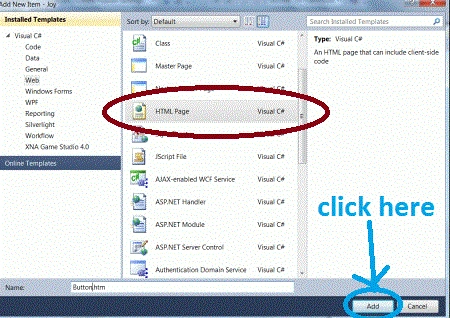
Code :
Step 6: Add one CSS file named design.css that is used to set the properties of a body.
- window.onload = function ()
- {
- var M = ctx("holder", 1240, 480),
- fonts = [0, M.getFont("1"), M.getFont("2"), M.getFont("3"), M.getFont("Arial Black")],
- rax = M.print(20, 240, "CShorpCorner", fonts[4], 120).attr({ fill: "#00ff99" })
- NUMBERS = [
- M.print(800, 380, "3", fonts[3], 180).attr({ fill: "#00ff99" }),
- ], times = 3;
- for (var i = 0, ii =rax.length; i < ii; i++) {
- rax[i].animate({ fill: ctx.getColor() }, 2000);
- }
Code
Step 7: Now some CSS and js files are used in the application.
- body {
- background: #fff;
- color: Fuchsiafont: 100.1% "Lucida Grande", Lucida, Verdana, sans-serif;
- }
- #holder {
- height: 500px;
- left: 100%;
- margin: 0 0 0 -420px;
- position: fixed;
- top: 0;
- width: 640px;
- }
- #copy {
- bottom: 0;
- font-size: .7em;
- position: fixed;
- right: 1em;
- text-align: right;
- }
-
design1.css: The css file helps set a text alignment, position, font -size, and background color feature of rotation font web page.
-
work.js: work.js is a Javascript file that helps to set a rotation angle according to the font position of a font.
-
fontstyle.js: fontstyle.js is a Javascript file that helps set a font on a title.
-
Use all the above files in an application.
Code
- < link rel = "stylesheet"
- href = "design1.css"
- media = "screen" / ><
- script type = "text/jscript"
- src = "Scripts/Work.js" >< /script><
- script type = "text/javascript"
- src = "Scripts/fontstyle.js" >< /script>
Step 8: Set the animation properties that are used for visualization of a font.
Code
Step 9: Press Ctrl + F5 to run the code in a browser.
- NUMBERS[0].animate({ fill: ctx.getColor() }, 2000);
- NUMBERS[1].animate({ fill: ctx.getColor() }, 2000);
- NUMBERS[2].animate({ fill: ctx.getColor() }, 2000,
- function ()
- {
- rax.animate({ transform: "...r360" }, 1000);
- }
Output :
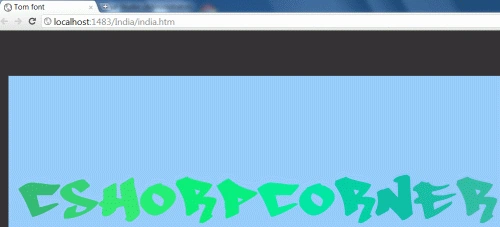
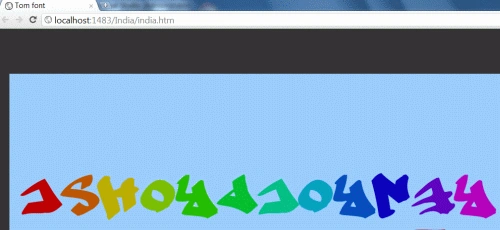
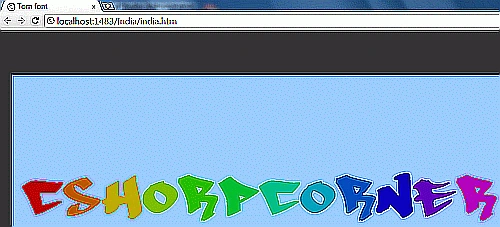
Here are some useful resources:
Krishna GaradPosted Feb 4, 2012, 2:01 AM
nice one keep it up animation