

Introduction
This is a simple application for beginners that helps with how to perform create,edit,delete operations on a table in an ASP.NET MVC application. It also helps with how to create the database and add a table. We know that MVC is an integrated module. This is the integration of three words models,views,controllers. Models provide the business logic, Views isprovide the presentation and last controllers handle all of the requests that are provided by models,views. ASP.NET MVC gives you a powerful patterns-based way to build dynamic websites that enables a clean separation of concerns and that gives you full control over markup for enjoyable agile development. ASP.NET MVC is an alternative but not a replacement for ASP.NET Web Forms.
Step 1
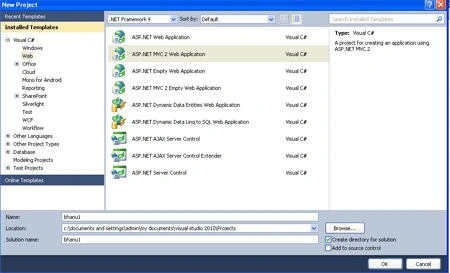
Open Visual Studio 2010.
- Click file ->New->Projects
- Add MVC ASP. NET 2 Web application
- The name of application is "bhanu1"
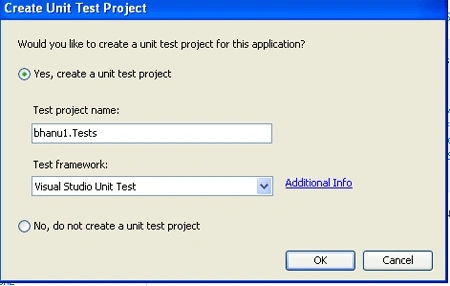
- Create unit test
Step 2
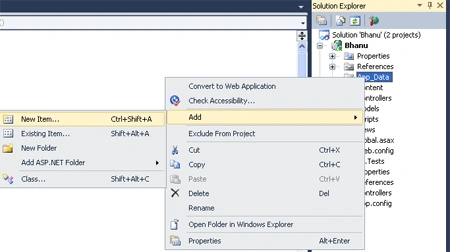
In the App_Data folder add SQL SERVER DATABASE. SQL SERVER DATABASE will then takes care of generating the appropriate SQL execution logic to use at runtime when we interact and use them.
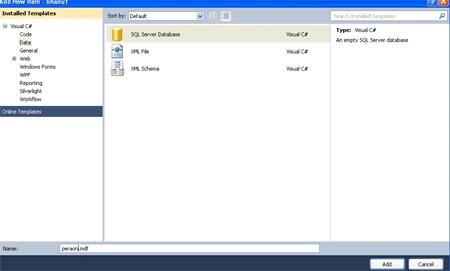
- Right Click of App_Data Folder->Add New Item-> add "SQL SERVER DATABASE" class
- Name of database is "Person"
Step 3
After add ingthe SQL SERVER DATABASE two files are created in the folder.
- First is "Person.mdf"
- Second is "person.ldf"
Step 4
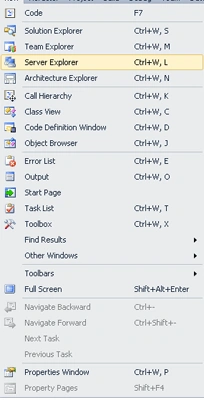
Open the Server Explorer.
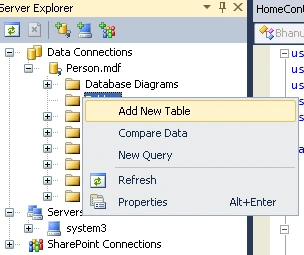
- Right Click on "person.mdf"->Add Table Schema
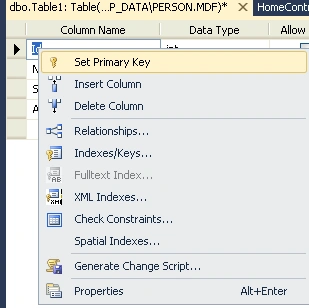
- Set the fields "Id,Name,salary,Address"
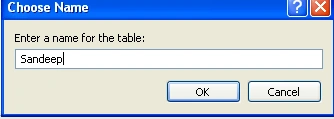
Step 5
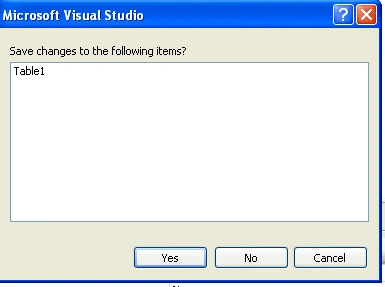
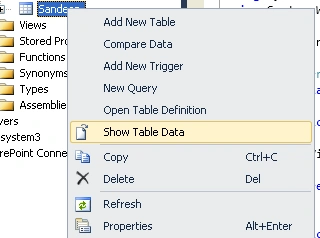
Click the table.
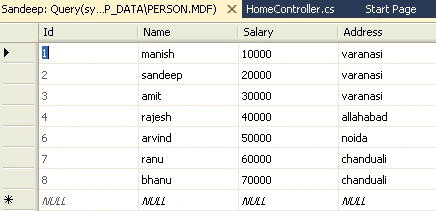
- Right click on sandeep and open "Show table data"
- Insert data from a table
Step 6
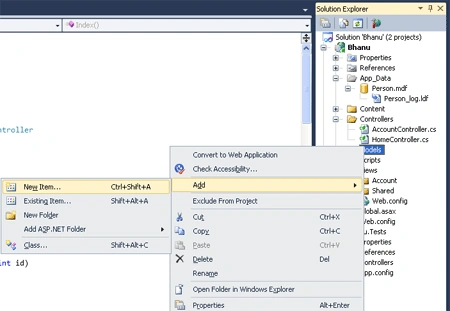
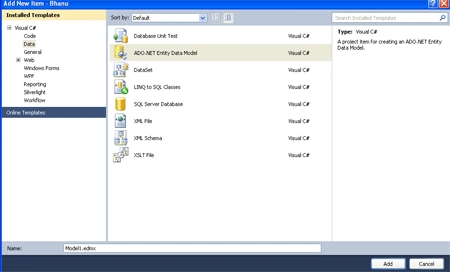
Add "ADO.NET Entity Data Model".
- Right Click on the Model Folder->add->add new item->ADO.NET Entity Data Model
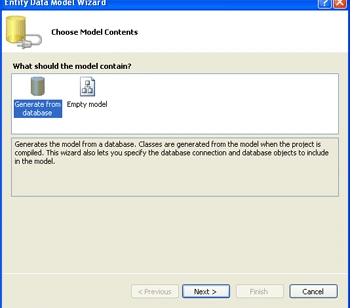
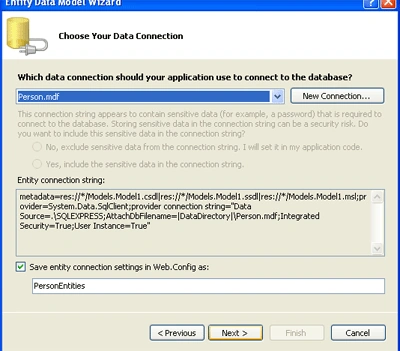
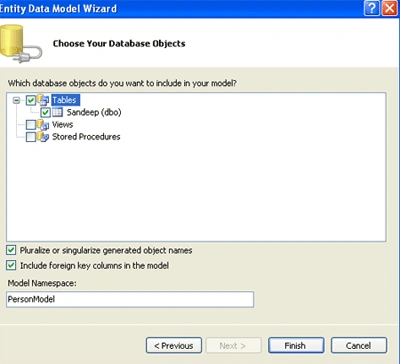
- Bind the data
Step 7
Add controller.
- Right Click on the controller folder->add->controller
- Name of the controller "ranu contoller"
- Click the checkbox to perform all action
Code
- using System;
- using System.Collections.Generic;
- using System.Linq;
- using System.Web;
- using System.Web.Mvc;
- using bhanu1.Models;
- namespace bhanu1.Controllers
- {
- public class ranuController : Controller
- {
- //
- // GET: /ranu/
- private personEntities1 per = new personEntities1();
- public ActionResult Index()
- {
- return View(per.sandeep1.ToList());
- }
- //
- // GET: /ranu/Details/5
- public ActionResult Details(int id)
- {
- return View();
- }
- //
- // GET: /ranu/Create
- public ActionResult Create()
- {
- return View();
- }
- //
- // POST: /ranu/Create
- [HttpPost]
- public ActionResult Create([Bind(Exclude = "Id")]sandeep1 san)
- {
- try
- {
- // TODO: Add insert logic here
- per.AddTosandeep1(san);
- per.SaveChanges();
- return RedirectToAction("Index");
- }
- catch
- {
- return View();
- }
- }
- //
- // GET: /ranu/Edit/5
- public ActionResult Edit(int id)
- {
- return View();
- }
- //
- // POST: /ranu/Edit/5
- [HttpPost]
- public ActionResult Edit(int id, FormCollection collection)
- {
- try
- {
- // TODO: Add update logic here
- return RedirectToAction("Index");
- }
- catch
- {
- return View();
- }
- }
- //
- // GET: /ranu/Delete/5
- public ActionResult Delete(int id)
- {
- return View();
- }
- //
- // POST: /ranu/Delete/5
- [HttpPost]
- public ActionResult Delete(int id, FormCollection collection)
- {
- try
- {
- // TODO: Add delete logic here
- return RedirectToAction("Index");
- }
- catch
- {
- return View();
- }
- }
- }
- }
Step 8
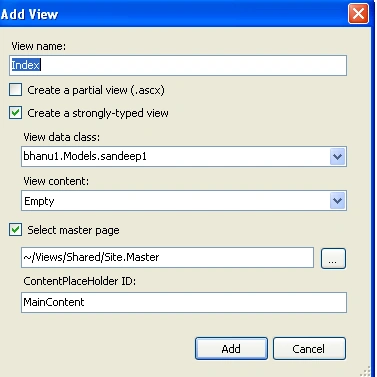
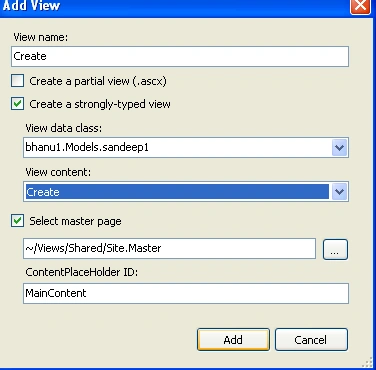
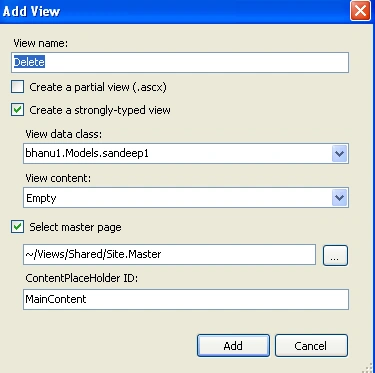
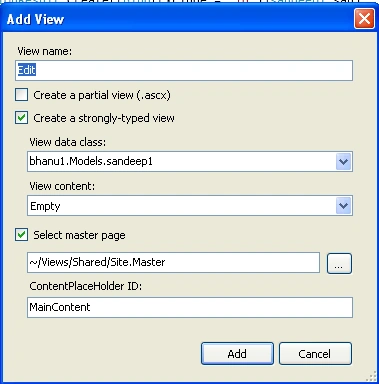
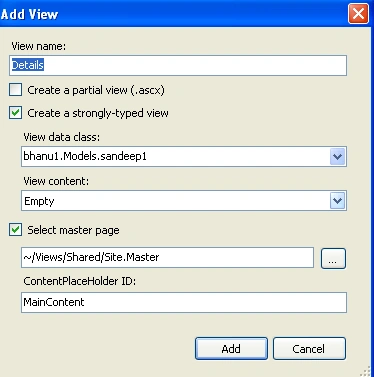
Add views.
- first add a view "index"
- second add a view "create"
- third view is "delete"
- four view is "detail"
- six view is "edit"
Code
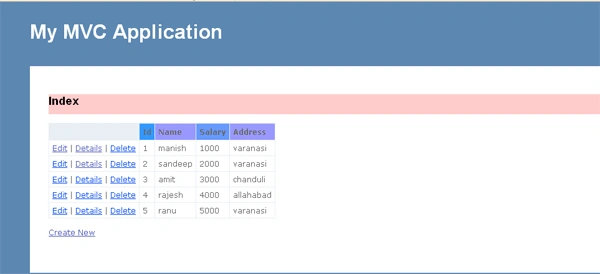
Code of index views
- <%@ Page Title="" Language="C#" MasterPageFile="~/Views/Shared/Site.Master" Inherits="System.Web.Mvc.ViewPage<IEnumerable<bhanu1.Models.sandeep1>>" %>
- <asp:Content ID="Content1" ContentPlaceHolderID="TitleContent" runat="server">
- Index
- </asp:Content>
- <asp:Content ID="Content2" ContentPlaceHolderID="MainContent" runat="server">
- <h2 style="background-color: #FFCCCC">Index</h2>
- <table>
- <tr>
- <th></th>
- <th style="background-color: #3399FF">
- Id
- </th>
- <th style="background-color: #9999FF">
- Name
- </th>
- <th style="background-color: #6699FF">
- Salary
- </th>
- <th style="background-color: #9999FF">
- Address
- </th>
- </tr>
- <% foreach (var item in Model) { %>
- <tr>
- <td>
- <%: Html.ActionLink("Edit", "Edit", new { id=item.Id }) %> |
- <%: Html.ActionLink("Details", "Details", new { id=item.Id })%> |
- <%: Html.ActionLink("Delete", "Delete", new { id=item.Id })%>
- </td>
- <td>
- <%: item.Id %>
- </td>
- <td>
- <%: item.Name %>
- </td>
- <td>
- <%: item.Salary %>
- </td>
- <td>
- <%: item.Address %>
- </td>
- </tr>
- <% } %>
- </table>
- <p>
- <%: Html.ActionLink("Create New", "Create") %>
- </p>
- </asp:Content>
Code
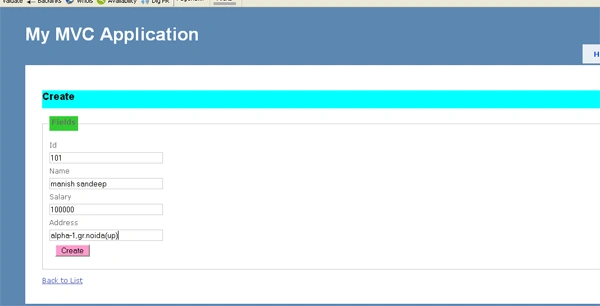
code of create views
- <%@ Page Title="" Language="C#" MasterPageFile="~/Views/Shared/Site.Master" Inherits="System.Web.Mvc.ViewPage<bhanu1.Models.sandeep1>" %>
- <script runat="server">
- </script>
- <asp:Content ID="Content1" ContentPlaceHolderID="TitleContent" runat="server">
- Create
- </asp:Content>
- <asp:Content ID="Content2" ContentPlaceHolderID="MainContent" runat="server">
- <h2 style="background-color: #00FFFF">Create</h2>
- <% using (Html.BeginForm()) {%>
- <%: Html.ValidationSummary(true) %>
- <fieldset>
- <legend style="background-color: #33CC33">Fields</legend>
- <div class="editor-label">
- <%: Html.LabelFor(model => model.Id) %>
- </div>
- <div class="editor-field">
- <%: Html.TextBoxFor(model => model.Id) %>
- <%: Html.ValidationMessageFor(model => model.Id) %>
- </div>
- <div class="editor-label">
- <%: Html.LabelFor(model => model.Name) %>
- </div>
- <div class="editor-field">
- <%: Html.TextBoxFor(model => model.Name) %>
- <%: Html.ValidationMessageFor(model => model.Name) %>
- </div>
- <div class="editor-label">
- <%: Html.LabelFor(model => model.Salary) %>
- </div>
- <div class="editor-field">
- <%: Html.TextBoxFor(model => model.Salary) %>
- <%: Html.ValidationMessageFor(model => model.Salary) %>
- </div>
- <div class="editor-label">
- <%: Html.LabelFor(model => model.Address) %>
- </div>
- <div class="editor-field">
- <%: Html.TextBoxFor(model => model.Address) %>
- <%: Html.ValidationMessageFor(model => model.Address) %>
- </div>
- <p>
- <input type="submit" value="Create" style="background-color: #FF99CC" />
- </p>
- </fieldset>
- <% } %>
- <div>
- <%: Html.ActionLink("Back to List", "Index") %>
- </div>
- </asp:Content>
Step 9
Press crlt+f5 and run your application.
Output
Rohan RaoPosted Jul 6, 2019, 2:03 AM
You should have shown the actual Edit logic for editing(updating) the data, But you have not. Not a professional way to write an article. Please mention the logic behind each and every operation.
Former memberPosted Jan 13, 2014, 2:12 AM
i used your code but i found resource not found error ex:view/create so please give me downloaded project facility
anil babuPosted Jun 26, 2013, 10:05 AM
Can you add one more column image also AND perform all operations,I want to inset images also,please give me this example code
nilesh mondePosted Mar 12, 2013, 6:17 AM
someone here to answer th e question
nilesh mondeeditedPosted Mar 12, 2013, 2:28 AMEdited Mar 12, 2013, 4:44 AM
Error 1 The type or namespace name 'personEntities1' could not be found (are you missing a using directive or an assembly reference?) F:\nilesh\MVC\bhanu1\bhanu1\Controllers\ranuController.cs 13 17 bhanu1
nilesh mondePosted Mar 11, 2013, 9:17 AM
Error 3 Metadata file 'F:\nilesh\loginform\bhanu1\bhanu1\bin\bhanu1.dll' could not be found bhanu1.Tests what is dll ?? plz reply me