

Introduction
To map a shared folder or a network drive with our network to our computer, we use the Map Network Drive. When we use locally connected computers in our home network we always prefer to share our files with other computer devices for eliminating the requirement of manually copying the file to external storage media and after that transferring them to other computers. It will be helpful when we want to quickly access a network drive or a shared folder without remembering the complete path of the location.
In Windows 8 if you want to map any remotely shared folder as a network drive to your local computer, you have to follow certain steps shown below:
Step 1. Log into the Windows 8 computer.
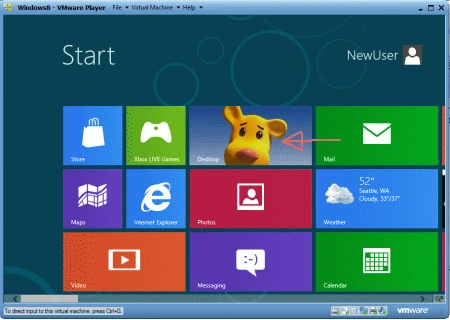
Step 2. From the given option available on the applications Click on Desktop.
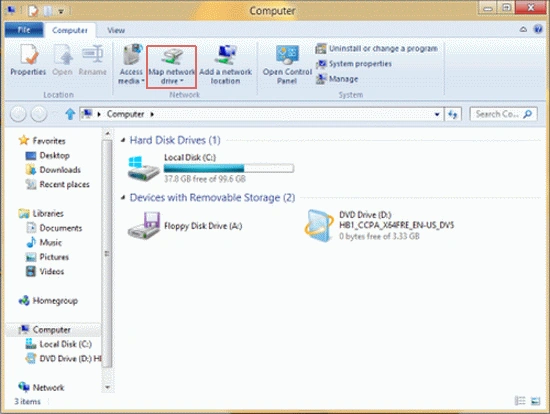
Step 3. Double-click on the Computer icon.
Step 4. Now Click on the Map Network Drive button from the standard toolbar.
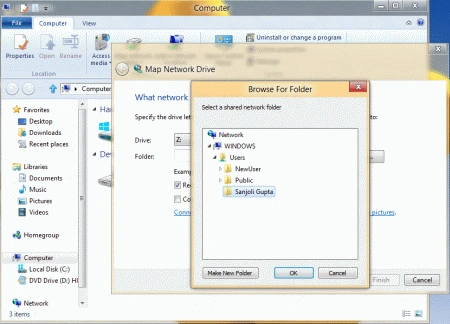
Step 5. Click on "Browse" to select a network drive of the folder; otherwise, if you know the folder or drive you can type it directly into the"Folder" text box.
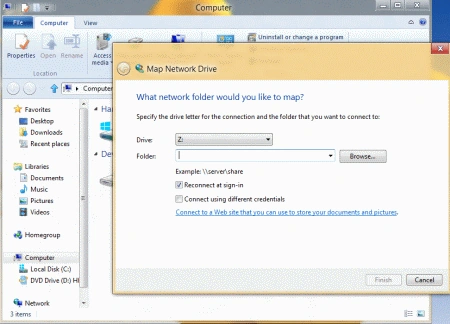
Step 6. Select "Reconnect at sign-in" to connect the drive each time when you log in.
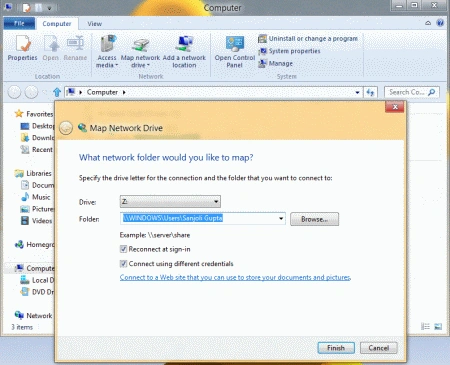
Step 7. It will ask you the permission to access the folder.
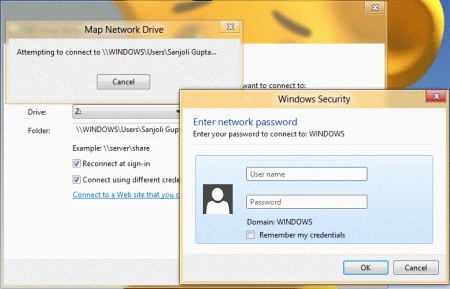
Step 8. Once located, click on the Finish button to map the remotely shared folder as a network drive to your local computer.
Resources
Summary
In this article, we learned about how to Map Network Drive in Windows 8.
Joe ReynoldsPosted Dec 11, 2012, 7:16 PM
I had been trying to map a network drive for a while and it kept asking for a password. Problem was trying to map a Wind 7 drive. I was doing it like I did with XP, but in Wind 7 if you get the list to come up when you click on browse and you see the group, go down to the Users/Public and it will map that. You can't map the library.