

Introduction
In this article we will learn how to open the popup windows in ASP.NET MVC. In ASP.NET we can easily use the window.open function to open the popup windows. In this article we also use the same function to open the popup but in MVC you know that every Controller method has an action to perform.
In this article, we will see two popup windows i.e.
- Modal Popup
- Modeless Popup window
So let's get started.
Modal Popup
Do you know what "modal windows" are? They are windows that, once opened, they do not provide any interaction with the rest of the windows in the application. If we need to interact with the rest of the windows we must have to provide some response like Ok or cancel or close; then we can only interact with other windows in our application. In many situation in windows forms based applications we use Message boxes; these are an excellent example of modal windows. In our application if we want to display confirmation dialogs then we can use these modal windows to get confirmation from the user. So let's create one modal popup window.
Step 1 : Start a new ASP.NET MVC Web application. Add a new controller called Home and in the Home controller, the Index method is available to you but there is not a view with it so add a view by right-clicking in Index action.
Step 2 : In index.aspx add one HTML button to open our modal popup window like below.
In index.aspx add one HTML button to open our modal popup window like below.
- <input type="button" id="btnpopup" value="Open Modal Popup" onclick="ShowModelPopUp();" />
- <script type="text/javascript">
- ShowModelPopUp = function () {
- window.showModalDialog('/Home/OpenModelPopup', "WindowPopup", 'width=400px,height=400px');
- }
- </script>
- window.showModalDialog('/Home/OpenModelPopup' , "WindowPopup", 'width=400px,height=400px');
- public string OpenModelPopup()
- {
- //can send some data also.
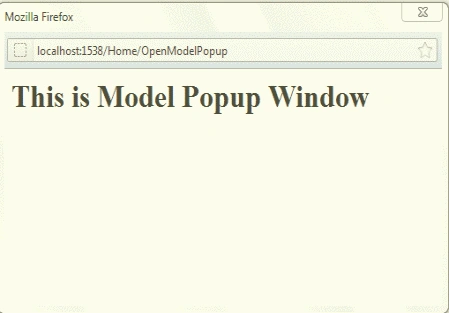
- return "<h1>This is Modal Popup Window</h1>";
- }
Modeless Popup
All of you are aware of modeless popup windows also. These windows are opposite of Modal windows which open but also provide interaction with other windows of application. We will create these windows in the same manner as the above modal windows we created. So let's start doing that. To create a Modeless popup put one button on our Index.aspx and write one more script to open a popup window like below.
- <input type="button" id="btnpopu" value="Open Modeless popup" onclick="ShowPopup();" />
- <script type="text/javascript">
- ShowPopup = function () {
- window.open('/Home/OpenPopup', "PopupWindow", 'width=400px,height=400px,top=150,left=250');
- }
- </script>
In the above line the window.open function takes as arguments the controller name with action name so create one more action or method in your home controller with the name OpenPopup like below.
- public string OpenPopup()
- {
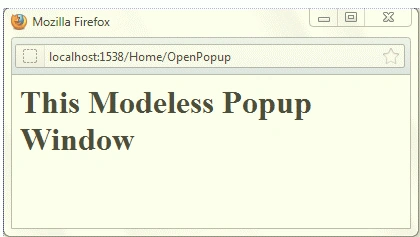
- return "<h1> This Is Modeless Popup Window</h1>";
- }
It's ready now; we have both Modal as well as Modeless popup windows. Run your application and see the results like below.
Modal Popup Window
Modeless Popup Window
Conclusion
Using a simple JavaScript we can create a modal as well as modeless popup for our ASP.NET MVC application.
gampa dugPosted Feb 21, 2024, 5:58 PM
Wait: That was ShowModalDialog() not ShowModalPopup()
Joe PoolPosted Jun 7, 2023, 6:42 PM
In Chrome, the error is "window.showModalDialog is not a function"
Scott MingusPosted Sep 7, 2022, 11:21 PM
This works as long as I use IISExpress to run the program - then the popup window opens just fine. However, when I change it to use Local IIS, i gives a 404 when trying to open the popup window.
Rudra SinghPosted Jul 1, 2022, 7:10 AM
Hey Krishna it's working but can i put it under foreach loop in cshtml page, so that it will work for all rows defined under foreach loop, actually i have to add file attachment as well as dynamic download functionalities for all unique rows. Actually i am facing nested form problem, so the fileUpload function defined in controller is not responding. Please guide me .....
vamsi kumarPosted Apr 20, 2016, 9:43 AM
It worked in IE, but failed in Chrome coz it is not supporting showModalDialog() function
William ChukwuPosted Dec 9, 2015, 7:03 AM
I have just tried it but it is not working... Kindly confirm if there are any libraries required for this implementation to work.
arpit vaishPosted Jul 29, 2015, 3:11 AM
It is very good example.it save my lot of time.Thanks
yuvaraj pPosted Feb 9, 2015, 2:46 AM
very useful
Saravanakumar SekaranPosted Nov 29, 2014, 10:12 PM
So nice
Santosh YadavPosted Apr 14, 2013, 8:21 AM
Nice article.
Ricardo AranibarPosted Apr 4, 2013, 9:16 AM
Hi Krishna and Muhammad Muhammad, If the call is windospopup presentation layer that is not the way? anyway we can call the controller and the model as stated in the article. I would like if you could explain the difference between your proposal with the article to clarify the doubts.
Muhammad ArshadeditedPosted Dec 6, 2012, 3:52 AMEdited Dec 6, 2012, 3:57 AM
no no this is not a way for popup window in asp.net/MVC you should use "jquery.unobtrusive-ajax.min.js" and "jquery.unobtrusive-ajax.js" with jquery ui and you can call any view as popup by using Ajax.actionlink like as " @Ajax.ActionLink("openPopup", "SomeAction", new AjaxOptions { HttpMethod = "GET", UpdateTargetId = "result", InsertionMode = InsertionMode.Replace, OnSuccess="openPopup" }) Add action that returns the partial view. [HttpGet] public PartialViewResult SomeAction() { return PartialView(); }
Sonakshi SinghPosted Jan 22, 2012, 11:45 PM
Hey its is really very useful article for me... thank you so much for sharing
Daisy KrausePosted Jan 22, 2012, 11:12 PM
Hi Krishna. Its a great concept which you have discussed here.