SIGN UP MEMBER LOGIN:    
ARTICLE

SplitContainer in C#

Posted by Mahesh Chand Articles | Windows Controls C# November 15, 2005
If you have ever written Outlook type user interfaces using Windows Forms, you must be familiar with Splitter control. The Splitter control used to provide functionality to split two controls and dock them.
Reader Level:


If you have ever written Outlook type user interfaces using Windows Forms, you must be familiar with Splitter control. The Splitter control used to provide functionality to split two controls and dock them.  Now Windows Forms 2.0, that ships with Visual Studio 2005 replaces Splitter control with a new control called SplitContainer.

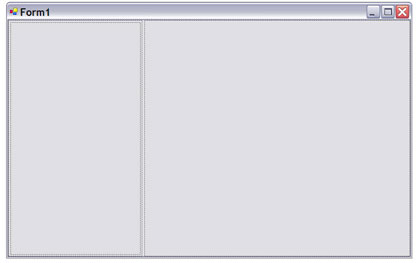
SplitContainer is a combination of panels and a splitter control. Two panels are separated by the splitter control. The default SplitContainer is shown in Figure 1.
 

SplitContainer1.jpg 
Figure 1. SplitContainer control

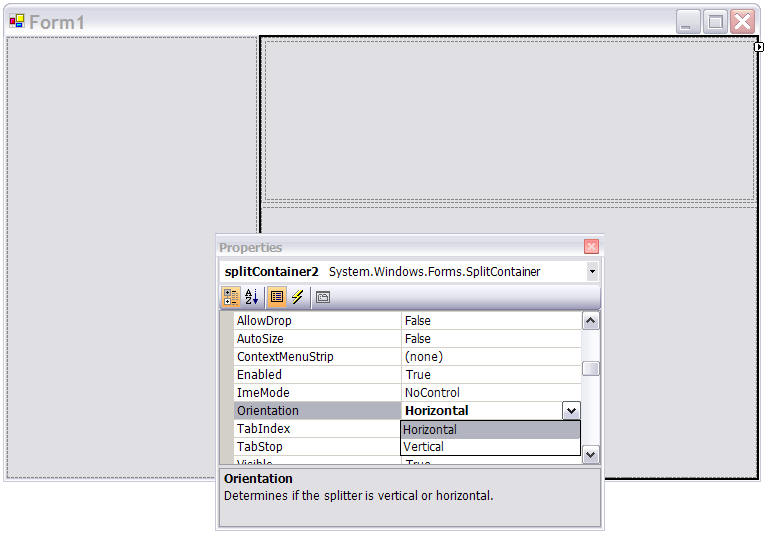
In Figure 1, you can see there is a left panel (Panel1) and there is a right panel (Panel2) separated by a splitter. Now to create an Outlook type application, I drop one more SplitContainer on the right panel of SplitContainer1. By default the orientation of SplitContainer is vertical. I set it to Horizontal. See Figure 2. 
SplitContainer2.jpg
Figure 2. Adding second SplitContainer with Orientation = Horizontal.

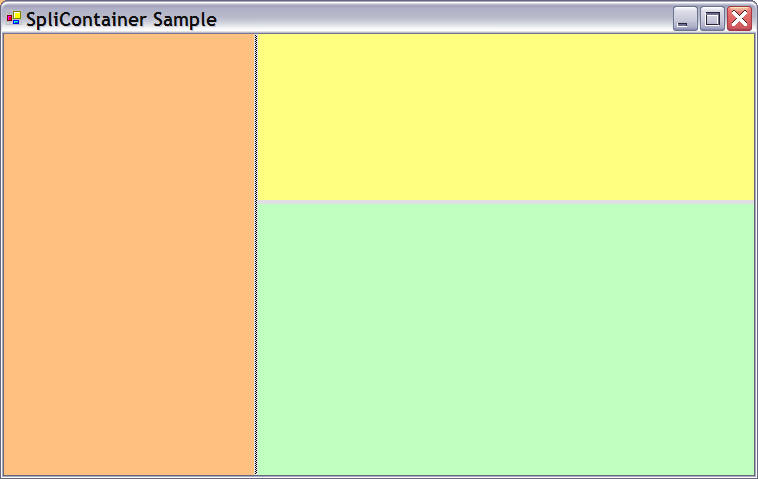
Now I change the color of various panels so they can be easily identified. Now the final form looks like Figure 3. You can resize the panels by using the splitter. 
SplitContainer3.jpg
Figure 3. Outlook style application.

Now you can drop TreeView, ListBox, DataGrid and other controls on these various panels and create the application whatever way you want.

Login to add your contents and source code to this article
share this article :
post comment
 

Can you take a screen shot of your application and post it here so I can understand the layout of your application.

Posted by Mahesh Chand Nov 09, 2010

Hi I have a problem, I have a MDI with a SplitContainer and this with 2 panels in the first panel I have a menu and the second is where I open the forms, when a form from the menu that is in the panel1 if this works but when I open child form a third form does not work inside the panel could help me

Posted by Manuel Nov 08, 2010

Can you post this in English?

Posted by Mahesh Chand Nov 08, 2010

Are you tying to create an MDI application? There are different ways to build MDI application. Search this site for MDI application.

Posted by Mahesh Chand Nov 08, 2010

hola tengo un problema, tengo un MDI con un splitContainer y este con 2 paneles en el primer panel tengo un menu y en el segundo es donde abro los formularios, cuando un formulario desde el menu que esta en el panel1 si funciona pero cuando de este formulario del hijo quiero abrir un tercer formulario no dentro del panel no funciona me podrian ayudar

Posted by Manuel Nov 08, 2010
Team Foundation Server Hosting
Become a Sponsor
PREMIUM SPONSORS
  • ceTE software specializes in components for dynamic PDF generation and manipulation. The DynamicPDF™ product line allows you to dynamically generate PDF documents, merge PDF documents and new content to existing PDF documents from within your applications.
    The leading .NET charting control now features PDF, Flash and Silverlight export, visualization of large datasets and more. Deliver true charting functionality to your BI, Scorecard, Presentation or Scientific apps. Download evaluation now.
Team Foundation Server Hosting
Become a Sponsor