Introduction
The most popular instrument to access database data for .NET applications is ADO.NET. This set of components contains three main classes those are used to manipulate and store data: DataReader, DataSet and DataAdapter. DataReader is only able to read data and can't work as data source for data-aware components like DataGridView; DataSet provides all interfaces to be a data source but disconnected model considers some restrictions that can become important for some kind of applications, especially for desktop programs that work under multiuser concurrent environment and change database data actively. Below we consider main restrictions and popular ways to solve them; non standard solutions is considered also.
Prerequisites
All code samples are intended for Microsoft Visual Studio 2005; as database we have used Oracle 10i and Oracle Development Tools (ODT.NET) to generate sample code to access data, last version is available here: http://www.oracle.com/technology/software/tech/
windows/odpnet/index.html but the main principles those are shown are also suitable for other RDBMS.
Concurrent model
One of the serious problems of ADO.NET is concurrent model; it's not a secret that ADO.NET uses optimistic concurrency. The disconnected nature of the DataSet makes it quite powerful. However, optimistic concurrency can lead to problems, as in the case of frequent data updates. Optimistic concurrency means that you assume no one will be making edits to a record while you are making your edits. Because you are "optimistic" that two people will not edit the same record simultaneously, you do not apply a lock to the record as soon as a user starts to edit it. Instead, you apply the lock only when the actual update is attempted.
To check for optimistic concurrency violations, the Data Adapter Configuration Wizard writes SQL statements that verify the record you are about to update or delete has not changed since you originally loaded it into your DataSet. The Wizard does this by adding a rather large WHERE clause to the SQL statement to verify that it is updating or deleting an exact match of what was downloaded and placed in the DataSet.
In our samples we have used a simple table named "COLORS".
create table COLORS
(
COLOR_ID NUMBER not null,
COLOR_NAME varchar2(100) not null,
RED number not null,
GREEN number not null,
BLUE number not null,
CONSTRAINT PK_COLORS PRIMARY KEY (COLOR_ID)
)
--fill table-------------
insert into colors(color_id, color_name, red, green, blue) values(1, 'black', 0, 0, 0);
insert into colors(color_id, color_name, red, green, blue) values(2, 'white', 254, 254, 254);
insert into colors(color_id, color_name, red, green, blue) values(3, 'red', 254, 0, 0);
insert into colors(color_id, color_name, red, green, blue) values(4, 'green', 0, 254, 0);
insert into colors(color_id, color_name, red, green, blue) values(5, 'blue', 0, 0, 254);
insert into colors(color_id, color_name, red, green, blue) values(6, 'yellow', 0, 254, 254);
commit;
To generate program simply drag table "COLORS" from OracleExplorer panel that is part of ODT.NET tool and drop it on application form (fig 1).
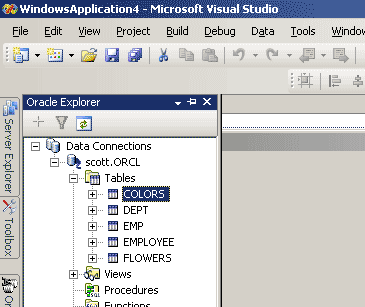
figure 1.
Wizard generates automatically OracleDataAdapter and OracleConnection so we should add untyped DataSet, DataGridView manually as well as Button to post changes in database and few lines of code to make our program work:
public Form1()
{
InitializeComponent();
colorsOracleDataAdapter1.Fill(dataSet1, "COLORS");
dataGridView1.DataSource = dataSet1.Tables["COLORS"];
}
private void button1_Click(object sender, EventArgs e)
{
try
{
colorsOracleDataAdapter1.Update(dataSet1, "Colors");
//Display confirmation message
MessageBox.Show("Changes saved successfully !");
}
catch (Exception ex)
{
MessageBox.Show(ex.ToString(), "Exception Occured");
}
}
Now we can see how update SQL that is generated by wizard looks like. Update Command text:
UPDATE
"COLORS" SET "COLOR_ID"=:current_COLOR_ID_param0, "COLOR_NAME"=:current_COLOR_NAME_param1, "RED"=:current_RED_param2, "GREEN"=:current_GREEN_param3, "BLUE"=:current_BLUE_param4
WHERE"COLOR_ID"=:original_COLOR_ID_param5
AND "COLOR_NAME"=:original_COLOR_NAME_param6 AND "RED"=:original_RED_param7
AND "GREEN"=:original_GREEN_param8 AND "BLUE"=:original_BLUE_param9
The default behavior of Data Adapter Configuration Wizard is to include all the columns in the WHERE clause. This prevents your code from overwriting changes made by other users between the time your code retrieves the row and the time your code attempts to submit the pending change in the row. Because the value of another user's updated column for a row of data has changed in the database, no row in the table satisfies all the criteria in the query's WHERE clause. Thus, the database does not modify the row.
This update query works, but obviously it can't be optimal, because RDBMS has to select not indexed parameters. So it is suitable for small tables like our "COLORS" table, but for real tables those contain significant number of rows this query can hardly slow down database.
We should modify this query and make some optimization. As a variant we can include only the primary columns in the SQL UPDATE queries:
UPDATE
"COLORS" SET "COLOR_ID"=:current_COLOR_ID_param0, "COLOR_NAME"=:current_COLOR_NAME_param1,"RED"=:current_RED_param2, "GREEN"=:current_GREEN_param3, "BLUE"=:current_BLUE_param4
WHERE
"COLOR_ID"=:original_COLOR_ID_param5
This creates a "last in wins" updating scenario. Both update attempts will succeed. Obviously, the database is not going to maintain both sets of changes. The changes made by the last update will override the previous changes. The "last in wins" scenario is not appropriate if you want to prevent users from unwittingly overwriting other users' changes.
Anyway we can improve this situation and add timestamp columns to "COLORS" table and include the Primary Key and Timestamp Columns in WHERE clause:
alter table
COLORS add TIMESTAMP date;
Also we should create a trigger after insert or update to generate new value in this column:
create or replace trigger
TBIU_COLORSbefore
insert or update on COLORSfor each rowdeclare
begin
select sysdate into :new.timestamp from dual;end
TBIU_COLORS;
And create index to optimize query:
create index
INDX_COLORS_ID_STAMP on COLORS (color_id, timestamp);
Any time the contents of a row changes, SQL Server will modify the value of the timestamp column for that row. We make our query look like this:
UPDATE
"COLORS" SET "COLOR_ID"=:current_COLOR_ID_param0, "COLOR_NAME"=:current_COLOR_NAME_param1, "RED"=:current_RED_param2, "GREEN"=:current_GREEN_param3, "BLUE"=:current_BLUE_param4
WHERE
"COLOR_ID"=:original_COLOR_ID_param5 and "TIMESTAMP"=:original_TIMESTAMP_param6
Because the server will generate a new value for the timestamp column each time it updates a row, you can use a combination of the primary key and timestamp columns in the WHERE clause of your query-based updates to ensure that you don't overwrite another user's changes. The disadvantage of this method is necessity to make extra job, especially if you have to work with existing database and all tables was made without timestamp column and hold extra data in your database.
As we can see, we can choice one of this ways to use in our ado.net applications. A big plus of those methods is universality, but universality doesn't mean optimality and convenience and of course it's not a cure all. Except individual disadvantages for each method there are common disadvantages:
- if you add a column or column in table "COLORS" you should make changes in your UPDATE statement manually and recompile application;
- each time application must update entire row even if you have changed only one column value.
Using RDBMS specific mechanism to handle optimistic concurrency violations.
Each database has a mechanism that maintains different concurrent models. The important part of this mechanism is record locking. The moment when you lock a database record considers the type of concurrency: optimistic or pessimistic. If you apply to lock record as soon as a user have started to edit it, it is pessimistic concurrency and all other users can't change this record until first user hasn't finished editing it and posted changes to database. If you apply to lock record only when the actual update is attempted it is optimistic concurrency. Using ADO.NET DataSet and DataAdatper we have no choice, you can use only optimistic variant, but the realization of the one is far away from ideal.
Ok, but how looks like the 'right' realization? The main scenario of optimistic concurrency:
- User has changed a record and tries to post changes in database.
- Application tries to execute "select for update" for current record. If record is locked by another user, the first one gets concurrency violation.
- If record is unlocked, application checks if record was changed by another user. I record was changed application informs user about it and offer to overwrite or cancel post record.
- If record is unchanged, or user decided to overwrite it, application updates only columns those were changed by current user.
- Application executes "commit" if changes were made successfully or "rollback" if operation was failed to unlock current record.
"Select for update" is very important part, because in Oracle database user don't see changes, those was made by another user until "commit" was made, but since we have executed "select for update" for some record oracle will throw appropriate exception if another user tries to change it.
Thank god, Oracle has unique identifier for each table named ROWID so we can use it as universal row identifier in any program. To realize optimistic model for Oracle database, first we should change CommandText of UpdateCommand as it is shown below:
UPDATE
"COLORS" SET "COLOR_ID"=:current_COLOR_ID_param0, "COLOR_NAME"=:current_COLOR_NAME_param1, "RED"=:current_RED_param2, "GREEN"=:current_GREEN_param3, "BLUE"=:current_BLUE_param4
WHERE
"ROWID"=:original_ROWID_param5.
Also we should delete parameters high that 4 and add new one that has type Varchar2 (see fig 2 below).
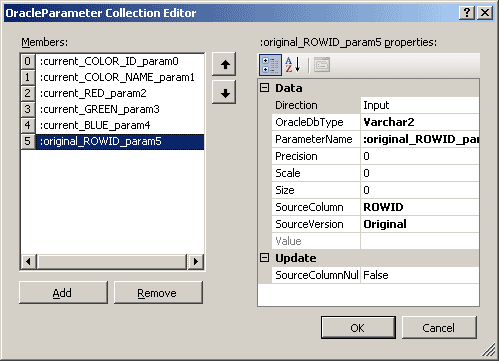
figure 2.
Then we should write a RowUpdating event handler for OracleDataAdapter1.
private void colorsOracleDataAdapter1_RowUpdating
(object sender, Oracle.DataAccess.Client.OracleRowUpdatingEventArgs e)
{
OracleCommand oracleDMLCommand = null;
OracleDataReader oracleDataReader = null;
if (e.StatementType != StatementType.Update)
return;
try
{
//clear row erros
e.Row.ClearErrors();
//create command
oracleDMLCommand = colorsOracleConnection1.CreateCommand();
oracleDMLCommand.CommandType = CommandType.Text;
//select for update nowait
oracleDMLCommand.CommandText = "select * from colors c where
c.rowid= :cur_rowid for update nowait";
oracleDMLCommand.Parameters.Add("cur_rowid",
OracleDbType.Varchar2,
e.Row["ROWID"].ToString().Length,
e.Row["ROWID"].ToString(), ParameterDirection.Input);
//execute command
oracleDataReader = oracleDMLCommand.ExecuteReader();
//read data from database reader
while (oracleDataReader.Read())
{
//iterate all fields from datareader
for (int i = 0; i < oracleDataReader.FieldCount; i++)
{
//compare original data in column with data from
// database
if (e.Row[oracleDataReader.GetName(i),
DataRowVersion.Original].ToString() !=
oracleDataReader.GetValue(i).ToString())
{
//We found a difference, inform user about it
//and offer to overwrite record
if (DialogResult.Cancel == MessageBox.Show("Row
was changed by another user, rewrite anyway?",
"Warning", MessageBoxButtons.OKCancel, MessageBoxIcon.Question))
throw new Exception("Row was changed
by another user");
else
break;
}
}
}
}
catch (OracleException ee)
{
//set row error
e.Row.SetColumnError("COLOR_ID", ee.ToString());
throw ee;
}
catch (Exception ex)
{
//set row error
e.Row.SetColumnError("COLOR_ID", ex.ToString());
throw ex;
}
finally
{
if(oracleDataReader != null)
oracleDataReader.Close();
if (oracleDMLCommand != null)
oracleDMLCommand.Dispose();
}
}
OracleDataAdapter executes "commit" command automatically after update command so we shouldn't worry about it. It's not idial solution but at least it checks if record is locked, checks if changed by another user and allows user to overwrite the new record if necessary.
Tests
To test our application one can use sqlplus application. When application is started window like in fig.3 appears.
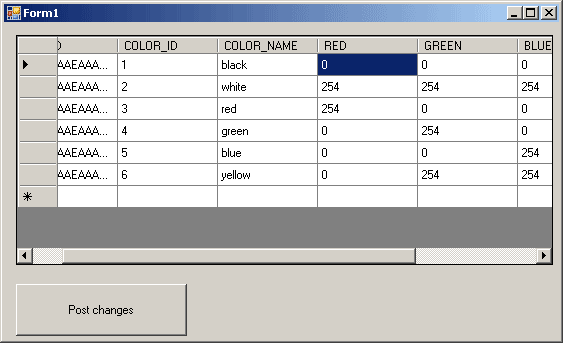
figure 3.
Then connect as scott/tiger using sqlplus and execute command:
select
* from colors where color_id=1 for update nowait;
Then I can try to change some data using our application: for example I change red column from 0 to 5. When I try to post changes; I get ORA-00054: resource busy and acquire with NOWAIT specified. Ok, using sqlpus I execute following command:
update
colors set red=1 where color_id=1;commit
;
So I changed data row and commit changes. Now this record should be ready for modifications. I try to post changes using our application:
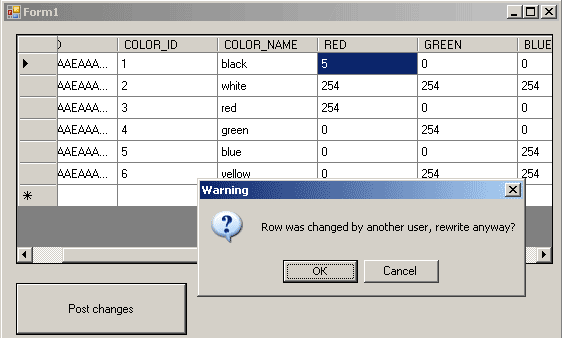
figure 4.
So now I see that record is ready for modifications and it was changed by another user (fig.4). I decided to rewrite it and push OK but of course can cancel. If you select data from this table you can see that this row was changed by our application and concurrency violation was handled correctly.
As was shown here, handling optimistic concurrency violations gracefully can be done with some coding effort.
ADO.NET problems, concerning concurrent model can be solved by another way. Obviously, one can write visual component that would be able to set suitable concurrent model but not only optimistic and like DataSet be data source for data-aware components.
Snotra Tech Oracle Data Components for .NET
For our third sample we have used Snotra Tech Oracle Data Components for .NET that contain STOraDataTable component. Unlike DataTable it is connected dataset and it checks all oracle constraints "on the fly" and posts all changes, those are have made by user in database automatically, so we shouldn't call command like colorsOracleDataAdapter1.Update. Component allows both pessimistic and optimistic concurrency and offer a good Oracle specific realization of them. When user has made some changes in DataGrid and is going to another row, STOraDataTable validates data and posts changes to database. Unlike DataAdapter it posts only columns those were changed by user. You can download Snotra Tech Oracle Data Components from here http://www.snotratech.com/products/snocnetdemo.exe(9,5 MB). Close Visual Studio environment and install it. It takes odp.net 2.102.2.20 or 9.2.0.700 as well as Oracle client installed on your PC.
After installation SNOC.NET tab should appear on Visual Studio Toolbar (fig 5).
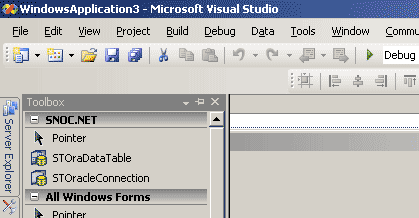
figure 5.
To make a simple application, drop STOracleConnection and STOraDataTable to application form. DataGridView also should be on form.
STOracleConnection takes connection string so write this string as it shown on fig.6.
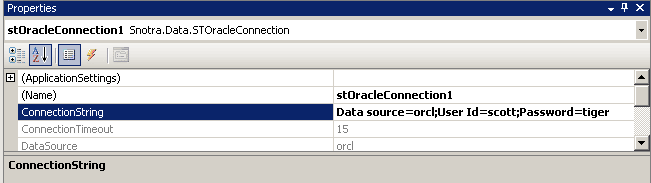
figure 6.
STOraDataTable also takes some options should be defined. See fig. 7.
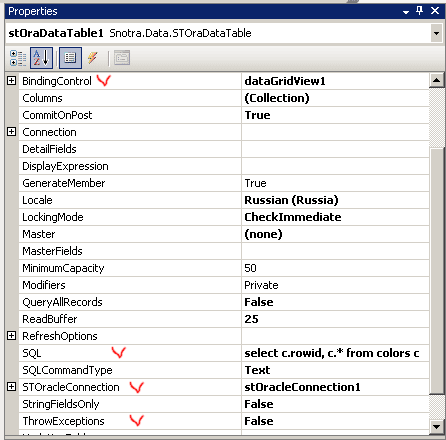
figure 7.
Here on need to set up correctly 4 properties:
- BindingControl property allows STOraDataTable to control DataGridView and user can't leave record if it contains some errors.
- SQL property allows STOraDataTable from where to select data, all other SQLs (insert, update, delete) component generates automatically.
- STOracleConnection property sets oracle connection component.
- ThrowException property defines exception propagation. If oracle error occurred and ThrowException is false, exception will be handled by STOraDataTable only.
OK, put also three lines of code and application is ready to start:
public Form1()
{
InitializeComponent();
dataGridView1.DataSource = stOraDataTable1;
stOracleConnection1.Open();
stOraDataTable1.Open();
}
Let's see how to set suitable concurrent model using STOraDataTable component.
STOraDataTable has property named LockingMode that can be on of 4 variants:
- CheckImmediate. When the user starts editing a record, it is locked and a check is performed to see if it has been changed. The lock remains until the user posts or cancels the changes.
- LockDelayed. When the user starts editing a record, a check is performed to see if it has been changed, but the record is not locked. Therefore, when the user posts the record, it is locked and checked again.
- LockImmediate. When the user posts an edited record, it is locked and a check is performed to see if it has been changed. After this, the lock is released.
- None. No locking or checks are performed. This should only be used in single user applications.
By default LockingMode is set to CheckImmediate and this mode works similar to our last realisation of optimistic concurrency. But here you have a good choise and realisation that is very suitable for Oracle database.
Points of Interest
I came to .NET from Delphi and was a bit frustrated those possibilities that disconnected ADO.NET components offer, so I decided to write my own solution that allows to use concurrent models those I need and some other extra features like single record refreshing, partial data selection and so on.
Consclusion
To write effective SQL code we suggested do not make a cure all and the solution that we offer nowadays is suitable for Oracle database only, but this restriction is temporary. Snotra Tech Oracle Data Components is shareware licensed, but we have a number of free licenses and ready to deliver this soft for interested persons for free.