Tools used : .NetFramework Beta 2, Editplus.
Introduction
Microsoft had made lot of Changes for Beta2, some of the changes are old Namespace such as System.WinForms modified to System.Windows.Forms. In addition no. of new Namespaces like Microsoft.CSharp, Microsoft.JScript, Microsoft.Vsa etc... are added. In Beta2, namespace Microsoft.Win32.Interop is integrated with mscorlib library, so no need to use this library while compiling, whereas it is compulsory in Beta1.
TimeTicker sample application can be compatible with Beta2 with the following modifications.
1) Change namespace System.WinForms to System.Windows.Forms
2) Change BorderStyle property to FormBorderStyle
3) Change the Methods FromHWND to FromHwnd and FromARGB to FromArgb
Source code
/*
Author Mokhtar B
Date 4th July, 2001
Company Adsoft Solutions Pvt. Ltd
Application Type Windows Forms
*/
using System;
using System.Windows.Forms;
using System.Drawing;
public class TimeTicker:Form
{
private Graphics g;
private Font DispFont;
private string CDate;
private SolidBrush MyBrush;
// Constructor
public TimeTicker()
{
InitializeComponents();
}
public void InitializeComponents()
{
DispFont = new Font("Arial",35,FontStyle.Bold);
MyBrush = new SolidBrush(Color.Red);
CDate = DateTime.Now.ToString();
g = Graphics.FromHwnd(this.Handle);
//Instantiating Timer Class
Timer aTimer = new Timer();
aTimer.Interval = 1000; // 1000 milliseconds
aTimer.Enabled = true;
aTimer.Tick += new EventHandler(OnTimer);
//Setting Form Properties
this.Size = new Size(310, 150);
this.Text = "Time Ticker";
this.MaximizeBox = false;
this.MinimizeBox = false;
this.FormBorderStyle = FormBorderStyle.FixedSingle;
//Setting Form Icon through Icon Class
this.Icon = new Icon("clock.ico");
this.StartPosition=FormStartPosition.CenterScreen;
}
protected override void OnPaint(PaintEventArgs e)
{
g.DrawString(CDate.Substring(9) , DispFont,MyBrush,10,30);
}
//Timer Event
protected void OnTimer(object source, EventArgs e)
{
CDate = DateTime.Now.ToString();
g.Clear(Color.FromArgb(216,208,200));
g.DrawString(CDate.Substring(9) , DispFont,MyBrush,10,30);
}
public static void Main()
{
Application.Run(new TimeTicker());
}
}
Compilation
csc /t:winexe /r:System.dll /r:System.Windows.Forms.dll /r:System.Drawing.dll TimeTicker2.cs
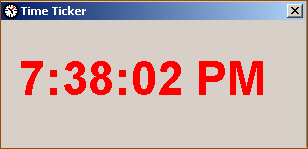
Output