SIGN UP MEMBER LOGIN:    
ARTICLE

Building a Setup for a Windows Forms Application

Posted by Rahul Kumar Saxena Articles | Windows Forms C# August 23, 2007
This step by step article shows how to build a setup executable for a Windows Forms application using Visual Studio .NET.
Reader Level:

This step by step tutorial guides you towards how to create a setp for a Windows Forms application using Visual Studio 2005.


Step 1: First of all, create a Windows Forms application. 


Step 2: Next add a setup project by clicking on File-> Add-> New Project.

By clicking here the window will open like this:
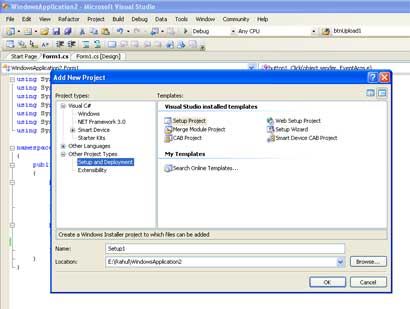


Figure 1:

Step 3: Select here Setup and Deployment in the left side bar in project types.
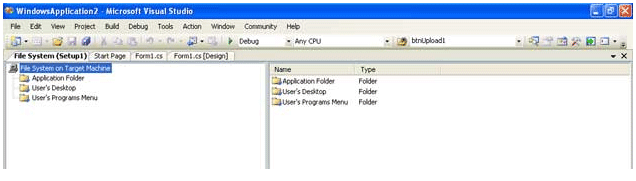


Figure 2:

Here we find three options as following:

  1. Application Folder
  2. User's Desktop
  3. User's Program Menu

Step 4: These three options are the three places where we want to copy our setup fules during the installation process. From here we have to select one option. Suppose I select User's Desktop. Then Right click on User's Desktop option and select Add-> Project Output. The window will look like as.
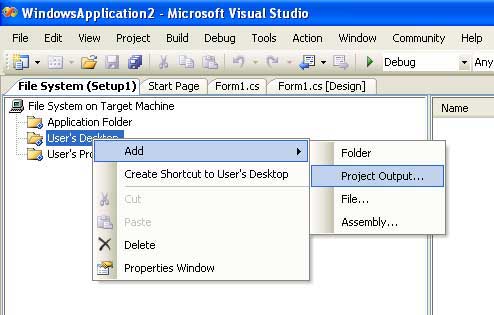


Figure 3:

Step 5: After clicking on Project Output, a new window will open. Here we select first four options. Now click on OK.
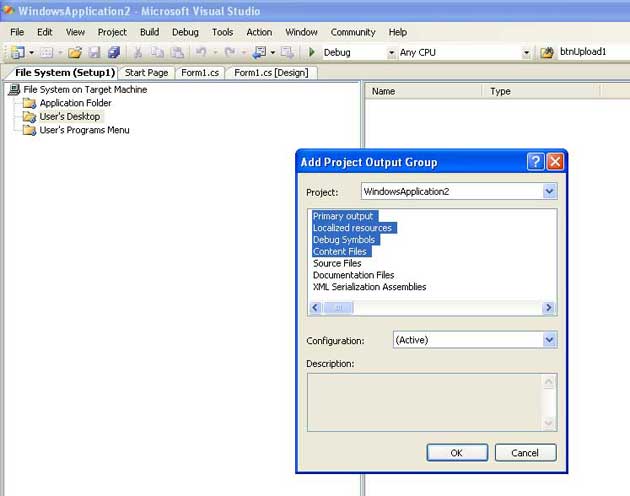


Figure 4:

Step 6: After clicking on OK, Rebuild the Setup from Build option in Menu bar like as.
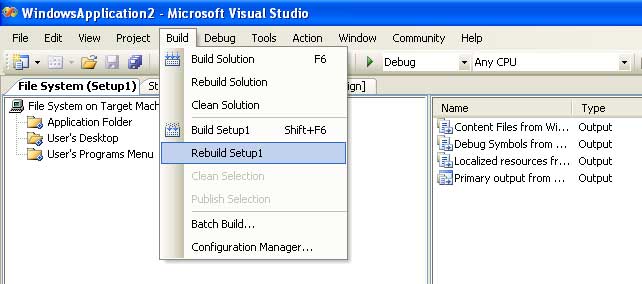


Figure 5:

Step 7: After this, let's test our setup by going right clicing on the setup project in Solution Explorer and click on Install menu item. 
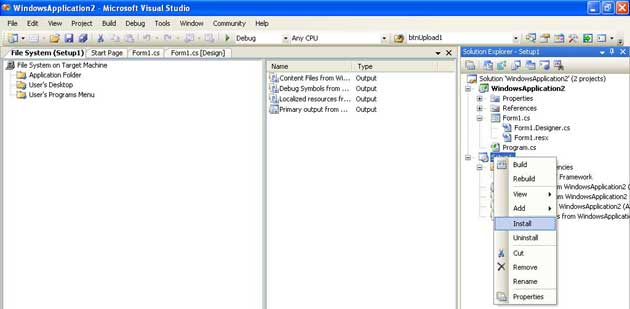


Figure 6:


The setup process will start, which looks like this: 
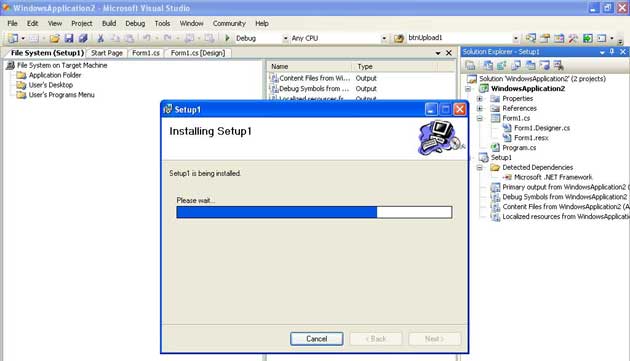


Figure 7:

Step 8: After copmpleting the installation go on desktop there you will find all files you have included in the setup on the desktop.


Login to add your contents and source code to this article
share this article :
post comment
 

I have created a c# windows project and now company wants to upload installation files on server for people to download and use it.But problem is i dont know how to create or install sql server at there end where i can create database programmatically if there is not sql server engine how projects is going to work.. Please help

Posted by prashant pol Apr 01, 2012

This will make setup of my project but i have image on my button and when i run my software exefile it generate error."Unhandled exception has occurred in your application ..\image\btn_stop.red.jpg".But other function work properly. Can you solve this.

Posted by jaydeep jadeja Jan 13, 2012

Thank you

Posted by krishan kumar singh Aug 10, 2011

Great article. Thank you!

Posted by ritu mahajan Aug 01, 2011

This resource is really helpful. Now I want to know, if its easy to add a font to the system while installing windows application. Thanx in advance

Posted by bipin shrestha Jul 11, 2011
Become a Sponsor
PREMIUM SPONSORS
  • The leading .NET charting control now features PDF, Flash and Silverlight export, visualization of large datasets and more. Deliver true charting functionality to your BI, Scorecard, Presentation or Scientific apps. Download evaluation now.
    ceTE software specializes in components for dynamic PDF generation and manipulation. The DynamicPDF™ product line allows you to dynamically generate PDF documents, merge PDF documents and new content to existing PDF documents from within your applications.
Team Foundation Server Hosting
Become a Sponsor