

The following is my Data Table from which I will show the records.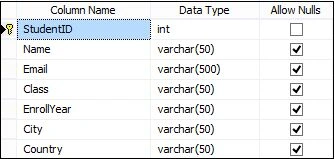
Image 1
Open Visual Studio and go to "File" -> "New" -> "Project..." and you will get the New Project window as in the following: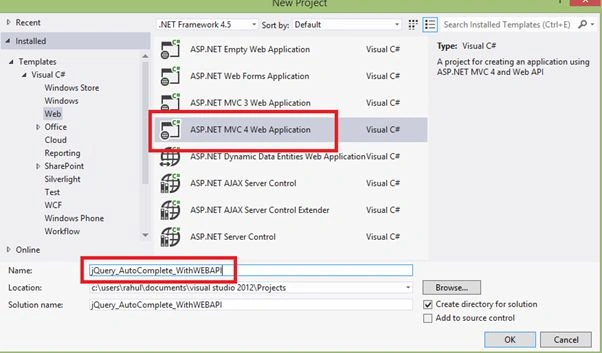
Image 2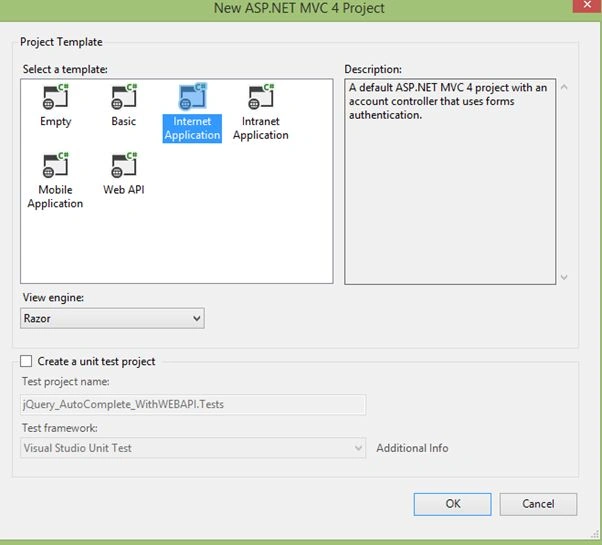
Image 3
We will now add our Data Table. So right-click on the Models folder then select "Add" -> "ADO.NET Entity Data Model".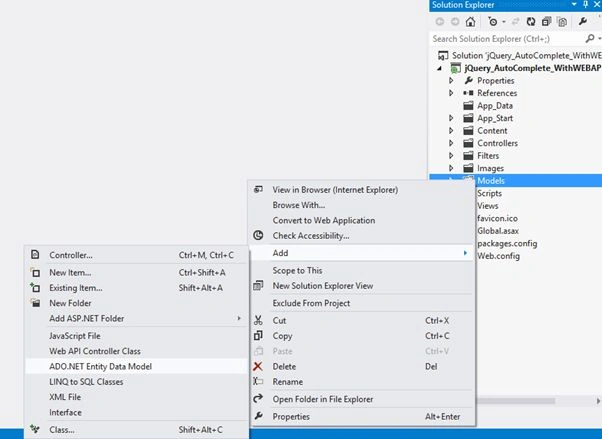
Image 4
Give it a name.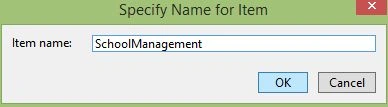
Image 5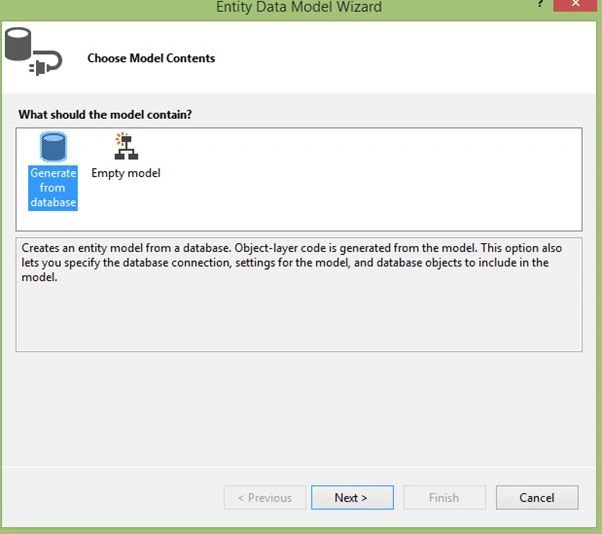
Image 6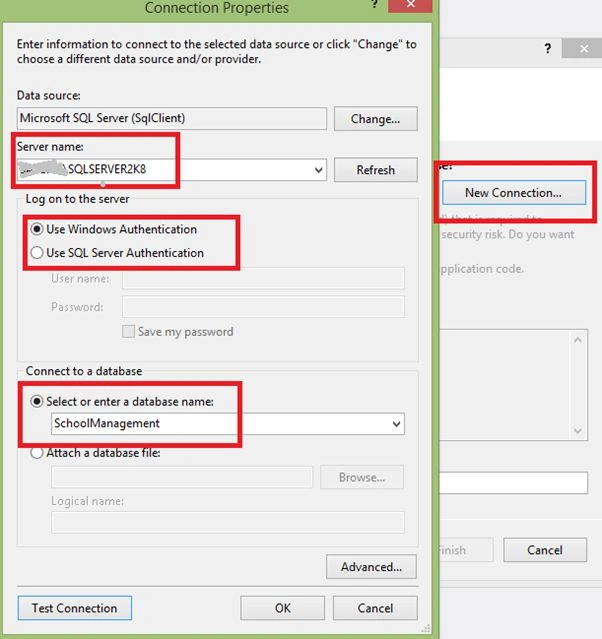
Image 7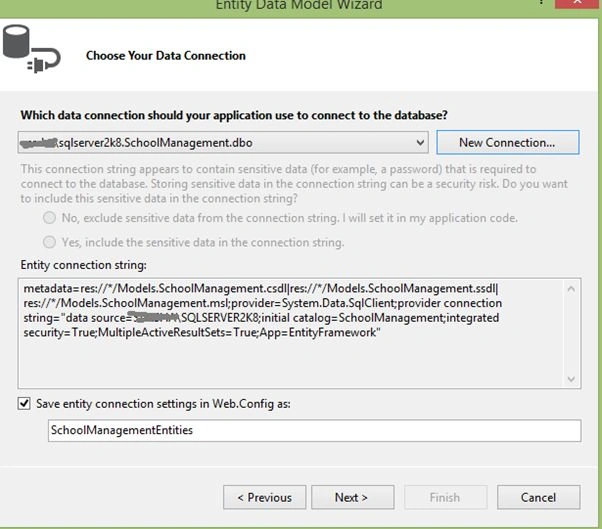
Image 8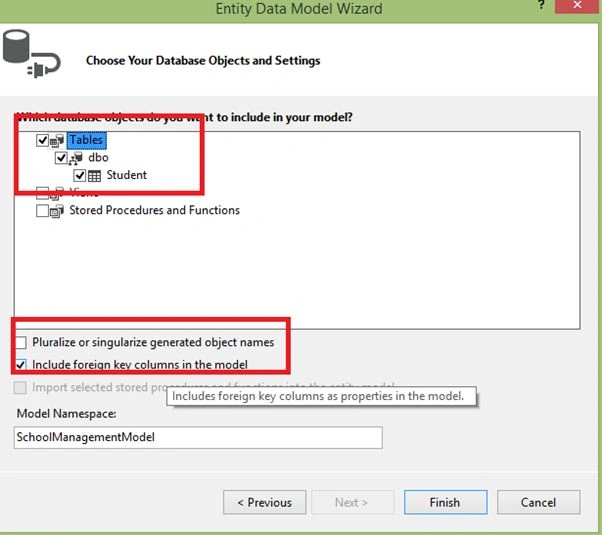
Image 9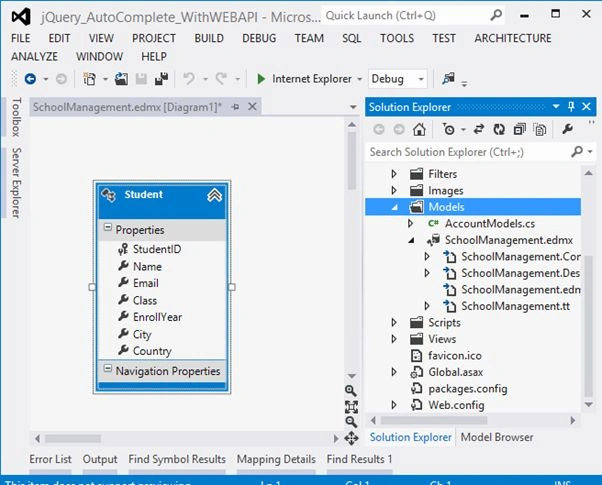
Image 10
Now it is time to add the Web API. So Right-click on Controller -> Add -> Controller.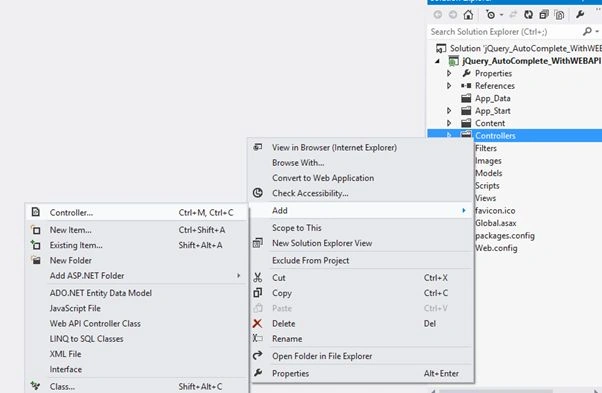
Image 11
Select API Controller with read/write actions, using Entity Framework from the Template, select Model Class and select Data Context Class then click Add.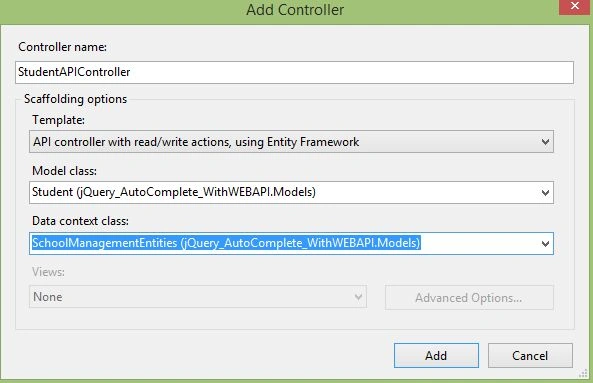
Image 12
This StudentAPI controller will generate code for Get, Put, Post & Delete methods. Here I modify my Get method since I need to pass my search text.
Here we need only a Get method.
The following is my StudentAPIController class:
- using System;
- using System.Collections.Generic;
- using System.Data;
- using System.Data.Entity;
- using System.Data.Entity.Infrastructure;
- using System.Linq;
- using System.Net;
- using System.Net.Http;
- using System.Web;
- using System.Web.Http;
- using jQuery_AutoComplete_WithWEBAPI.Models;
- namespace jQuery_AutoComplete_WithWEBAPI.Controllers
- {
- public class StudentAPIController : ApiController
- {
- private SchoolManagementEntities db = new SchoolManagementEntities();
- // GET api/Student
- public IEnumerable<Student> GetStudents(string searchText)
- {
- return db.Student.Where(m => m.Name.Contains(searchText)).ToList();
- }
- // GET api/StudentAPI/5
- public Student GetStudent(int id)
- {
- Student student = db.Student.Find(id);
- if (student == null)
- {
- throw new HttpResponseException(Request.CreateResponse(HttpStatusCode.NotFound));
- }
- return student;
- }
- // PUT api/StudentAPI/5
- public HttpResponseMessage PutStudent(int id, Student student)
- {
- if (ModelState.IsValid && id == student.StudentID)
- {
- db.Entry(student).State = EntityState.Modified;
- try
- {
- db.SaveChanges();
- }
- catch (DbUpdateConcurrencyException)
- {
- return Request.CreateResponse(HttpStatusCode.NotFound);
- }
- return Request.CreateResponse(HttpStatusCode.OK);
- }
- else
- {
- return Request.CreateResponse(HttpStatusCode.BadRequest);
- }
- }
- // POST api/StudentAPI
- public HttpResponseMessage PostStudent(Student student)
- {
- if (ModelState.IsValid)
- {
- db.Student.Add(student);
- db.SaveChanges();
- HttpResponseMessage response = Request.CreateResponse(HttpStatusCode.Created, student);
- response.Headers.Location = new Uri(Url.Link("DefaultApi", new { id = student.StudentID }));
- return response;
- }
- else
- {
- return Request.CreateResponse(HttpStatusCode.BadRequest);
- }
- }
- // DELETE api/StudentAPI/5
- public HttpResponseMessage DeleteStudent(int id)
- {
- Student student = db.Student.Find(id);
- if (student == null)
- {
- return Request.CreateResponse(HttpStatusCode.NotFound);
- }
- db.Student.Remove(student);
- try
- {
- db.SaveChanges();
- }
- catch (DbUpdateConcurrencyException)
- {
- return Request.CreateResponse(HttpStatusCode.NotFound);
- }
- return Request.CreateResponse(HttpStatusCode.OK, student);
- }
- protected override void Dispose(bool disposing)
- {
- db.Dispose();
- base.Dispose(disposing);
- }
- }
- }
Now add a controller. Right-click on the Controller folder then select Add -> Controller.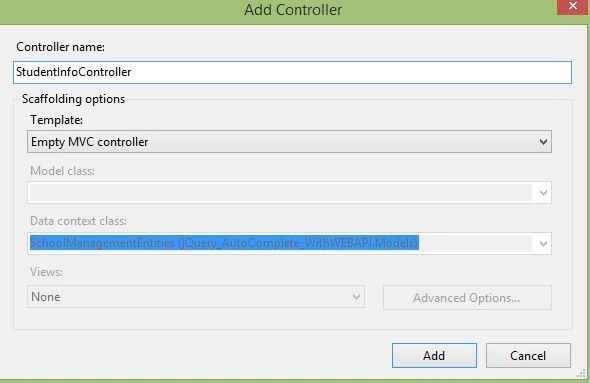
Image 13
Now add a View. So right-click on the Index Method then select Add View.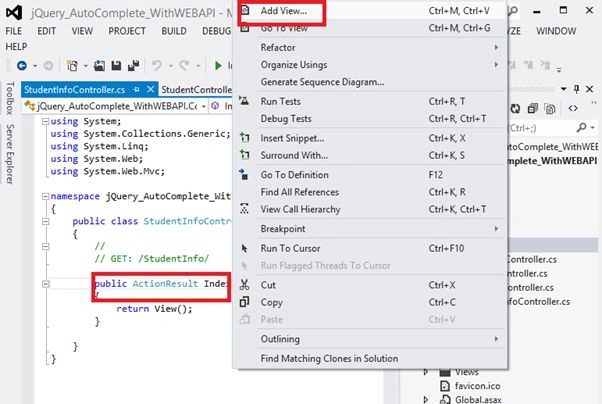
Image 14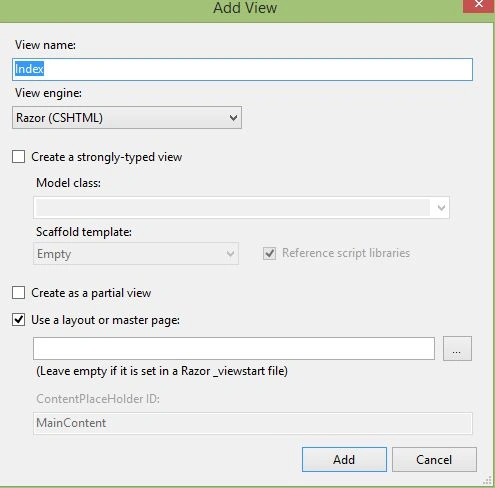
Image 15
Make sure your solution has the following JavaScript and CSS files. Otherwise you can download these from the jQuery site.
jquery-1.8.2.js
jquery-ui-1.9.0.js
& jquery-ui-1.9.0.custom.css
Now our Index.cshtml is:
- @{
- ViewBag.Title = "jQuery AutoComplete Text Box using WEB API";
- }
- <link href="~/CSS/jquery-ui-1.9.0.custom.css" rel="stylesheet" />
- <script src="~/Scripts/jquery-1.8.2.js"></script>
- <script src="~/Scripts/jquery-ui-1.9.0.min.js"></script>
- <style>
- .ui-autocomplete {
- max-height: 100px;
- overflow-y: auto;
- }
- .ui-autocomplete {
- height: 100px;
- }
- </style>
- <div id="body">
- <table style="background-color: skyblue; border: solid 4px green; width: 80%; text-align: center;">
- <tr>
- <td>
- <label for="autocomplete-textbox">Enter User Name : </label>
- </td>
- <td style="text-align: left">
- <input type="text" id="txtName" /></td>
- </tr>
- <tr>
- <td></td>
- </tr>
- <tr>
- <td>
- <label id="lblMessage" style="color: red;"></label>
- </td>
- <td style="text-align: left">
- <label id="lblSelectedVal" style="color: magenta;"></label>
- </td>
- </tr>
- </table>
- </div>
- <script type="text/javascript">
- $(document).ready(function () {
- $('#txtName').autocomplete({
- source: function (request, response) {
- var autocompleteUrl = '/api/StudentAPI' + '?searchText=' + request.term;
- $.ajax({
- url: autocompleteUrl,
- type: 'GET',
- cache: false,
- dataType: 'json',
- success: function (json) {
- response($.map(json, function (data, id) {
- return {
- label: data.Name,
- value: data.Name
- };
- }));
- },
- error: function (xmlHttpRequest, textStatus, errorThrown) {
- console.log('some error occured', textStatus, errorThrown);
- }
- });
- },
- minLength: 1,
- select: function (event, ui) {
- lblMessage.innerText = "Your Selected Name :";
- lblSelectedVal.innerText = ui.item.label;
- $('#txtName').val(ui.item.label);
- return false;
- }
- });
- });
- </script>
Run the application.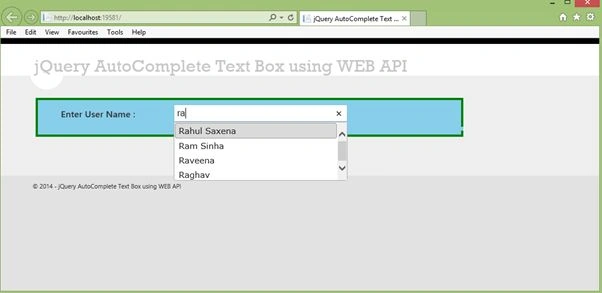
Image 16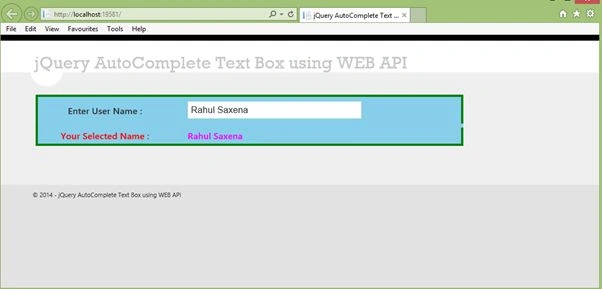
Image 17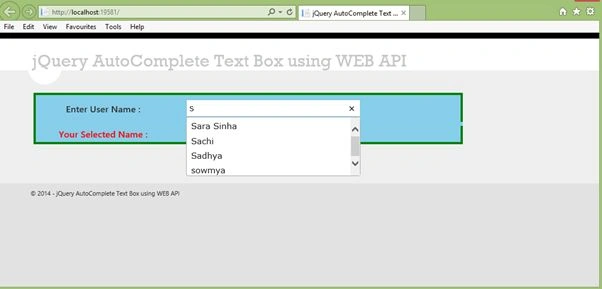
Image 18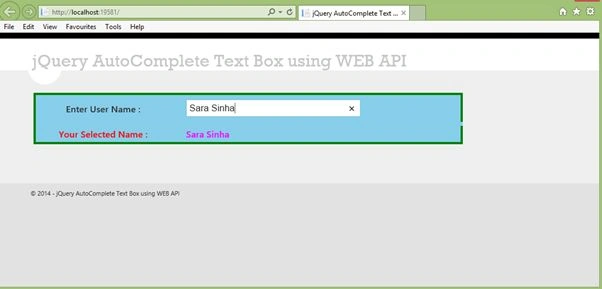
Image 19
Roger SwetnamPosted Mar 18, 2017, 8:23 PM
I would like to have the 'name"s of the foods brought back shown in the dropdown list.
Roger SwetnamPosted Mar 18, 2017, 8:22 PM
Hi Rahul - Thanks for this - it was very useful - How would you handle it if your get was returning data that looked like { "list": { "q": "flax", "sr": "28", "ds": "any", "start": 0, "end": 25, "total": 312, "group": "", "sort": "r", "item": [ { "offset": 0, "group": "Branded Food Products Database", "name": "FLAX4LIFE, FLAX MUFFINS, CARROT RAISIN, UPC: 065776631513", "ndbno": "45015058", "ds": "BL" }, { "offset": 1, "group": "Branded Food Products Database", "name": "FLAX4LIFE, DELICIOUS FLAX MUFFINS, WILD BLUEBERRY, UPC: 065776631537", "ndbno": "45015059", "ds": "BL" }, { "offset": 2, "group": "Branded Food Products Database", "name": "FLAX4LIFE, FLAX MUFFINS, CRANBERRY ORANGE, UPC: 065776631506", "ndbno": "45015060", "ds": "BL" } ] } }
chetan dudhatPosted Dec 13, 2015, 6:43 AM
http://www.dotnetcode2u.com/2015/12/autocomplete-textbox-or-searchbox-in.html
Dinesh BeniwalPosted Jan 21, 2015, 12:25 AM
Great again article of the day on asp.net
prabhash yadavPosted Dec 29, 2014, 5:01 AM
how to show data in autocomplete text box based on already selected value
Rahul Kumar SaxenaPosted Dec 1, 2014, 1:10 PM
Thanks a Lot Hussain Azfridi...
Hussain AfridiPosted Nov 26, 2014, 8:51 AM
very niceeeeeeeeeeeeeeeeeeeeeeeeeeeeeeeeeee