Objective
Public Key Token is used by the .Net runtime in lot of places but its generation algorithm is not clearly mentioned in the documentation. To satisfy my inquisitiveness I explored the algorithm and also in the process I could use some of Crypto classes of .Net. The end products are the PublicKeyTokenGenerator class and a small utility that generates Public Key Token from the Public Key using that class. The utility provides a feature not found in the .Net framework's sn.exe utility, viz., generation of the Public Key Token from the Key Pair file.
What is public key?
If two assemblies, developed by two developers, happen to have same file name, version and culture then the users will have problem in deploying and sharing them. The .Net team has decided to use RSA public key to create additional information to identify the assemblies uniquely. The RSA public key is of 1024-bit length. Because of its length there are lot more possible values than the Microsoft way of giving unique identity using 16-byte GUID like in COM.
However, the Microsoft .Net team for some reason decided to use a shortened Id generated from the Public Key instead of the entire Public Key. This is Id called the Public Key Token.
What is public key token?
The .Net framework documentation states that the Public Key Token is the 'last 8 bytes of the SHA-1 hash of the public key'.
Strong Name Tool
.Net provides the strong name tool (sn.exe) for generation and verification of the public key and public key token in addition to other options. Following are some of the important options of sn.exe.
| sn -k sn1.snk |
Generates and stores the key pair in the file 'sn1.snk'. |
| sn -p sn1.snk snpub1.snk |
Extracts the public key from the key pair file 'snk1.snk' and stores the public key in the file 'snpub1.snk'. |
| sn -t snpub1.snk |
Generates the Public Key Token from the Public Key. |
Table 1: Strong Name tool important commands.
These are the commands I would be using at the end to verify my implementation of public key token generation algorithm.
The algorithm
After some experimentation with the Public Key Token generation algorithm I found that the algorithm has one more undocumented step. Below I have listed the complete algorithm
- Generate hash of this public key using SHA1 algorithm.
- Extract the last 8-byte sequence of the SHA1 hash of the public key.
- Reverse the 8-byte sequence. (This is not documented in .Net SDK documentation).
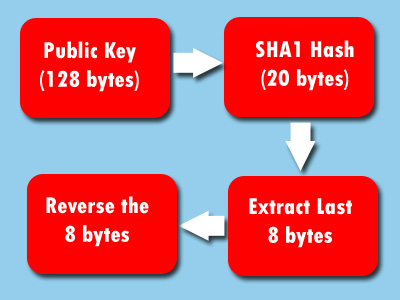
Figure 1: Algorithm to generate the Public Key Token from Public Key
Implementation of the algorithm
The algorithm's core is in generation of the SHA1 hash of the Public Key. SHA1 is Secure Hashing Algorithm version 1.0. The Secure Hashing Algorithms are designed such that it is computationally expensive to find another text (which conveys your message) whose hash is same as the given hash. Applying it to our case it is computationally expensive to find another 1024-bit RSA Public Key whose hash is same as the given hash. However, since the Public Key Token considers only last 8-bytes of the 20-byte SHA1 hash of the Public Key this difficulty in finding alternate Public Key doesn't hold that strong.
Secure Hashing Crypto APIs in .Net
A search in the .Net Framework SDK documentation for the Crypto classes led me to the following relevant classes. The various SHA (Secure Hash Algorithm) classes are available in the namespace System.Security.Cryptography
| SHA1CryptoServiceProvider |
This is a wrapper class using the unmanaged Microsoft CyptoAPI. The hash size for this algorithm is 160 bits. |
| SHA1Managed |
This is completely managed implementation in .Net. The hash size for this algorithm is 160 bits. |
| SHA256Managed |
This is completely managed implementation in .Net. The hash size for this algorithm is 256 bits. |
| SHA384Managed |
This is completely managed implementation in .Net. The hash size for this algorithm is 384 bits. |
| SHA512Managed |
This is completely managed implementation in .Net. The hash size for this algorithm is 512 bits. |
Table 2: Secure Hashing Algorithm related classes in the .Net Framework SDK
Since the documentation says Public Key Token is SHA1 hash of the Public Key I have decided to use SHA1Managed class for the purpose of hashing. Although I could have used SHA1CryptoServiceProvider class, I have decided to use the Managed implementation.
Computing the hash
After reading the public key into byte array I used the ComputeHash method of the SHA1Managed class to generate hash. The code corresponding to this hashing is shown below. The computed SHA1 hash is an array of 20 bytes.
private byte [] ComputeSHA1Hash()
{
SHA1Managed sha1Algo = new SHA1Managed();
byte [] hash = sha1Algo.ComputeHash(publicKey);
return hash;
}
Table 3: SHA1 hash computation
Extracting token from the hash
Next, I extracted the last 8-byte sequence from the generated hash bytes. I figured out that the public key token is actually the reversed last 8-byte sequence of the hash generated with SHA1Managed. The .Net Framework SDK documentation for some reason missed out this step of reversing the extracted bytes. This had led me into trying other Secure Hashing classes (listed in the Table above) that are provided by .Net Framework SDK.
private static byte [] ExtractAndReverseBytes(byte [] hash)
{
byte [] publicKeyToken = new byte [8];
//Extracting the last 8 bytes from the Hash
Array.Copy(hash, hash.Length-publicKeyToken.Length, publicKeyToken, 0, publicKeyToken.Length);
//Reversing the extracted bytes
Array.Reverse(publicKeyToken, 0, publicKeyToken.Length);
return publicKeyToken;
}
Table 4: Extracting the Public Key Token
Generation of the Token from Key Pair
The sn.exe utility can generate the Public Key Token only from the Public Key file. Usually you do not extract Public Key to a separate file unless you are Delay signing the assembly. So the additional step of extraction of extracting the Public Key to a different can be eliminated if you this utility to generate the Public Key Token. When you pass the Public Key to the utility it will read the Public Key from the Key Pair using the .Net Framework class System.Reflection.StrongNameKeyPair.
The StrongNameKeyPair class takes the File object that refers to a Key Pair and exposes a property PublicKey that gives extracted Public Key in a byte array. Here is the relevant code.
keyPairFile = File.Open(args[1], FileMode.Open, FileAccess.Read);
StrongNameKeyPair pair = new StrongNameKeyPair(keyPairFile);
generator = new PublicKeyTokenGenerator(pair.PublicKey);
Table 5: Extracting the Public Key from Key Pair file
Verifying the Algorithm
To verify the implementation I have used the sn.exe utility to generate the Public Key Token and compare it with my utility called pktg.exe.
The sn.exe can generate the Public Key Token only from the Public Key file. Hence you have to first generate a Key Pair and then extract the Public Key. This Public Key is then passed to the sn.exe. Here are the steps for generation of Public Key and verification of its Token using sn.exe.
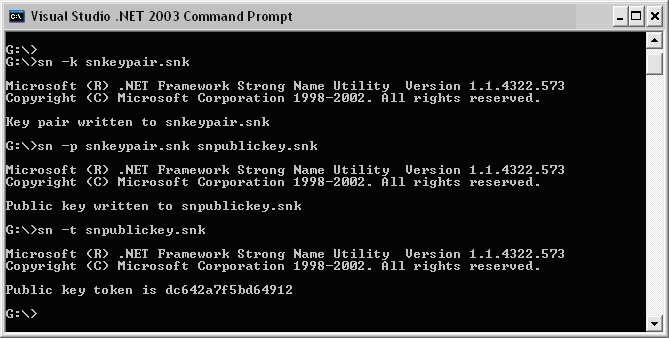
Figure 2: Output from running the sn.exe utility to generate the Public Key Token
My utility can generate the Public Key Token from either the Key pair file or Public key file. Here is the output generated for the above mentioned Public Key with my utility. Note that 'snkeypair.snk' contains Key pair and 'snpublickey.snk' contains only the Public Key extracted using sn.exe. I am using the 'snpublickey.snk' here only to verify the feature that I provided, viz., generating the Public Key Token from the Key Pair file. The Public Key Token generated from both 'snkeypair.snk' and 'snpublickey.snk' matches that generated by the sn.exe which proves the algorithm is correct.
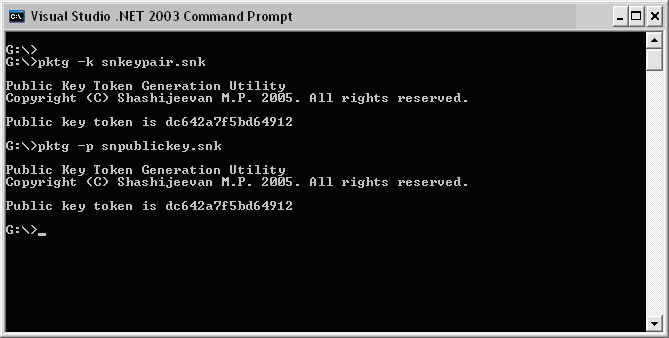
Figure 3: Output from running the pktg.exe utility to generate the Public Key Token
Conclusion
The Crypto classes provided by .Net are extremely easy to use but unfortunately the documentation about these classes is insufficient. The Public Key Token is the 'reversed last 8 bytes of the SHA-1 hash of the public key'. This means that, there is a one-to-one mapping between Public Key and its SHA1 hash (20 bytes), but the mapping between Public Key and Public Key Token is not that strong because it represents only last 8 bytes of the SHA1 hash. I have a created a class PublicKeyTokenGenerator that generates the Public Key Token using the above mentioned algorithm. As a proof of concept I have created a utility using this class. This is a completed .Net managed implementation. It also provides one feature that the sn.exe utility misses, i.e., generating the Pubic Key Token directly from the Key Pair file.