In the last article we’ve seen how can we inject multiple parameters to Web API method; the same can be achieved using route attribute in Web API. Though there were small challenges which I will also describe in this article which may reduce your development time for sure. An excerpt from asp.net about routing,
"Routing is how Web API matches a URI to an action. Web API 2 supports a new type of routing, called attribute routing. As the name implies, attribute routing uses attributes to define routes. Attribute routing gives you more control over the URIs in your web API. For example, you can easily create URIs that describe hierarchies of resources.The earlier style of routing, called convention-based routing, is still fully supported. In fact, you can combine both techniques in the same project".
The website also stated why Attribute Routing is required,
"The first release of Web API used convention-based routing. In that type of routing, you define one or more route templates, which are basically parameterized strings. When the framework receives a request, it matches the URI against the route template. One advantage of convention-based routing is that templates are defined in a single place, and the routing rules are applied consistently across all controllers".
Enabling Attribute Routing
To enable attribute routing, call MapHttpAttributeRoutes during configuration. This extension method is defined in the System.Web.Http.HttpConfigurationExtensions class. Kindly have a look at the code shown below as well as an image depicted below:
- namespace WebApiDemo
- {
- public static class WebApiConfig
- {
-
- public static void Register(System.Web.Http.HttpConfiguration config)
- {
- config.MapHttpAttributeRoutes();
-
- config.Routes.MapHttpRoute(
- name: "DefaultApi",
- routeTemplate: "api/{controller}/{action}/{id}",
- defaults: new
- {
- id = RouteParameter.Optional
- }
- );
- }
- }
- }
Here, I’ve a simple controller, Employees, which has the following Action Method defined below and performs a set of statement like fetch a record from collection.GetDetails() action method takes one parameter and has its own specific routes while GetEmployeeByID() action method takes two parameters as arguments and has its own defined route.
GetDetails
- [Route("api/{employees}/{id}")]
- public Employee GetDetails(int id)
- {
- return listEmp.First(e => e.ID == id);
- }
GetEmployeeByID
- [HttpGet]
- [Route("api/{employees}/{id}/{userName}")]
- [ActionName("GetEmployeeByID")]
- public Employee Get(int id, string userName)
- {
- return listEmp.First(e => e.ID == id);
- SqlDataReader reader = null;
- SqlConnection myConnection = newSqlConnection();
- myConnection.ConnectionString = @ "Server=.;Database=DBCompany;User ID=sa;Password=db@1234;";
-
- SqlCommand sqlCmd = newSqlCommand();
- sqlCmd.CommandType = CommandType.Text;
- sqlCmd.CommandText = "Select * from tblEmployee where EmployeeId=" + id + "";
- sqlCmd.Connection = myConnection;
- myConnection.Open();
- reader = sqlCmd.ExecuteReader();
- Employee emp = null;
- while (reader.Read())
- {
- emp = new Employee();
- emp.EmployeeId = Convert.ToInt32(reader.GetValue(0));
- emp.Name = reader.GetValue(1).ToString();
- emp.ManagerId = Convert.ToInt32(reader.GetValue(2));
- }
- return emp;
- myConnection.Close();
- }
I run my application and verify that whether API is up or not. Kindly find given below image to identify this.
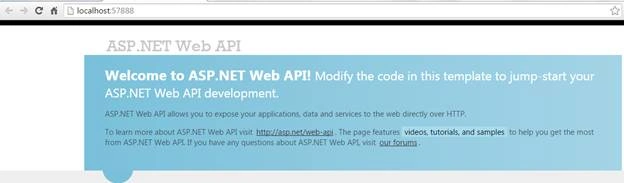
It shows API is running and ready to perform some action. Along with this I’ve Postman running along side where I paste the specific url. which meets the requirement as shown below:

As soon as I click on the Send button it will go to the respective controller’s action to execute set of statements. This is the best benefit of Attribute routing -- you can set any route as per you convenient. Like in the above URl there is no action method defined still it finds the right action method.This type of URI is difficult to create using convention-based routing(traditional routing model). Although it can be done, the results don’t scale well if you have many controllers or resource types
The output will be like given image shown below:
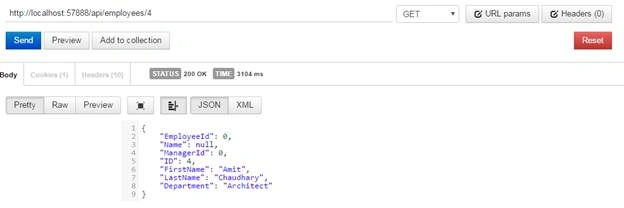
The same way you would have an action which takes multi arguments than you can set the Attribute routing in such a way in below code segment. It makes it simple to understand and easily to execute.
- [HttpGet]
- [Route("api/{employees}/{id}/{userName}")]
- [ActionName("GetEmployeeByID")]
- public Employee Get(int id, string userName)
- {
- }
I run an application again and verify that whether API is up or not. Kindly find given below image to identify this.
It shows API is running and ready to perform some action. Along with this I have Postman running aside where I paste the specific url (http://localhost:57888/api/employees/4/SachinKalia) which meets the requirement as shown below:

As soon as user clicks on send button it should reach anticipated action method.
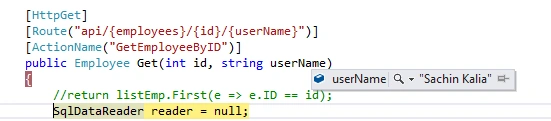
And the output will be like given below:
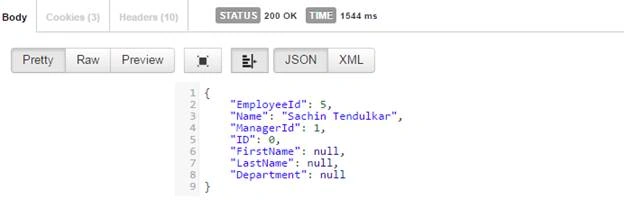
Attribute routing makes things easy and can create complex route in simpler way.

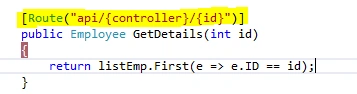
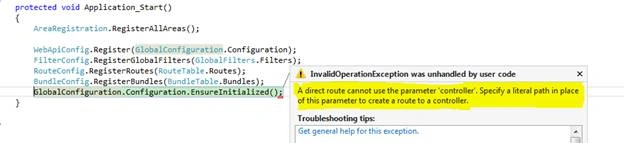
However there is a little issue which I confronted and would like to share with you. If you create route in such a way, that keeps parameter {controller} like in following route[Route("api/{controller}/{id}")]it prompts an error like “A direct route cannot use the parameter 'controller'. Specify a literal path in place of this parameter to create a route to a controller”. In simple words it should be a literal value. It throwsthe same issue if you keep parameter {action} in route.
Which may consume your potential time during development?
Kindly add the following line in Global.asax file to initialize object as give below:
- GlobalConfiguration.Configuration.EnsureInitialized();
If you don’t put this line in Global.asax file it throws an error as given below in screen shot.

Reference
Attribute Routing in ASP.NET Web API 2
Read more articles on ASP.NET:


Pardeep GargPosted Jun 1, 2018, 12:51 AM
I want to define my controller name at run time. How I can achieve the same?
sreerejith sreerejithPosted May 30, 2017, 4:16 AM
Nice also check http://grandhah.blogspot.in/2015/07/url-rewriting-in-mvc-4-attribute-routing.html for detailed url writing in web-api
Vivek KumarPosted Apr 28, 2016, 3:07 PM
Good one
Debasis SahaPosted Apr 9, 2016, 2:06 AM
Good share..
Vignesh ManiPosted Apr 8, 2016, 5:10 PM
Nice
Mohammed IbrahimPosted Apr 8, 2016, 2:28 PM
nice
Upendra Pratap ShahiPosted Apr 8, 2016, 9:00 AM
nice article...
Rahul Kumar SaxenaPosted Apr 8, 2016, 7:39 AM
:) Good to reAD
Karthikeyan KPosted Apr 8, 2016, 3:47 AM
Thanks for sharing