

In this article I will explain how to perform CRUD operations in MVC using Code First Approach, Web API, Repository pattern, Unit of work, and jqGrid. I will also create several different layers, including Data Access Layer, Business Layer, Service Layer, and Presentation Layer. Also, we will check some validation in jqgrid. Now, lets get started.
Step 1
We will create a table in the database.
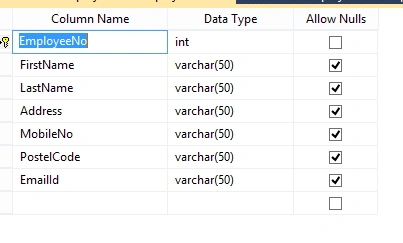
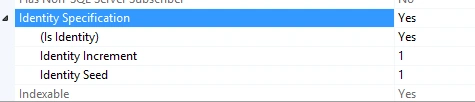
Here, set "EmployeeNo" as a primary key and set Identity to "Yes".
Step 2
Now, we will add projects using class library, like DataAccessLayer, BusinessLayer, ServiceLayer, and PersentationLayer.
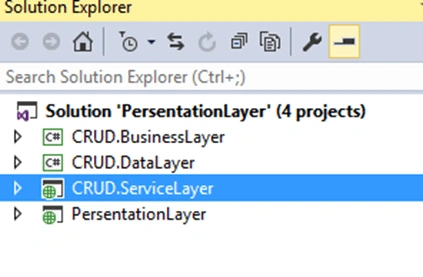
First, we will create an MVC empty project and then we will add projects one by one. We will add tje DataAccessLayer first.
For this, right click on project solution and go to Add >> New Project.
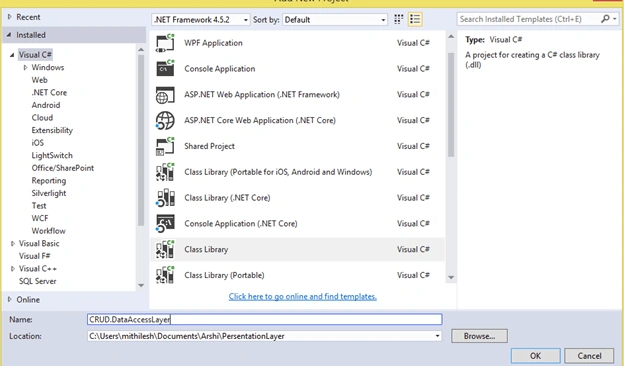
Click OK.
Right click on project solution and go to Add >> New Project. Select Class library file and give it name as CRUD.Bussiness .
- Right click on project solution and go to Add >> New Project. Select Class library file and give it name as CRUD.Service.
- Right click on project solution and go to Add >> New Project. Select Class library file and give it name as CRUD.Presentation.
Okay! Now let's add the DLL files.
First we build a DataAccessLayer project and add the DLL file DataAccessLayer in the BussinessLayer. For this, right click on the project and select Add >> Reference. Select CRUD.DataLayer.dll.
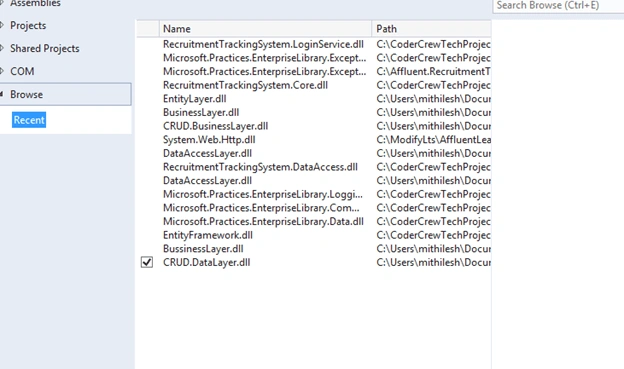
Similarly, we have to add DLL file Business Layer in the Service Layer
Step 3
We will go to the Data Access Layer and add model classes but here we will use the code first approach using existing data. So for this, we add a folder like "Entity." After that right click the Entity folder and select the add option and select new item and then select data in the left panel and finally select ADO.Net Entity data model.
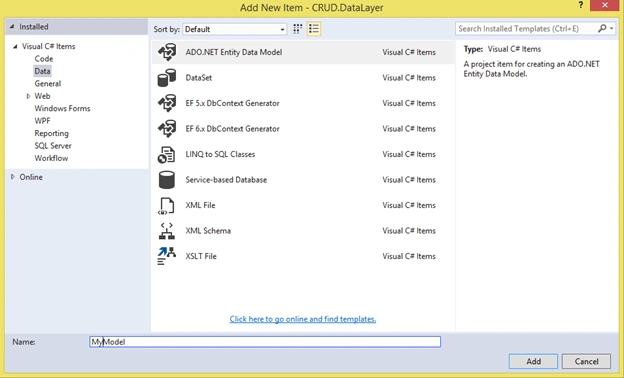
Click add button.
After that we will select Code First From database.
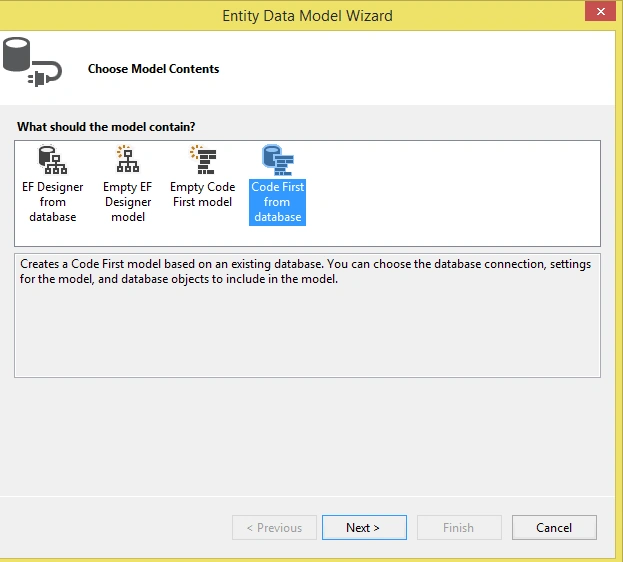
Click next and give the connection and select the table of the database.
After that again we will create a folder, my folder name is Implementation.
And this folder add two classes.
- DataAccess.cs
- UnitOfWork.cs
Write code in DataAccess.cs
- using CRUD.DataLayer.Entities;
- using CRUD.DataLayer.Interfaces;
- using System.Collections.Generic;
- using System.Data.Entity;
- using System.Linq;
- namespace CRUD.DataLayer.Implementation
- {
- public class DataAccess<TEntity> : IDataAccess<TEntity> where TEntity : class
- {
- /// <summary>
- /// The context
- /// </summary>
- internal MyModel context;
- /// <summary>
- /// The database set
- /// </summary>
- internal DbSet<TEntity> dbSet;
- /// <summary>
- /// Initializes the new instance of MyModel Model
- /// </summary>
- /// <param name="context">context object</param>
- public DataAccess(MyModel context)
- {
- this.context = context;
- this.dbSet = context.Set<TEntity>();
- }
- /// <summary>
- /// Gets all data
- /// </summary>
- /// <returns>collection of specified class.</returns>
- public virtual IEnumerable<TEntity> Get()
- {
- IQueryable<TEntity> query = this.dbSet;
- return query.ToList();
- }
- /// <summary>
- /// Gets the by identifier.
- /// </summary>
- /// <param name ="id"> The identifier.</param>
- /// <returns> object </returns>
- public virtual TEntity GetByID(object id)
- {
- return this.dbSet.Find(id);
- }
- /// <summary>
- /// Insert data
- /// </summary>
- /// <param name="entity">object for insertion.</param>
- public virtual void Insert(TEntity entity)
- {
- this.dbSet.Add(entity);
- }
- /// <summary>
- /// Delete data by id
- /// </summary>
- /// <param name="id">id</param>
- public virtual void Delete(object id)
- {
- TEntity entityToDelete = this.dbSet.Find(id);
- this.Delete(entityToDelete);
- }
- /// <summary>
- /// Delete data
- /// </summary>
- /// <param name ="entityToDelete">entity To Delete.</param>
- public virtual void Delete(TEntity entityToDelete)
- {
- if (this.context.Entry(entityToDelete).State == System.Data.Entity.EntityState.Detached)
- {
- this.dbSet.Attach(entityToDelete);
- }
- this.dbSet.Remove(entityToDelete);
- }
- /// <summary>
- /// Attach data.
- /// </summary>
- /// <param name="entityToUpdate">entity To Update.</param>
- public virtual void Attach(TEntity entityToUpdate)
- {
- this.dbSet.Attach(entityToUpdate);
- this.context.Entry(entityToUpdate).State = System.Data.Entity.EntityState.Modified;
- }
- }
- }
Write code in UnitOfWork.cs
- using System;
- using System.Collections.Generic;
- using System.Linq;
- using System.Text;
- using System.Threading.Tasks;
- using CRUD.DataLayer.Entities;
- namespace CRUD.DataLayer.Implementation
- {
- /// <summary>
- /// The UnitOfWork class designed for binding classes to generic class DataAccess. This class is the conversion or binding class
- /// </summary>
- /// <seealso cref="System.IDisposable" />
- public class UnitOfWork : IDisposable
- {
- /// <summary>
- /// Stores the string error message
- /// </summary>
- private string errorMessage = string.Empty;
- /// <summary>
- /// Defines condition for disposing object
- /// </summary>
- private bool disposed = false;
- private DataAccess<EmployeeInfo> employeeInfoRepository;
- /// <summary>
- /// Initializes a new instance of the MyModel class
- /// </summary>
- private MyModel objMyModel = new MyModel();
- /// <summary>
- /// Gets the get employee repository.
- /// </summary>
- /// <value>
- /// The get employee repository.
- /// </value>
- public DataAccess<EmployeeInfo> GetEmployeeRepository
- {
- get
- {
- if (this.employeeInfoRepository == null)
- {
- this.employeeInfoRepository = new DataAccess<EmployeeInfo>(this.objMyModel);
- }
- return this.employeeInfoRepository;
- }
- }
- /// <summary>
- /// This Method will commit the changes to database for the permanent save
- /// </summary>
- /// <returns>
- /// affected rows
- /// </returns>
- public int Save()
- {
- return this.objMyModel.SaveChanges();
- }
- public void Dispose()
- {
- this.Dispose(true);
- GC.SuppressFinalize(this);
- }
- /// <summary>
- /// This method will dispose the context class object after the uses of that object
- /// </summary>
- /// <param name="disposing">parameter true or false for disposing database object</param>
- protected virtual void Dispose(bool disposing)
- {
- if (!this.disposed)
- {
- if (disposing)
- {
- this.objMyModel.Dispose();
- }
- }
- this.disposed = true;
- }
- }
- }
Now we have completed the data access part.
Step 4
Now we go to the Business Layer.
Here we will create two folders:
- Implementation
- Interfaces
Now we add interface class like IEmployee.cs and declare our methods.
- using System.Collections.Generic;
- using CRUD.DataLayer.Entities;
- namespace CRUD.BusinessLayer.Interfaces
- {
- public interface IEmployee
- {
- IEnumerable<EmployeeInfo> EmployeeGet();
- string EmployeeInsert(EmployeeInfo emp);
- string EmployeeUpdate(EmployeeInfo emp);
- string EmployeeDelete(int id);
- }
- }
Now we add class Employee.cs in the Implementation folder.
- using CRUD.BusinessLayer.Interfaces;
- using System.Collections.Generic;
- using System.Linq;
- using CRUD.DataLayer.Entities;
- using CRUD.DataLayer.Implementation;
- namespace CRUD.BusinessLayer.Implementation
- {
- public class Employee : IEmployee
- {
- private UnitOfWork unitOfWork = new UnitOfWork();
- private List<EmployeeInfo> lstEmp = new List<EmployeeInfo>();
- private EmployeeInfo objEmp = new EmployeeInfo();
- public IEnumerable<EmployeeInfo> EmployeeGet()
- {
- lstEmp = unitOfWork.GetEmployeeRepository.Get().ToList();
- return lstEmp;
- }
- public string EmployeeUpdate(EmployeeInfo emp)
- {
- objEmp = unitOfWork.GetEmployeeRepository.GetByID(emp.EmployeeNo);
- if(objEmp !=null)
- {
- objEmp.FirstName = emp.FirstName;
- objEmp.LastName = emp.LastName;
- objEmp.Address = emp.Address;
- objEmp.MobileNo = emp.MobileNo;
- objEmp.PostelCode = emp.PostelCode;
- objEmp.EmailId = emp.EmailId;
- }
- this.unitOfWork.GetEmployeeRepository.Attach(objEmp);
- int result = this.unitOfWork.Save();
- if(result > 0)
- {
- return "Sucessfully updated of employee records";
- }
- else
- {
- return "Updation faild";
- }
- }
- public string EmployeeDelete(int id)
- {
- var objEmp = this.unitOfWork.GetEmployeeRepository.GetByID(id);
- this.unitOfWork.GetEmployeeRepository.Delete(objEmp);
- int deleteData = this.unitOfWork.Save();
- if(deleteData > 0)
- {
- return "Successfully deleted of employee records";
- }
- else
- {
- return "Deletion faild";
- }
- }
- public string EmployeeInsert(EmployeeInfo emp)
- {
- this.unitOfWork.GetEmployeeRepository.Insert(emp);
- int inserData =this.unitOfWork.Save();
- if(inserData > 0)
- {
- return "Successfully Inserted of employee records";
- }
- else
- {
- return "Insertion faild";
- }
- }
- }
- }
So now we have completed business layer part, next we will go to the service layer:
Step 5
Now we have to add an API Controller in our Service layer.
Right click the controller and add an API Controller.
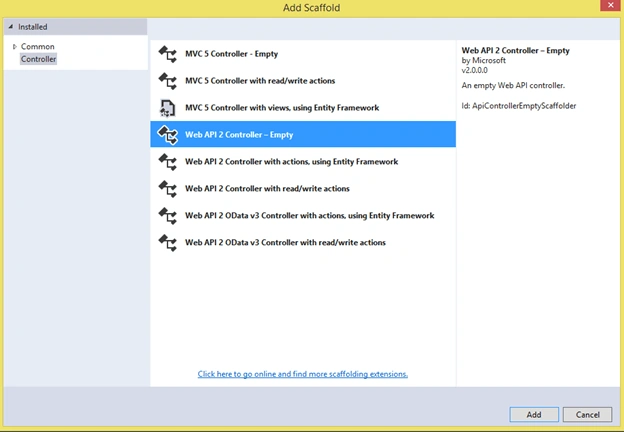
Click add.
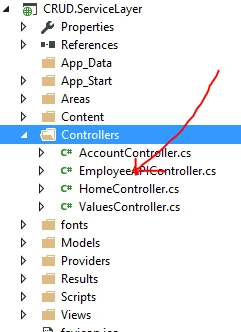
Next we write the code for all operations to perform CRUD Operation in EmplyeeAPI Controller.
- using System;
- using System.Collections.Generic;
- using System.Net;
- using System.Net.Http;
- using System.Web.Http;
- using CRUD.DataLayer.Entities;
- using CRUD.BusinessLayer.Implementation;
- using CRUD.BusinessLayer.Interfaces;
- namespace CRUD.ServiceLayer.Controllers
- {
- [System.Web.Http.RoutePrefix("api/Employee")]
- public class EmployeeAPIController : ApiController
- {
- IEmployee objEmp = new Employee();
- [System.Web.Http.HttpGet]
- [System.Web.Http.Route("EmpDetails")]
- public IEnumerable<EmployeeInfo> GetEmployeeData()
- {
- IEnumerable<EmployeeInfo> empDetail = new List<EmployeeInfo>();
- try
- {
- empDetail = objEmp.EmployeeGet();
- }
- catch (ApplicationException ex)
- {
- throw new HttpResponseException(new HttpResponseMessage { StatusCode = HttpStatusCode.BadRequest, ReasonPhrase = ex.Message });
- }
- catch (Exception ex)
- {
- throw new HttpResponseException(new HttpResponseMessage { StatusCode = HttpStatusCode.BadGateway, ReasonPhrase = ex.Message });
- }
- return empDetail;
- }
- [System.Web.Http.HttpPost]
- [System.Web.Http.Route("InsertEmpDetails")]
- public string InserEmployee(EmployeeInfo objEmpDetails)
- {
- string objEmployee;
- try
- {
- objEmployee = this.objEmp.EmployeeInsert(objEmpDetails);
- }
- catch (ApplicationException ex)
- {
- throw new HttpResponseException(new HttpResponseMessage { StatusCode = HttpStatusCode.BadRequest, ReasonPhrase = ex.Message });
- }
- catch (Exception ex)
- {
- throw new HttpResponseException(new HttpResponseMessage { StatusCode = HttpStatusCode.BadGateway, ReasonPhrase = ex.Message });
- }
- return objEmployee;
- }
- [System.Web.Http.HttpPut]
- [System.Web.Http.Route("UpdateEmpDetails")]
- public string UpdateEmployee(EmployeeInfo objEmpDetails)
- {
- string objEmployee;
- try
- {
- objEmployee = this.objEmp.EmployeeUpdate(objEmpDetails);
- }
- catch (ApplicationException ex)
- {
- throw new HttpResponseException(new HttpResponseMessage { StatusCode = HttpStatusCode.BadRequest, ReasonPhrase = ex.Message });
- }
- catch (Exception ex)
- {
- throw new HttpResponseException(new HttpResponseMessage { StatusCode = HttpStatusCode.BadGateway, ReasonPhrase = ex.Message });
- }
- return objEmployee;
- }
- [System.Web.Http.HttpDelete]
- [System.Web.Http.Route("DeleteEmpData/{id}")]
- public string DeleteEmployeeData(int id)
- {
- string objEmpDetails;
- try
- {
- objEmpDetails = this.objEmp.EmployeeDelete(id);
- }
- catch (ApplicationException ex)
- {
- throw new HttpResponseException(new HttpResponseMessage { StatusCode = HttpStatusCode.BadRequest, ReasonPhrase = ex.Message });
- }
- catch (Exception ex)
- {
- throw new HttpResponseException(new HttpResponseMessage { StatusCode = HttpStatusCode.BadGateway, ReasonPhrase = ex.Message });
- }
- return objEmpDetails;
- }
- }
- }
After that we will run the web api project the find some output...
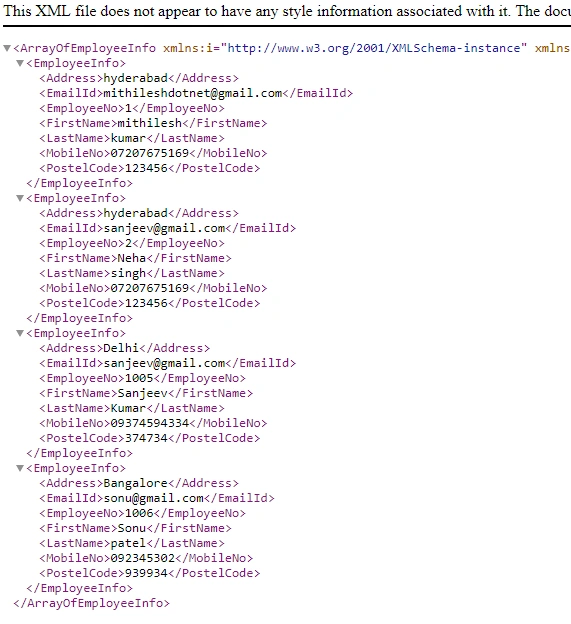
Okay we have completed also Service layer part so now we have to consume in mvc so for this we will go Presentation layer part I.e MVC Layer
Step 6
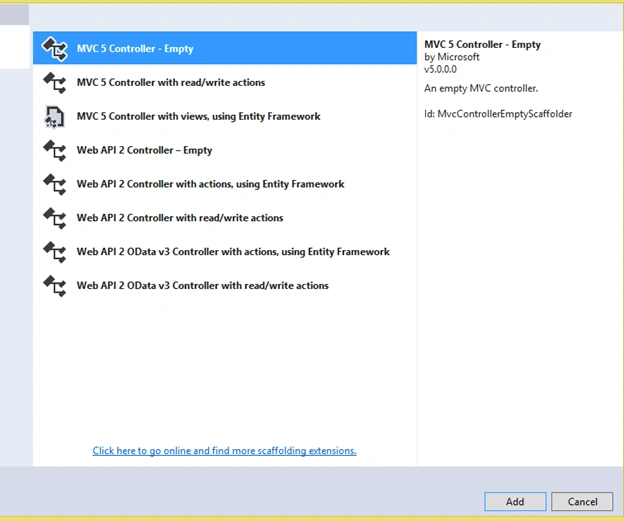
First we will add a controller
So for this, Go to controller folder and right click and add a empty controller
Now, we have to consume the Web API service and finally, we have to display records in View.
We will add a class in our Models folder and give it a class name of Rest Client. This is a common class for performing all CRUD operations.
Here, we need to add the URL of our service layer.
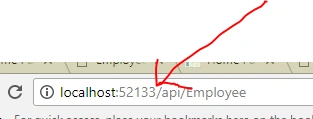
- public const string ApiUri = "http://localhost:52133/";
Write the methods in RestClient Class.
- using System;
- using System.Collections.Generic;
- using System.Linq;
- using System.Web;
- using System.Net.Http;
- using System.Net.Http.Headers;
- using System.Threading.Tasks;
- namespace PersentationLayer.Models
- {
- public class RestClient : IDisposable
- {
- /// <summary>
- /// The client
- /// </summary>
- private HttpClient client;
- public const string ApiUri = "http://localhost:52133/";
- /// <summary>
- /// Media type used for send data in API
- /// </summary>
- public const string MediaTypeJson = "application/json";
- /// <summary>
- /// Media type used for send data in API
- /// </summary>
- public const string MediaTypeXML = "application/XML";
- public const string RequestMsg = "Request has not been processed";
- public static string ReasonPhrase { get; set; }
- /// <summary>
- /// Initializes a new instance of the <see cref="RestClient"/> class.
- /// </summary>
- public RestClient()
- {
- this.client = new HttpClient();
- this.client.BaseAddress = new Uri(ApiUri);
- this.client.DefaultRequestHeaders.Accept.Clear();
- this.client.DefaultRequestHeaders.Accept.Add(new MediaTypeWithQualityHeaderValue(MediaTypeJson));
- }
- public async Task<List<U>> RunAsyncGetAll<T, U>(dynamic uri)
- {
- HttpResponseMessage response = await this.client.GetAsync(uri);
- if (response.IsSuccessStatusCode)
- {
- return await response.Content.ReadAsAsync<List<U>>();
- }
- else if (response.StatusCode == System.Net.HttpStatusCode.BadRequest)
- {
- throw new ApplicationException(response.ReasonPhrase);
- }
- else if (response.StatusCode == System.Net.HttpStatusCode.BadGateway)
- {
- throw new Exception(response.ReasonPhrase);
- }
- throw new Exception(RequestMsg);
- }
- public async Task<List<U>> RunAsyncGet<T, U>(dynamic uri, dynamic data)
- {
- HttpResponseMessage response = await this.client.GetAsync(uri + "/" + data);
- if (response.IsSuccessStatusCode)
- {
- return await response.Content.ReadAsAsync<List<U>>();
- }
- else if (response.StatusCode == System.Net.HttpStatusCode.BadRequest)
- {
- throw new ApplicationException(response.ReasonPhrase);
- }
- else if (response.StatusCode == System.Net.HttpStatusCode.BadGateway)
- {
- throw new Exception(response.ReasonPhrase);
- }
- throw new Exception(RequestMsg);
- }
- public async Task<U> RunAsyncPost<T, U>(string uri, T entity)
- {
- HttpResponseMessage response = client.PostAsJsonAsync(uri, entity).Result;
- ReasonPhrase = response.ReasonPhrase;
- if (response.IsSuccessStatusCode)
- {
- return await response.Content.ReadAsAsync<U>();
- }
- else if (response.StatusCode == System.Net.HttpStatusCode.BadRequest)
- {
- throw new ApplicationException(response.ReasonPhrase);
- }
- else if (response.StatusCode == System.Net.HttpStatusCode.BadGateway)
- {
- throw new Exception(response.ReasonPhrase);
- }
- throw new Exception(RequestMsg);
- }
- public async Task<U> RunAsyncPut<T, U>(string uri, T entity)
- {
- HttpResponseMessage response = await this.client.PutAsJsonAsync(uri, entity);
- if (response.IsSuccessStatusCode)
- {
- return await response.Content.ReadAsAsync<U>();
- }
- else if (response.StatusCode == System.Net.HttpStatusCode.BadRequest)
- {
- throw new ApplicationException(response.ReasonPhrase);
- }
- else if (response.StatusCode == System.Net.HttpStatusCode.BadGateway)
- {
- throw new Exception(response.ReasonPhrase);
- }
- throw new Exception(RequestMsg);
- }
- public async Task<U> RunAsyncDelete<T, U>(string uri, dynamic id)
- {
- HttpResponseMessage response = await this.client.DeleteAsync(uri + "/" + id);
- if (response.IsSuccessStatusCode)
- {
- return await response.Content.ReadAsAsync<U>();
- }
- else if (response.StatusCode == System.Net.HttpStatusCode.BadRequest)
- {
- throw new ApplicationException(response.ReasonPhrase);
- }
- else if (response.StatusCode == System.Net.HttpStatusCode.BadGateway)
- {
- throw new Exception(response.ReasonPhrase);
- }
- throw new Exception(RequestMsg);
- }
- /// <summary>
- /// Performs application-defined tasks associated with freeing, releasing, or resetting unmanaged resources.
- /// </summary>
- public void Dispose()
- {
- this.Dispose(true);
- GC.SuppressFinalize(this);
- }
- /// <summary>
- /// Releases unmanaged and - optionally - managed resources.
- /// </summary>
- /// <param name="disposing"><c>true</c> to release both managed and unmanaged resources; <c>false</c> to release only unmanaged resources.</param>
- protected virtual void Dispose(bool disposing)
- {
- if (disposing)
- {
- //// dispose managed resources
- this.client.Dispose();
- }
- //// free native resources
- }
- }
- }
Add one more class in Models folder for declaring all entities of emplyee.
Employee.cs
- using System;
- using System.Collections.Generic;
- using System.Linq;
- using System.Web;
- namespace PersentationLayer.Models
- {
- public class Employee
- {
- public int EmployeeNo { get; set; }
- public string FirstName { get; set; }
- public string LastName { get; set; }
- public string Address { get; set; }
- public string MobileNo { get; set; }
- public string PostelCode { get; set; }
- public string EmailId { get; set; }
- }
- }
After that, we will write all the code in MVC Controller class.
- using System;
- using System.Web.Mvc;
- using PersentationLayer.Models;
- using System.Threading.Tasks;
- using System.Net.Http;
- using System.Net;
- using System.Web.Http;
- namespace PersentationLayer.Controllers
- {
- public class EmployeeController : Controller
- {
- private RestClient restClient = new RestClient();
- // GET: Employee
- public ActionResult EmployeeDetails()
- {
- return this.View();
- }
- public async Task<ActionResult> EmpInfoData()
- {
- try
- {
- return this.Json(await this.restClient.RunAsyncGetAll<Employee, Employee>("api/Employee/EmpDetails"), JsonRequestBehavior.AllowGet);
- }
- catch (ApplicationException ex)
- {
- throw new HttpResponseException(new HttpResponseMessage { StatusCode = HttpStatusCode.BadRequest, ReasonPhrase = ex.Message });
- }
- catch (Exception ex)
- {
- throw new HttpResponseException(new HttpResponseMessage { StatusCode = HttpStatusCode.BadGateway, ReasonPhrase = ex.Message });
- }
- }
- public async Task<ActionResult> InsertEmployeeInfo(Employee objEmp)
- {
- try
- {
- return this.Json(await this.restClient.RunAsyncPost<Employee, string>("api/Employee/InsertEmpDetails", objEmp));
- }
- catch (ApplicationException ex)
- {
- throw new HttpResponseException(new HttpResponseMessage { StatusCode = HttpStatusCode.BadRequest, ReasonPhrase = ex.Message });
- }
- catch (Exception ex)
- {
- throw new HttpResponseException(new HttpResponseMessage { StatusCode = HttpStatusCode.BadGateway, ReasonPhrase = ex.Message });
- }
- }
- public async Task<ActionResult> UpdateEmployeeInfo(Employee objEmp)
- {
- try
- {
- return this.Json(await this.restClient.RunAsyncPut<Employee, string>("api/Employee/UpdateEmpDetails", objEmp));
- }
- catch (ApplicationException ex)
- {
- throw new HttpResponseException(new HttpResponseMessage { StatusCode = HttpStatusCode.BadRequest, ReasonPhrase = ex.Message });
- }
- catch (Exception ex)
- {
- throw new HttpResponseException(new HttpResponseMessage { StatusCode = HttpStatusCode.BadGateway, ReasonPhrase = ex.Message });
- }
- }
- public async Task<ActionResult> DeleteEmployeeInfo(int id)
- {
- try
- {
- return this.Json(await this.restClient.RunAsyncDelete<int, string>("api/Employee/DeleteEmpData", id));
- }
- catch (ApplicationException ex)
- {
- throw new HttpResponseException(new HttpResponseMessage { StatusCode = HttpStatusCode.BadRequest, ReasonPhrase = ex.Message });
- }
- catch (Exception ex)
- {
- throw new HttpResponseException(new HttpResponseMessage { StatusCode = HttpStatusCode.BadGateway, ReasonPhrase = ex.Message });
- }
- }
- }
- }
We will display all our records in View however here we will use jqGrid for viewing the records. First, we have to add jqGrid library. Go to Manage NuGet Package, search for jqGrid library, and install.
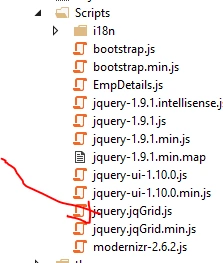
Now, we will write code related to jqGrid so we will take a separate JavaScript file and give it a name like EmpDetails.js, now write this code...
- /// <reference path="jqGrid/jquery.jqGrid.js" />
- var EmployeeDetails = {
- GetEmpData: function () {
- $("#list").jqGrid({
- url: '/Employee/EmpInfoData',
- datatype: 'json',
- mtype: 'Get',
- colModel: [
- {
- key: true, hidden: true, name: 'EmployeeNo', index: 'EmployeeNo', editable: true
- },
- { key: false, name: 'FirstName', index: 'FirstName', width: 245, editable: true, editrules: { required: true }, },
- { name: 'LastName', index: 'LastName', width: 245, editable: true, editrules: { required: true }, },
- { name: 'Address', index: 'Address', width: 245, editable: true, editrules: { required: true }, },
- {
- name: 'MobileNo', index: 'MobileNo', width: 245, editable: true, editrules: { required: true }, editoptions: {
- maxlength: "10", dataInit: function (element) {
- $(element).keypress(function (e) {
- if (e.which != 8 && e.which != 0 && (e.which < 48 || e.which > 57)) {
- alert("Accept only numeric value and only ten digits");
- return false;
- }
- });
- }
- }
- },
- {
- name: 'PostelCode', index: 'PostelCode', width: 145, editable: true, editrules: { required: true }, editoptions: {
- maxlength: "6", dataInit: function (element) {
- $(element).keypress(function (e) {
- if (e.which != 8 && e.which != 0 && (e.which < 48 || e.which > 57)) {
- alert("Accept only numeric value and only six digits");
- return false;
- }
- });
- }
- }
- },
- { name: 'EmailId', index: 'EmailId', width: 245, editable: true, editrules: { required: true }, }
- ],
- pager: jQuery('#pager'),
- rowNum: 10,
- loadonce: true,
- rowList: [10, 20, 30, 40],
- height: '100%',
- viewrecords: true,
- caption: 'Employee Details',
- emptyrecords: 'No records to display',
- jsonReader: {
- repeatitems: false,
- root: function (obj) { return obj; },
- page: "page",
- total: "total",
- records: "records",
- repeatitems: false,
- EmployeeNo: "0"
- },
- autowidth: true,
- multiselect: false
- }).navGrid('#pager', { add: false, edit: true, del: true, search: false, refresh: true },
- {
- // edit options
- zIndex: 1000,
- url: '/Employee/UpdateEmployeeInfo',
- closeOnEscape: true,
- closeAfterEdit: true,
- recreateForm: true,
- loadonce: true,
- align: 'center',
- afterComplete: function (response) {
- GetEmpData()
- if (response.responseText) {
- alert(response.responseText);
- }
- }
- }, {},
- {
- // delete options
- zIndex: 1000,
- url: '/Employee/DeleteEmployeeInfo',
- closeOnEscape: true,
- closeAfterdel: true,
- recreateForm: true,
- msg: "Are you sure you want to delete this task?",
- afterComplete: function (response) {
- if (response.responseText) {
- $("#alert-Grid").html("<b>" + response.responseText + "</b>");
- $("#alert-Grid").show();
- $("#alert-Grid").delay(3000).fadeOut("slow");
- }
- }
- });
- },
- insertEmployeeDetails: function () {
- $("#btnSubmit").click(function () {
- $.ajax(
- {
- type: "POST", //HTTP POST Method
- url: "/Employee/InsertEmployeeInfo", // Controller/View
- data: { //Passing data
- FirstName: $("#txtFName").val(), //Reading text box values using Jquery
- LastName: $("#txtLName").val(),
- Address: $("#txtAddress").val(),
- MobileNo: $("#txtMobileNo").val(),
- PostelCode: $("#txtPinCode").val(),
- EmailId: $("#txtEmail").val()
- },
- success: function (data) {
- alert(data);
- $("##alert-danger").html("<b>" + data + "</b>");
- $("##alert-danger").show();
- $("##alert-danger").delay(10000).fadeOut("slow");
- },
- error: function (data) {
- GetEmpData();
- //var r = data.responseText;
- //var errorMessage = r.Message;
- $("##alert-danger").html("<b>" + data + "</b>");
- $("##alert-danger").show();
- $("##alert-danger").delay(10000).fadeOut("slow");
- }
- });
- });
- }
- }
Now, let's design our UI with HTML in View.
- @{
- ViewBag.Title = "EmployeeDetails";
- }
- <link href="~/themes/jquery-ui-1.12.1.custom/jquery-ui.css" rel="stylesheet" />
- <link href="~/Content/jquery.jqGrid/ui.jqgrid.css" rel="stylesheet" />
- <script src="~/Scripts/jquery-1.9.1.js"></script>
- <script src="~/Scripts/jquery-ui-1.10.0.js"></script>
- <script src="~/Scripts/i18n/grid.locale-en.js"></script>
- <script src="~/Scripts/jquery.jqGrid.min.js"></script>
- <script src="~/Scripts/EmpDetails.js"></script>
- <br />
- <div class="row">
- <div class="col-xs-4 col-md-2"></div>
- <div class="col-xs-6 col-md-8" ng-hide="showHide">
- <div class="panel panel-default">
- <div class="panel-heading" style="background-color:#4B7082;color:white"><h4 align="center">Add New Employee Records</h4></div>
- <div class="panel-body">
- <div class="row">
- <form class="form-inline" id="form1">
- <div class="col-md-5" style="padding-left:80px;">
- <div class="form-inline">
- <label for="" id="label">First Name</label>
- <input type="text" class="form-control" required id="txtFName">
- </div>
- <br />
- <div class="form-inline">
- <label for="" id="label">Address</label>
- <input type="text" class="form-control" required id="txtAddress">
- </div>
- <br />
- <div class="form-inline">
- <label for="" id="label">Pin Code</label>
- <input type="text" class="form-control" required id="txtPinCode">
- </div>
- </div>
- <div class="col-md-5" style="padding-left:80px;">
- <div class="form-inline">
- <label for="" id="label">Last Name</label>
- <input type="text" required id="txtLName" class="form-control">
- </div>
- <br />
- <div class="form-inline">
- <label for="" id="label">Mobile Number</label>
- <input type="text" class="form-control" required id="txtMobileNo">
- </div><br />
- <div class="form-inline">
- <label for="" id="label">Email Id</label>
- <input type="text" class="form-control" required id="txtEmail">
- </div>
- <br />
- <input type="submit" class="btn btn-success" id="btnSubmit" value="Submit" />
- </div>
- </form>
- </div>
- </div>
- </div>
- </div>
- <div class="col-xs-6 col-md-2"></div>
- </div>
- <div class="row">
- <div class="col-md-10 col-md-offset-1">
- <div class="alert alert-danger" role="alert" id="alert-Grid"></div>
- <table align="center" id="list"></table>
- <div id="pager"></div>
- </div>
- </div>
Now, we will callour jqGrid methods in View. Write this code in View page.
- <script type="text/javascript">
- $(function () {
- $("#alert-Grid").hide();
- EmployeeDetails.GetEmpData();
- EmployeeDetails.insertEmployeeDetails();
- });
- </script>
So, we can see that this is my final View.
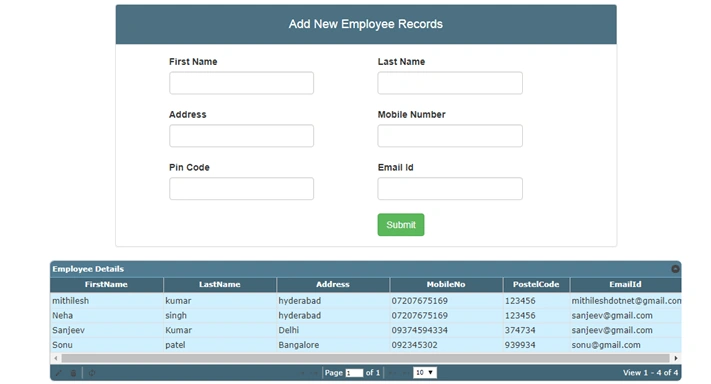
We will insert, update, and delete our records.
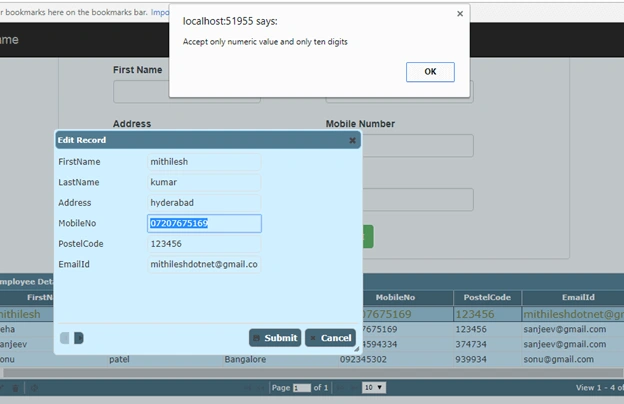
Here, it is working with all related validation. We can see that the mobile number should be numeric but if we try to enter it alphabetically, then it will show an error.
Thanks and happy coding.
Swagat NayakPosted Feb 26, 2019, 4:35 AM
When I run the web api project am not able to find the output... I am getting this error : Server Error in '/' Application.
sekar subramaniPosted Jul 26, 2018, 6:55 AM
Where you created the IDataAccess interface
Akshay PorwalPosted Jun 6, 2018, 4:53 AM
Your article is awesome. But i am unable to insert data. Please let me know did i have to give any reference in PresentationLayer???
Mithilesh KumarPosted Apr 12, 2018, 2:53 AM
Here I created model class as existing data so please check your connection and also you can add first domain class and DbContext class and give proper connection string ................
Arjun DhilodPosted Apr 12, 2018, 2:28 AM
Very NIce @Mithilesh Kumar i am new in EF and web api when i am read you this article it very nice thank you very much
Vinodh NarayananPosted Aug 11, 2017, 8:20 AM
Good one thanks for sharing keep going