

In this 19th day of AngularJS article series, we are going to be learning next key players/concept of AngularJS, understanding the concept of Value and Constant service of AngularJS. Before moving on to key players/concepts of AngularJS, please read my previous articles:
- Introduction to AngularJS – Day 1
- Introduction to AngularJS – Day 2
- Introduction to AngularJS – Day 3
- Introduction to AngularJS – Day 4
- Introduction to AngularJS – Day 5
- Introduction to AngularJS – Day 6
- Introduction to AngularJS – Day 7
- Introduction to AngularJS – Day 8
- Introduction to AngularJS – Day 9
- Introduction to AngularJS – Day 10
- Introduction to AngularJS – Day 11
- Introduction to AngularJS – Day 12
- Introduction to AngularJS – Day 13
- Introduction To AngularJS – Day 14
- Introduction To AngularJS – Day 15
- Introduction To AngularJS – Day 16
- Introduction to AngularJS – Day 17
- Introduction to AngularJS – Day 18
Value(name, value)
Value service is nothing but global variables, you can change it and use it in any controller. A value can be a string, array or a number. It can inject anywhere. It’s not possible to inject any other service in value service.
Syntax:
app.value(name, value);
name – is nothing but a label for accessing the actual value.
value – value is nothing but actual data.
Example:
In the below example we are going to assign a user data to value:
app.js
- /// <reference path="angular.min.js" />
- var app = angular.module("myApp", []);
- //Creating value
- app.value("user_data", {
- first_name: 'Jeetendra',
- last_name: 'Gund',
- city: 'Pune',
- tech: '.NET, C#, AngularJS',
- author_at: 'C# Corner'
- });
- //Creating controller & injecteing value('user_data') in controller
- app.controller("myController", function ($scope, user_data) {
- $scope.result = user_data;
- });
- <!DOCTYPE html>
- <html ng-app="myApp">
- <head>
- <title>Welcome to C# Corner</title>
- <meta charset="utf-8" />
- <script src="app/angular.min.js"></script>
- <script src="app/app.js"></script>
- </head>
- <body>
- <div ng-controller="myController">
- <h2 style="color:red">Value and Constant in AngularJS</h2>
- <h2>Author Details:</h2>
- <h3>Name : {{result.first_name}} {{result.last_name}}</h3>
- <h3>City : {{result.city}}</h3>
- <h3>Technology : {{result.tech}}</h3>
- <h3>Author At : {{result.author_at}}</h3>
- </div>
- </body>
- </html>
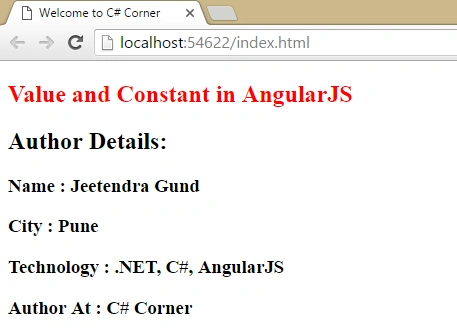
In the above example we can see I have created value ‘user_data’ and injected it in ‘myController’. Now I am going to change the value ‘user_data’ of ‘tech’ property, see below code:
- /// <reference path="angular.min.js" />
- var app = angular.module("myApp", []);
- //Creating value
- app.value("user_data", {
- first_name: 'Jeetendra',
- last_name: 'Gund',
- city: 'Pune',
- tech: '.NET, C#, AngularJS',
- author_at: 'C# Corner'
- });
- //Creating controller & injecteing value('user_data') in controller
- app.controller("myController", function ($scope, user_data) {
- $scope.result = user_data;
- });
- app.controller("myCtrl", function ($scope, user_data) {
- user_data.tech = user_data.tech + ", MVC";
- $scope.test = user_data;
- });
- <!DOCTYPE html>
- <html ng-app="myApp">
- <head>
- <title>Welcome to C# Corner</title>
- <meta charset="utf-8" />
- <script src="app/angular.min.js"></script>
- <script src="app/app.js"></script>
- </head>
- <body>
- <div ng-controller="myController">
- <h2 style="color:red">Value and Constant in AngularJS</h2>
- <h2>Author Details:</h2>
- <h3>Name : {{result.first_name}} {{result.last_name}}</h3>
- <h3>City : {{result.city}}</h3>
- <h3>Technology : {{result.tech}}</h3>
- <h3>Author At : {{result.author_at}}</h3>
- </div>
- <div ng-controller="myCtrl"></div>
- </body>
- </html>
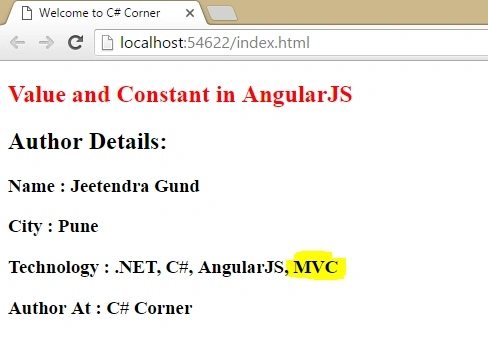
In the above screen shot you can see we added value in ‘user_data’ of ‘tech’ property is updated in our first ‘myController’ also. Now, you can understand how to create a value in AngularJS and change it anywhere and it's updated everywhere.
Constant(name, value)
This Constant service, name defines itself as nothing to be changed. Once assigned value to constant service cannot be changed in the application. You can inject anywhere only exclude from config. You can assign value to constant but it cannot be changed, like value service we see above.
Syntax:
app.constant(name, value);
name – it contains the label for a constant.
value – it contains the value for a constant.
Example:
In the below example, we store some needed values in ‘web.config’ file and later on access or read from ‘web.config’. We can do the same thing in this AngularJS constant service as follows:
app.js
- /// <reference path="angular.min.js" />
- var app = angular.module("myApp", []);
- //Creating Constant
- app.constant("connectionStrings", {
- data_source: 'Jeet_Server',
- initial_catalog: 'Jeet_AngularJS',
- user_id: 'Jeet',
- password: 'Admin@2016',
- MultipleActiveResultSets: 'True',
- App: 'EntityFramework'
- });
- //Creating controller & injecteing constant('connectionStrings') in controller
- app.controller("myConstantController", function ($scope, connectionStrings) {
- $scope.Conn_String = connectionStrings;
- });
constant.html
- <!DOCTYPE html>
- <html ng-app="myApp">
- <head>
- <title>Welcome to C# Corner</title>
- <meta charset="utf-8" />
- <script src="app/angular.min.js"></script>
- <script src="app/app.js"></script>
- </head>
- <body>
- <div ng-controller="myConstantController">
- <h2 style="color:red">Value and Constant in AngularJS</h2>
- <h2>Constant values 'connectionStrings'</h2>
- <h3>Data Source : {{Conn_String.data_source}}</h3>
- <h3>Initial Catalog : {{Conn_String.initial_catalog}}</h3>
- <h3>User Id : {{Conn_String.user_id}}</h3>
- <h3>Password : {{Conn_String.password}}</h3>
- <h3>MultipleActiveResultSets : {{Conn_String.MultipleActiveResultSets}}</h3>
- <h3>App : {{Conn_String.App}}</h3>
- </div>
- </body>
- </html>
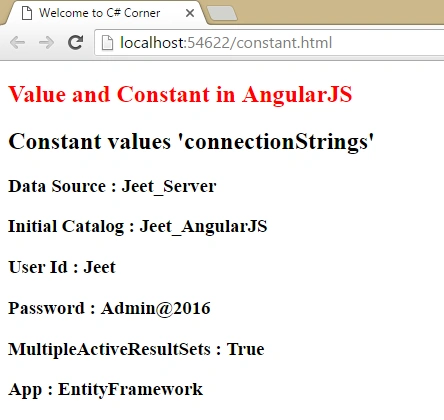
Now run the application in browser, you can see how we can use Constant values in controller in output as follows:
Great, Value and Constant service in AngularJS with example created successfully!
Summary
I hope that beginners as well as students understand the concept of Value and Constant service in AngularJS with Example. If you have any suggestion regarding this article, then please contact me. Stay tuned for other concepts of AngularJS coming soon!
Thanks for reading. Learn it! Share it!
Read more articles on AngularJS:
Kuppurasu NagarajPosted Apr 30, 2016, 2:41 PM
Nice Sharing..
Ajeet MishraPosted Apr 28, 2016, 12:14 PM
nice
Mohammed IbrahimPosted Apr 28, 2016, 12:11 PM
nice
Debasis SahaPosted Apr 28, 2016, 10:45 AM
Good One..
Pankaj Kumar ChoudharyPosted Apr 28, 2016, 9:54 AM
Great Series of article sir.......
Upendra Pratap ShahiPosted Apr 28, 2016, 9:50 AM
Nice one sir...
Thiruppathi RPosted Apr 28, 2016, 8:57 AM
Simple and good example..that s good....
Vignesh ManiPosted Apr 28, 2016, 8:25 AM
Nice