In this 15th day of AngularJS article series, we are going to be learning the next key players/concept of AngularJS, and understanding the concept of Factories in AngularJS. Before moving to key players/concepts of AngularJS, please read my previous articles:
- Introduction to AngularJS – Day 1
- Introduction to AngularJS – Day 2
- Introduction to AngularJS – Day 3
- Introduction to AngularJS – Day 4
- Introduction to AngularJS – Day 5
- Introduction to AngularJS – Day 6
- Introduction to AngularJS – Day 7
- Introduction to AngularJS – Day 8
- Introduction to AngularJS – Day 9
- Introduction to AngularJS – Day 10
- Introduction to AngularJS – Day 11
- Introduction to AngularJS – Day 12
- Introduction to AngularJS – Day 13
- Introduction To AngularJS – Day 14
Factories
A factory is a simple function that returns as object. It is just a collection of functions like a class. Hence, it can be instantiated in different controllers when you are using it with constructor function.
- Create and return a custom object.
- Created using the module.factory () function.
- Can be injected into other components.
- Can have dependencies.
Syntax:
-
- var app = angular.module("myApp", []);
-
-
- app.factory("myFactory", function () {
-
- var factObj = {};
-
- factObj.function1 = function () {
-
- };
-
- factObj.function2 = function () {
-
- };
-
- return factObj;
- });
The above syntax shows how to create a factory in AngularJS.
Inject factory in controller as follows:
-
- app.controller("factoryController", function ($scope, myFactory) {
-
- $scope.tets = function () {
- $scope.result = myFactory.function1();
- };
-
- });
In the below example we are going to create a module, factory and controller and a view to be used.
app.js
-
- var app = angular.module("myApp", []);
-
-
- app.factory("myFactory", function () {
-
- var factObj = {};
- factObj.Display = function (text) {
- return "Welcome to " + text + " !";
- };
-
- return factObj;
- });
-
-
- app.controller("myController", function ($scope, myFactory) {
-
- $scope.show = function () {
- $scope.result = myFactory.Display($scope.enter_text);
- };
-
- });
- <!DOCTYPE html>
- <html ng-app="myApp">
- <head>
- <title>Factories in AngularJS</title>
- <meta charset="utf-8" />
- <script src="app/angular.min.js"></script>
- <script src="app/app.js"></script>
- </head>
- <body ng-controller="myController">
- <h2>Factories in AngularJS</h2>
- Enter the text : <input type="text" ng-model="enter_text" /><br /><br />
- <input type="button" value="Factory" ng-click="show()" /><br />
- <h3>{{result}}</h3>
- </body>
- </html>
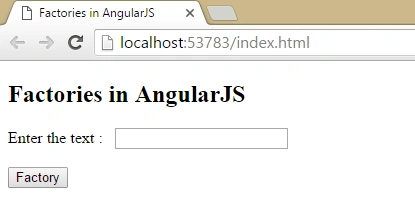
Enter some text box and click on ‘Factory’ button it will show you output as follows:
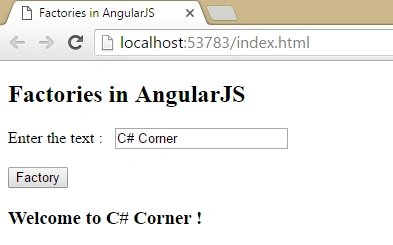
Great, Factories in AngularJS with example created successfully!
Summary
I hope that beginners as well as students understand the concept of Factories in AngularJS with examples. If you have any suggestion regarding this article, then please contact me. Stay tuned for other concepts of AngularJS coming soon!
Thanks for reading. Learn it! Share it!
Read more articles on AngularJS:


Kuppurasu NagarajPosted Apr 30, 2016, 2:58 PM
Nice Sharing..
Kishor Bikram OliPosted Apr 28, 2016, 1:08 PM
Good articles
Vivek KumarPosted Apr 26, 2016, 10:40 AM
Good series.
Debasis SahaPosted Apr 26, 2016, 10:20 AM
Nice One..
Jeetendra GundPosted Apr 26, 2016, 1:49 AM
Thanks all..
Pankaj Kumar ChoudharyPosted Apr 25, 2016, 7:55 PM
Nice Article Sir.......
sreenivasa kPosted Apr 25, 2016, 1:47 PM
nice stuff
Gowtham RajamanickamPosted Apr 25, 2016, 10:00 AM
good article..
Vignesh ManiPosted Apr 25, 2016, 8:15 AM
Good one
Upendra Pratap ShahiPosted Apr 25, 2016, 7:50 AM
again nice...