

Before reading this article, I highly recommend reading my previous parts:
- Introduction To CDC (Change Data Capture) Of SQL Server - Part One
- Introduction To CDC (Change Data Capture) Of SQL Server - Part Two
Here, we will go deeper and understand few more commands.
When we enable CDC on a table, it will create two SQL Agent jobs for each database:

- Capture job is used to read transaction log and populates change tables with audit details.
- Cleanup is used to remove entries from change tables after a specified retention period.
We can find configuration settings of these jobs using SP sys.sp_cdc_help_jobs and the same can be modified by sys.sp_cdc_change_job:

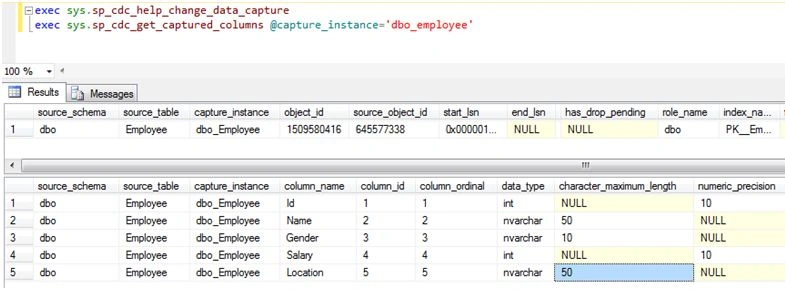
We can use sys.sp_cdc_help_change_data_capture to retrieve information like capture columns, file group name etc. of each CDC enabled table in a database.
sys.sp_cdc_get_captured_columns used to get column details like name, data type etc. of a CDC enabled table.
DDL modifications on a source table, like adding or dropping a column or changing the data type, are maintained in the cdc.ddl_history table and can be retrieved by sys.sp_cdc_get_ddl_historyas shown below:

This table will contain source_table name and ddl statement fired on it. Any DDL changes on a table will not be captured in CDC tables automatically. We need to manually create one more/re-create capture instance for tracking newly added columns using SP sp_cdc_enable_table.
We can use sys.sp_cdc_cleanup_change_table to remove rows from change table by passing capture instance and LSN value.
To restore database with change data capture tables, we can use the KEEP_CDC option when restoring the database.
RESTOREDATABASEEmployeeDBFROMDISK=N'c:\SQLServerBackups\test.Bak'WITHFILE=1,
NOUNLOAD,STATS=5,REPLACE,KEEP_CDC
We can restore the database on SQL Server enterprise edition only, if not we will get an error while restoring it.
Tips:
- As per CDC design, we can’t keep CDC tables in a different database. So, it’s recommended to store those in separate file group using option @filegroup_name.
- We can’t track user ID, by whom changes are done. Alternatively, we can add extra column like ModifiedBy to each table and update that field from UI.
- Instead of auditing complete table, audit only required columns using option @captured_column_list.
By using CDC, we can do auditing/change tracking on tables. It is a very useful tool to audit all inserts\updates\deletes at table level.
I am ending things here on CDC, I hope this article will be helpful for all.
Read more articles on SQL Server:
Gowtham RajamanickamPosted Mar 4, 2016, 1:39 AM
Good one..
Sibeesh VenuPosted Mar 3, 2016, 6:53 AM
Nice Share
Yashwant VishwakarmaPosted Mar 3, 2016, 12:46 AM
Nice information on CDC, thanks for sharing.
Shubham KumarPosted Mar 3, 2016, 12:15 AM
good to know about cdc
Raja TPosted Mar 2, 2016, 11:12 PM
Nice,Thanks for sharing..
Humayun Kabir MamunPosted Mar 2, 2016, 10:55 PM
Nice...
Rajeev PunhaniPosted Mar 2, 2016, 10:29 PM
Nice
Ankur MistryPosted Mar 2, 2016, 12:39 PM
Good job
Vignesh ManiPosted Mar 2, 2016, 11:03 AM
Nice
Asfend YarPosted Mar 2, 2016, 10:59 AM
nice
Ammar ShaukatPosted Mar 2, 2016, 10:05 AM
Good