

Introduction
Technical Debt is a term that is commonly used in agile-scrum team process. Technical debt is used for the work which team or an individual didn’t prioritize upon while pushing the deliverable, and either left some unwanted code in various project artifacts, such as - .cs, .config, .cshtml, .js, .sql etc. or didn't use the right technique to accomplish the goal. But, in real world software development process, this is expected and totally fine; as long as team takes the responsibility to pay off the Technical Debt.
How is Technical Debt created?
Technical Debt is like financial $$ debt; if you don’t pay off previously owned $ amount and keep borrowing more, then you are getting into messier situation. I assume that you are not the one who like debt that much, whether it is technical or financial. Anyway, just to be aware; if you don’t take good care of the following items, you are potentially seeding “Technical Debt” situation in general. Later on, that needs to be paid off.
- First and foremost, poor coding style and standards.
- No unit test cases.
- Not following the OO design principles.
- Developing long monolithic classes and code libraries.
- Not envisioning on proper candidate technology, architecture, or approach, and then hitting a wall. This means, when application is little bit mature, you start to feel the hit on user experience, performance, scalability, and code maintenance etc.
- Over engineered application, i. e., the things which can be done in simpler way, are done using very complicated mechanism. For instance, to encrypt the data, custom code is written or taken from internet, which causes a lot of security holes and performance hits.
- Code files have lot of comments, i.e., the code is completely documented. Many developers write few or no lines of comment for each line of code.
- Code is not self-documented, i.e., classes, functions, and variables etc., are given improper names. For example, a function is named Salary instead of EmployeeSalary, or a variable is called double sal instead of double employeeSalary.
- Shortcut approach is taken to push the functionality to meet the code completion deadlines. Such events trigger further refactoring to be performed later. For instance, you created one thick bulky Model class with a lot of classes within; Or hard coded various paths and endpoints into the .cs code rather than putting those into a web.config, and reading web.config Key in the code for the related value (key-value pair).
- Dead code in project. You must have seen or left some commented code in various code files. This is the dead code and needs to be cleaned up.
Based on the above mentioned points, now, you will be able to understand that why Technical Debt is also known as Code Debt or Design Debt. In addition to this, anything in your software development work which slows you down or looks odd or can be improvised, is a “Technical Debt”.
How to handle Technical Debt
The first step is, not to cause any technical debt from your end, if, at all, possible. However, in agile development, it’s common to have some technical debt accumulated over the period of time. If so, then move to second step. The second step is to report any technical debt which you have either caused or came across.
Please don’t get into blame game, or point finger to any individual. Let’s say, you come across some code blocks in a file you are working on, and then, you see some dead code. Rather than start cleaning it up, I recommend, you create a Technical Debt item and let the team decide.
How to Report Technical Debt
Technical debt items are usually reported as issues or as a “New Product Backlog Item”. Also, technical debt items are supposed to be logged in a separate backlog, i.e., don’t report those to Production or sprint backlog. In many teams, and as per my experience with agile-scrum, I have always worked on a separate dedicated “TechnicalDebt backlog”.
Having a separate Technical Debt Backlog allows the team to stay focused on Sprint backlog, and don’t interfere with business requirements which are logged in to the Product Backlog.
Creating Technical Debt backlog
Creation of backlog and modifying process templates etc. is usually done by an admin in your project team. In an agile team, setting this duty is usually performed by the scrum master.
If your team doesn’t already have a Technical Debt backlog, then it’s time create one.
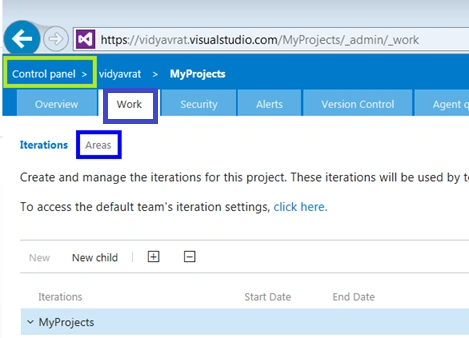
- Go to VSTS (Visual Studio Team Services) Team Project’s Web Portal and in the control panel, click on Areas, under Work tab.
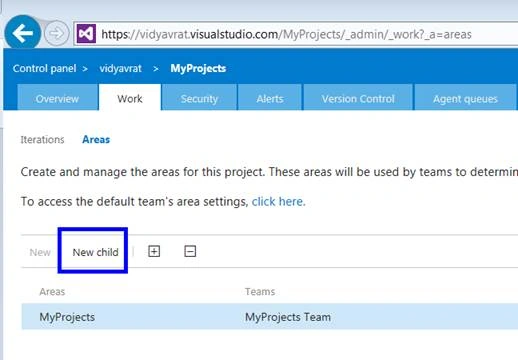
- Under the “Areas”, click on “New child".
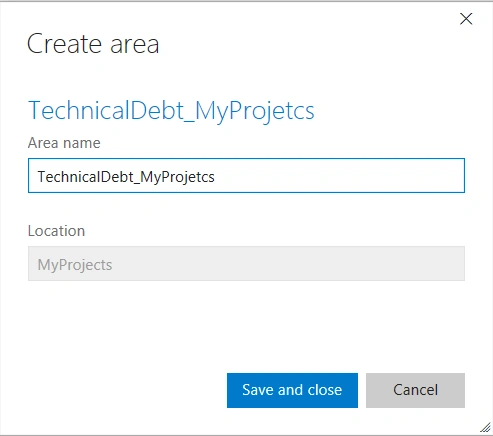
- Name it as “TechnicalDebt_<YourTeamProjectName>”. Technical Debt prefix helps you differentiate it from other areas and makes it self-explanatory.
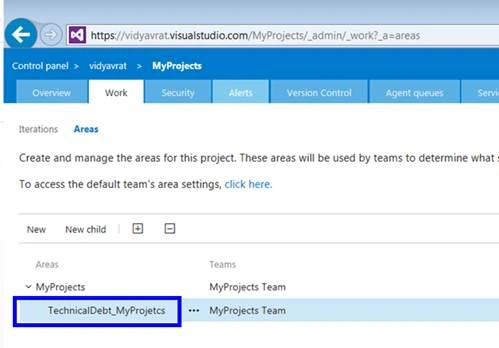
- It will, now, appear under your Team Project as an area.
Let’s see it from Developer’s angle
Developers usually interact via Team Explorer, from within Visual Studio IDE. 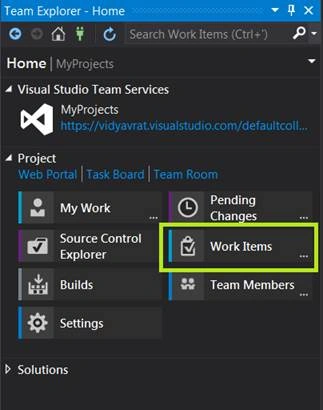
Select Work Items. Then, click on “New Work Item”. Based on your team process template, usually, either Agile or Scrum, you can select Product Backlog Item or Impediment or Issue as item type, to report the Technical debt.
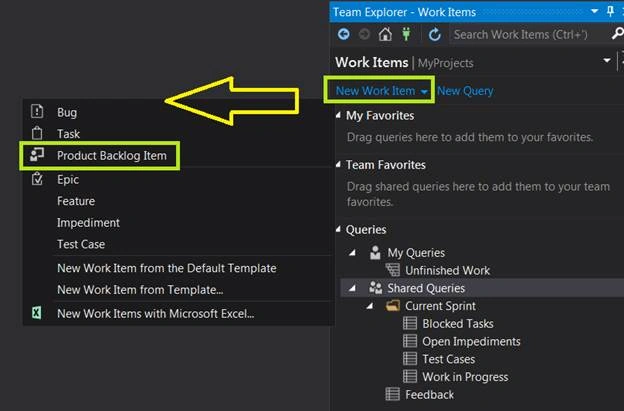
Filling in the details
Usually, any item, in any backlog, needs to have ample information to describe what the issue is. In the below example, it is briefly pointed out that some classes need code cleanup. Some questions might still be unanswered and those will be discussed during backlog grooming and sprint planning.
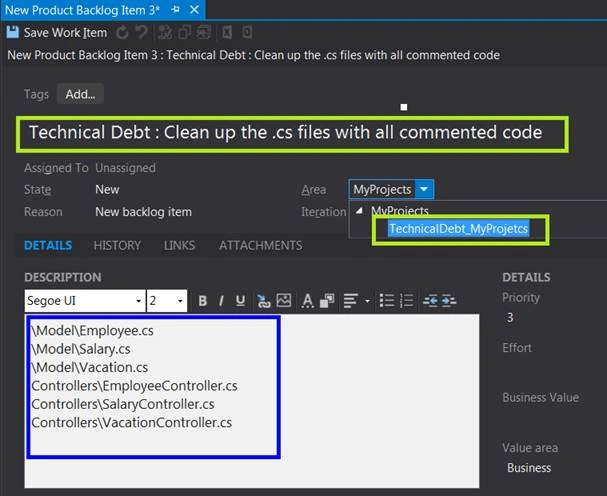
When to work on Technical Debt
Just like the Product and Sprint backlogs, Technical Debt backlog also needs to be groomed, i.e., each “Technical Debt” item needs to be reviewed and groomed by the team, to identify its validity, impact on overall team’s development experience, and software quality team is producing. Once, the team is in agreement to pay off a technical debt item (or items), those items are transferred to Sprint Backlog and, many times, a new User Story is created for each technical debt.
Many Agile experts say that a team must not carry Technical Debt beyond a sprint, just like you should not carry Credit Card balances over to next pay period. That is, to pay off full Credit Card debt in the same billing cycle. But, it’s not always possible. So, it doesn’t happen in Software world for Technical Debt, as well.
Summary
I personally recommend that as a developer, you should not cause any technical debt due to the code you have written or currently writing. Be honest about any improvements your code might need, and explicitly call out what changes can be made to make it better. Avoid any over engineering or unwanted design patterns and technology implementations, to be called out as Technical Debt. If you are not sure whether a particular code / technique is Technical Debt or not, call out a short brain storming session. In today’s software development industry, it’s not easy to avoid technical debt. We all live with it, but, be aware that you have to get rid of technical debt to achieve complete Technical Freedom.
Hanif HefazPosted Aug 24, 2016, 9:32 AM
Nice
Muhammad Aqib ShehzadPosted Jul 15, 2016, 6:39 AM
Very nice share sir
Suthish NairPosted Jul 14, 2016, 2:27 AM
Great Share.. So Technical Debt is more specific to Agile Development only? So this should identify or consider as a Risk factor during the project cycle? Article Bookmarked... :)
Vignesh ManiPosted Jul 13, 2016, 5:42 PM
Good one sir
kalu singh raoPosted Jul 13, 2016, 7:14 AM
Nice...