

After a standard period of hibernation, I am awake and hungry, but first it's time to pay the dues so without wasting much of your time, let's jump right into it. This is a long due post in continuation with the first post on RESTful api with express-js and mongodb - Part 1
What's covered in this article?
As promised, I'm going to cover the following
- Take a look at app.js and explain all the mumbo-jumbo
- Middleware
- How users and routes work
Pre-requirements
As I mentioned, this blog is (as the title says), part two. If you haven't gone through RESTful api with express-js and mongodb - Part 1 then I'd strongly advise you to read it first. Other than that you'd want to get code that was produced as part of first blog from this github repository, also you'd need to switch to part-1 branch. In a nutshell, the following code with clone latest repo, checkout part-1 branch and install npm packages.
- git clone [email protected]:daveamit/mongo-crud-express-api.git && cd mongo-crud-express-api && git checkout part-1 && npm install
The Big Bang
So you must be wondering how it all began? Why npm start launches the app? Today we are going to take a peek under the hood, roughly, the following happens
- Require all the good stuff
- Configure and register all the middleware
- Listning for http requests on a given port
Still not clear? Let's break it down. When you do npm start, npm goes and looks for scripts configuration area for start command, meaning, npm <script>. If you open up your package.json, you'll find a script section as shown below,
- {
- ...
- "scripts": {
- "start": "node ./bin/www"
- }
- ...
- }
What it means is, when someone issues start command just fire-up node ./bin/www command. So when you do npm start you are actually executing node ./bin/www.
Following is commented version of app.js
- // This line loads up the express package
- var express = require('express');
- // express() creates an application object
- // which we'll be using to configure middleware
- var app = express();
- // The path module is used to manipulate and calculate path
- var path = require('path');
- var favicon = require('serve-favicon');
- // Morgan is a logging module,
- // you guessed it right, Morgan as in Dexter Morgan
- var logger = require('morgan');
- // These parsers are help express parse information in cookies, url and body
- var cookieParser = require('cookie-parser');
- var bodyParser = require('body-parser');
- //This is where we load routes
- var routes = require('./routes/index');
- var users = require('./routes/users');
- // view engine setup, what we are saying to express is
- // the ./views directory contains all our views
- app.set('views', path.join(__dirname, 'views'));
- // Here are are stating that we are going to use handlebars
- // as the view engine, hence all view would be foo.hbs.
- app.set('view engine', 'hbs');
- // This will cause all the requests to be logged on the
- // console
- app.use(logger('dev'));
- // bodyParser.json() detects json content, and parses it and
- // loads it under req.body
- app.use(bodyParser.json());
- app.use(bodyParser.urlencoded({ extended: false }));
- app.use(cookieParser());
- // express.static is a middleware which handles all the
- // static content
- app.use(express.static(path.join(__dirname, 'public')));
- // and finally we mount the routes
- app.use('/', routes);
- // this just means, when a request comes for /users
- // just pass on the request to users middleware
- app.use('/users', users);
- // As I'll explain how middlewares work, for now just know that
- // If the execution comes that this point means that,
- // nigther the static content nor any of our routes
- // handled the incoming request, meaning, we were unable
- // to entertain it, meaning its a 404 and forward to error handler
- app.use(function(req, res, next) {
- var err = new Error('Not Found');
- err.status = 404;
- // This invokes next error handling middleware
- // down the pipline
- next(err);
- });
- // error handlers
- // if we are in development mode,
- // we will print full stack-trace
- if (app.get('env') === 'development') {
- app.use(function(err, req, res, next) {
- res.status(err.status || 500);
- // render causes our 'error.hbs' view to be
- // rendered with the details, message and error object
- res.render('error', {
- message: err.message,
- error: err
- });
- });
- }
- // if we are in production make sure that
- // no stack-traces leaked to user
- app.use(function(err, req, res, next) {
- res.status(err.status || 500);
- // render causes our 'error.hbs' view to be
- // rendered with the details
- res.render('error', {
- message: err.message,
- error: {}
- });
- });
- // and finally we export fully configured ready to run
- // application instance
- module.exports = app;
and /bin/www,
- #!/usr/bin/env node
- /**
- * Module dependencies.
- */
- // Load up the app.js in which we configure and
- // export our app
- var app = require('../app');
- var debug = require('debug')('mongo-crud-express-api:server');
- var http = require('http');
- /**
- * Get port from environment and store in Express.
- */
- var port = normalizePort(process.env.PORT || '3000');
- app.set('port', port);
- /**
- * Create HTTP server.
- */
- var server = http.createServer(app);
- /**
- * Listen on provided port, on all network interfaces.
- */
- server.listen(port);
- server.on('error', onError);
- server.on('listening', onListening);
- /**
- * Normalize a port into a number, string, or false.
- */
- function normalizePort(val) {
- var port = parseInt(val, 10);
- if (isNaN(port)) {
- // named pipe
- return val;
- }
- if (port >= 0) {
- // port number
- return port;
- }
- return false;
- }
- /**
- * Event listener for HTTP server "error" event.
- */
- function onError(error) {
- if (error.syscall !== 'listen') {
- throw error;
- }
- var bind = typeof port === 'string'
- ? 'Pipe ' + port
- : 'Port ' + port;
- // handle specific listen errors with friendly messages
- switch (error.code) {
- case 'EACCES':
- console.error(bind + ' requires elevated privileges');
- process.exit(1);
- break;
- case 'EADDRINUSE':
- console.error(bind + ' is already in use');
- process.exit(1);
- break;
- default:
- throw error;
- }
- }
- /**
- * Event listener for HTTP server "listening" event.
- */
- function onListening() {
- var addr = server.address();
- var bind = typeof addr === 'string'
- ? 'pipe ' + addr
- : 'port ' + addr.port;
- debug('Listening on ' + bind);
- }
TL;DR version
The npm start invoking node ./bin/www, /bin/www loads up the app.js, app.js loads up all the routes and configures the app, then /bin/www reads port information from the environment variables and finally listens to given port (3000 by default) for any http requests. Simple enough, hmm?
Middleware
That being said, let's understand one of the core concepts of express, the mighty middleware. Middleware is actually a very simple concept to understand, it is very similar to middleman, what middleman does is he take the request from one party and gets in touch with the other party, does what needs to be done and then provides a response back to the party which placed the request in the first place. So middleware are just simple functions with three arguments; request, response and next, they act as a middleman when express receives a request, express passes this request to each middleware in chain until it receives a response. In general, there are two kinds of middleware, first one being a normal middleware, and second one an error handling middleware.
Middleware concept is at the core of express.js and very important to understand, almost everything in express.js is a middleware from bodyparsers to loggers, from routes to error handlers. So it is very important to understand what are middlewares and how they work.
A middleware has following signature
- function aMiddleware(req, res, next){
- //req: an express request object
- //res: express response object, res.send, res.json,
- //res.render etc can be used to generate response
- /* the voodoo */
- }
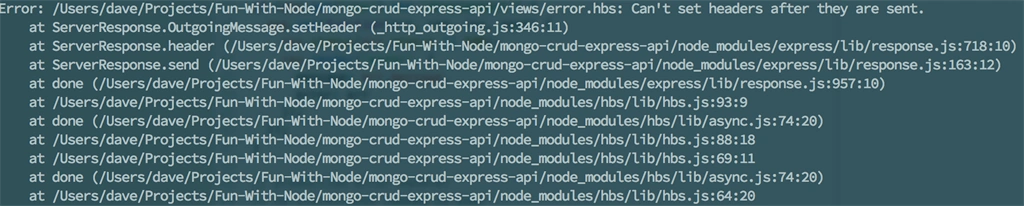
Here, req is the express request object, the res is express response object and next is the Next Middleware in The Pipeline. You can either do your thing with res object like sending response or you can trigger the next middleware in the pipeline. > But you can't do both, i.e You can't write to the res and call next as well, if you do so, the response will be sent to the client as soon as res.json or similar function is called then next will be executed, keep in mind that the response has already been sent and now next can't send response again so if the next middleware tries to send a response then express would throw an exception, though client will never know about that because it already received a response with status 200. In a typical scenario, the next middleware might get similar error when it tries to render a response.
Error when response is set and still next is called.
A word of caution, if you do not write to res nor call next then that request will hang forever. And that is not what you'd want. Although this is pretty useful while implementing long polling.
Ok now, can you guess what the following middleware does?
- function iJustSitThereAndDoNothingMiddleware(req, res, next){
- next();
- }
Yes! you guessed it right, it just "Sits there and does nothing"! I call such middleware as connective middleware as they do not terminate the pipeline and connect the request to the next middleware. You must be wondering "why in the world would I want to write such a dumb middleware?", Well, you don't need to be so harsh, dumb is a very strong word for such a slick thing like this. For, eg, we can use such middleware to log stuff!
- function aLoggingMiddleware(req, res, next){
- //Assume log is a logging function and its pre-written
- //Log the request
- log(req);
- //Log the response
- log(res);
- //Call the next middleware
- next();
- }
Don't believe me? Look at following snippet from the good guys at morgan,
- function logger(req, res, next) {
- // request data
- req._startAt = #ff0000
- req._startTime = #ff0000
- req._remoteAddress = getip(req)
- // response data
- res._startAt = undefined
- res._startTime = undefined
- // record request start
- recordStartTime.call(req)
- function logRequest() {
- if (skip !== false && skip(req, res)) {
- debug('skip request')
- return
- }
- var line = formatLine(morgan, req, res)
- if (null == line) {
- debug('skip line')
- return
- }
- debug('log request')
- stream.write(line + '\n')
- };
- if (immediate) {
- // immediate log
- logRequest()
- } else {
- // record response start
- onHeaders(res, recordStartTime)
- // log when response finished
- onFinished(res, logRequest)
- }
- next();
- };
- }
They are Similar right? The above middleware is essentially,
- function logger(req, res, next){
- //blah blah blah
- //la la la
- //some more blah blah blah and la la la
- //Call the next middleware
- next();
- }
Ok, now can you guess what the following middleware does?
- function helloWorldMiddleware(req, res, next){
- res.json({ 'message': 'Hello world!' });
- }
Again, yes! you guessed it right! It just responds with {'message': 'Hello world!'}. I guess you are getting the hang of it. Now the following middleware,
- function sayHiIfRequestedMiddleware(req, res, next){
- if(req.query.sayhi){
- res.json({ 'message': 'Hi ' + req.query.sayhi + '!' });
- }
- else{
- next();
- }
- }
As you may have guessed if a request came like /foo?sayhi=bar and this middleware was attached in the pipeline, it would respond with {'message': 'Hi bar!'} and terminate the pipeline (not call next), if the request did not contain sayhi request parameter, then it would just call the next middleware. I hope it makes sense.
Using middleware
I think we should talk about app.use now, app.use comes in many flavours, but for now we are interested in two, first one being app.use(middleware) and second one being app.use(mountPath,middleware). mountPath can be a string, a regular-expression etc. So app.use('/foo', sayHiIfRequestedMiddleware) will cause sayHiIfRequestedMiddleware middleware to be executed when someone asks for /foo and not for /bar on the other hand, if we register it like app.use(sayHiIfRequestedMiddleware) then express will execute it each and every time irrespective of the request url (T&C Apply 😜).
The Order in which middleware is registered is very important, express executes each middleware as they appear, so the middleware registered first will be executed first (ofcourse if path and other criteria match). That is why express.static middleware was registered before users and routes were registered, to serve static content first and then dynamic content. Suppose there is a file ./public/hello and a middleware is defined as app.use('/hello',function(res, rep, next){ ... }) and a request came for GET /hello then the file ./public/hello would be served and the app.use('/hello'.. would never get called.
The other type of middleware is an error handling middleware, they are exactly like normal middleware and all the principles apply to them, but they are only triggered when something goes wrong. And to signal that something has gone terribly wrong, we need to call next with an argument like next(err). In a nutshell, next() calls next regular middleware and next(err) calls next error handling middleware in the pipeline. When an error handling middleware is called, all the regular middleware in the chain are skipped. Following is an error handler from our app.js file.
- app.use(function (req, res, next) {
- var err = new Error('Not Found');
- err.status = 404;
- // This invokes next error handling middleware
- // down the pipline
- next(err);
- });
- app.use(function(err, req, res, next) {
- res.status(err.status || 500);
- // render causes our 'error.hbs' view to be
- // rendered with the details
- res.render('error', {
- message: err.message,
- error: {}
- });
- });
In this case, the first middleware creates an error object with message 'not found' and status to 404 and invokes the next error handling middleware by next(err).
Let me demonstrate how middleware behaves with a simple app having a bunch of middleware,
- var express = require('express');
- var app = express();
- function aLoggingMiddleware(req, res, next){
- var debug = require('debug')('app:aLoggingMiddleware:');
- //Do some kind of logging
- debug('********************* --' + req.url + '-- ***********************')
- //Call the next middleware
- next();
- }
- function helloWorldMiddleware(req, res, next){
- var debug = require('debug')('app:aLoggingMiddleware:');
- debug('Responding with Hello World!');
- res.json({ 'message': 'Hello world!' });
- }
- function sayHiIfRequestedMiddleware(req, res, next){
- var debug = require('debug')('app:sayHiIfRequestedMiddleware:');
- if(req.query.sayhi){
- debug('Saying hi to ' + req.query.sayhi);
- res.json({ 'message': 'Hi ' + req.query.sayhi + '!' });
- }
- else{
- debug('Calling next middleware');
- next();
- }
- }
- app.use(aLoggingMiddleware);
- app.use(sayHiIfRequestedMiddleware);
- app.use('/hello',helloWorldMiddleware);
- app.use(function (req, res, next) {
- var debug = require('debug')('app:404 Middleware:');
- debug('Calling error middleware');
- var err = new Error('Not Found');
- err.status = 404;
- // This invokes next error handling middleware
- // down the pipline
- next(err);
- });
- app.use(function(err, req, res, next) {
- var debug = require('debug')('app:errorHandlingMiddleware:');
- debug('Rendering error page');
- res.status(err.status || 500);
- // render causes our 'error.hbs' view to be
- // rendered with the details
- res.render('error', {
- message: err.message,
- error: {}
- });
- });
- /*
- ...
- ...
- so on and so forth
- */
I have used debug instead of console.log for formatted, which will help to better understand the output. If you are not able to make sense of debug just think of it as a fancy console.log which prints label and calculate delay between calls.
This configuration will cause aLoggingMiddleware to be executed on every request and helloWorldMiddleware to be executed only when /hello resource is requested. So when a request comes with /hello then first aLoggingMiddleware and then helloWorldMiddleware will be executed, in that sequence.
So essentially it will produce following output (If you can't see what in there, you can open the image in new tab by right clicking and zoom).
Output from above code
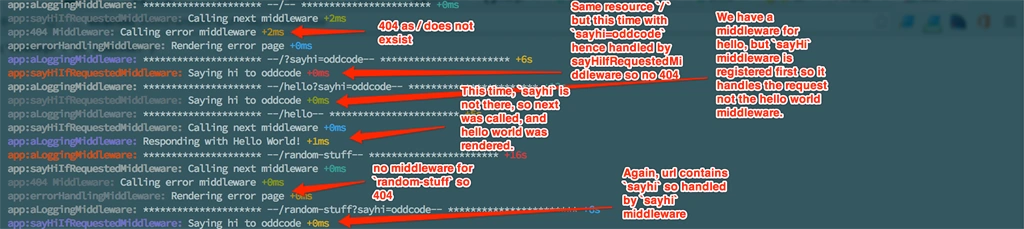
- request: /
sayHi middleware calls next (sayhi param absent)
404 middleware calls error middleware
error middleware renders error page.
(request terminates) - request: /?sayhi=oddcode
sayHi middleware handles and returns 'Hi oddcode!'
(request terminates) - request: /hello?sayhi=oddcode
sayHi middleware handles and returns 'Hi oddcode!', This happens because "sayHi" middleware is registered before "helloWorld" middleware. (request terminates) - request: /hello
sayHi middleware calls next (sayhi param absent)
helloWorld handles the request because it is mapped to `/hello` url
(request terminates) - request: /random-stuff
sayHi middleware calls next (sayhi param absent)
404 middleware calls error middleware
error middleware renders error page.
(request terminates) - request: /random-stuff?sayhi=oddcode
sayHi middleware handles and returns 'Hi oddcode!'
(request terminates)
Routing
Now let's see how requesting /users executed the middleware in ./routes/users.js. You see, we have used router.get instead of app.use to register the middleware. The router.get is very similar to app.use, the only difference is that it will be invoked only for GET requests that match the mountPath in this case /. Now you guys must be stretching your heads and thinking that the router.get is set to listen to / then why does it respond to /users? I know what you are saying but there is one more piece to this puzzle. Notice that in our app.js we have mounted the users module at /users by app.use('/users', users), so request with any verb (GET, PUT or POST) to /users would trigger the users module, in now inside the users module, the route matching remaining url will be invoked, in our case the url is /users so the remaining url with respect to users mount point is /, so router.get('/' ...) got executed. If we add a route router.get('/hello' ...) in our users module then to invoke the route, we'd need to put a GET /users/hello, as GET /users will take the control up to users module (because of app.use('/users',users)) and now the relative url becomes /hello which matches with our routes.get('/hello'... middleware and invokes it.
I believe this must have helped you understand how middleware works. For further reading I'd advise to go to official express post.
I guess this is it for the second part, I know - this part was mostly theoretical and we didn't write much code, well middleware can get quite complicated and if you do not understand middleware then you will not be able to understand about 80% of code in a real life ready for production quality application written in express.js. In the next and final part I'll cover.
- Advance routing
- Connecting to Mongodb and do CRUD operations
- validating the inputs.
Hope you guys had fun! Feel free to comment below, See you in part three.
Cheers and Happy coding !!
Amit DavePosted Apr 30, 2016, 3:21 PM
Thank you Kuppurasu Nagaraj and Manas Mohapatra
Kuppurasu NagarajPosted Apr 30, 2016, 2:54 PM
Nice Sharing..
Manas MohapatraPosted Apr 29, 2016, 3:02 AM
Good effort :)
Vivek KumarPosted Apr 28, 2016, 2:39 PM
Good one
Rahul Kumar SaxenaPosted Apr 28, 2016, 1:26 PM
Good Show
Mohammed IbrahimPosted Apr 28, 2016, 12:22 PM
nice
K P Singh ChundawatPosted Apr 28, 2016, 9:01 AM
Brilliant