

Introduction
In this article I will explain to you how you can create a rich textbox editor for your MVC application. Actually, I was working in one project and I needed a much faster and more reliable Rich Textbox Editor. So there is a free and better Rich Textbox Editor available, which is really so reliable, called TinyMCE.
What is TinyMCE
This is a platform independent web-based Java Script HTML WYSIWYG editor control released as open source under LGPL. Really this editor enables us to convert HTML text area fields or other HTML elements to editor instances. This is a pure Java Script Rich TextBox editor. This editor has lots of features some are like
In this article I will explain to you how you can create a rich textbox editor for your MVC application. Actually, I was working in one project and I needed a much faster and more reliable Rich Textbox Editor. So there is a free and better Rich Textbox Editor available, which is really so reliable, called TinyMCE.
What is TinyMCE
This is a platform independent web-based Java Script HTML WYSIWYG editor control released as open source under LGPL. Really this editor enables us to convert HTML text area fields or other HTML elements to editor instances. This is a pure Java Script Rich TextBox editor. This editor has lots of features some are like
- Text Formatting
- Tables Designer
- Media File Editor
- Cut, Copy, Paste Options.
- List Designer
- Hyperlink
How to use this TinyMCE in Project
First of all right click on your MVC project and click on Manage Nuget Package. After then one dialog box will be open, search for "TinyMCE" and you will get "TinyMCE.MVC" package. Install that "TinyMCE.MVC".
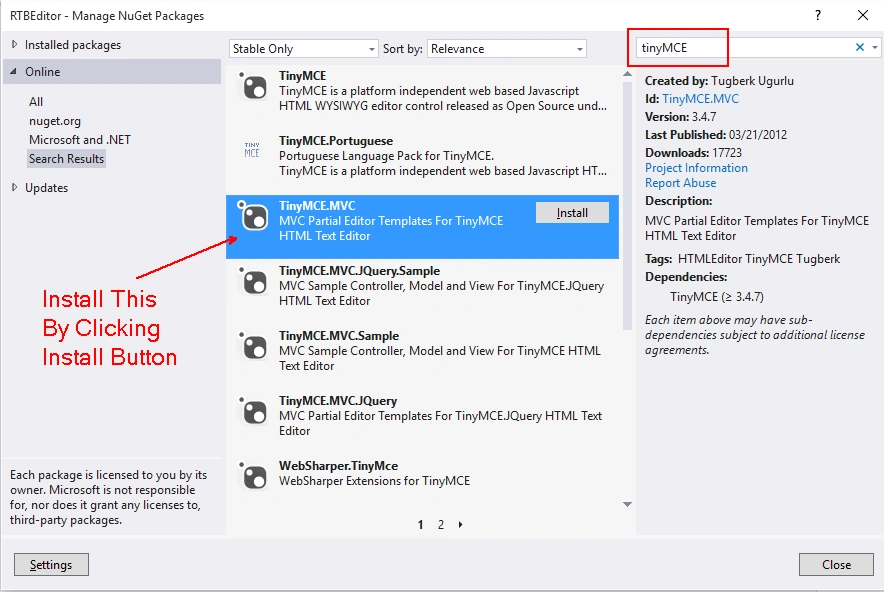
First of all right click on your MVC project and click on Manage Nuget Package. After then one dialog box will be open, search for "TinyMCE" and you will get "TinyMCE.MVC" package. Install that "TinyMCE.MVC".
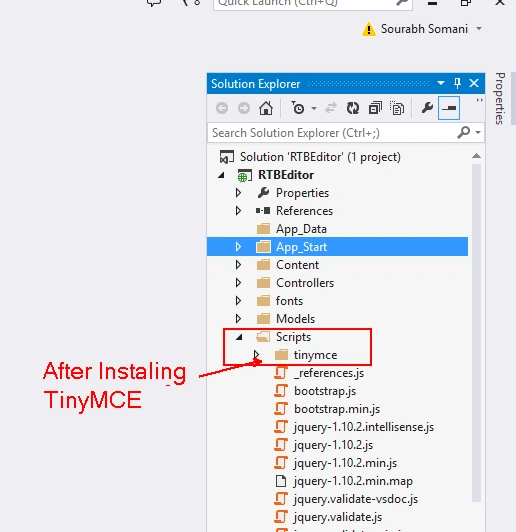
After Installing TinyMCE.MVC, inside the script folder of your project you will get one folder more with the name TinyMCE. As I discussed above that TinyMCE is completely a java script editor so inside that tinymce folder you will get mostly Java Script files.
Apart from this Script folder after installing TinyMCE in our project you will get one more folder inside View> Shared with name "EditorTemplates."
Apart from this Script folder after installing TinyMCE in our project you will get one more folder inside View> Shared with name "EditorTemplates."
Inside this editor Template you will get two cshtml file "tinymce_full.cshtml" and "tinymce_full_compressed.cshtml" Both file contents are the same but one is a compressed version and one is a full version. These files are very important for us because by these files we can modify our Editor with the features that we want.
Now to use this Editor in our view I am creating one model class with name About where I will specify fields which I want to save into the database.
So I am writing the following code for about class.
- using System;
- using System.ComponentModel.DataAnnotations;
- using System.Web.Mvc;
- namespace RTBEditor.Models
- {
- public class About
- {
- public int UserID { get; set; }
- [AllowHtml]
- [UIHint("tinymce_full")]
- [Display(Name = "About")]
- public string AboutMe { get; set; }
- }
- }
Here I am using two attributes.
- [AllowHtml]:
This attribute is very important. Because whatever you will type in your Text Editor will be the complete HTML Code. And for security reasons MVC does not allow to to POST HTML content. By this attribute MVC will allow you to accept HTML content for AboutMe Property. - [UIHint("tinymce_full")]:
This attribute allows as to use "tinymce_fill.cshtml" template. If you want to use Compressed template then you can use this attribute as [UIHint("tinymce_full_compressed")]. Which will allow you to use compressed template.
Why I am using [UIHint("tinymce_full")] attribute:
Because I will modify in my template and in compressed version it will be difficult for me to change something into the template.
Because I will modify in my template and in compressed version it will be difficult for me to change something into the template.
How will we use this inside View: To show this Text Editor in View we will just write the following code:
- @Html.EditorFor(model => model.AboutMe)
- @model RTBEditor.Models.About
- @{
- ViewBag.Title = "Index";
- Layout = "~/Views/Shared/_Layout.cshtml";
- }
- <h2>Index</h2>
- @using (Html.BeginForm())
- {
- @Html.AntiForgeryToken()
- <div class="form-horizontal">
- <h4>About</h4>
- <hr />
- @Html.ValidationSummary(true)
- <div class="form-group">
- @Html.LabelFor(model => model.AboutMe, new { @class = "col-md-12" })
- <div class="col-md-12">
- @Html.EditorFor(model => model.AboutMe)
- @Html.ValidationMessageFor(model => model.AboutMe)
- </div>
- </div>
- <div class="form-group">
- <div class="col-md-offset-2 col-md-10">
- <input type="submit" value="Create" class="btn btn-default" />
- </div>
- </div>
- </div>
- }
- <div>
- @Html.ActionLink("Back to List", "Index")
- </div>
- @section Scripts {
- @Scripts.Render("~/bundles/jqueryval")
- }
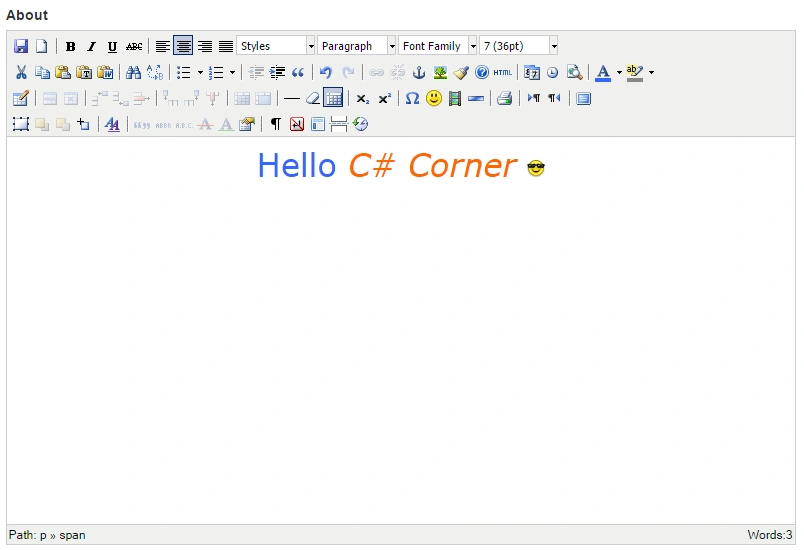
Output:
How to remove template extra options from this Editor:
To remove some features from this editor you can modify tinymce_full.cshtml. Whatever functions you want keep this you can also modify the complete editor and its feature.
To remove some features from this editor you can modify tinymce_full.cshtml. Whatever functions you want keep this you can also modify the complete editor and its feature.
Note:
I will modify in tinymce_full.cshtml because I am using [UIHint("tinymce_full")] Attribute in my model. if you are using [UIHint("tinymce_full_compressed")] Attribute then modify tinymce_full_compressed.cshtml file.
I will modify in tinymce_full.cshtml because I am using [UIHint("tinymce_full")] Attribute in my model. if you are using [UIHint("tinymce_full_compressed")] Attribute then modify tinymce_full_compressed.cshtml file.
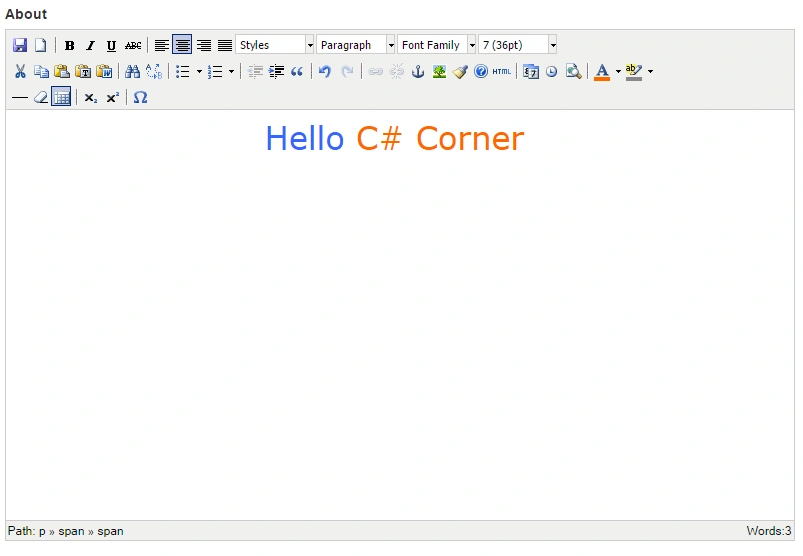
I am removing some functionalities by commenting the code in tinymce_full.cshtml. I am changing in Theme Options.
- // Theme options
- theme_advanced_buttons1 : "save,newdocument,|,bold,italic,underline,strikethrough,|,justifyleft,justifycenter,justifyright,justifyfull,styleselect,formatselect,fontselect,fontsizeselect",
- theme_advanced_buttons2 : "cut,copy,paste,pastetext,pasteword,|,search,replace,|,bullist,numlist,|,outdent,indent,blockquote,|,undo,redo,|,link,unlink,anchor,image,cleanup,help,code,|,insertdate,inserttime,preview,|,forecolor,backcolor",
- //theme_advanced_buttons3 : "tablecontrols,|,hr,removeformat,visualaid,|,sub,sup,|,charmap,emotions,iespell,media,advhr,|,print,|,ltr,rtl,|,fullscreen",
- //theme_advanced_buttons4 : "insertlayer,moveforward,movebackward,absolute,|,styleprops,|,cite,abbr,acronym,del,ins,attribs,|,visualchars,nonbreaking,template,pagebreak,restoredraft,codehighlighting,netadvimage",
- theme_advanced_toolbar_location : "top",
- theme_advanced_toolbar_align : "left",
- theme_advanced_statusbar_location : "bottom",
- theme_advanced_resizing : false,
You can download this complete project from following GitHub Link.
Read more articles on ASP.NET:
Stella OliveiraPosted Jul 29, 2019, 9:32 AM
When you save the form, it comes as null.
tri suwantaPosted Nov 27, 2018, 4:15 AM
Hi, if the data from my database is using html tag already, how do i set it so it show properly in the text box?
Kamlesh VermaPosted Jul 26, 2018, 3:41 AM
Hi can pls any advise that waht is the isuue with word count its not working for me.
Gurmeet SinghPosted Dec 29, 2016, 5:00 AM
How set width and height of this editor can anyone tell me
Ano MepaniPosted Apr 26, 2016, 2:04 AM
Congratulation Sourabh Somani for article of the day
Shakti Singh DulawatPosted Apr 25, 2016, 10:21 AM
This article selected for article of the day in ASP.NET website congratulations for it
MannanPosted Apr 21, 2016, 12:05 AM
nice ..
Vignesh ManiPosted Apr 8, 2016, 5:24 PM
nice
Rahul Kumar SaxenaPosted Apr 8, 2016, 7:41 AM
Good Show