

Introduction
In this article, we will learn how we can implement paging and sorting in MVC. In this article for paging we will use PageList.MVC package which we will download from Nuget Package Manager. I will create one table using code first approach of Entity Framework.
In this article, we will learn how we can implement paging and sorting in MVC. In this article for paging we will use PageList.MVC package which we will download from Nuget Package Manager. I will create one table using code first approach of Entity Framework.
The following step will explain to you how can we perform paging and sorting in MVC.
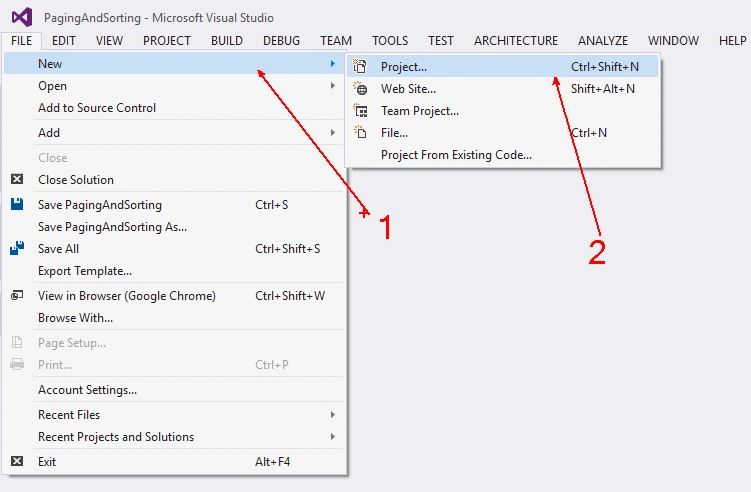
Firstly, open Visual Studio and create an MVC project by clicking File, New, Project or press CTRL + SHIFT + N Key together.
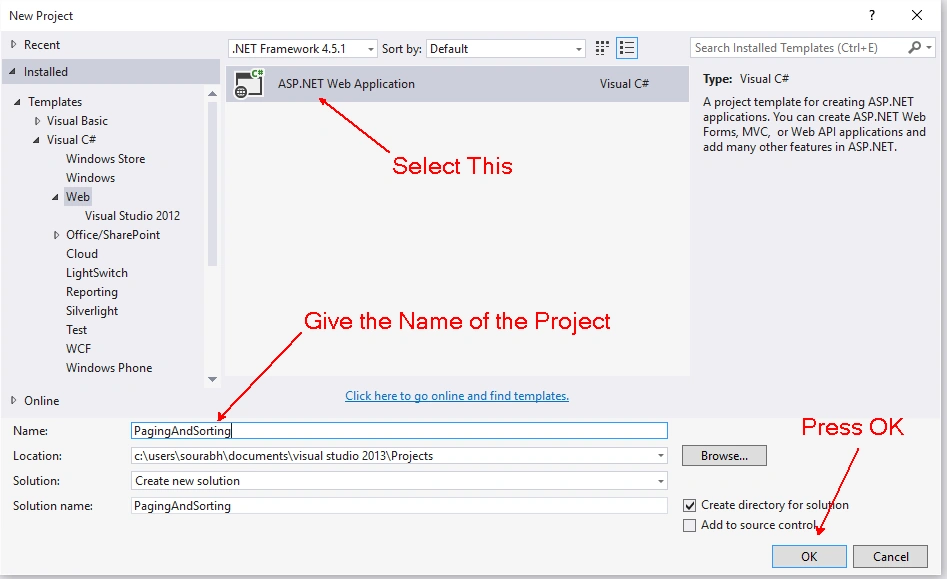
After clicking on New Project you will get one dialog box. From that dialog box go to installed template and Visual C# and then web and choose ASP.NET Web Application and give the name to your project. Press OK, also you can follow the below figure.
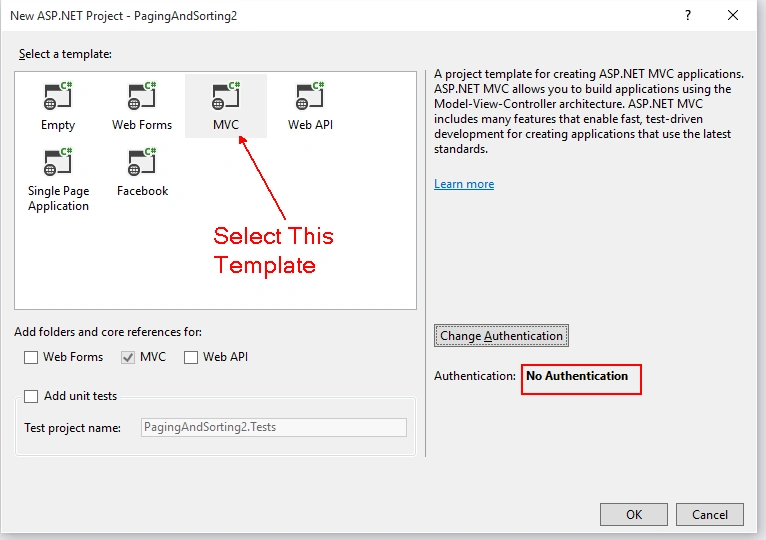
After clicking on OK button you will get one more dialog box where you have to select your project template so select project template as MVC with No Authentication.
After completing the above steps your project will ready. Now By default your project will contain Home Controller. So, delete HomeController and Inside View folder you will get Home Folder so also Delete Home Folder from the project.
After deleting right click on the solution and download Entity Framework from the Nuget Package Manager. Here are the steps for getting Entity Framework package in your solution.
- Right click on project and click on Manage NuGet Packages.
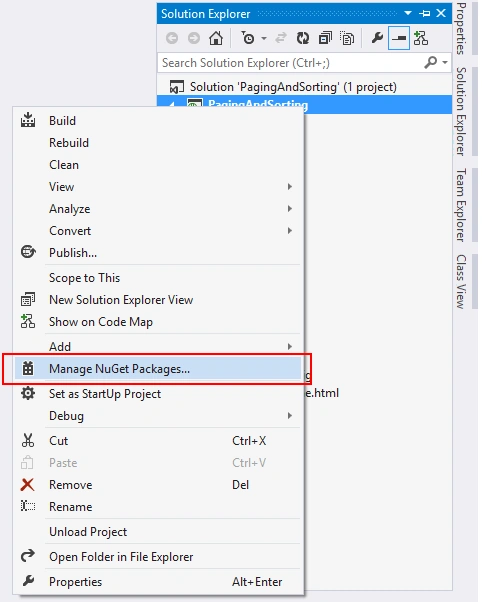
- After that you will get one more dialog box. On that dialog box click on online and search for Entity Framework.
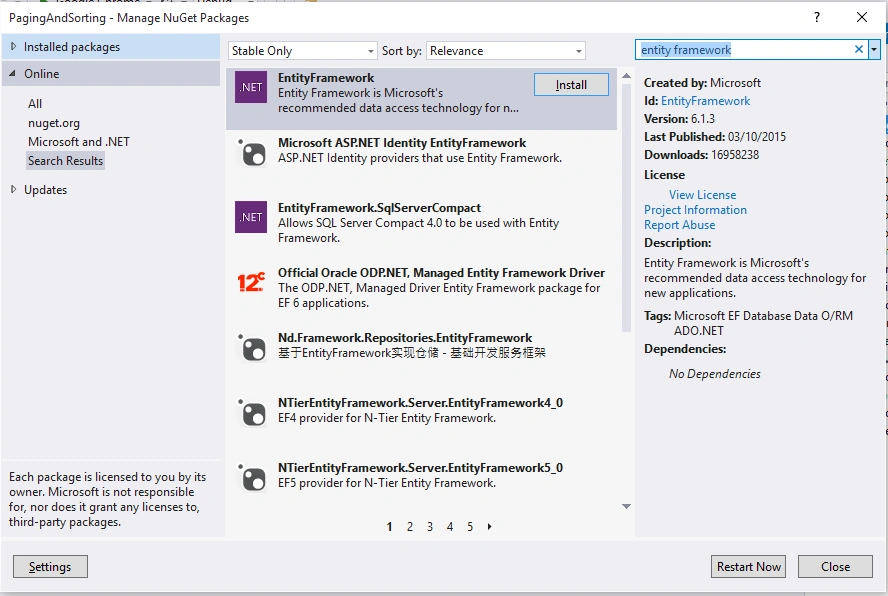
After installing entity framework in my project I am creating a new folder with name "Entities" and also adding one class inside that folder with the name "EmployeeMaster".
Because I am creating this project with code first approach I am creating the table with the name EmployeeMaster so I have added this class. I am writing the following code inside that class.
Because I am creating this project with code first approach I am creating the table with the name EmployeeMaster so I have added this class. I am writing the following code inside that class.
- using System;
- using System.Collections.Generic;
- using System.ComponentModel.DataAnnotations;
- using System.Linq;
- using System.Web;
- namespace PagingAndSorting.Entities
- {
- public class EmployeeMaster
- {
- [Key]
- public string ID { get; set; }
- [Required(ErrorMessage="Please Enter Employee Name")]
- public string Name { get; set; }
- [Required(ErrorMessage="Please Enter Phone Number")]
- public string PhoneNumber { get; set; }
- [Required(ErrorMessage="Please Enter Email")]
- public string Email { get; set; }
- [Required(ErrorMessage="Please Enter Salary")]
- public decimal Salary { get; set; }
- }
- }
Write the following code inside ApplicationDbContext class.
- using PagingAndSorting.Entities;
- using System;
- using System.Collections.Generic;
- using System.Data.Entity;
- using System.Linq;
- using System.Web;
- namespace PagingAndSorting.Models
- {
- public class ApplicationDbContext:DbContext
- {
- public ApplicationDbContext()
- : base("DefaultConnection")
- {
- }
- public DbSet<EmployeeMaster> Employees { get; set; }
- }
- }
- <connectionStrings>
- <add name="DefaultConnection" connectionString="Data Source=(LocalDb)\v11.0;Initial Catalog=EmployeeDb;Integrated Security=True;MultipleActiveResultSets=true" providerName="System.Data.SqlClient" />
- </connectionStrings>
- Click on Tools strip on Menu Bar.
- Select Library Package Manager.
- Then Select Package Manager Console.
After opening package manager console. Type the following command,
- PM> Enable-Migrations
Configurations.cs
- namespace PagingAndSorting.Migrations
- {
- using System;
- using System.Data.Entity;
- using System.Data.Entity.Migrations;
- using System.Linq;
- internal sealed class Configuration : DbMigrationsConfiguration<PagingAndSorting.Models.ApplicationDbContext>
- {
- public Configuration()
- {
- AutomaticMigrationsEnabled = true;
- }
- protected override void Seed(PagingAndSorting.Models.ApplicationDbContext context)
- {
- // This method will be called after migrating to the latest version.
- // You can use the DbSet<T>.AddOrUpdate() helper extension method
- // to avoid creating duplicate seed data. E.g.
- //
- // context.People.AddOrUpdate(
- // p => p.FullName,
- // new Person { FullName = "Andrew Peters" },
- // new Person { FullName = "Brice Lambson" },
- // new Person { FullName = "Rowan Miller" }
- // );
- //
- }
- }
- }
- PM> update-database
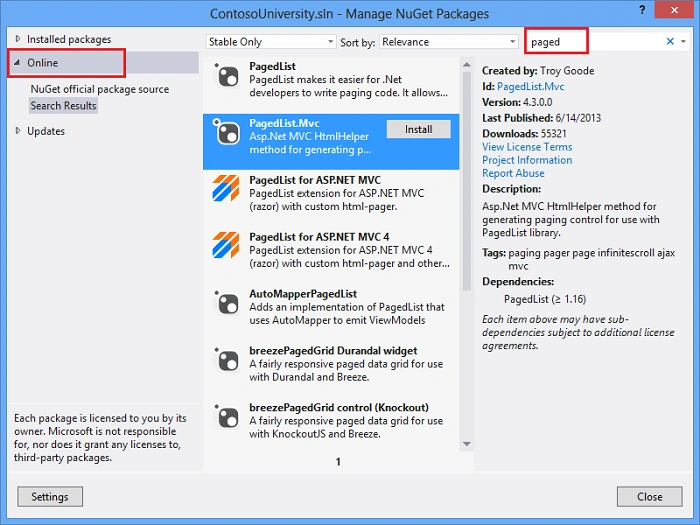
Now add a controller with name EmployeeController and write the following code.
Now add two views, One for adding some Employee and second for Views Employee and Paging and Sorting. I am adding a View for Adding Employee with name Add. And write the following code in Add View.
- using PagingAndSorting.Entities;
- using PagingAndSorting.Models;
- using System;
- using System.Collections.Generic;
- using System.Linq;
- using System.Web;
- using System.Web.Mvc;
- using PagedList;
- namespace PagingAndSorting.Controllers
- {
- public class EmployeeController : Controller
- {
- //
- // GET: /Employee/
- public ActionResult Index(string sortOrder, string CurrentSort, int? page)
- {
- ApplicationDbContext db = new ApplicationDbContext();
- int pageSize = 10;
- int pageIndex = 1;
- pageIndex = page.HasValue ? Convert.ToInt32(page) : 1;
- ViewBag.CurrentSort = sortOrder;
- sortOrder = String.IsNullOrEmpty(sortOrder) ? "Name" : sortOrder;
- IPagedList<EmployeeMaster> employees = null;
- switch (sortOrder)
- {
- case "Name":
- if (sortOrder.Equals(CurrentSort))
- employees = db.Employees.OrderByDescending
- (m => m.Name).ToPagedList(pageIndex, pageSize);
- else
- employees = db.Employees.OrderBy
- (m => m.Name).ToPagedList(pageIndex, pageSize);
- break;
- case "Email":
- if (sortOrder.Equals(CurrentSort))
- employees = db.Employees.OrderByDescending
- (m => m.Email).ToPagedList(pageIndex, pageSize);
- else
- employees = db.Employees.OrderBy
- (m => m.Email).ToPagedList(pageIndex, pageSize);
- break;
- case "Phone":
- if (sortOrder.Equals(CurrentSort))
- employees = db.Employees.OrderByDescending
- (m => m.PhoneNumber).ToPagedList(pageIndex, pageSize);
- else
- employees = db.Employees.OrderBy
- (m => m.PhoneNumber).ToPagedList(pageIndex, pageSize);
- break;
- case "Salary":
- if (sortOrder.Equals(CurrentSort))
- employees = db.Employees.OrderByDescending
- (m => m.Salary).ToPagedList(pageIndex, pageSize);
- else
- employees = db.Employees.OrderBy
- (m => m.Salary).ToPagedList(pageIndex, pageSize);
- break;
- case "Default":
- employees = db.Employees.OrderBy
- (m => m.Name).ToPagedList(pageIndex, pageSize);
- break;
- }
- return View(employees);
- }
- public ActionResult Add()
- {
- return View();
- }
- [HttpPost]
- [ValidateAntiForgeryToken]
- public ActionResult Add(EmployeeMaster emp)
- {
- emp.ID = Guid.NewGuid().ToString();
- ApplicationDbContext db = new ApplicationDbContext();
- db.Employees.Add(emp);
- db.SaveChanges();
- return RedirectToAction("Index");
- }
- }
- }
- @model PagingAndSorting.Entities.EmployeeMaster
- @{
- ViewBag.Title = "Add Employee";
- }
- <h2>Add</h2>
- @using (Html.BeginForm())
- {
- @Html.AntiForgeryToken()
- <div class="form-horizontal">
- <h4>EmployeeMaster</h4>
- <hr />
- @Html.ValidationSummary(true)
- <div class="form-group">
- @Html.LabelFor(model => model.Name, new { @class = "control-label col-md-2" })
- <div class="col-md-10">
- @Html.EditorFor(model => model.Name)
- @Html.ValidationMessageFor(model => model.Name)
- </div>
- </div>
- <div class="form-group">
- @Html.LabelFor(model => model.PhoneNumber, new { @class = "control-label col-md-2" })
- <div class="col-md-10">
- @Html.EditorFor(model => model.PhoneNumber)
- @Html.ValidationMessageFor(model => model.PhoneNumber)
- </div>
- </div>
- <div class="form-group">
- @Html.LabelFor(model => model.Email, new { @class = "control-label col-md-2" })
- <div class="col-md-10">
- @Html.EditorFor(model => model.Email)
- @Html.ValidationMessageFor(model => model.Email)
- </div>
- </div>
- <div class="form-group">
- @Html.LabelFor(model => model.Salary, new { @class = "control-label col-md-2" })
- <div class="col-md-10">
- @Html.EditorFor(model => model.Salary)
- @Html.ValidationMessageFor(model => model.Salary)
- </div>
- </div>
- <div class="form-group">
- <div class="col-md-offset-2 col-md-10">
- <input type="submit" value="Create" class="btn btn-default" />
- </div>
- </div>
- </div>
- }
- <div>
- @Html.ActionLink("Back to List", "Index")
- </div>
- @section Scripts {
- @Scripts.Render("~/bundles/jqueryval")
- }
- @model PagedList.IPagedList<PagingAndSorting.Entities.EmployeeMaster>
- @using PagedList.Mvc;
- @{
- ViewBag.Title = "Employee List";
- Layout = "~/Views/Shared/_Layout.cshtml";
- }
- <style>
- table {
- width: 100%;
- }
- table tr td{
- border: 2px solid black;
- text-align: center;
- word-wrap: break-word;
- }
- table tr:hover {
- background-color:#000;
- color:#fff;
- }
- table tr th {
- border: 2px solid black;
- text-align: center;
- background-color: #fff;
- color: #000;
- }
- </style>
- <h2>Employee List</h2>
- @using (Html.BeginForm())
- {
- <table>
- <tr>
- <th>
- @Html.ActionLink("Employee Name", "Index",
- new { sortOrder = "Name", CurrentSort = ViewBag.CurrentSort })
- </th>
- <th>
- @Html.ActionLink("Email", "Index",
- new { sortOrder = "Email", CurrentSort = ViewBag.CurrentSort })
- </th>
- <th>
- @Html.ActionLink("PhoneNumber", "Index",
- new { sortOrder = "Phone", CurrentSort = ViewBag.CurrentSort })
- </th>
- <th>
- @Html.ActionLink("Salary", "Index",
- new { sortOrder = "Salary", CurrentSort = ViewBag.CurrentSort })
- </th>
- </tr>
- @foreach (var item in Model)
- {
- <tr>
- <td>
- @Html.DisplayFor(modelItem => item.Name)
- </td>
- <td>
- @Html.DisplayFor(modelItem => item.Email)
- </td>
- <td>
- @Html.DisplayFor(modelItem => item.PhoneNumber)
- </td>
- <td>
- @Html.DisplayFor(modelItem => item.Salary)
- </td>
- </tr>
- }
- </table>
- <br />
- <div id='Paging' style="text-align:center">
- Page @(Model.PageCount < Model.PageNumber ? 0 : Model.PageNumber)
- of @Model.PageCount
- @Html.PagedListPager(Model, page => Url.Action("Index", new { page }))
- </div>
- }
- using System;
- using System.Collections.Generic;
- using System.Linq;
- using System.Web;
- using System.Web.Mvc;
- using System.Web.Routing;
- namespace PagingAndSorting
- {
- public class RouteConfig
- {
- public static void RegisterRoutes(RouteCollection routes)
- {
- routes.IgnoreRoute("{resource}.axd/{*pathInfo}");
- routes.MapRoute(
- name: "Default",
- url: "{controller}/{action}/{id}",
- defaults: new { controller = "Employee", action = "Index", id = UrlParameter.Optional }
- );
- }
- }
- }
- <!DOCTYPE html>
- <html>
- <head>
- <meta charset="utf-8" />
- <meta name="viewport" content="width=device-width, initial-scale=1.0">
- <title>@ViewBag.Title - My ASP.NET Application</title>
- @Styles.Render("~/Content/css")
- @Scripts.Render("~/bundles/modernizr")
- </head>
- <body>
- <div class="navbar navbar-inverse navbar-fixed-top">
- <div class="container">
- <div class="navbar-header">
- <button type="button" class="navbar-toggle" data-toggle="collapse" data-target=".navbar-collapse">
- <span class="icon-bar"></span>
- <span class="icon-bar"></span>
- <span class="icon-bar"></span>
- </button>
- @Html.ActionLink("Employee Master", "Index", "Employee", null, new { @class = "navbar-brand" })
- </div>
- <div class="navbar-collapse collapse">
- <ul class="nav navbar-nav">
- <li>@Html.ActionLink("View Employee", "Index", "Employee")</li>
- <li>@Html.ActionLink("Add Employee ", "Add", "Employee")</li>
- </ul>
- </div>
- </div>
- </div>
- <div class="container body-content">
- @RenderBody()
- <hr />
- <footer>
- <p>© @DateTime.Now.Year - Employee Master</p>
- </footer>
- </div>
- @Scripts.Render("~/bundles/jquery")
- @Scripts.Render("~/bundles/bootstrap")
- @RenderSection("scripts", required: false)
- </body>
- </html>
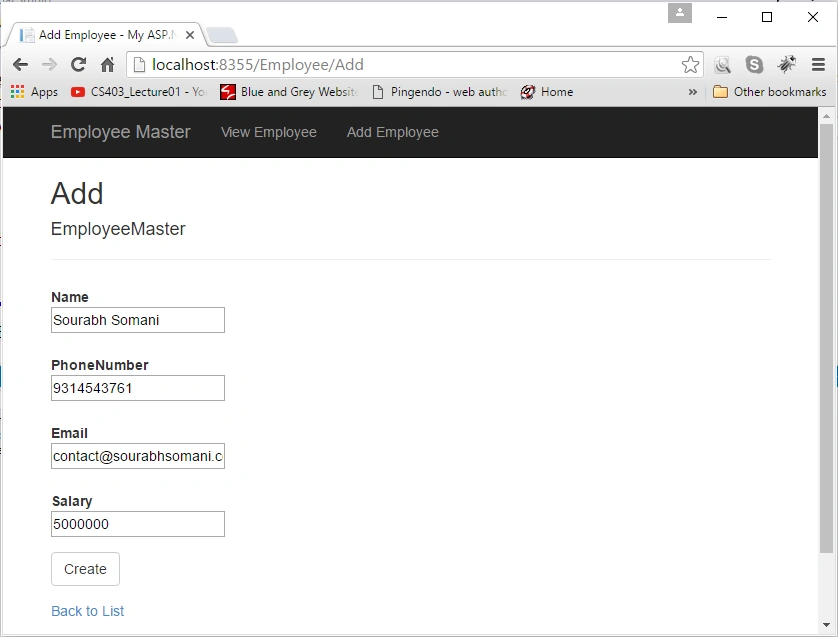
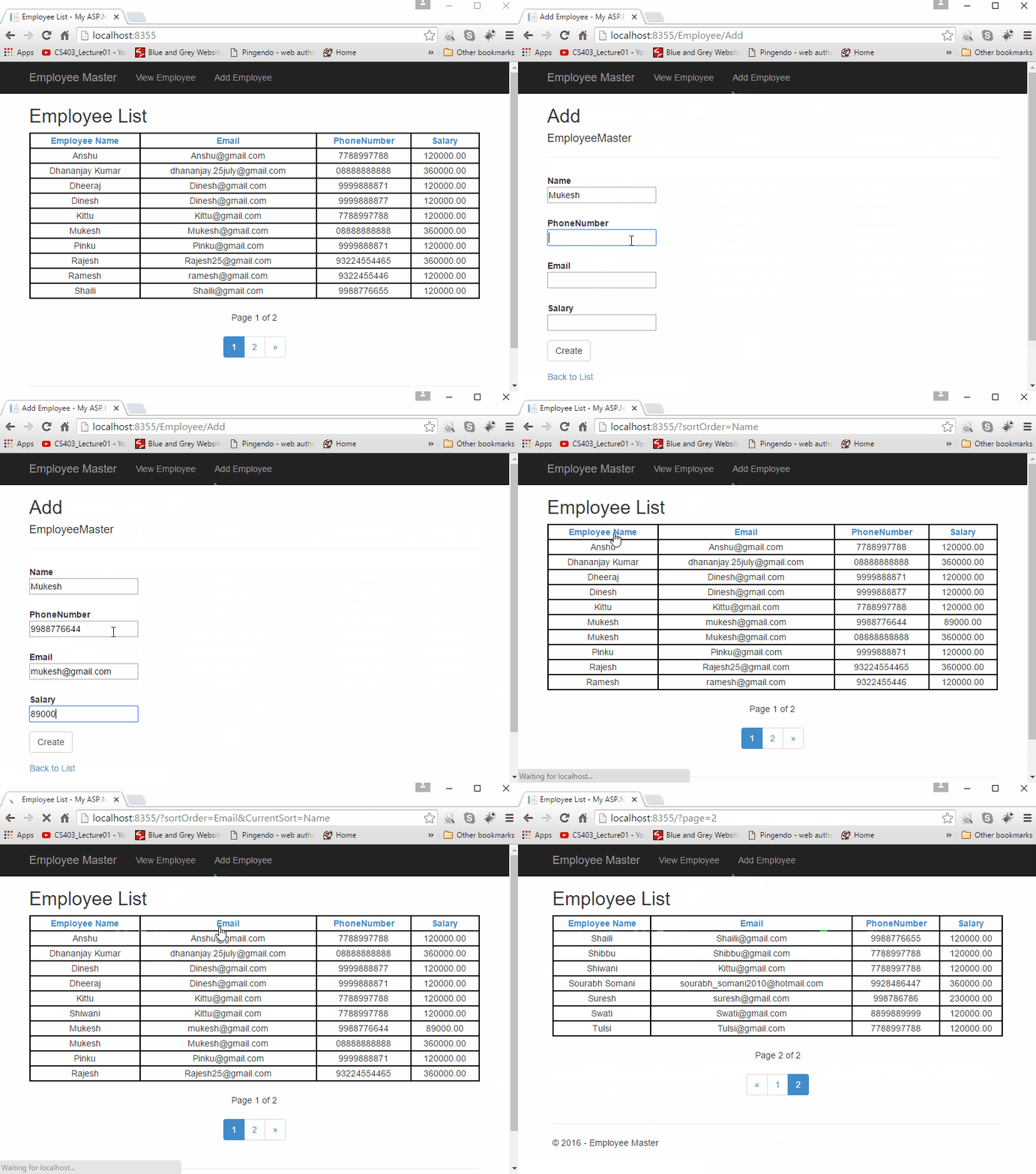
Add Employee
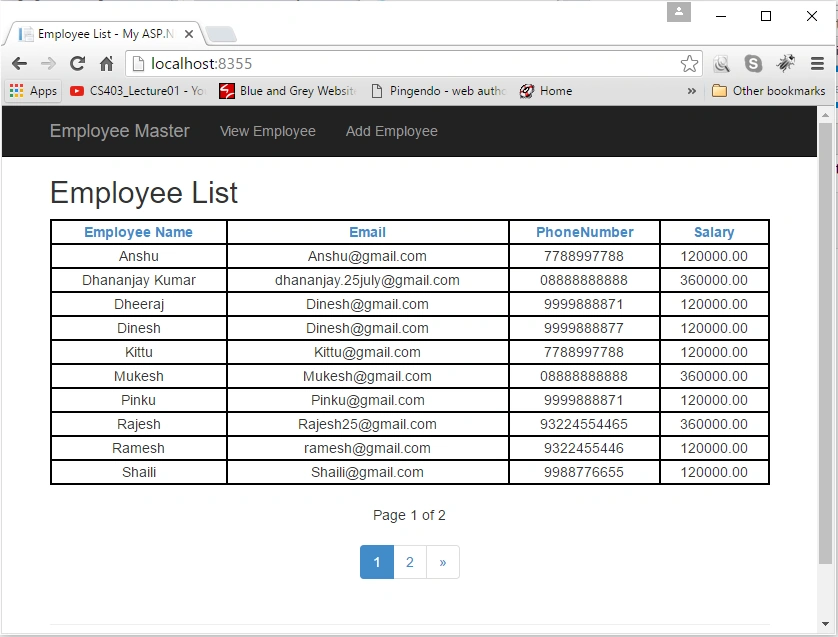
List of Employee With Paging and Sorting
Complete Demo
Note: You can download this article code from the following link.
Read more articles on ASP.NET:
Ginahcnad SobhaniPosted Jul 15, 2022, 11:35 PM
Hi Sourabh, great example. I tried your example, You forgot to mention about 'Add-Migration Initial' step after 'Enable-Migration' step of Code First Migrations to Seed the Database. I noticed, it wasn't letting me update data without 'Add-Migration Initial' step. Thank you Gian Sobhani
Jan HuyghPosted Oct 29, 2020, 3:43 PM
I was totally stuck, and than I saw your idea of working with the abstract interface-type IPagedList<EmployeeMaster> employees = null; which totally solved the issue. Great inspiration, thank you very much.
karishma sawantPosted Apr 30, 2020, 2:01 AM
Good tutorial , how to perform paging without using entity framework
Niraj BhanushaliPosted Sep 25, 2018, 11:01 AM
Good work, beautifully explained article about paging
Goran BorojevicPosted Aug 14, 2018, 10:13 AM
I do think the code has a problem with sorting ascending and descending if you keep toggling the same sort. For example if name is sorted ascending, clicking name again would sort descending, But clicking name third time will keep sorting it ascending, and fourth and so on. Or am I wrong?
Goran BorojevicPosted Aug 6, 2018, 2:54 PM
Thanks! This is really useful stuff. I am going to utilize it across the platform.
Manav PandyaPosted Sep 10, 2016, 12:58 PM
Wanna ask you that u have written codes in controller so how we can keep in mind and write it manually next time ???
Manav PandyaPosted Sep 10, 2016, 12:57 PM
Share source code if possible ,
Rahul Kumar SaxenaPosted Apr 8, 2016, 7:40 AM
Good Work
Shaili DashoraPosted Apr 7, 2016, 3:28 AM
Nice work Sourabh
Gowtham RajamanickamPosted Apr 7, 2016, 3:04 AM
good one..
S.Ravi KumarPosted Apr 7, 2016, 1:38 AM
Saurabh one suggestion tough please use Github to share code as Media Fire is not a reliable source.
S.Ravi KumarPosted Apr 7, 2016, 12:38 AM
Nice Article Saurabh
Gowtham KPosted Apr 6, 2016, 1:21 PM
Good One
Vignesh ManiPosted Apr 6, 2016, 12:37 PM
Good
Mohammed IbrahimPosted Apr 6, 2016, 12:11 PM
nice
Karthikeyan KPosted Apr 6, 2016, 11:50 AM
Thanks for sharing
Karthikeyan KPosted Apr 6, 2016, 11:50 AM
Awesome one..
Suraj SahooPosted Apr 6, 2016, 11:46 AM
Nice!