

This article shows you how to set up the dotLess CSS framework with an ASP.NET MVC project in order to enable Inheritance, Arithmetic and Variables etc. in stylesheets.
Advantages
- LESS broadens CSS with dynamic behaviors like Nesting, Variables, Math Functions, Operational Function, Reusable Mixins and namespaces etc.
- It makes easy to work with CSS.
- It makes reusable components.
- It minifies the original CSS file which results the performance boost.
Running LESS on the Client Side
LESS can run on the client or from the server side. It involves the following three steps to run it from the client side.
- Add your .less file to your project and reference that in your LINK tag.
- Update the rel value in the LINK tag to rel="stylesheet/less".
- Add a reference to the LESS JavaScript file from the CDN.
It is very important to update the rel value to "stylesheet/less" because the LESS library looks for rel value. It process the file once it gets rel value as a "stylesheet/less". Your page header should look like below.
- <linkhref="Content/sample.less"rel="stylesheet/less"/>
- <scriptsrc="https://cdnjs.cloudflare.com/ajax/libs/less.js/2.6.1/less.min.js"></script>
Less code:
- @color: #4D926F;
- h3 {
- color: @color;
- }
- <!DOCTYPEhtml>
- <html>
- <head>
- <title></title>
- <meta charset="utf-8" />
- <link href="Content/sample.less" rel="stylesheet/less" />
- <script src="https://cdnjs.cloudflare.com/ajax/libs/less.js/2.6.1/less.min.js">
- </script>
- </head>
- <body>
- <h3>This is Santosh!</h3>
- </body>
- </html>
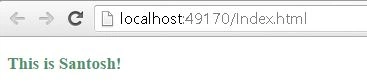
In the same way you can use other dynamic behaviors as well:
Use of Nesting
dotLess CSS code
- body {
- .header
- {
- h1
- {
- font - size: 28 px;
- }
- h2
- {
- font - size: 21 px;
- }
- }
- }
- body.headerh1
- {
- font - size: 28 px;
- }
- body.headerh2
- {
- font - size: 21 px;
- }
Less code:
- @color: #4D926F;
- h3 {
- color: @color;
- }
- h3
- {
- color: #4D926F;
- }
Less code:
- @base - size: 10 px;
- .small
- {
- font - size: @base - size;
- }
- .medium
- {
- font - size: @base - size * 1.2;
- }
- .large
- {
- @_large: @base - size * 1.5;
- font - size: @_large;
- line - height: @_large + 4;
- }
- .small
- {
- font - size: 10 px;
- }
- .medium
- {
- font - size: 12 px;
- }
- .large
- {
- font - size: 15 px;
- line - height: 19 px;
- }
Less code:
- h1
- {
- color: rgb(230, 140, 230);
- color: darken(#123456,10%);
- color: fade(# 123456, 50 % );
- }
- h1
- {
- color: #e68ce6;
- color: #091a2c;
- color:rgba(18, 52, 86, 0.5);
- }
Less code:
- .radius(@size: 5 px)
- {
- -webkit - border - radius: @size; - moz - border - radius: @size;
- border - radius: @size;
- }
- .box
- {
- .radius;
- }
- .circle
- {
- .radius(15 px);
- }
- .box
- {
- -webkit - border - radius: 5 px; - moz - border - radius: 5 px;
- border - radius: 5 px;
- }
- .circle
- {
- -webkit - border - radius: 15 px; - moz - border - radius: 15 px;
- border - radius: 15 px;
- }
If you have a big CSS file then you can split your code into multiple CSS files and you can import into one less file. The main file where you have imported, that needs to be included in the webpage, from this file all other style modules are imported.
Less code:
- @import (less) "Content/Site.css";
- /*@import url('Site.css');*/
- @import "Content/Site.css";
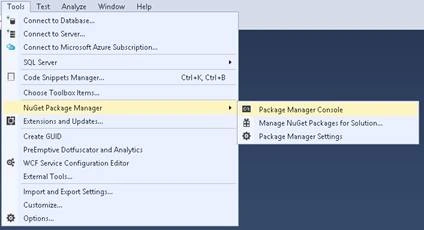
From the Tools menu, select NuGet Package Manager, then Manage NuGet Package for Solution. Run the following command in the Package Manager Console.
PM> Install-Package dotLess
This command installs the latest dotLessNuGet packages.
Note: You can install dotLess either from Package Manager Console or Manage NuGet Package for Solution as shown in the above screen.
After successful installation, you can remove the JavaScript CDN reference from your page. And make sure that you have updated the LINK tag by removing the /less from the rel attribute. The code should look like below:
- <link href="Content/sample.less"rel="stylesheet"/>
- <configSections>
- <section name="dotless" type="dotless.Core.configuration.DotlessConfigurationSectionHandler, dotless.Core" />
- </configSections>
- <dotlessminifyCss="false" cache="true" web="false" strictMath="false" />
- <system.webServer>
- <handlers>
- <addname="dotless" path="*.less" verb="GET" type="dotless.Core.LessCssHttpHandler,dotless.Core" resourceType="File" preCondition="" />
- </handlers>
- </system.webServer>
Add the following code to your Razor layout that is _Layout.cshtml
- <!DOCTYPEhtml>
- <html>
- <head>
- <meta charset="utf-8" />
- <meta name="viewport" content="width=device-width, initial-scale=1.0">
- <title>@ViewBag.Title - My ASP.NET Application</title>
- @Styles.Render("~/Content/css") @Styles.Render("~/Content/less") @Scripts.Render("~/bundles/modernizr")
- </head>
- <body>
- --- --- ---
- </body>
- </html>
- Index.cshtml @{ ViewBag.Title = "Home Page"; Layout = "~/Views/Shared/_Layout.cshtml"; }
- <div class="row">
- <h3>Hello Santosh</h3>
- </div>
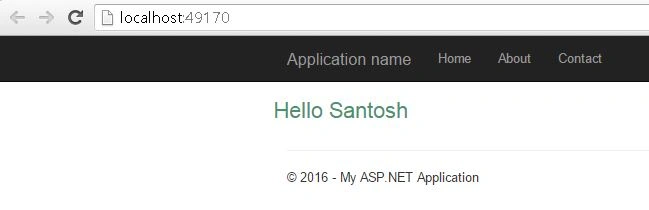
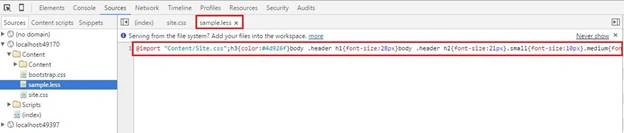
The best feature about dotLess is that it can automatically minify the CSS for you via the minifyCss attribute. If you update that to "true" in your Web.config file and run the web application/website now, you'll see the minified CSS.
- <dotlessminifyCss="false" cache="true"web="false"strictMath="false" />
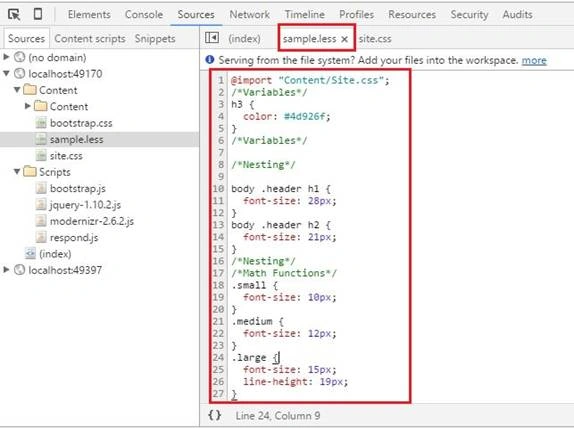
If the minifyCss attribute is "true" then the output will be as below:
Improve performance for dotLess files in MVC project
Bundles are an easy way to merge and minify resources in your application (such as JavaScript files and CSS stylesheets). Using “System.Web.Optimization.Less” plugin, you can improve site performance in a better way.
So go back to Package Manager Console and install the below plugin:
PM> Install-Package System.Web.Optimization.Less
And add your bundle to the appropriate location within BundleConfig.cs,
- public class BundleConfig
- {
- public static void RegisterBundles(BundleCollection bundles)
- {
- // NOTE: existing bundles are here
- bundles.Add(newLessBundle("~/Content/less").Include("~/Content/*.less"));
- }
- }
Development Vs production workflow
In development, we use a handler for parsing dotLess stylesheets on the fly. It allows us to make modifications to the dotLess CSS and simply reload a page in the web browser to see the results.
In production, we exclude the handler and use a pre-parsed minified version of the stylesheet. This pre-parsed minified version is updated every time the website project is built.
Read more articles on ASP.NET:
Santosh Kumar AdidawarpuPosted May 11, 2016, 5:17 AM
Thanks everyone
Sr KarthigaPosted May 6, 2016, 9:04 PM
good one
Mithun PradhanPosted May 5, 2016, 4:43 AM
Nice way presented...
Vivek KumarPosted Mar 23, 2016, 1:14 PM
Nice share
Kashif SohailPosted Mar 21, 2016, 10:45 PM
Very nice
Debasis SahaPosted Mar 10, 2016, 2:36 AM
good one..
Kumaresh RajalingamPosted Mar 9, 2016, 8:39 PM
Nice share
Ammar ShaukatPosted Mar 9, 2016, 6:54 AM
Nice
Shailesh UkePosted Mar 9, 2016, 1:04 AM
Nice Article..
Debasis SahaPosted Mar 9, 2016, 12:09 AM
Nice one...
Humayun Kabir MamunPosted Mar 8, 2016, 11:20 PM
Nice...
Saillesh PawarPosted Mar 8, 2016, 11:12 PM
Nice article will try it for sure