The DetailsView control in ASP.Net 2.0 is used to create an HTML table that displays the contents of a single database record.
Step 1:
- Open Visual Studio
- Add a webForm to your website, name it DetailsView.aspx
- Add a DataSource control to the page and configure it to a database
Step 2: If you want to have paging in DetailsView like a Gridview then go to the Smart tag of the DetailsView and select Enable paging.
See code below:
<asp:DetailsView ID="DetailsView1" runat="server" AllowPaging="True"
AutoGenerateRows="False" CellPadding="4" DataSourceID="SqlDataSource1"
ForeColor="#333333" GridLines="None" Height="50px" Width="125px">
<FooterStyle BackColor="#507CD1" Font-Bold="True" ForeColor="White" />
<CommandRowStyle BackColor="#D1DDF1" Font-Bold="True" />
<RowStyle BackColor="#EFF3FB" />
<FieldHeaderStyle BackColor="#DEE8F5" Font-Bold="True" />
<PagerStyle BackColor="#2461BF" ForeColor="White" HorizontalAlign="Center" />
<Fields>
<asp:BoundField DataField="Username" HeaderText="Username"
SortExpression="Username" />
<asp:BoundField DataField="word" HeaderText="word"
SortExpression="word" />
<asp:BoundField DataField="Email" HeaderText="Email" SortExpression="Email" />
<asp:BoundField DataField="Address" HeaderText="Address"
SortExpression="Address" />
</Fields>
<HeaderStyle BackColor="#507CD1" Font-Bold="True" ForeColor="White" />
<EditRowStyle BackColor="#2461BF" />
<AlternatingRowStyle BackColor="White" />
</asp:DetailsView>
This is the ConnectionString, which is automatically generated when we select a data source:
<asp:SqlDataSource ID="SqlDataSource1" runat="server"
ConnectionString="<%$ ConnectionStrings:telecomConnectionString %>"
SelectCommand="SELECT [Username], [word], [Email], [Address] FROM [User_Registration]">
</asp:SqlDataSource>
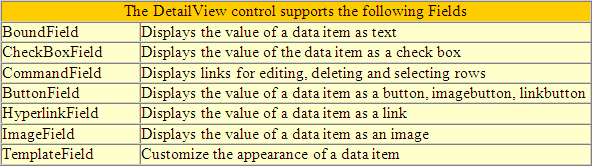
DetailsView Fields in ASP.Net
You can control the appearance of the DetailsView.
Step 3: Now run the application and verify that it works.